
1. Introduction
This manual provides detailed instructions for the installation, operation, and maintenance of your DALY 100 BALANCE BMS 150A 4S-8S Smart Active Balance Battery Management System. This BMS is designed to protect and manage LiFePO4, Li-ion, and LTO battery packs, ensuring their safety and longevity. It features built-in Bluetooth, 1A active cell balancing, and communication interfaces including RS485 and CAN.

Image: DALY BMS 150A 4S-8S Smart Active Balance Battery Management System with included cables and accessories.
2. Safety Information
Always prioritize safety when working with battery systems. Failure to follow these instructions may result in damage to the product, battery pack, or personal injury.
- Ensure all connections are correct and secure before applying power. Incorrect wiring can cause severe damage.
- Do not short-circuit the battery terminals or BMS connections.
- Wear appropriate personal protective equipment (PPE), including safety glasses and insulated gloves, when handling batteries and wiring.
- Keep the BMS and battery pack away from water, moisture, and flammable materials.
- Do not attempt to disassemble or modify the BMS. Contact qualified personnel for service.
- Verify battery cell voltage and polarity before connecting to the BMS.
3. Package Contents
Verify that all items are present in your package:

Image: Visual representation of the DALY BMS package contents.
- 150A Smart BMS (1 unit)
- Sampling Cable (1 unit)
- P- & B- Cable (1 unit)
- B+ Cable (1 unit)
- NTC Temperature Sensor (1 unit)
- Screws (2 units)
- Operation Manual (1 unit)
- Optional: RS485/CAN port cable (standard package only for BT RS485CAN version BMS)
- Optional: WIFI Module (standard package only for BT Wifi version BMS)
4. Product Specifications
| Feature | Specification |
|---|---|
| Model Number | 150A 4-8S |
| Voltage Compatibility | 4S, 6S, 8S; 12V, 24V battery packs |
| Active Cell Balancing | 1A |
| Communication Interfaces | Bluetooth, RS485, CAN |
| Material | Plastic |
| Item Weight | 450 Grams |
| Package Dimensions | 8.27 x 5.91 x 1.57 inches |
This BMS is suitable for LiFePO4, Li-ion, and LTO battery chemistries.
5. Setup and Installation
Careful wiring is crucial for the proper function and safety of your BMS. Follow these steps precisely.
5.1. Battery Pack Wiring
Connect the sampling cables to your battery cells in the correct sequence. The black cable (B0) connects to the total negative pole of the battery. Subsequent red cables (B1, B2, etc.) connect to the positive poles of each cell in series.
Video: Detailed tutorial on wiring the DALY BMS to a battery pack, demonstrating correct cable connections and verification steps.
- B0 (Black Cable): Connect to the total negative terminal of the battery pack.
- B1 (First Red Cable): Connect to the positive terminal of the first cell.
- Continue connecting subsequent red cables (B2, B3, etc.) to the positive terminals of the corresponding cells in series.
- The last red cable connects to the total positive pole of the battery pack.
Verification: Use a multimeter to measure the voltage between adjacent wires. The voltage difference between the batteries in each string of wires should be less than 1V. This indicates correct wiring. Also, measure the total voltage of the battery pack and then measure the voltage after passing through the BMS (between the red pin and the P- cable port). If consistent, the connection is correct.
5.2. Connecting the BMS
- Connect the P- cable from the BMS to the negative pole of the charger.
- Connect the total positive pole of the battery to the positive pole of the charger.
- Connect the power switch to the BMS. Press the switch button to start the BMS.

Image: DALY BMS with connected wiring harness and main power cables.

Image: Close-up of DALY BMS ports for NTC, UART, CAN/RS485, and KEY switch.
6. Operating Instructions
6.1. Mobile App (Bluetooth/WiFi)
The DALY BMS can be managed via a mobile application on Android or iOS devices, offering real-time monitoring and settings adjustment.
Video: Guide on how to download and install the DALY BMS mobile application for smartphone monitoring.
- Download: Search for "SMART BMS" in your device's app store. If unavailable, contact customer service for a direct download link.
- Permissions: Grant all necessary permissions (Bluetooth, location, file access) when first opening the app.
- Connection: Select "Local monitoring" for Bluetooth connection. The app will display a list of available BMS devices by serial number. Select your device.
- Monitoring: View detailed battery information including total voltage, current, SOC, cell voltages, and temperature.
- Settings: Adjust parameters like balance current, sleep time, and protection thresholds within the app.
Video: Instructions on how to connect and use the optional WiFi module for remote monitoring of your BMS.

Image: Diagram illustrating the various communication channels supported by the DALY BMS, including Bluetooth, WiFi, RS485, and CAN.
6.2. PC Host Software
For advanced monitoring and configuration, connect your BMS to a PC using the appropriate communication cable (UART, RS485, or CAN).
Video: Tutorial on how to connect the 100Balance Smart BMS to a PC host for monitoring and configuration.
- Download: Obtain the PC Host software from the official website or customer service.
- Connection: Connect the UART/RS485/CAN cable to the BMS and your PC. Open the PC Host software, select the correct communication port (COM port for UART/RS485, or CAN set for CAN communication) and baud rate (e.g., 9600 for UART/RS485, 250 for CAN).
- Monitoring: The "Live Data" screen displays real-time battery data, including total voltage, current, temperature, SOC, cell voltages, and MOS temperature.
- Parameter Settings: Access the "Set Param" page to modify balance current, sleep time, rated capacity, and various protection parameters. Enter the default password (20211115) to access management mode.
- Engineering Interface: Calibrate current readings for accuracy.
- History Data: View battery alarm information and clear history data.
- Firmware Upgrade: Use the "BMS Upgrade" section to update the BMS firmware by loading the corresponding file and starting the upgrade process.
7. Maintenance
Regular maintenance ensures optimal performance and longevity of your DALY BMS.
- Regular Checks: Periodically inspect all wiring connections for looseness or corrosion.
- Software Updates: Keep the mobile app and PC Host software updated to the latest versions for new features and bug fixes.
- Firmware Updates: Check for and apply BMS firmware updates as recommended by the manufacturer.
- Environmental Conditions: Ensure the BMS operates within its specified temperature and humidity ranges.
8. Troubleshooting
This section addresses common issues you might encounter.
- App Connectivity Issues:
- Ensure Bluetooth is enabled on your device and the BMS is powered on.
- Verify that the app has all necessary permissions (Bluetooth, location).
- If using WiFi module, ensure it's correctly installed and connected to a stable network.
- Restart the app or cycle power to the BMS if connection fails.
- Incorrect Readings:
- Double-check all sampling cable connections for correct order and secure contact.
- Use a multimeter to verify individual cell voltages and total pack voltage.
- Calibrate current readings using the PC Host software if discrepancies are observed.
- BMS Not Powering On:
- Ensure the main power connections (B- and P-) are secure.
- Verify the power switch is correctly connected and pressed.
- Check for any short circuits or miswiring in the battery pack or BMS connections.
- Balancing Issues:
- Ensure the active balancing feature is enabled in the app or PC software.
- Check the set parameters for balancing voltage and differential voltage.
- Allow sufficient time for the active balancer to equalize cells, especially if there are large voltage differences.
9. Advanced Protection Features
The DALY BMS provides comprehensive protection for your battery pack:
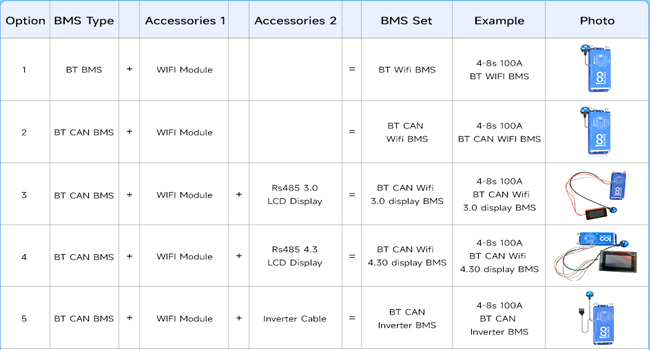
Image: Overview of basic and extra protection functions provided by the DALY BMS.
- Basic Protection Functions:
- Overcharge Protection
- Over-discharge Protection
- Overcurrent Protection
- Short Circuit Protection
- Temperature Protection
- Extra Protection Features:
- Pre-charge Protection
- Wrong connection or missing connection of wires
- Parallel connection current limiting
- Cell balancing

Image: Visual representation of the quadruple extra protection features for enhanced battery safety.
10. Application Scenarios
The DALY BMS is versatile and suitable for a wide range of applications, including:

Image: Various application scenarios for the DALY BMS, such as electric vehicles, energy storage, and portable power stations.
- Electric two-wheelers and tricycles
- Electric bicycles and wheelchairs
- Home energy storage systems
- Outdoor energy storage and portable power stations
- RV energy storage
- Lead-Acid battery upgrades to Lithium
- Automated Guided Vehicles (AGV)
- Lease battery swapping stations
11. Warranty and Support
Your DALY BMS comes with a 3-year warranty. For technical support, troubleshooting assistance, or warranty claims, please contact the manufacturer or your point of purchase. Refer to the official website for the latest support information and contact details.