
Introduction
Thank you for choosing the Ttbesmi Q26S Sleep Earbuds. These earbuds are specifically designed to provide a comfortable and quiet listening experience, especially for side sleepers. Featuring advanced noise cancellation and a compact, invisible design, they are ideal for blocking out environmental sounds and snoring, ensuring undisturbed rest. This manual will guide you through the setup, operation, and maintenance of your new earbuds.

Image: A collage showcasing key features of the Ttbesmi Q26S Sleep Earbuds, including their design for side sleepers, skin-friendly silicone material, AI smart voice control, HIFI stereo sound, comfortable wear, and physical noise reduction capabilities.
What's in the Box
Please check the package contents to ensure all items are present:
- 1 x Pair of Ttbesmi Q26S Sleep Earbuds
- 1 x Charging Case
- 1 x USB Charging Cable (Type-C)
- 1 x User Manual
Setup
1. Charging the Earbuds and Case
Before first use, fully charge the earbuds and the charging case. Use the provided USB Type-C cable to connect the charging case to a power source.
- Charging Time: Approximately 1 hour for a full charge.
- Earbud Playtime: Up to 8 hours on a single charge.
- Total Playtime with Charging Case: Up to 20 hours.
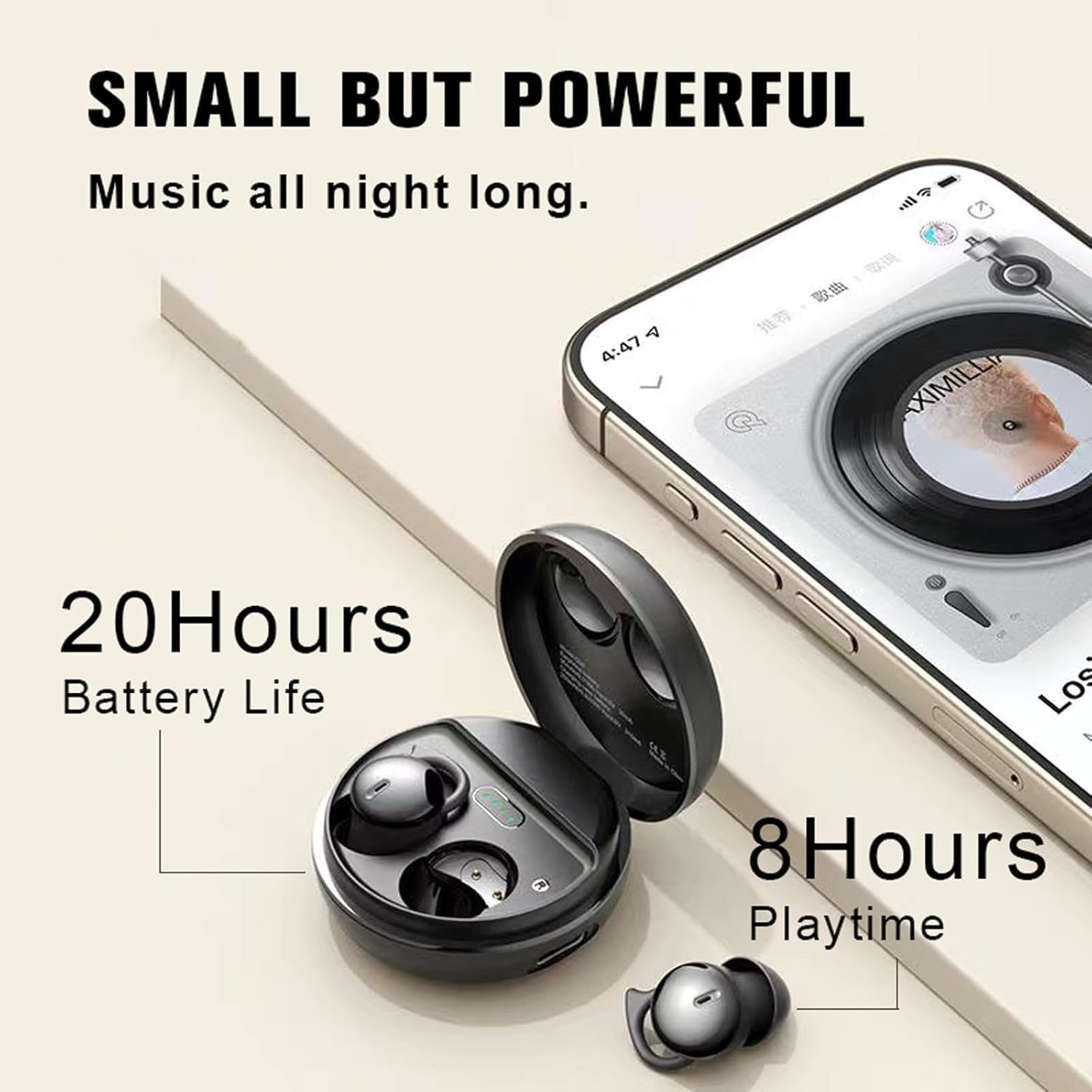
Image: The Ttbesmi Q26S Sleep Earbuds in their charging case, illustrating the 20-hour total battery life with the case and 8 hours of playtime for the earbuds themselves.
2. Pairing with Your Device
The Ttbesmi Q26S earbuds feature a one-step connection process using Bluetooth 5.3 for fast and stable pairing.
- Ensure the earbuds are charged.
- Open the lid of the charging case. The earbuds will automatically power on and enter pairing mode.
- On your mobile device (smartphone, tablet, etc.), go to the Bluetooth settings.
- Search for available devices and select "Q26S" (or similar name) from the list.
- Once connected, you will hear a confirmation tone, and the earbuds will be ready for use.
- The earbuds will automatically reconnect to the last paired device when removed from the case, if Bluetooth is enabled on the device.
Operating Instructions
Wearing the Earbuds
Insert the earbuds gently into your ear canals. Adjust them for a snug and comfortable fit. The design is optimized for side sleepers, minimizing pressure on the ear.

Image: A woman sleeping on her side, demonstrating the comfortable and discreet fit of the Ttbesmi Q26S Sleep Earbuds, designed to prevent accidental touches.

Image: A close-up view highlighting the soft silicone ear caps of the Ttbesmi Q26S Sleep Earbuds, emphasizing their comfortable design for extended wear.
Basic Controls (Voice Control)
The Ttbesmi Q26S earbuds support voice control for various functions. Specific voice commands may vary depending on your connected device's operating system and voice assistant settings. Refer to your device's manual for detailed voice command options.
- Play/Pause Music: Use voice command (e.g., "Hey Siri, play music" or "Ok Google, pause").
- Next/Previous Track: Use voice command (e.g., "Hey Siri, next song").
- Volume Adjustment: Use voice command (e.g., "Ok Google, turn up the volume").
- Answer/End Call: Use voice command (e.g., "Answer call", "End call").
- Activate Voice Assistant: Typically a long press on the earbud or a specific voice command.
Call Management
The earbuds are equipped with an HD microphone for clear voice transmission during calls, effectively reducing ambient noise.

Image: The Ttbesmi Q26S Sleep Earbuds and their charging case next to a smartphone displaying a call screen, highlighting the HD microphone for clear voice calls.
- Answering a Call: Use voice command or refer to your device's specific interaction for Bluetooth headsets.
- Ending a Call: Use voice command or refer to your device's specific interaction.
- Rejecting a Call: Use voice command or refer to your device's specific interaction.
Maintenance
Proper maintenance ensures the longevity and optimal performance of your Ttbesmi Q26S Sleep Earbuds.
- Cleaning: Regularly clean the earbuds, especially the ear tips and charging contacts, with a soft, dry, lint-free cloth. Do not use abrasive cleaners or solvents.
- Storage: When not in use, store the earbuds in their charging case to protect them from dust and damage.
- Avoid Water: While the earbuds have a water resistance level, avoid submerging them in water. Dry them thoroughly if they get wet.
- Temperature: Do not expose the earbuds or charging case to extreme temperatures (hot or cold).
Troubleshooting
If you encounter any issues with your earbuds, please refer to the following common solutions:
| Problem | Possible Solution |
|---|---|
| Earbuds not pairing/connecting |
|
| No sound or low volume |
|
| Earbuds not charging |
|
| Poor call quality |
|
Specifications

Image: The Ttbesmi Q26S Sleep Earbuds and their charging case, illustrating their small size and lightweight design, comparing them to a phone camera and a coin.
| Feature | Detail |
|---|---|
| Model Name | Q26S |
| Brand | Ttbesmi |
| Bluetooth Version | 5.3 |
| Transmission Distance | Approximately 10 meters (32.8 feet) |
| Earbud Play Time | Up to 8 hours |
| Total Play Time (with Charging Case) | Up to 20 hours |
| Charging Time | Approximately 1 hour |
| Standby Time | 130 hours |
| Noise Control | Sound Isolation, ENC Call Noise Reduction |
| Ear Placement | In Ear |
| Form Factor | In Ear |
| Audio Driver Type | Dynamic Driver (Graphene diaphragm unit) |
| Frequency Range | 20 Hz - 20,000 Hz |
| Control Type | Voice Control |
| Water Resistance Level | Waterproof (Specific rating not provided, general term used) |
| Material | Plastic, Liquid Silicone (ear caps) |
| Earbud Weight | Approximately 2.6g (0.08 ounces) per earbud |
| Compatible Devices | All devices and mobile phones that support Bluetooth |
Warranty and Support
For any questions, concerns, or if you receive a defective product, please contact Ttbesmi customer support. We are committed to resolving any issues within 24 hours.
Please refer to your purchase documentation or the retailer's website for specific warranty details and contact information.