
EUREKA ERGONOMIC ERK-Z60-B
EUREKA ERGONOMIC Z60 Gaming Desk Instruction Manual
Model: ERK-Z60-B | Brand: EUREKA ERGONOMIC
1. Introduction
Thank you for choosing the EUREKA ERGONOMIC Z60 Gaming Desk. This manual provides detailed instructions for the assembly, operation, and maintenance of your new gaming desk. Designed for serious gamers, the Z60 features a robust Z-shaped structure, dynamic RGB lighting, and a spacious carbon fiber textured tabletop. Please read this manual thoroughly before beginning assembly to ensure proper setup and safe operation.
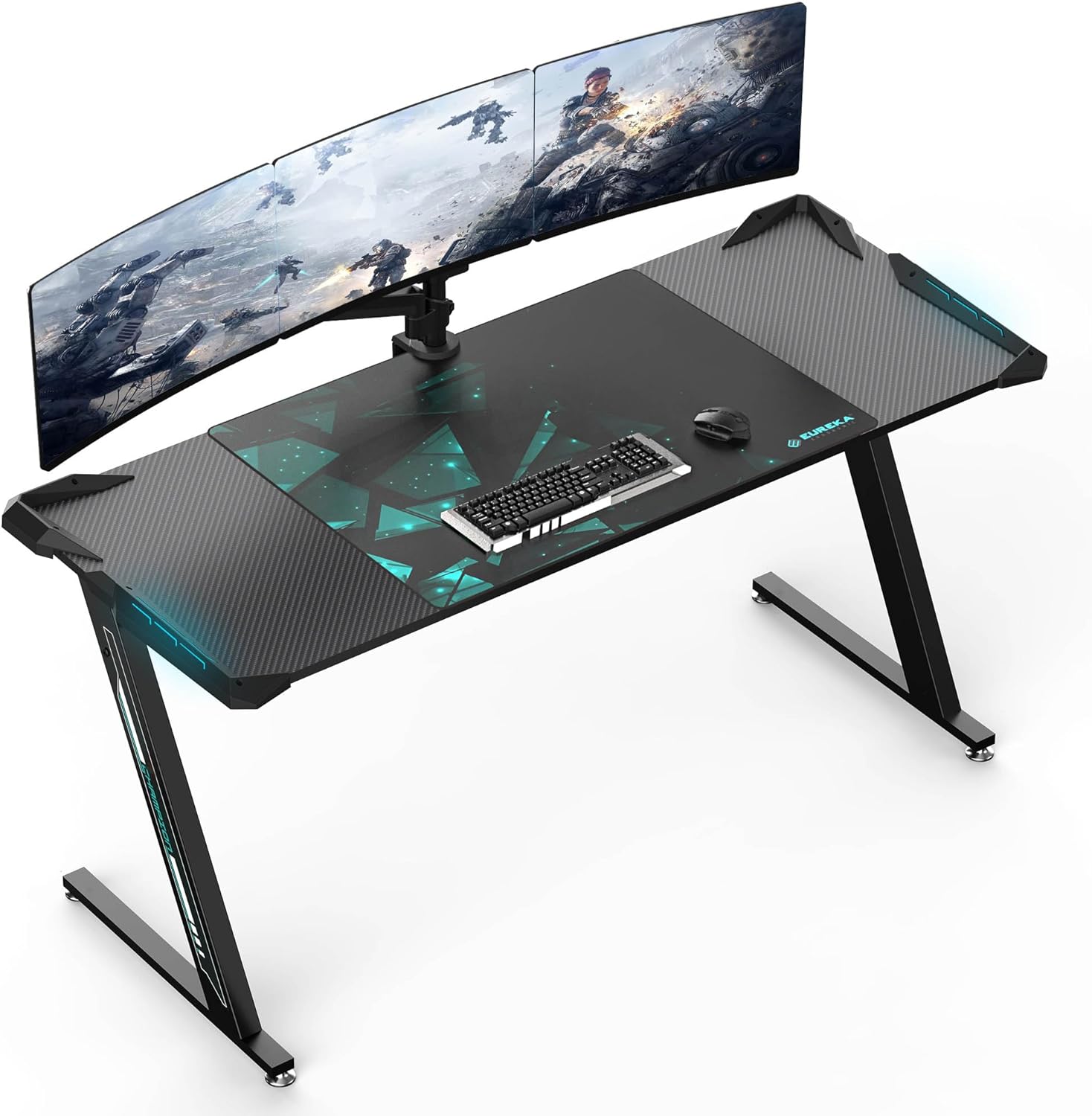
Figure 1.1: The EUREKA ERGONOMIC Z60 Gaming Desk setup with dual monitors.
2. Safety Information
Please observe the following safety precautions to prevent injury or damage to the product:
- During assembly, ensure good ventilation in the work area.
- It is recommended to have two people for assembly to ensure stability and safety.
- Do not exceed the maximum weight limit of 300 lbs (136 kg) on the desk surface.
- Keep all small parts and packaging materials away from children.
- Ensure all screws and fasteners are securely tightened before use. Periodically check and re-tighten if necessary.
- This product complies with all California toxic substance regulations, including formaldehyde and heavy metals.

Figure 2.1: Environmental certification for material safety.
3. Package Contents
Before beginning assembly, verify that all components are present and undamaged. If any parts are missing or damaged, please contact customer service.
- Desk Top (Carbon Fiber Textured)
- Z-shaped Leg Frames (Left and Right)
- Support Beams and Brackets
- Adjustable Leveling Feet
- RGB LED Light Strips (Pre-installed or separate)
- Power Adapter for LED Lights
- Large Gaming Mouse Pad
- Basic Installation Tool (e.g., Allen wrench)
- Sticker (Brand/Decorative)
- Hardware Pack (Screws, bolts, washers, etc.)

Figure 3.1: Overview of desk components and included accessories.
4. Assembly Instructions
Assembly is required for this gaming desk. Follow these steps carefully. It is highly recommended to have two people for assembly.
- Prepare the Area: Clear a spacious, flat, and clean area for assembly. Lay down the packaging material or a soft cloth to protect the desk components from scratches.
- Attach Leg Frames: Carefully attach the Z-shaped leg frames to the main support beams using the provided hardware. Ensure the orientation is correct as per the diagrams (if provided in physical manual). Do not fully tighten screws yet.
- Secure Desk Top: With assistance, carefully place the desk top onto the assembled leg frame. Align the pre-drilled holes on the desk top with the mounting points on the frame. Secure the desk top to the frame using the appropriate screws.
- Tighten All Fasteners: Once all components are loosely assembled, gradually tighten all screws and bolts. Start from the center and work your way outwards, ensuring the desk is stable and level.
- Install Leveling Feet: Screw the adjustable leveling feet into the bottom of the Z-shaped legs. Adjust them as needed to ensure the desk sits level on your floor and prevents wobbling.
- Connect RGB Lighting: If the RGB LED light strips are not pre-installed, attach them to the designated areas on the desk. Connect the LED strips to the power adapter and then plug the adapter into a standard electrical outlet.
- Final Check: Before placing any equipment on the desk, gently shake it to confirm stability. Ensure all connections are secure.

Figure 4.1: Detail of the Z-shaped leg structure, highlighting stability and load capacity.

Figure 4.2: Comparison illustrating the robust Z-shaped leg design.
5. Operating Instructions (RGB Lighting)
The EUREKA ERGONOMIC Z60 Gaming Desk features dynamic RGB LED lighting to enhance your gaming experience. The lighting is controlled via a single button.
- Power On/Off: Press the control button once to turn the RGB lights on or off.
- Change Lighting Mode: Repeatedly press the control button to cycle through various lighting modes. These include single-color static modes and dynamic multi-color light shows.
- Power Source: Ensure the desk's power adapter for the LED lights is securely plugged into a working electrical outlet.

Figure 5.1: RGB LED lighting control button and available light modes.
6. Maintenance
Proper maintenance will extend the life and appearance of your gaming desk.
- Cleaning: Wipe the desk surface and legs with a damp cloth. Avoid using harsh chemicals or abrasive cleaners, which can damage the finish.
- Spills: In case of spills, wipe them immediately with a dry cloth to prevent staining or damage to the carbon fiber texture.
- Fasteners: Periodically check all screws and bolts to ensure they remain tight. Re-tighten if any looseness is detected.
- Environmental Conditions: Avoid exposing the desk to extreme temperatures or high humidity, which can affect the material integrity.
7. Troubleshooting
If you encounter any issues with your EUREKA ERGONOMIC Z60 Gaming Desk, refer to the following common solutions:
- Desk is Wobbly:
- Ensure all assembly screws are fully tightened.
- Adjust the leveling feet at the bottom of the legs to compensate for uneven floor surfaces.
- RGB Lights Not Working:
- Check if the power adapter is securely plugged into both the desk and a working electrical outlet.
- Ensure the connection between the LED strips and the power adapter is secure.
- Press the control button multiple times to ensure it's not just in an 'off' state or a very dim mode.
- Missing Parts / Damaged Components:
- Carefully re-check all packaging materials.
- Contact EUREKA ERGONOMIC customer service for assistance.
8. Specifications
Detailed specifications for the EUREKA ERGONOMIC Z60 Gaming Desk:
| Model Number | ERK-Z60-B |
| Brand | EUREKA ERGONOMIC |
| Product Dimensions (D x W x H) | 25.2"D x 61.51"W x 30.71"H (64cm D x 156.2cm W x 78cm H) |
| Tabletop Thickness | 1.5 Inches (3.8 cm) |
| Maximum Weight Recommendation | 300 lbs (136 kg) |
| Material | P2PB Engineer Wood / Steel (Base Material: Metal, Top Material Type: Metal) |
| Finish Type | Laminated (Carbon Fiber Texture) |
| Color | Black and Blue (Mainly Black) |
| Special Feature | Dynamic RGB LED Lighting |
| Assembly Required | Yes |

Figure 8.1: Key dimensions and load capacity of the gaming desk.
9. Warranty and Support
Your EUREKA ERGONOMIC Z60 Gaming Desk comes with a Manufacturer Warranty. For specific details regarding the warranty period and coverage, please refer to the warranty card included with your product or visit the official EUREKA ERGONOMIC website.
If you have any questions, require technical assistance, or need to report missing/damaged parts, please contact EUREKA ERGONOMIC customer service. Contact information can typically be found on the product packaging, the official brand website, or through your point of purchase.
For more information, you may visit the EUREKA ERGONOMIC Store on Amazon.
Ask a question about this manual
Ask about setup, troubleshooting, compatibility, parts, safety, or missing instructions. Manuals+ will review the question and use this page’s manual context to help answer it.