
Introduction
Thank you for choosing the Doorii 012 4000A Jump Starter. This device is designed to provide reliable emergency jump-starting for vehicles, serve as a portable power bank for electronic devices, and offer an integrated LED flashlight for various situations. Please read this manual thoroughly before using the product to ensure safe and optimal operation.
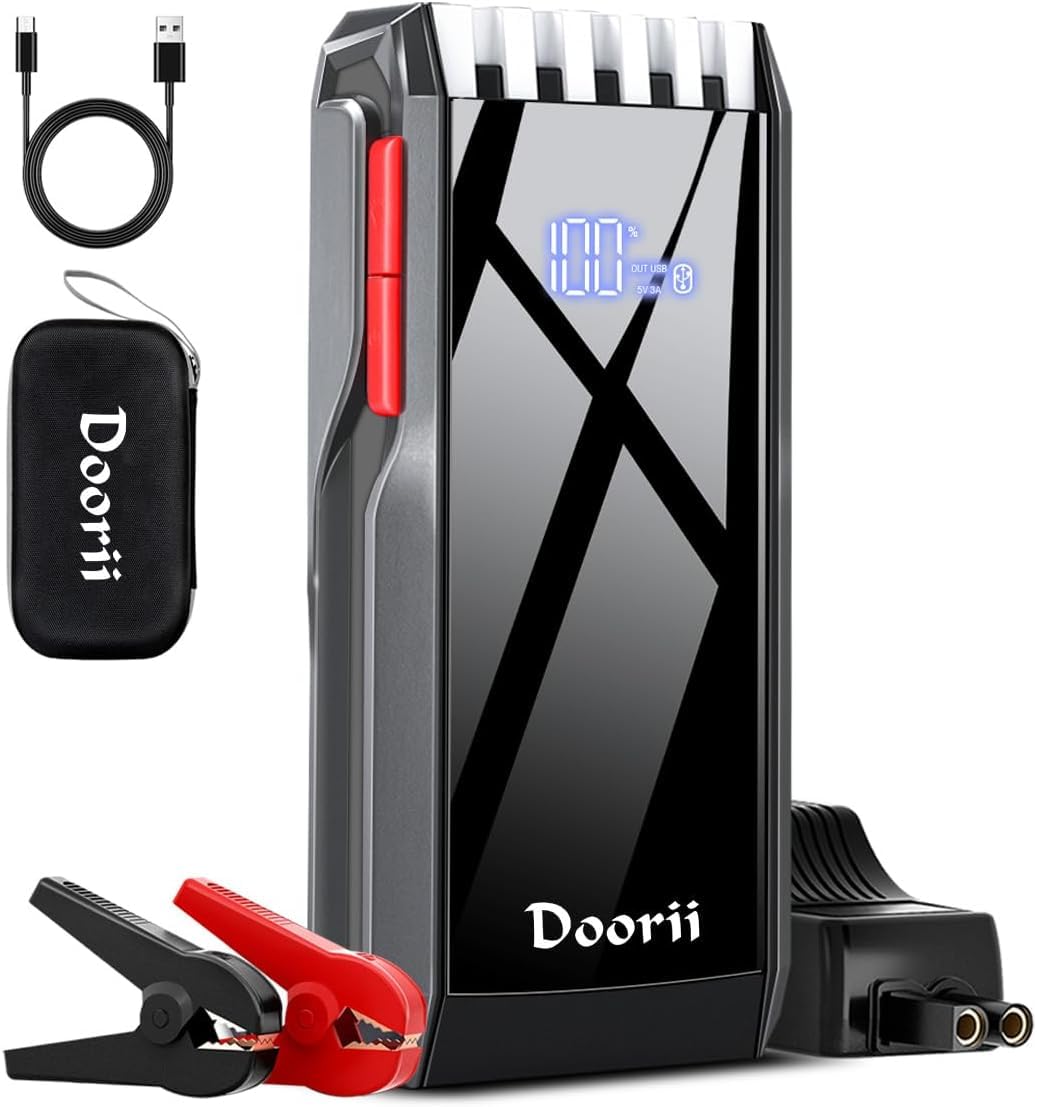
Image: The Doorii 012 4000A Jump Starter unit with its jumper cables connected.
Safety Precautions
Always observe the following safety guidelines to prevent injury or damage to the device or vehicle:
- Do not disassemble the jump starter.
- Do not expose the device to extreme temperatures (above 60°C/140°F or below -20°C/-4°F) or direct sunlight for extended periods.
- Keep out of reach of children.
- Do not immerse the device in water.
- Ensure proper polarity when connecting to a vehicle battery (red clamp to positive, black clamp to negative). Reverse connection protection is built-in, but caution is advised.
- Do not crank the engine for more than 3 seconds at a time. Allow at least 30 seconds between attempts.
- Remove the jumper clamps from the vehicle battery within 30 seconds after the engine starts.
- Do not use the jump starter if it is damaged or if the cables are frayed.
- Always wear eye protection when working with vehicle batteries.

Image: This diagram illustrates the 9 safety protections integrated into the Doorii jump starter, including short circuit, over discharge, overload, reverse connection, voltage regulation, temperature, over charge, over current, and reverse polarity protection.
Product Overview
The Doorii 012 Jump Starter is a versatile device featuring a powerful jump-starting capability, multiple USB output ports for charging electronics, and an integrated LED flashlight with various modes.
Key Features:
- High Peak Current: 4000A peak current for starting various vehicles.
- Multi-functional LED Display: Shows battery level and output status.
- USB Output Ports: For charging smartphones, tablets, and other USB-powered devices.
- 3-in-1 LED Flashlight: Includes Flashlight, Strobe Light, and SOS Light modes.
- Advanced Safety Protections: Built-in safeguards against common electrical issues.
Integrated LED Flashlight:
The device includes a powerful LED flashlight with three modes for different situations:
- Flash Light: Standard illumination.
- Strobe Light: For signaling or disorienting.

Image: This graphic illustrates the three modes of the integrated LED flashlight: standard flash, strobe, and SOS, useful for outdoor emergencies.
Portable Power Bank Function:
The Doorii 012 can charge various electronic devices via its USB output ports.
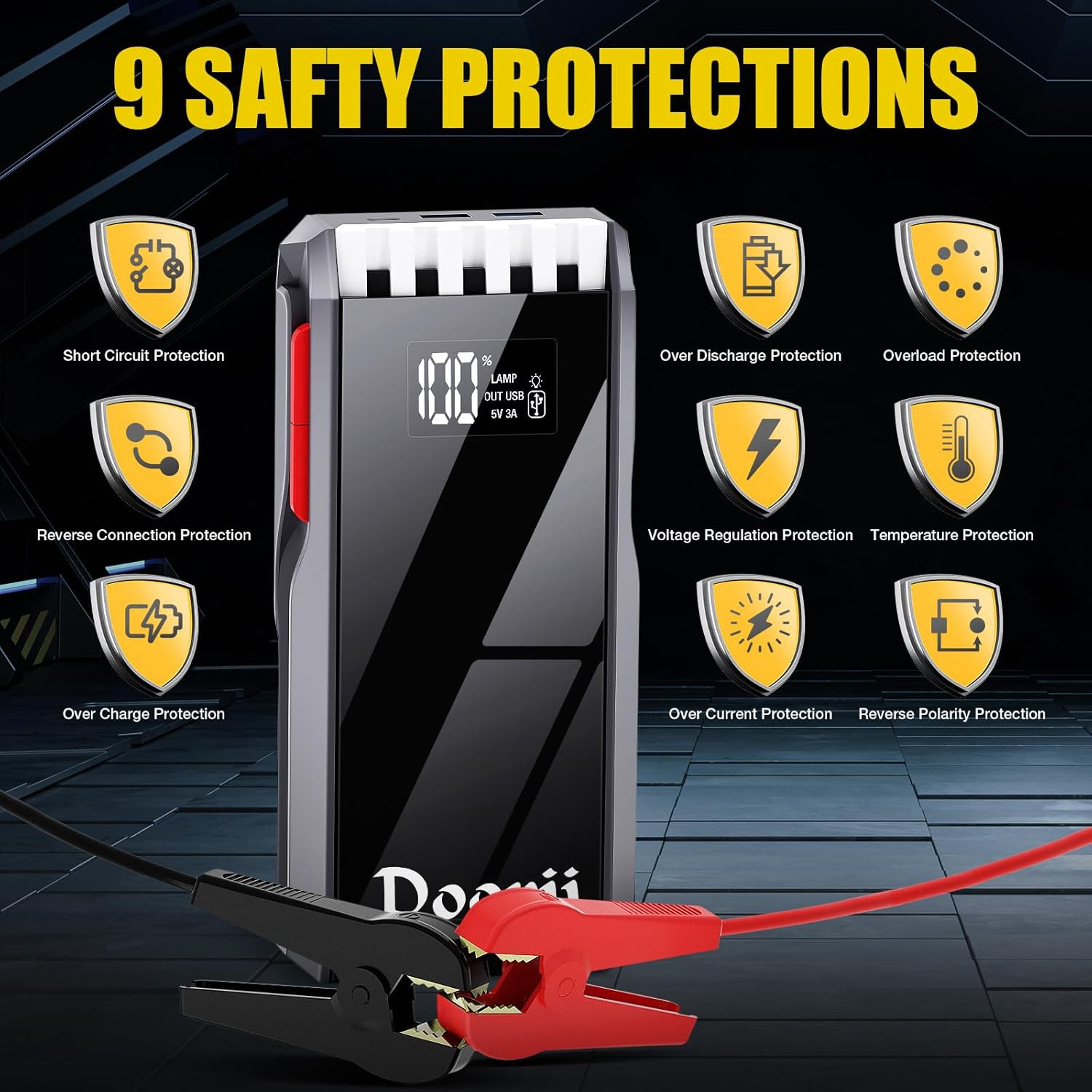
Image: The jump starter is shown connected to and charging various portable electronic devices, including earbuds, a smartphone, a tablet, a camera, a laptop, and a smartwatch, highlighting its power bank functionality.
Charging the Jump Starter
Before initial use, fully charge the jump starter. It is recommended to recharge the device every 3-6 months to maintain battery health, even if not in use.
- Connect the provided USB charging cable to the jump starter's input port.
- Connect the other end of the USB cable to a suitable USB wall adapter (not included) or a car charger.
- The LED display will show the charging progress. The device is fully charged when the display indicates 100%.
Operating Instructions: Jump Starting a Vehicle
Follow these steps carefully to jump start your vehicle:
- Ensure Sufficient Power: Before starting, make sure the jump starter has at least 75% of its remaining power.
- Connect to Jump Starter: Plug the smart jumper cable's blue connector into the 12V vehicle start port on the jump starter. Ensure a secure connection.
- Connect to Vehicle Battery:
- Connect the RED clamp to the vehicle battery's positive (+) terminal.
- Connect the BLACK clamp to the vehicle battery's negative (-) terminal.
When the indicator light on the smart cable shows a solid green, the connection is successful and safe to proceed.
- Start Vehicle: Enter your vehicle and start the engine.
- Remove Clamps: Once the engine starts, immediately remove the jumper clamps from the vehicle battery within 30 seconds. First, remove the black clamp, then the red clamp.
- Unplug from Jump Starter: Unplug the smart jumper cable from the jump starter.
Note: If the vehicle does not start on the first attempt, wait at least 30 seconds before trying again. If a second start is required, it needs to be started every 120 seconds. Never connect the red and black clamps together.

Image: This four-step visual guide demonstrates the process of using the jump starter: 1. Ensure power and plug in, 2. Connect red to positive and black to negative, 3. Start the vehicle, 4. Remove clamps.
Operating Instructions: Using as a Power Bank
The Doorii 012 Jump Starter can charge various USB-powered devices.
- Connect your device's USB charging cable to one of the USB output ports on the jump starter.
- The jump starter will automatically begin charging your device. The LED display may show the output status.
- Disconnect your device once charging is complete.
Operating Instructions: Using the LED Flashlight
The integrated LED flashlight offers three modes for different needs.
- Press and hold the flashlight button (usually located on the side or front of the device) for a few seconds to turn on the standard flashlight mode.
- Press the button again to cycle through the modes: Flashlight → Strobe Light → SOS Light.
- Press and hold the button again to turn off the flashlight.
Maintenance and Storage
Proper maintenance ensures the longevity and performance of your Doorii 012 Jump Starter.
- Cleaning: Wipe the device with a soft, dry cloth. Do not use harsh chemicals or abrasive materials.
- Charging: Recharge the jump starter every 3-6 months to maintain optimal battery health, even if not used.
- Storage: Store the device in a cool, dry place, away from direct sunlight and extreme temperatures. The operating temperature range is -20°C (-4°F) to 60°C (140°F).
- Case: Utilize the provided storage case to keep the jump starter and its accessories organized and protected.

Image: This image highlights the jump starter's durability across a wide temperature range, from -20°C (-4°F) to 60°C (140°F), indicating its suitability for various environmental conditions.
Troubleshooting
| Problem | Possible Cause | Solution |
|---|---|---|
| Jump starter does not turn on. | Battery is completely discharged. | Charge the jump starter fully. |
| Vehicle does not start. | Low battery on jump starter. Incorrect connection. Vehicle battery is severely damaged. | Ensure jump starter is sufficiently charged (above 75%). Check clamp connections for correct polarity. Consult a mechanic if vehicle battery is faulty. |
| Smart cable indicator light is not green. | Incorrect connection. Short circuit. | Verify correct polarity (red to +, black to -). Ensure clamps are not touching each other. |
| Device gets warm during use. | Normal operation during high power output. | This is normal. If it becomes excessively hot, disconnect and allow to cool. |
Specifications
- Brand: Doorii
- Model Number: COCY-012
- Peak Current: 4000A
- Voltage: 12 Volts
- Item Weight: 2.27 pounds
- Product Dimensions: 3.94 x 1.97 x 0.79 inches
- Battery Type: Lithium Polymer (1 included)
- Manufacturer: Dongguan Huaqing Technology Co., LTD
- Date First Available: March 21, 2024
Warranty and Support
For warranty information and customer support, please refer to the documentation included with your purchase or contact Doorii customer service through the retailer where the product was purchased. Keep your purchase receipt as proof of purchase.