
1. Introduction
Thank you for choosing the Hama "Colour 10" Power Pack. This portable power bank is designed to provide convenient and reliable charging for your mobile devices on the go. Please read this instruction manual carefully before using the device to ensure safe and optimal performance. Keep this manual in a safe place for future reference.
Safety Instructions
- Do not short-circuit the power bank.
- Do not expose the power bank to extreme temperatures (e.g., direct sunlight, heat sources).
- Do not expose the power bank to water or high humidity.
- Do not open, disassemble, or modify the power bank.
- Keep out of reach of children.
- Use only appropriate charging cables and adapters.
- Dispose of the power bank according to local regulations.
2. Package Contents
Please check that all items are present and in good condition:
- Hama "Colour 10" Power Pack (10000 mAh)
- USB-C charging cable
- This instruction manual
3. Product Overview
Familiarize yourself with the components of your Hama Power Pack:

Figure 1: Front view of the Hama Colour 10 Power Pack, highlighting its compact design and the two output ports.

Figure 2: Top view of the power bank, showing the LED power indicators. These LEDs illuminate to show the remaining battery charge.
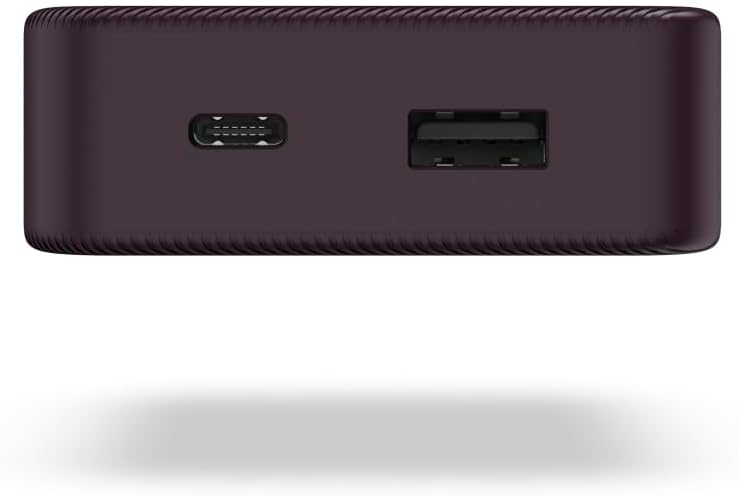
Figure 3: Close-up of the side of the power bank, detailing the USB-C input/output port and the USB-A output port.
The power bank features two output ports: one USB-C and one USB-A, allowing for versatile device charging. An integrated LED display indicates the remaining power level.
4. Setup
4.1 Charging the Power Pack
Before first use, fully charge the power bank. This ensures optimal battery performance and longevity.
- Connect the supplied USB-C charging cable to the USB-C port on the power bank.
- Connect the other end of the USB-C cable to a suitable USB power adapter (not included) or a computer's USB port.
- The LED indicators will illuminate to show the charging progress. All four LEDs will be solid when fully charged.
Note: Charging time may vary depending on the power source.
5. Operating
5.1 Charging Your Devices
The Hama "Colour 10" Power Pack can charge two devices simultaneously using its USB-C and USB-A output ports.
- Connect your device's charging cable to the appropriate output port on the power bank (USB-C or USB-A).
- Connect the other end of the cable to your device.
- The power bank will automatically begin charging your device. If not, press the power button on the power bank to initiate charging.
- The LED indicators on the power bank will show the remaining charge level during use.
Tip: For optimal charging, use the original charging cable that came with your device.
5.2 Checking Battery Level
To check the remaining battery capacity of the power bank, briefly press the power button. The LED indicators will light up:
- 1 LED: 0-25% charge remaining
- 2 LEDs: 25-50% charge remaining
- 3 LEDs: 50-75% charge remaining
- 4 LEDs: 75-100% charge remaining
6. Maintenance
6.1 Cleaning
- Only clean this product with a slightly damp, lint-free cloth.
- Do not use aggressive cleaning agents.
6.2 Storage
- Store the power bank in a cool, dry place away from direct sunlight and extreme temperatures.
- If storing for extended periods, charge the power bank to approximately 50% every 3 months to maintain battery health.
7. Troubleshooting
| Problem | Possible Cause | Solution |
|---|---|---|
| Power bank not charging | Cable faulty; Power adapter insufficient; Power bank fully charged. | Try a different cable/adapter; Ensure adapter output meets requirements; Check LED indicators. |
| Device not charging from power bank | Power bank discharged; Cable faulty; Device incompatible; Power button not pressed. | Recharge power bank; Try a different cable; Ensure device is compatible; Press power button. |
| Slow charging | Cable quality; Device input limit; Multiple devices charging. | Use a high-quality cable; Check device's charging specifications; Charge one device at a time if possible. |
8. Specifications
- Model: Hama "Colour 10" Power Pack
- Item Model Number: 00201712
- Battery Capacity: 10000 mAh (Lithium Polymer)
- Input: USB-C
- Output: USB-C, USB-A
- Product Dimensions: 19.5 x 9 x 4 cm
- Weight: 196 g
- Special Features: Lightweight, Fast Charging, Pocket Size
- Country of Origin: China
9. Warranty and Support
Hama GmbH & Co KG assumes no liability and provides no warranty for damage resulting from improper installation/mounting, improper use of the product or from failure to observe the operating instructions and/or safety notes.
For technical support or warranty claims, please contact your retailer or the Hama customer service department. You can find contact information on the official Hama website or through your purchase documentation.
Note: Keep your proof of purchase for warranty purposes.