
Important Safety Instructions
Please read all instructions carefully before using the iBELL AF1270M Air Fryer. Failure to follow these instructions may result in electric shock, fire, or serious injury.
- Always place the appliance on a stable, heat-resistant surface, away from walls or other appliances to allow adequate air circulation.
- Do not immerse the appliance, cord, or plug in water or other liquids.
- Ensure the voltage indicated on the appliance corresponds to your local mains voltage before connecting.
- Keep children and pets away from the appliance during operation.
- Do not touch hot surfaces. Use handles or knobs. Always use oven mitts when handling hot accessories or food.
- Unplug from the outlet when not in use and before cleaning. Allow to cool before putting on or taking off parts.
- Do not operate any appliance with a damaged cord or plug, or after the appliance malfunctions or has been damaged in any manner.
- Do not use accessories or attachments not recommended by the manufacturer.
- Never leave the appliance unattended while in operation.
- Exercise extreme caution when moving an appliance containing hot oil or other hot liquids.
- Do not block any ventilation openings.
- Do not place the appliance against a wall or against other appliances. Leave at least 10 cm free space on the back and sides and 10 cm free space above the appliance.
- This appliance is for household use only.
Product Overview
Components and Features
The iBELL AF1270M Air Fryer is designed for versatile cooking with its advanced features:
- 12-Liter Capacity: Spacious interior for family-sized meals.
- 2000W Power: Ensures rapid heating and efficient cooking.
- 360° Turbo Hot Air Circulation: Utilizes rapid air technology for even cooking and crispy results with minimal oil.
- Digital Display with Feather Touch Control: User-friendly interface for easy navigation and setting adjustments.
- 10 Cooking Presets: Pre-programmed settings for common dishes, including dehydrate, fries, steak, fish, shrimp, chicken, baking, rotisserie, pizza, frozen food, keep warm, and preheat.
- Precise Temperature Control: Adjustable temperature range from 30°C to 200°C (86°F to 392°F).
- Auto Shut-Off: For safety and convenience.
- Transparent Cooking Window: Allows monitoring of food without opening the door.

The iBELL AF1270M Air Fryer features a transparent window to monitor cooking progress, with a digital display panel above.
Included Accessories
The following accessories are included to enhance your cooking experience:
- Oven Basket
- Drip Tray
- Rotating Mesh Basket
- Crisper Tray
- Skewer Set
- Rotisserie Fetch Tool
- Rotisserie Fork

This image displays the full range of accessories provided with the air fryer, designed for versatile cooking.

Illustrations demonstrating how each accessory, such as the oven basket, rotating mesh basket, and rotisserie fork, is used for different cooking methods.
Initial Setup
1. Unpacking
- Remove all packaging materials, stickers, and labels from the appliance.
- Remove all accessories from the packaging.
- Inspect the appliance for any damage. Do not use if damaged.
2. Placement
- Place the air fryer on a stable, level, and heat-resistant surface.
- Ensure there is at least 10 cm of clear space around the back, sides, and above the appliance for proper ventilation.
- Do not place the appliance near flammable materials or heat sources.
3. First Use Cleaning
- Wipe the exterior of the appliance with a damp cloth.
- Clean the accessories (oven basket, drip tray, rotating mesh basket, crisper tray, skewers, rotisserie fork) with hot water, dish soap, and a non-abrasive sponge.
- Rinse thoroughly and dry all parts completely before use.
- It is recommended to run the air fryer empty for about 10-15 minutes at 180°C (350°F) during the first use to eliminate any manufacturing odors. A slight smell or smoke is normal during this initial process.
Operating Instructions
1. Control Panel
The iBELL AF1270M features a digital display with feather touch controls for easy operation. The panel includes power, temperature, time, and various preset icons.
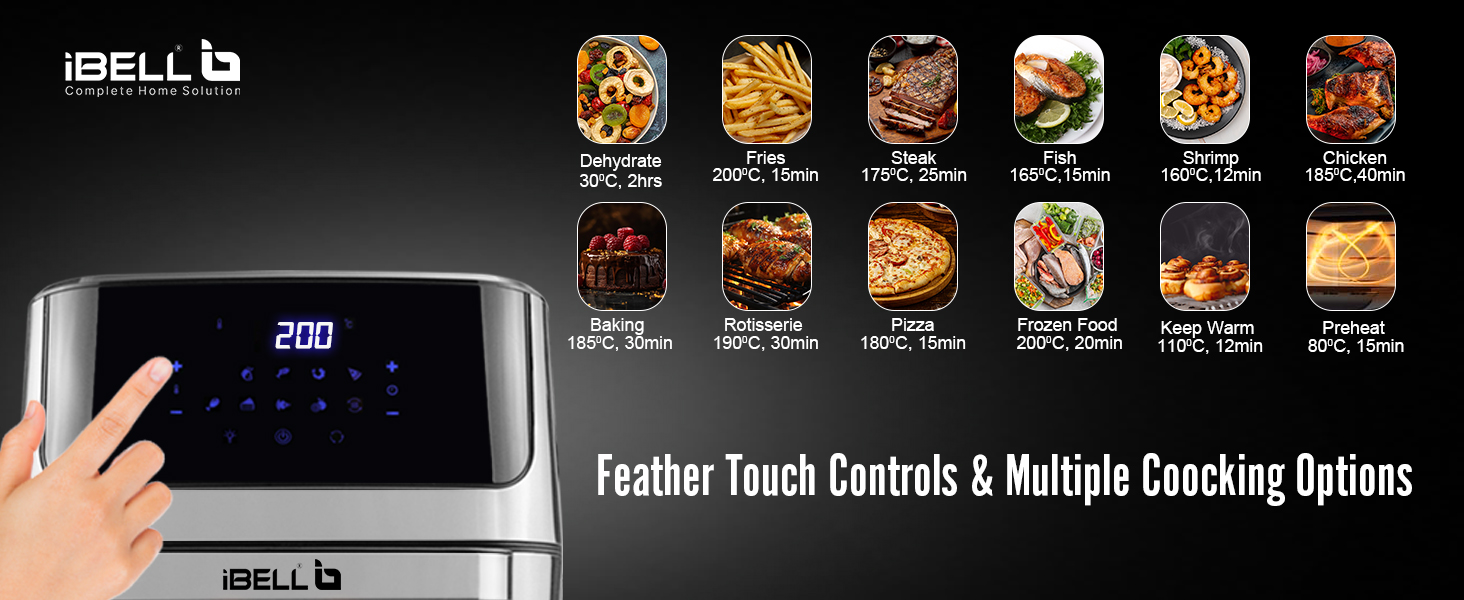
The digital touch control panel highlights the 10 pre-programmed cooking options, simplifying meal preparation.
2. Basic Operation
- Prepare Food: Place your ingredients into the appropriate accessory (e.g., oven basket, crisper tray).
- Insert Accessory: Slide the accessory into the air fryer. Ensure the drip tray is at the bottom to catch any drippings.
- Power On: Plug the air fryer into a grounded electrical outlet. The power indicator will light up. Press the Power button to turn on the display.
- Select Cooking Method: Choose between using a preset function or manually setting the time and temperature.
- Start Cooking: Press the Start/Pause button to begin the cooking cycle.
- Monitor Progress: Use the transparent window to check on your food.
- Remove Food: Once cooking is complete, carefully remove the hot accessory and food using the rotisserie fetch tool or oven mitts.
3. Using Preset Functions
The air fryer comes with 10 preset functions for convenience. To use a preset:
- Turn on the air fryer.
- Press the desired preset icon on the control panel (e.g., Fries, Chicken, Pizza). The display will show the default time and temperature for that preset.
- You can adjust the time and temperature manually even after selecting a preset if needed.
- Press the Start/Pause button to begin cooking.
4. Manual Temperature and Time Adjustment
For custom cooking, you can manually set the temperature and time:
- Turn on the air fryer.
- Use the temperature control buttons (usually '+' and '-') to set the desired temperature between 30°C and 200°C.
- Use the time control buttons (usually '+' and '-') to set the desired cooking time.
- Press the Start/Pause button to begin cooking.
5. Using Rotisserie Function
The rotisserie function is ideal for roasting whole chickens or larger cuts of meat.
- Assemble the rotisserie fork by securing the food onto the spit rod with the forks.
- Insert the assembled rotisserie into the air fryer's rotisserie slots. Ensure it is securely in place.
- Select the Rotisserie preset or manually set the temperature and time.
- Press the Rotisserie rotation button (if available) to activate the rotation.
- Press Start/Pause to begin cooking.
- Once cooked, use the rotisserie fetch tool to safely remove the hot rotisserie assembly.
6. Using Other Accessories
- Oven Basket / Crisper Tray: Ideal for fries, vegetables, and smaller items. Place food evenly on the tray/basket.
- Rotating Mesh Basket: Perfect for items that benefit from tumbling, like popcorn or nuts. Ensure the basket is properly secured in the rotisserie slots.
- Skewer Set: Use for kebabs. Insert skewers into the rotisserie assembly and secure.
- Drip Tray: Always place the drip tray at the bottom of the air fryer to collect excess oil and food particles, making cleanup easier.
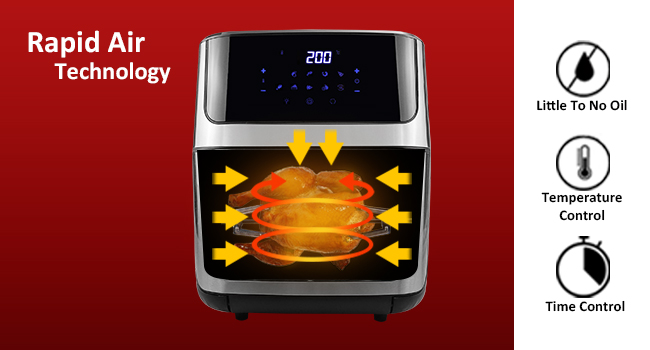
This graphic explains the rapid air technology that ensures even cooking and crispy results with little to no oil.
Maintenance and Cleaning
Regular cleaning ensures optimal performance and extends the lifespan of your air fryer.
1. General Cleaning
- Unplug and Cool: Always unplug the air fryer and allow it to cool completely before cleaning.
- Clean Exterior: Wipe the exterior with a damp cloth. Do not use abrasive cleaners.
- Clean Interior: Wipe the interior with a damp cloth and mild detergent. For stubborn food residue, use a non-abrasive sponge.
- Clean Accessories: All removable accessories (oven basket, drip tray, rotating mesh basket, crisper tray, skewers, rotisserie fork) are dishwasher safe or can be hand-washed with hot water, dish soap, and a non-abrasive sponge.
- Heating Element: Gently clean the heating element with a soft brush to remove any food residue. Do not use water or liquid cleaners directly on the heating element.
- Dry Thoroughly: Ensure all parts are completely dry before reassembling or storing the appliance.
2. Storage
Store the cleaned and dried air fryer in a cool, dry place. Do not wrap the power cord tightly around the appliance.
Troubleshooting Guide
If you encounter any issues with your iBELL AF1270M Air Fryer, please refer to the following table for common problems and solutions.
| Problem | Possible Cause | Solution |
|---|---|---|
| Air fryer does not turn on. | Appliance not plugged in. Power outlet not working. | Ensure the power cord is securely plugged into a working outlet. Check the circuit breaker. |
| Food is not cooked evenly. | Too much food in the basket. Temperature or time settings incorrect. | Do not overcrowd the basket; cook in smaller batches. Shake or flip food halfway through cooking. Adjust temperature and time as needed. |
| White smoke coming from the appliance. | Greasy residue from previous use. Excess oil from food. | Clean the drip tray and interior thoroughly after each use. Remove excess oil from food before air frying. |
| Food is not crispy. | Not enough oil (for certain foods). Food too moist. Temperature too low. | Lightly brush or spray food with oil. Pat moist foods dry before cooking. Increase temperature or cooking time slightly. |
| Rotisserie function not rotating. | Rotisserie assembly not properly installed. Food too heavy or unbalanced. | Ensure the rotisserie spit is correctly seated in the drive and support slots. Balance the food evenly on the spit. Do not exceed the maximum weight capacity. |
Technical Specifications
| Feature | Specification |
|---|---|
| Brand | IBELL |
| Model Number | IBL AF 1270MEZ |
| Capacity | 12 Liters |
| Power | 2000 Watts |
| Voltage | 220 ~ 240V |
| Temperature Range | 30°C to 200°C (86°F to 392°F) |
| Display Type | Digital, Touchscreen |
| Special Features | 10 Cooking Presets, Auto Shut Off, 360° Turbo Hot Air Circulation |
| Material | Plastic |
| Item Weight | 8.7 Kilograms (8 kg 700 g) |
| Item Dimensions (LxWxH) | 30 x 29.5 x 39 Centimeters |
| Country of Origin | China |

A diagram illustrating the physical dimensions of the air fryer for placement and storage considerations.
Warranty and Support
1. Warranty Information
The iBELL AF1270M Air Fryer comes with a 1 Year Standard Warranty. An additional 1 Year Warranty is available upon registration. Registration must be completed within 30 days from the date of purchase to avail the extended warranty.
2. Customer Support
For any queries, service requests, or warranty claims, please contact iBELL customer support:
- Manufacturer: Innoative Technologies
- Customer Service Number: 1800 2020 260