
JUMMICO JVCH-241222
JUMMICO Electric Standing Desk User Manual
Model: JVCH-241222
Introduction
Thank you for choosing the JUMMICO Electric Standing Desk. This manual provides detailed instructions for the assembly, operation, and maintenance of your new adjustable height desk. Designed for comfort and productivity, this desk allows you to effortlessly switch between sitting and standing positions, promoting a healthier work environment. Please read this manual thoroughly before assembly and use to ensure proper function and safety.

Image: The JUMMICO Electric Standing Desk, showcasing its spacious white desktop, monitor stand, and electric control panel. A cup holder is attached to the side.
Safety Instructions
- Read all instructions carefully before assembly and operation.
- Keep children and pets away from the desk during operation.
- Ensure all cables are properly managed to prevent tripping hazards or damage during height adjustment.
- Do not overload the desk. Refer to the specifications section for maximum weight capacity.
- Avoid placing liquids directly on the control panel or near electrical components.
- Do not climb on or sit on the desk.
- Unplug the power cord before cleaning or performing any maintenance.
- If any unusual sounds or movements occur, immediately stop operation and unplug the desk. Contact customer support if the issue persists.
Package Contents
Please verify that all components are present before beginning assembly. If any parts are missing or damaged, please contact JUMMICO customer service.
| Item | Description | Quantity |
|---|---|---|
| Desktop Panel | Main desk surface (47 x 24 Inch) | 1 |
| Leg Frames | Adjustable height leg columns | 2 |
| Feet Bases | Stabilizing feet for leg frames | 2 |
| Control Box | Power and motor control unit | 1 |
| Control Panel | Digital display and buttons | 1 |
| Monitor Stand | Elevated shelf for monitor | 1 |
| Cup Holder | Attachable cup holder | 1 |
| Headphone Hook | Attachable hook for headphones | 1 |
| Power Adapter & Cable | For connecting to power outlet | 1 set |
| Assembly Hardware | Screws, Allen wrench, etc. | 1 set |
Assembly Instructions
Follow these steps carefully to assemble your JUMMICO Electric Standing Desk. It is recommended to have two people for assembly.
- Unpack and Identify Parts: Carefully remove all components from the packaging. Lay them out on a clean, soft surface to prevent scratches. Refer to the "Package Contents" section to ensure all parts are present.
- Attach Feet Bases to Leg Frames: Securely attach the two feet bases to the bottom of each leg frame using the provided screws and Allen wrench. Ensure they are firmly tightened for stability.
- Connect Leg Frames to Desktop: Place the desktop upside down on your soft surface. Align the leg frames with the pre-drilled holes on the underside of the desktop. Attach them using the appropriate screws.
- Install Control Box and Control Panel: Mount the control box to the designated area under the desktop. Connect the motor cables from the leg frames to the control box. Then, attach the control panel to the front edge of the desktop, typically on the right side, and connect its cable to the control box.
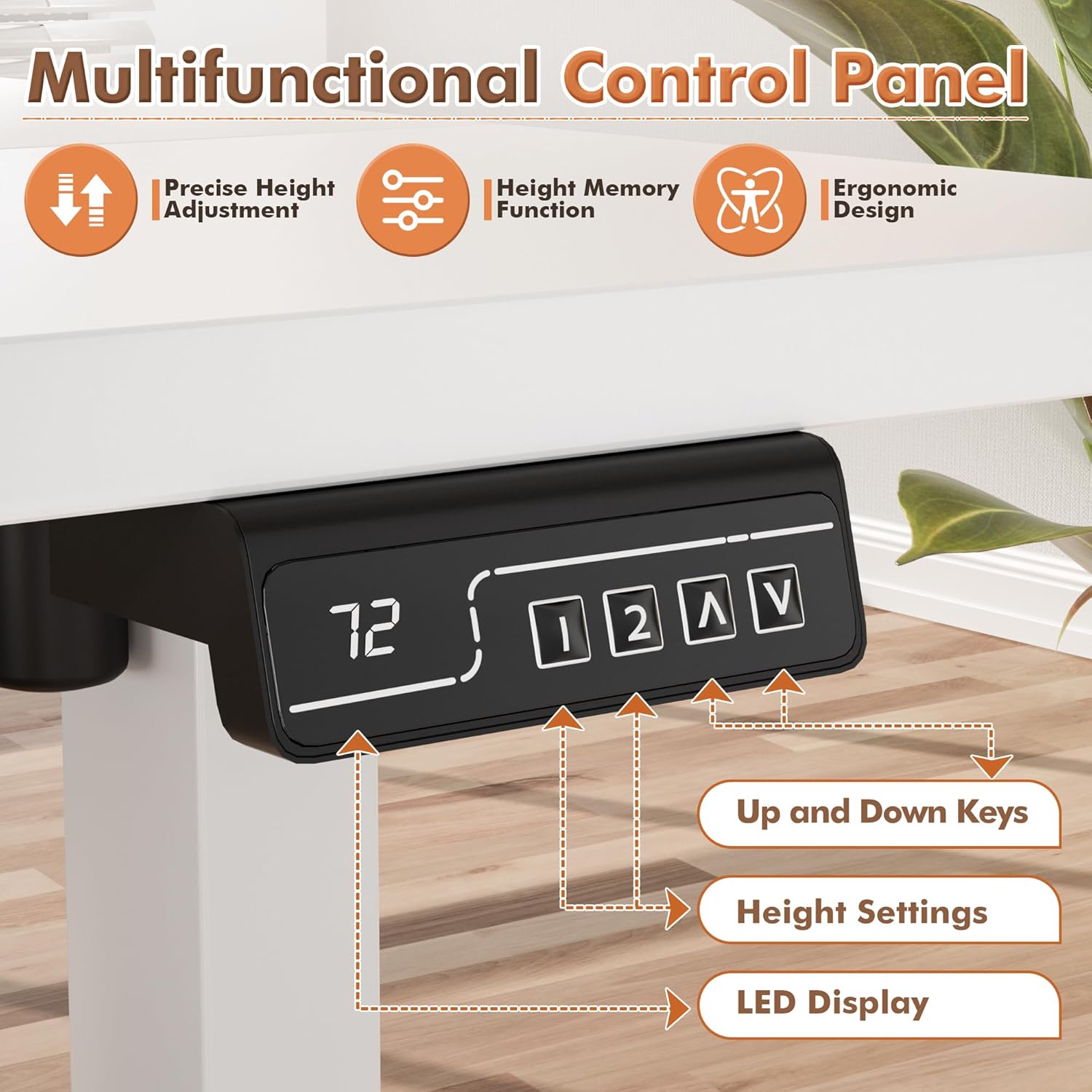
Image: Detailed view of the desk's control panel, showing the LED display and buttons for precise height adjustment and memory functions.
- Attach Monitor Stand: Position the monitor stand on the desktop as desired. It typically has a stable base that rests directly on the desk surface.

Image: A visual representation of the dual-layer desktop design, emphasizing the monitor stand's role in providing more desktop space and ease of cleaning.
- Install Accessories (Cup Holder, Headphone Hook): The cup holder and headphone hook can be installed on either the left or right side of the desktop using the provided hardware. Choose the most convenient location for your setup.
- Cable Management: Use any included cable ties or clips to neatly manage the power cable and motor cables, ensuring they do not interfere with the desk's movement.
- Flip the Desk: With assistance, carefully flip the desk upright onto its feet. Ensure it is stable before plugging it in.
Operating Instructions
Your JUMMICO Electric Standing Desk features an intuitive control panel for easy height adjustment and memory functions.
Basic Height Adjustment:
- Up/Down Keys (^ / v): Press and hold the "Up" (^) or "Down" (v) arrow keys on the control panel to raise or lower the desk to your desired height. The LED display will show the current height.
- The desk operates smoothly and quietly, typically below 50 decibels, minimizing disruption.

Image: A visual comparison of the desk's quiet operation (around 55dB) against common sounds like a quiet bedroom or talking.
Memory Preset Function:
The desk allows you to save up to two preferred height settings for quick transitions between sitting and standing.
- Set a Memory Position: Adjust the desk to your desired height using the Up/Down keys.
- Press the "M" button (or similar memory set button, indicated by a square icon on the control panel). The display may flash "S-" or "M-".
- Within 3 seconds, press either "1" or "2" to save the current height to that memory slot. The display will confirm the setting.
- Recall a Memory Position: Simply press the "1" or "2" button corresponding to your saved height. The desk will automatically move to that preset position.

Image: An illustrative diagram of the control panel, detailing the functions of the LED display, memory preset buttons (1, 2), and up/down keys.
Features and Functions
- Stable Height Adjustment: Equipped with a powerful motor, the desk offers smooth and quiet height transitions, minimizing disturbance to items on the desktop.
- Durable Construction: The desk features a high-quality steel frame and a spacious desktop that is both waterproof and scratch-resistant, ensuring longevity.
- T-shaped Table Legs: The design of the table legs enhances overall stability during use, providing a sturdy foundation.
- Rubber Protection on Feet: Ensures quiet movement and protects your flooring from scratches.
- Integrated Monitor Stand: Provides an ergonomic eye level for your monitor, helping to alleviate neck fatigue. Its hollow design offers additional storage space and simplifies cleaning.
- Intelligent Memory Presets: Easily save and recall your preferred sitting and standing heights with the touch of a button.
- Versatile Accessories: Includes a headphone hook and a cup holder, which can be installed on either side of the desk to suit your needs.
Maintenance and Care
- Cleaning: Wipe the desktop and frame with a soft, damp cloth. Avoid using harsh chemicals or abrasive cleaners. Ensure the desk is unplugged before cleaning.
- Regular Checks: Periodically check all screws and connections to ensure they remain tight. Retighten if necessary.
- Cable Management: Keep cables tidy and free from entanglement to prevent damage during height adjustments.
- Avoid Overloading: Do not exceed the maximum weight capacity to prevent damage to the motor and frame.
Troubleshooting
If you encounter any issues with your JUMMICO Electric Standing Desk, please refer to the following common problems and solutions:
| Problem | Possible Cause | Solution |
|---|---|---|
| Desk does not move. | Power cable disconnected; motor cable loose; overload protection activated. | Check if the power cable is securely plugged into the wall outlet and the control box. Ensure all motor cables are firmly connected. Reduce the weight on the desk. Unplug for 10 minutes, then plug back in. |
| Desk moves unevenly or makes unusual noise. | Loose connections; uneven weight distribution; obstruction. | Check all assembly screws and tighten if loose. Redistribute weight evenly on the desktop. Ensure there are no obstructions under or around the desk legs. |
| Memory presets not working. | Incorrect saving procedure. | Refer to the "Memory Preset Function" section in Operating Instructions and re-save your desired heights. |
| LED display shows an error code. | Specific system error. | Unplug the desk for 10 minutes, then plug it back in. If the error persists, contact JUMMICO customer support with the specific error code. |
Specifications
| Feature | Detail |
|---|---|
| Brand | JUMMICO |
| Model Number | JVCH-241222 |
| Product Dimensions | 47"D x 24"W x 46"H |
| Adjustable Height Range | 28.74 inches (min) to 46.45 inches (max) |
| Color | White |
| Base Material | Alloy Steel |
| Top Material Type | Metal (Laminated Finish) |
| Maximum Weight Recommendation | 59.9 Kilograms (approx. 132 lbs) |
| Motor Noise Level | Below 50 decibels |
| Assembly Required | Yes |
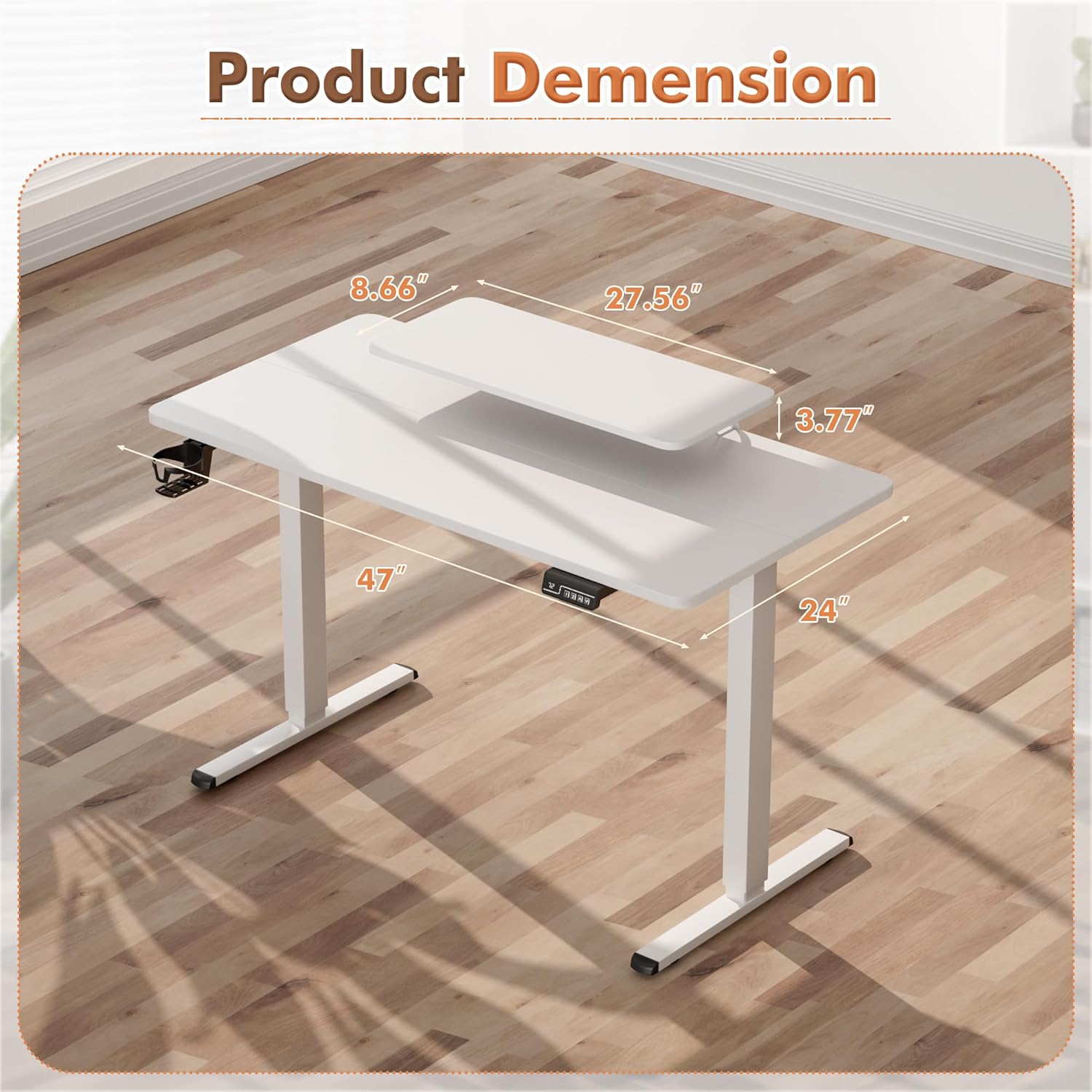
Image: A detailed diagram illustrating the dimensions of the JUMMICO Electric Standing Desk, including the main desktop and the monitor stand.

Image: The JUMMICO Electric Standing Desk displayed at its lowest (28.7 inches) and highest (48.1 inches) adjustable positions, highlighting its versatility.
Warranty and Support
JUMMICO provides a Lifetime Warranty for this Electric Standing Desk, ensuring peace of mind regarding its quality and durability.
For any questions, missing parts, or technical support, please contact JUMMICO customer service. Please have your model number (JVCH-241222) and purchase information ready when contacting support.
You can typically find contact information on the JUMMICO official website or through your purchase platform.
Ask a question about this manual
Ask about setup, troubleshooting, compatibility, parts, safety, or missing instructions. Manuals+ will review the question and use this page’s manual context to help answer it.