
1. Product Overview
The Aetheria F09-H SH60 Seahawk RC Helicopter is a highly detailed 1:47 scale remote-controlled aircraft, meticulously modeled after the U.S. SH60-Black Hawk. Designed for adults, this advanced helicopter features dual brushless motors, an 8-channel 2.4G remote control, and an electronic stabilization system for precise handling. It supports both 6G and 3D stunt modes, offering a versatile and immersive flying experience. The RTF (Ready-To-Fly) version includes a flight controller and GPS capabilities.
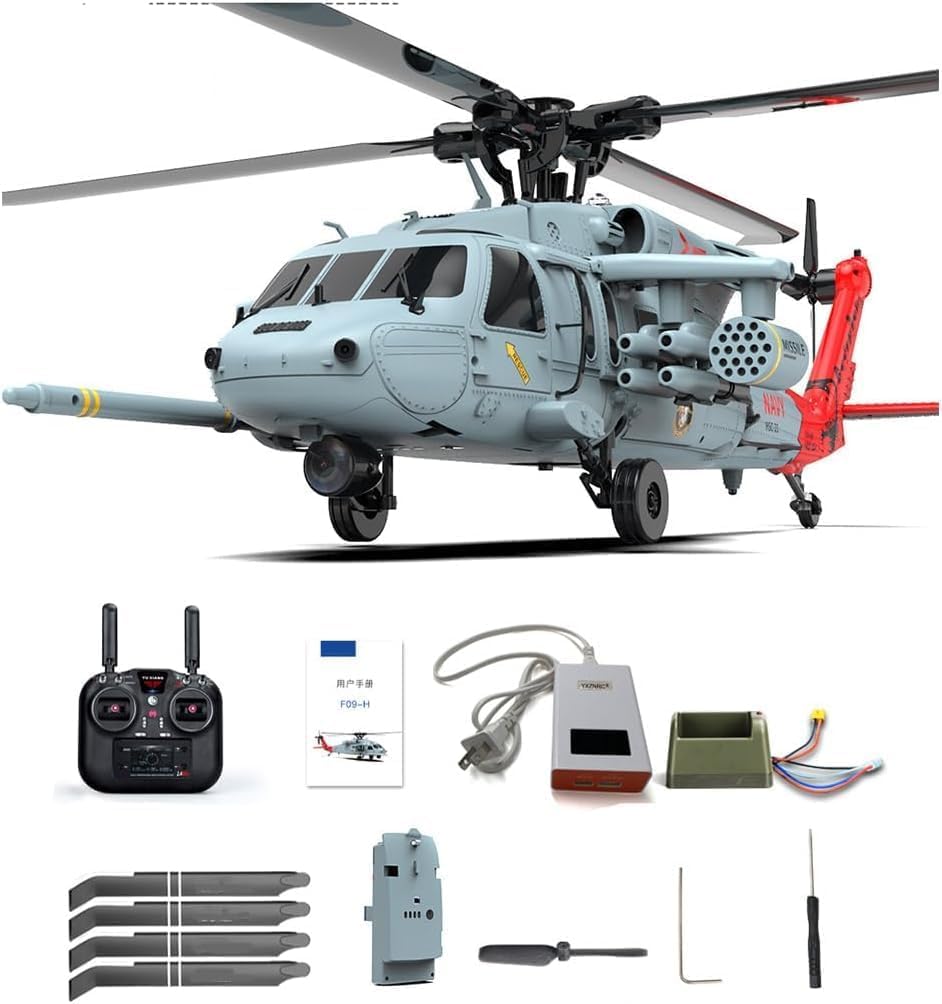
Figure 1: Aetheria F09-H SH60 Seahawk RC Helicopter and included accessories, such as the remote control, intelligent LIPO battery, balance charger, main paddles, and tail paddle.
2. Package Contents
Verify that all items are present in the package before proceeding with setup.
- Aircraft x 1
- RC (Remote Control) x 1
- Instructions x 1 (This manual)
- Balance Charger x 1
- Main Paddle x 4
- Tail Paddle x 1
- Smart Battery x 1
- Camera x 1
3. Setup Guide
3.1 Battery Charging
The F09-H helicopter is powered by a 3S 11.1V 1350mAh 30C Intelligent LIPO Battery. Before first use, fully charge the battery using the included balance charger. The charging time is approximately 75 minutes.

Figure 2: The intelligent LIPO battery and its specialized charging stand, designed for balanced charging and stability.
- Connect the intelligent LIPO battery to the balance charger.
- Plug the balance charger into a suitable power outlet.
- Monitor the charging indicator on the charger. The battery has built-in functions to prevent overcharging and includes a low battery indication.
- Once fully charged, disconnect the battery from the charger.
3.2 Remote Control Preparation
Ensure the 2.4G 8-Channel LED Display RC is ready for use. Install the necessary batteries (not specified in product description, assume standard AA/AAA) and familiarize yourself with the controls.
3.3 Helicopter Assembly (if required)
While the product is RTF (Ready-To-Fly), some minor assembly or attachment of components like the camera, main paddles, or tail paddle might be necessary. Refer to the visual guides for proper installation.

Figure 3: Key structural components of the F09-H, including the carbon fiber composite blades and the efficient tail-lock motor.
4. Operating Instructions
The F09-H offers advanced flight capabilities with its 6G/3D stunt modes and electronic stabilization system. Always operate the helicopter in an open area, away from obstacles, people, and animals.
4.1 Basic Flight Controls
Familiarize yourself with the basic movements:

Figure 4: Visual representation of the helicopter's directional controls.
- Throttle (Up/Down): Controls the helicopter's altitude.
- Yaw (Turn Left/Right): Rotates the helicopter horizontally.
- Pitch (Forward/Backward): Moves the helicopter forward or backward.
- Roll (Left/Right Side Flying): Moves the helicopter sideways.
4.2 Advanced Features
The F09-H incorporates several intelligent functions for enhanced control and user experience:

Figure 5: Intelligent functions including Optical Flow Mode for stable hovering, One-Key Landing, VR Image Transmission, and GPS Positioning.
- Optical Flow Mode: Provides stable hovering by using a downward-facing camera to detect ground patterns.
- One-Key Landing: Initiates an automatic landing sequence with a single button press.
- VR Image Transmission: Allows for real-time first-person view (FPV) flying when connected to compatible VR equipment (VR headset not included).
- GPS Positioning: Enhances stability and enables advanced features like precise hovering and return-to-home functions.
- 6G/3D Stunt Modes: Switch between stable 6G mode for beginners and agile 3D mode for advanced aerobatics.

Figure 6: The F09-H helicopter showcasing its advanced communication and navigation features.
4.3 Flight Duration
The intelligent LIPO battery provides approximately 9-12 minutes of flight time. Always monitor the low battery indication to ensure a safe return and landing.
4.4 Official Product Video
Watch the official product video for a demonstration of the Aetheria F09-H SH60 Seahawk RC Helicopter in action, showcasing its flight capabilities and realistic design.
Video 1: Official demonstration of the Aetheria F09-H SH60 Seahawk RC Helicopter's flight performance and features in a snowy environment.
5. Maintenance
Proper maintenance ensures the longevity and optimal performance of your F09-H helicopter.
- Cleaning: After each flight, gently wipe down the helicopter with a soft, dry cloth to remove any dust or debris. Avoid using water or harsh chemicals.
- Blade Inspection: Regularly inspect the main and tail paddles for any signs of damage, cracks, or wear. Replace damaged blades immediately using the provided spares.
- Battery Care: Store the LIPO battery in a cool, dry place, away from direct sunlight and extreme temperatures. Do not over-discharge or overcharge the battery.
- Motor Check: Ensure the brushless drive motor and lock tail motor are free from obstructions and spin smoothly.
- Storage: When not in use, store the helicopter and its components in the anti-collision aluminum box to protect them from damage.
6. Troubleshooting
This section addresses common issues you might encounter with your F09-H helicopter.
| Problem | Possible Cause | Solution |
|---|---|---|
| Helicopter does not respond to remote control. |
|
|
| Short flight time. |
|
|
| Helicopter is unstable during flight. |
|
|
7. Specifications
| Feature | Detail |
|---|---|
| Model Name | F09-H |
| Material | High Strength Composite Engineering Material |
| Color | Grey Red |
| Scale | 1/47 |
| Rotor Diameter | 425mm |
| Fuselage Length | 420mm |
| Height | 350mm |
| Individual Aircraft Weight | 425g |
| Drive Motor | 4006 630KV Brushless Motor |
| Lock Tail Motor | 1104 5200KV Brushless Motor |
| Remote Control | 2.4G / 8-Channel LED Display RC |
| RC Distance | Greater than 120 meters |
| Fuselage Battery | 3S 11.1V 1350mAh 30C Intelligent LIPO Battery |
| Charger | Balance Charger |
| Charging Time | About 75 minutes |
| Usage Time | 9-12 minutes |
| Product Dimensions | 42 x 42.5 x 12cm (16.54 x 16.73 x 4.72 inches) |
| Package Dimensions | 47.5 x 32.5 x 16.5cm |
| Packing | Anti-collision Aluminum Box |
| Recommended Age | 16+ |
8. Warranty and Support
For technical support, troubleshooting assistance, or warranty inquiries, please contact Aetheria customer service. Keep your purchase receipt as proof of purchase.
8.1 Protection Plans
Optional protection plans are available for extended coverage:
- 2-Year Protection Plan
- 3-Year Protection Plan
- Complete Protect (monthly billing option)
Please refer to the specific terms and conditions of each protection plan for full details.