1. Introduction
The NEEWER CM28 Wireless Lavalier Microphone System is designed for high-quality audio recording across various platforms, including smartphones, cameras, PCs, and tablets. This system features advanced noise canceling, internal audio storage, and versatile connectivity options, making it ideal for live streaming, video recording, podcasting, and interviews.
2. Package Contents
Please verify that all items listed below are included in your package:
- 1 x Receiver (RX)
- 2 x Transmitters (TX)
- 2 x Furry Windshields
- 2 x Magnets (for attaching transmitters)
- 2 x OTG Adapters (USB-C and Lightning)
- 1 x Camera Audio Cable (3.5mm TRS)
- 1 x USB Type-C Charging Cable
- 1 x 3-in-1 USB Type-C Charging Cable
- 1 x Storage Pouch
- 1 x User Manual

Image: All components included in the NEEWER CM28 Wireless Lavalier Microphone System package, neatly arranged.
3. Setup
3.1 Initial Charging
For optimal battery longevity, fully charge the microphone system before first use. Use the provided USB Type-C charging cables to charge the transmitters (TX) and receiver (RX).
3.2 Connecting the Receiver (RX)
The receiver (RX) is compatible with various devices:
- For Smartphones (iPhone/Android): Use the appropriate OTG adapter (USB-C or Lightning) to connect the receiver to your phone's charging port. For iPhone 16/15 Pro Max Plus, plug in the device first, then open your recording app.
- For Cameras (DSLR/Mirrorless): Use the included 3.5mm TRS camera audio cable to connect the receiver's OUT port to your camera's microphone input.
- For PC/MAC: Use a USB-A to USB-C data cable to connect the receiver to your computer.

Image: Diagram illustrating the wide compatibility of the NEEWER CM28 system with tablets, phones, PCs/MACs, and cameras using various adapters and cables.
3.3 Attaching the Transmitters (TX)
The transmitters can be attached to clothing using either the built-in clip or the magnetic attachment:
- Clip: Securely clip the transmitter onto your collar, shirt, or other clothing.
- Magnet: Place one magnet inside your clothing and the transmitter on the outside, aligning them to hold the transmitter in place.
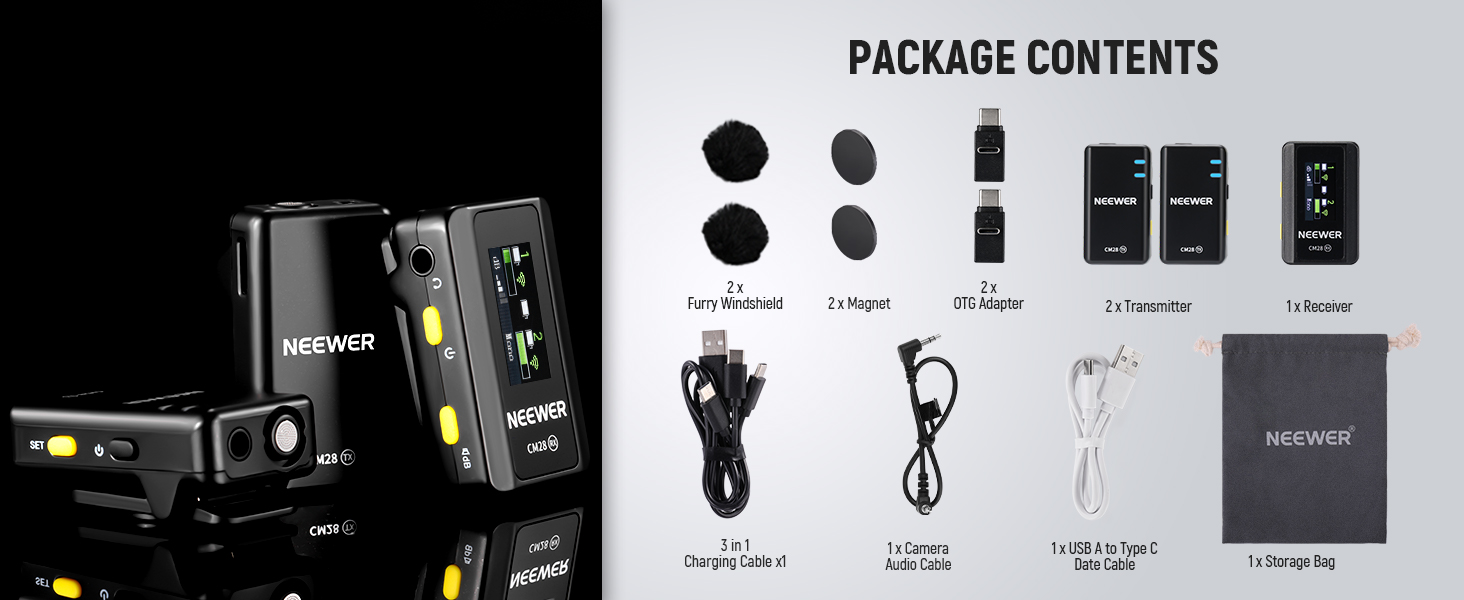
Image: Two examples showing how to attach the NEEWER CM28 transmitter to clothing using either the built-in clip or the magnetic attachment for discreet placement.
4. Operating Instructions
4.1 Power On/Off
Press and hold the power button on both the transmitters (TX) and receiver (RX) to turn them on or off. The blue LED indicator will show the power status.
4.2 One-Click Noise Canceling
The transmitters feature an advanced noise canceling chip. Press the designated button on the TX to activate or deactivate noise cancellation. Two LED indicators show different recording statuses.

Image: A hand holding a NEEWER CM28 transmitter, demonstrating the one-click noise canceling feature with visual representations of audio waveforms before and after activation. LED indicator statuses are also explained.
4.3 Standalone Recording & Internal Storage
Each transmitter doubles as a recording device with 4GB of internal storage, capable of saving up to 9 hours of uncompressed 48KHz WAV audio files. This provides a backup recording in case of wireless interference or connection loss.

Image: A NEEWER CM28 transmitter connected to a laptop via USB, illustrating its function as an internal recording backup device with 4GB storage for 9 hours of WAV audio.
4.4 Audio Export Modes
The receiver supports three audio export modes:
- Stereo: Records tracks from two transmitters as left and right channels for simplified post-production.
- Mono: Merges audio recorded by two transmitters into one track.
- MS (Mono Safety): Records at the selected microphone sensitivity and also 6dB lower to prevent clipping and distortion from interference.

Image: A visual representation of the three audio export modes (Stereo, Mono, MS) available on the NEEWER CM28 receiver, explaining how each mode processes audio from two transmitters.
4.5 Real-Time Monitoring
Connect monitoring headphones via the 3.5mm jack on the receiver to check the audio quality in real-time during recording. This allows for immediate adjustments.
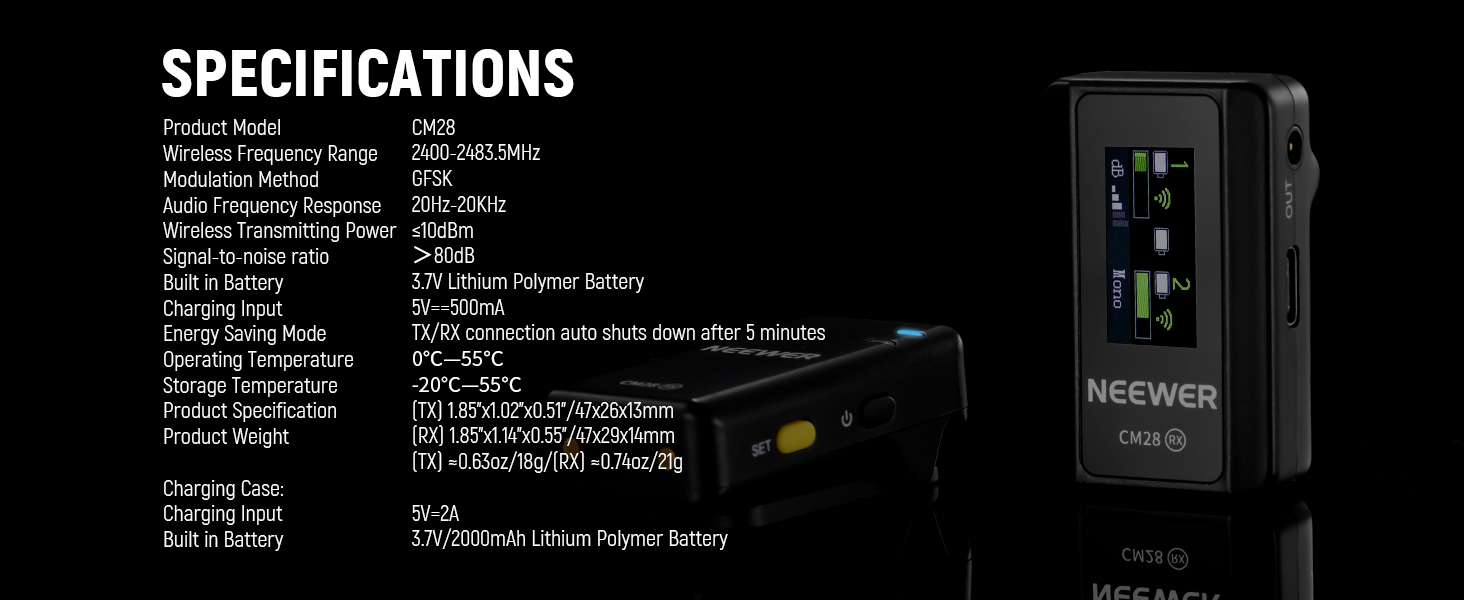
Image: A setup showing the NEEWER CM28 receiver connected to a camera and a smartphone, with headphones plugged into the receiver for real-time audio monitoring.
4.6 Transmission Range
The system provides a stable wireless transmission range of up to 656ft (200m) in unobstructed environments, ensuring reliable audio recording with higher resistance against interference. Note that the transmission range may vary depending on the environment.

Image: A visual depicting the NEEWER CM28 system's 200m (656ft) stable transmission range in an open, unobstructed environment, with a person recording using a camera and smartphone setup.
5. Maintenance
- Keep the devices clean and dry. Avoid exposure to moisture, dust, and extreme temperatures.
- Clean the contacts on the charging case and devices regularly with a dry, soft cloth to ensure proper charging.
- Store the system in the provided storage pouch when not in use to protect it from damage.
- For optimal battery life, fully charge the devices before long periods of storage.
6. Troubleshooting
| Problem | Possible Cause | Solution |
|---|---|---|
| No audio recording | Incorrect connection; low battery; device not paired | Ensure receiver is correctly plugged into device; charge all units; re-pair TX/RX units. |
| Poor audio quality/noise | Interference; noise canceling off; microphone too far | Move away from interference sources; activate noise canceling; ensure TX is close to the sound source. |
| Short transmission range | Obstructions; environmental interference | Ensure clear line of sight between TX and RX; avoid areas with high wireless traffic. |
| Device not charging | Dirty contacts; faulty cable/charger | Clean charging contacts; try a different USB cable or power adapter. |
7. Specifications
| Feature | Detail |
|---|---|
| Model Name | CM28 |
| Item Model Number | 21000071 |
| Brand | NEEWER |
| Microphone Form Factor | Microphone System |
| Connectivity Technology | USB |
| Connector Type | USB Type-C |
| Special Feature | Noise Reduction |
| Compatible Devices | iPhone, Android, PC, Camera, iPad |
| Polar Pattern | Omnidirectional |
| Audio Sensitivity | 656 Decibels |
| Signal-to-Noise Ratio | 70 dB |
| Frequency Response | 48 KHz |
| Internal Storage | 4GB (up to 9 hours of 48KHz 16 Bit uncompressed WAV audio) |
| Transmission Range | 656ft / 200m (unobstructed) |
| Power Source | Battery Powered |
| Item Weight | 4.6 Ounces |
| Color | Black |
| Recommended Uses | Live streaming, video recording, filmmaking, vlogging, news collection |
8. Official Product Videos
NEEWER CM28 PRO Wireless Microphone with Charging Case
Video Description: This video provides an overview of the NEEWER CM28 PRO Wireless Microphone System, highlighting its features and the included charging case. It demonstrates the compact design and ease of use for various recording scenarios.
FULL REVIEW Installation Use Real Sound Test
Video Description: A detailed review covering the installation process, practical usage, and a real sound test of the NEEWER CM28 Wireless Lavalier Microphone System. This video helps users understand the setup and audio performance in real-world conditions.
9. Warranty & Support
For warranty information, technical support, or service inquiries, please refer to the official NEEWER website or contact their customer service directly. Keep your purchase receipt for warranty claims.


