
MecTURING S9 Pro Plus
MecTURING S9 Pro Plus Robot Vacuum Cleaner Instruction Manual
Model: S9 Pro Plus with Auto Dust Collector
Introduction
This manual provides essential instructions for the safe operation, maintenance, and troubleshooting of your MecTURING S9 Pro Plus Robot Vacuum Cleaner with Auto Dust Collector. Please read this manual thoroughly before using the product and retain it for future reference.
Important Safety Instructions
To reduce the risk of injury or damage, read and follow all safety precautions when setting up, using, and maintaining your robot vacuum cleaner.
- Ensure the robot is fully charged before first use.
- Do not operate the robot in wet environments or near liquids.
- Keep loose clothing, hair, and body parts away from openings and moving parts.
- Do not use the robot to pick up large debris, broken glass, or hazardous materials.
- Supervise children and pets when the robot is operating.
- Only use the original charging dock and power adapter provided.
- Turn off the robot and unplug the charging dock before performing any maintenance.
Package Contents
Verify that all components are present in the package:
- MecTURING S9 Pro Plus Robot Vacuum Cleaner
- Auto Dust Collector (Charging Dock)
- Power Adapter
- Side Brushes (2 pairs)
- Main Brush
- Dust Bag (pre-installed in Auto Dust Collector)
- Water Tank and Mopping Pad
- Cleaning Tool
- User Manual
Product Overview
Familiarize yourself with the main components of your MecTURING S9 Pro Plus robot vacuum cleaner and its Auto Dust Collector.
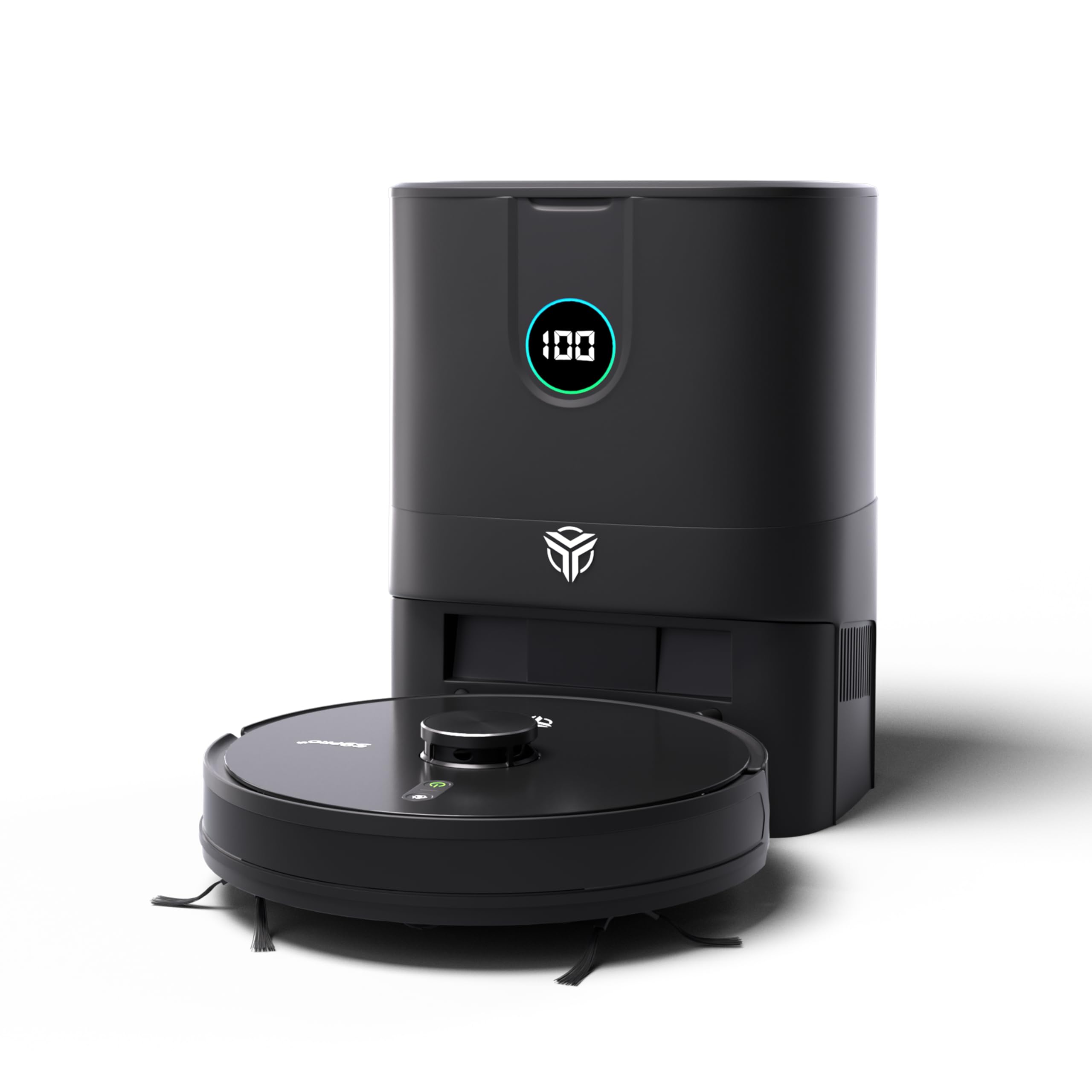
Image: The MecTURING S9 Pro Plus robot vacuum cleaner and its accompanying Auto Dust Collector.

Image: Overview of key features such as LiDAR 2.0 Navigation, Anti-Falling, Anti-Collision, Anti-Tangling, No Go Zone, Anti-Bacterial capabilities, 5000Pa suction, and its hybrid vacuum and mop functionality.
Setup Guide
1. Preparing the Robot
- Remove all protective films and packaging materials from the robot and the Auto Dust Collector.
- Attach the side brushes by pressing them onto the corresponding posts until they click into place.
2. Positioning the Auto Dust Collector
- Place the Auto Dust Collector against a wall in an open area, ensuring at least 0.5 meters (1.6 feet) of clear space on both sides and 1.5 meters (4.9 feet) in front.
- Plug the power adapter into the Auto Dust Collector and then into a wall outlet. Ensure the indicator light on the Auto Dust Collector illuminates.
3. Initial Charging
- Place the robot onto the Auto Dust Collector, aligning its charging contacts with those on the dock. The robot will automatically begin charging.
- Allow the robot to fully charge before its first use. The indicator light on the robot will change to solid green when fully charged.
4. App Connection and Initial Mapping
- Download the MecTURING Smart Life App from your mobile app store.
- Follow the in-app instructions to connect your robot to your home Wi-Fi network (2.4GHz only).
- Once connected, initiate a full cleaning cycle from the app. The robot will use its LiDAR 2.0 navigation to create an initial map of your home. Ensure all doors are open and obstacles are cleared for accurate mapping.

Image: The MecTURING S9 Pro Plus can be controlled via a smartphone app, offering features like voice and mobile control, spot cleaning, schedule cleaning, and multi-floor mapping.
Operating Instructions
1. Cleaning Modes
- Auto Clean: The robot intelligently cleans your entire home.
- Spot Clean: Direct the robot to clean a specific area with concentrated effort.
- Zone Clean: Define specific zones on the map for the robot to clean.
- Mopping Mode: Attach the water tank and mopping pad for wet cleaning. The robot supports multilevel mopping.
2. Navigation and Mapping
The MecTURING S9 Pro Plus utilizes advanced LiDAR 2.0 navigation technology for precise mapping and efficient cleaning paths. It can store multiple maps for different floors.

Image: Visualization of LiDAR 2.0 Navigation Technology, demonstrating how the robot maps its environment for precise cleaning.
- No-Go Zones: Use the app to set virtual boundaries or no-go zones to prevent the robot from entering specific areas.
- Anti-Falling: Integrated sensors prevent the robot from falling down stairs or off ledges.
- Anti-Collision: Sensors detect obstacles, allowing the robot to navigate around furniture and other objects.

Image: The robot vacuum cleaner detecting a drop-off, illustrating its anti-falling capabilities.
3. Control Methods
- App Control: Full control over cleaning modes, schedules, no-go zones, and real-time monitoring via the MecTURING Smart Life App.
- Voice Control: Compatible with Amazon Echo and Google Home for hands-free operation. Refer to the app for setup instructions.
- Remote Control: (If included) Use the physical remote control for basic functions like start/stop, return to dock, and directional control.
Maintenance and Care
Regular maintenance ensures optimal performance and extends the lifespan of your robot vacuum cleaner.
1. Auto Dust Collector and Dust Bag
- The Auto Dust Collector automatically empties the robot's dustbin after each cleaning cycle.
- Replace the dust bag in the Auto Dust Collector when the indicator light signals it is full, or approximately every 30-60 days depending on usage.

Image: Close-up of the Auto Dust Collector, highlighting the dust bag and the powerful suction mechanism for automatic emptying.
2. Robot Dustbin and Filters
- Even with the Auto Dust Collector, periodically check and clean the robot's internal dustbin.
- Clean the HEPA filter and primary filter weekly using the provided cleaning tool. Replace the HEPA filter every 3-6 months.
3. Main Brush and Side Brushes
- Remove the main brush and use the cleaning tool to cut and remove any tangled hair or debris. Clean weekly.
- Inspect side brushes for wear and tear. Clean them regularly and replace if damaged or excessively worn (typically every 3-6 months).
4. Sensors and Charging Contacts
- Wipe all sensors (cliff sensors, wall sensors, LiDAR sensor window) and charging contacts on both the robot and the Auto Dust Collector with a clean, dry cloth monthly.
5. Water Tank and Mopping Pad
- Empty any remaining water from the tank after each mopping session.
- Wash the mopping pad after each use. Allow it to air dry completely before reattaching.
Troubleshooting
Refer to this section for solutions to common issues you might encounter.
| Problem | Possible Cause | Solution |
|---|---|---|
| Robot does not turn on. | Low battery; Power switch off. | Charge the robot; Ensure the main power switch is ON. |
| Robot cannot return to charging dock. | Docking station obstructed; Robot too far from dock. | Clear obstacles around the dock; Manually place the robot near the dock. |
| Poor cleaning performance. | Dustbin full; Brushes tangled; Filter clogged. | Empty dustbin; Clean main and side brushes; Clean/replace filter. |
| Robot gets stuck frequently. | Small obstacles; Loose cables; Dark surfaces (cliff sensors). | Clear floor of small items; Secure cables; Use No-Go Zones for problematic areas. |
| App connection issues. | Incorrect Wi-Fi password; Router too far; 5GHz Wi-Fi network. | Verify password; Move robot closer to router; Ensure 2.4GHz Wi-Fi is used. |
Specifications
| Feature | Detail |
|---|---|
| Brand | MecTURING |
| Model Name | S9 Pro Plus |
| Special Features | Anti-Collision, Auto-Docking, Pet Hair Pick, LiDAR 2.0 Navigation, Multilevel Mopping, Auto Dust Collector |
| Suction Power | 5000 Pa (Robot), 26000 Pa (Auto Dust Collector) |
| Navigation Technology | LiDAR 2.0 |
| Battery Capacity | 5200mAh |
| Battery Life | Up to 240 minutes |
| Control Methods | App, Remote, Voice (Amazon Echo, Google Home) |
| Product Dimensions | 32L x 32W x 9.5H Centimeters |
| Item Weight | 12 kg |
| Included Components | Battery, Auto Dust Collector, Main Brush, Side Brushes, Water Tank, Mopping Pad, Cleaning Tool |

Image: Key specifications including 15 months product warranty, 4-layer HEPA 6 filtration, and up to 240 minutes runtime.

Image: Visual representation of the robot's suction power, indicating 5000 Pa suction.
Warranty and Support
MecTURING is committed to providing excellent customer service and product support.
- Product Warranty: Your MecTURING S9 Pro Plus comes with a 15-month product warranty.
- Motor Warranty: The motor is covered by a 10-year warranty.
- Customer Support: For any queries, technical assistance, or warranty claims, please contact MecTURING customer support.
- PAN India Priority Support: Call 08037203008 (Monday to Saturday, 10:00 am to 6:00 pm).
- Service Centers: MecTURING has over 100 dedicated offices across India for service and support.

Image: Map illustrating MecTURING's extensive network of over 100 dedicated offices across India for customer support.
Ask a question about this manual
Ask about setup, troubleshooting, compatibility, parts, safety, or missing instructions. Manuals+ will review the question and use this page’s manual context to help answer it.