
HP SAVI 8410 -M D1 SEHS
HP Poly SAVI 8410 -M D1 SEHS User Manual
Your comprehensive guide to setting up, operating, and maintaining your HP Poly SAVI 8410 -M D1 SEHS headset.
1. Introduction
This manual provides detailed instructions for the proper use and care of your HP Poly SAVI 8410 -M D1 SEHS wireless headset system. Please read this manual thoroughly before using the device to ensure optimal performance and to prevent damage. This system is designed for professional communication, offering clear audio and reliable connectivity.
2. Package Contents
Verify that all items are present in your product package. If any items are missing or damaged, please contact your retailer or HP support.
- HP Poly SAVI 8410 -M D1 SEHS Headset
- Charging Base/Dock
- USB Cable
- Power Adapter
- Quick Start Guide
3. Product Overview
The HP Poly SAVI 8410 -M D1 SEHS is a high-performance wireless headset system designed for seamless communication in professional environments. It features advanced audio technology and ergonomic design for extended comfort.
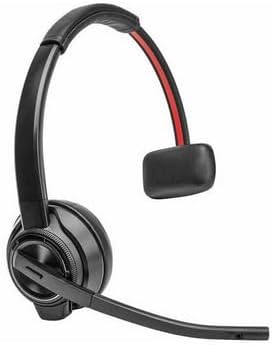
Image: The HP Poly SAVI 8410 -M D1 SEHS headset, featuring an over-the-head design with a flexible microphone boom and integrated ear cup controls.
Headset Components
- Microphone Boom: Adjustable for optimal voice pickup.
- Ear Cup: Houses speaker and controls.
- Volume Controls: Buttons on the ear cup for adjusting audio levels.
- Call Control Button: For answering and ending calls.
- Mute Button: To mute/unmute the microphone.
- Charging Port: Connects to the charging base.
4. Setup
4.1 Initial Charging
- Connect the power adapter to the charging base and plug it into a power outlet.
- Place the headset onto the charging base. Ensure it is seated correctly.
- Allow the headset to charge fully before first use. The charging indicator light will change color when fully charged.
4.2 Connecting to Devices
The SAVI 8410 -M D1 SEHS can connect to a computer via USB and to a desk phone (if applicable, with appropriate cables, not included).
Connecting to a Computer (USB)
- Connect the USB cable from the charging base to an available USB port on your computer.
- The computer will automatically detect and install the necessary drivers. This may take a few moments.
- Ensure the headset is selected as the default audio device in your computer's sound settings.
4.3 Wearing the Headset
Adjust the headband for a comfortable and secure fit. Position the microphone boom approximately two finger-widths from the corner of your mouth for optimal voice clarity. The microphone boom is flexible and can be bent to achieve the best position.
5. Operating Instructions
5.1 Power On/Off
To power on the headset, press and hold the Power button until the indicator light illuminates. To power off, press and hold the Power button again until the light turns off.
5.2 Call Management
- Answer/End Call: Press the Call Control button once.
- Mute/Unmute: Press the Mute button on the microphone boom or ear cup.
- Volume Up/Down: Use the volume buttons on the ear cup.
5.3 Pairing
The headset is typically pre-paired with its charging base. If re-pairing is necessary, refer to the Quick Start Guide or the full online manual for specific instructions on initiating pairing mode on both the headset and the base.
5.4 Advanced Features
The HP Poly SAVI 8410 -M D1 SEHS features active noise cancellation (ANC) for improved audio clarity in noisy environments. Ensure ANC is enabled through the headset's settings or associated software if available.
Official Product Videos:
No official product videos from the seller are available for embedding at this time.
6. Maintenance
6.1 Cleaning
Gently wipe the headset and charging base with a soft, dry, lint-free cloth. Do not use abrasive cleaners, solvents, or aerosol sprays. Avoid getting moisture into any openings.
6.2 Storage
When not in use, store the headset on its charging base or in a cool, dry place away from direct sunlight and extreme temperatures. Avoid placing heavy objects on the headset.
6.3 Battery Care
To prolong battery life, avoid fully discharging the battery frequently. Charge the headset regularly, even if not in daily use. Do not expose the battery to extreme heat or cold.
7. Troubleshooting
If you encounter issues with your HP Poly SAVI 8410 -M D1 SEHS, refer to the table below for common problems and their solutions.
| Problem | Solution |
|---|---|
| No audio from headset | Ensure headset is powered on and charged. Check computer's sound settings to confirm headset is selected as output device. Verify connection to charging base/computer. |
| Microphone not working | Check if microphone is muted. Ensure headset is selected as input device in computer's sound settings. Adjust microphone boom position. |
| Headset not pairing | Ensure both headset and base are in pairing mode. Move headset closer to the base. Refer to pairing instructions in the Quick Start Guide. |
| Short battery life | Ensure headset is fully charged before use. Avoid extreme temperatures. Battery performance may degrade over time with normal use. |
8. Specifications
Key technical specifications for the HP Poly SAVI 8410 -M D1 SEHS:
| Feature | Detail |
|---|---|
| Brand | HP |
| Model | SAVI 8410 -M D1 SEHS |
| Item Weight | 1.7 Pounds |
| Package Dimensions | 8.3 x 7.3 x 4.6 inches |
| UPC | 197497836677 |
| Noise Control | Active Noise Cancellation |
| Control Type | Media Control |
| Cable Feature | Without Cable |
9. Warranty and Support
Your HP Poly SAVI 8410 -M D1 SEHS headset is covered by a limited warranty. Please refer to the warranty card included with your purchase or visit the official HP support website for detailed warranty terms and conditions.
For technical support, troubleshooting assistance, or to inquire about replacement parts, please visit the official HP support portal or contact their customer service. Keep your product's serial number and proof of purchase readily available when seeking support.
HP Support Website: www.hp.com/support
Ask a question about this manual
Ask about setup, troubleshooting, compatibility, parts, safety, or missing instructions. Manuals+ will review the question and use this page’s manual context to help answer it.