
1. Introduction and Overview
Thank you for choosing the HIKOKL 21V Impact Drill and Screwdriver. This powerful and versatile tool is designed to meet your drilling and fastening needs with efficiency and precision. Please read this manual carefully before operating the tool to ensure safe and optimal performance.
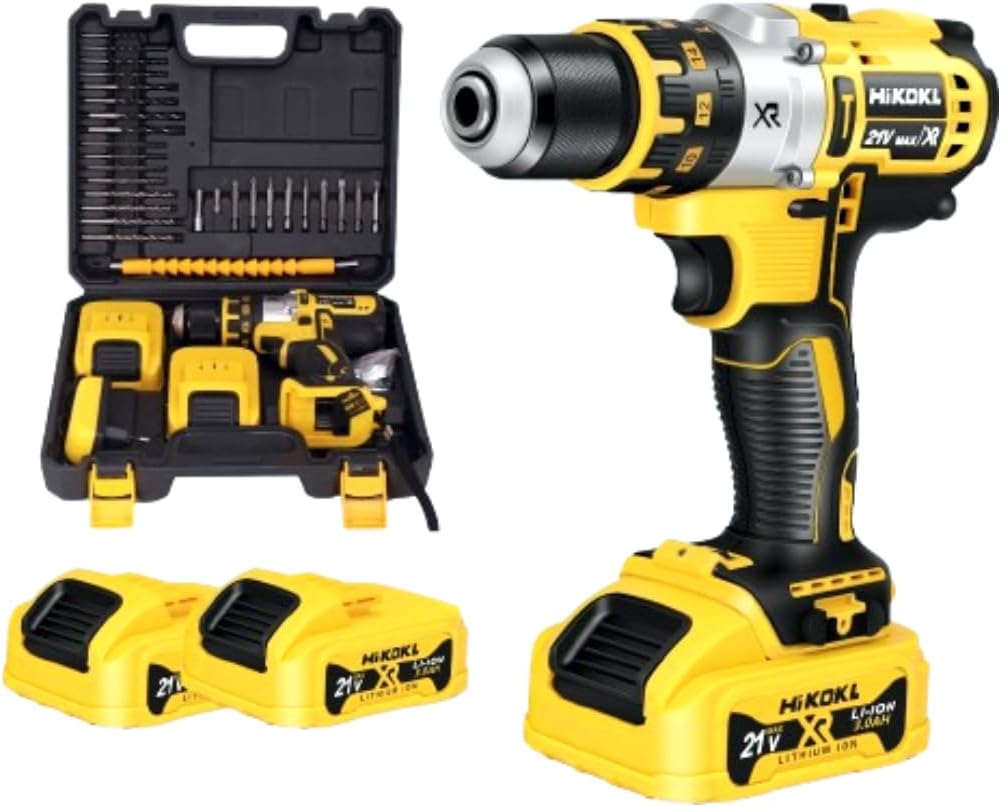
The HIKOKL 21V Impact Drill and Screwdriver comes with two rechargeable batteries and a durable carrying case for easy transport and storage.
2. Safety Instructions
Always wear appropriate personal protective equipment (PPE) such as safety glasses, gloves, and hearing protection when operating the drill. Ensure your work area is well-lit and clear of obstructions. Do not operate the tool in damp or wet conditions. Keep children and bystanders away while operating the tool. Disconnect the battery pack before making any adjustments, changing accessories, or storing the tool.
3. Components and What's Included
Your HIKOKL 21V Impact Drill and Screwdriver kit includes the following:
- HIKOKL 21V Impact Drill/Screwdriver Unit
- 2 x 21V Lithium-Ion Batteries (3 Ah capacity each)
- Battery Charger
- Carrying Case
- Accessory Kit (includes various drill bits, screwdriver bits, and flexible shaft)

The complete kit includes the drill, two batteries, a battery charger, and a comprehensive set of drill and screwdriver bits, along with a flexible shaft.
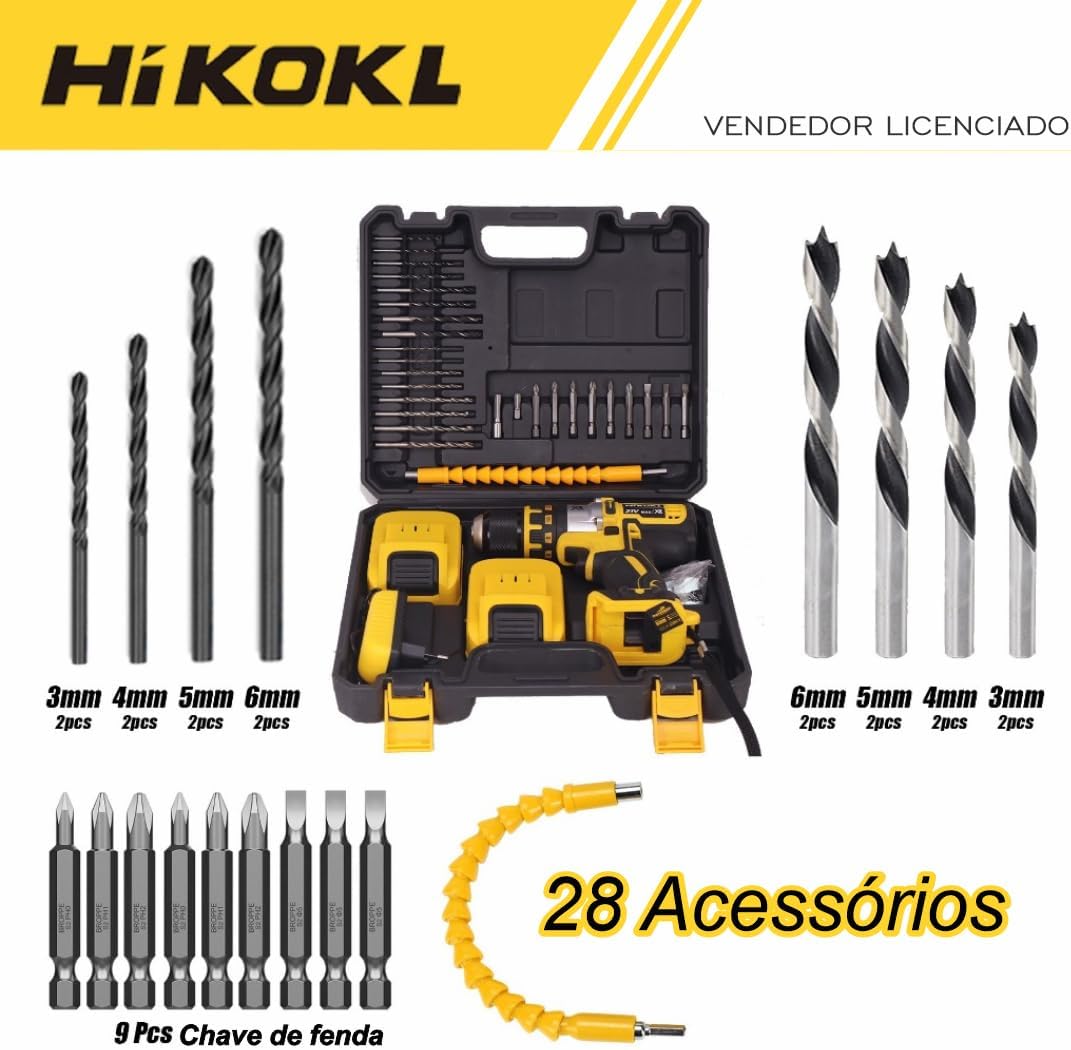
The accessory kit includes 28 pieces, comprising various sizes of drill bits for wood and metal, screwdriver bits (Phillips, flathead), and a flexible shaft for reaching tight spaces.
4. Setup
4.1 Charging the Battery
Before first use, fully charge the battery. Connect the charger to a 110V or 220V power outlet. Insert the battery pack into the charger. The indicator light on the charger will show the charging status. Once fully charged, remove the battery from the charger.
4.2 Attaching/Removing the Battery
To attach the battery, align the battery pack with the base of the drill and slide it in until it clicks securely into place. To remove, press the release buttons on the sides of the battery pack and slide it out.

The battery base features a convenient power display, allowing users to monitor the remaining battery charge.
4.3 Inserting/Removing Drill Bits and Screwdriver Bits
Twist the chuck counter-clockwise to open the jaws. Insert the desired drill bit or screwdriver bit into the chuck. Twist the chuck clockwise to tighten the jaws securely around the bit. Ensure the bit is centered and firmly held before operation. To remove, twist the chuck counter-clockwise and pull the bit out.

The drill features a durable metal chuck for secure bit retention, a reversal switch for changing rotation direction, and a continuously variable transmission (CVT) trigger for precise speed control.
5. Operating Instructions
5.1 Power On/Off and Variable Speed Control
To turn the tool on, press the trigger switch. The speed of the drill is controlled by the amount of pressure applied to the trigger; pressing harder increases the speed. Release the trigger to turn the tool off.
5.2 Forward/Reverse Rotation
The forward/reverse switch (located above the trigger) allows you to change the direction of rotation. Push the switch to the left for forward rotation (for drilling and fastening) and to the right for reverse rotation (for removing screws or freeing jammed bits). Position the switch in the center to lock the trigger and prevent accidental starting.
5.3 Speed Selection (Low/High)
The drill has a two-speed gearbox. Use the speed selector switch (located on top of the drill) to choose between low speed (0-450 RPM) for high torque applications like driving screws, and high speed (0-1500 RPM) for faster drilling.

The drill offers two speed ranges: Low (0-450 RPM) for high torque applications like driving screws, and High (0-1500 RPM) for faster drilling.
5.4 Torque Adjustment and Mode Selection
The torque collar allows you to adjust the torque setting for driving screws, preventing overtightening or stripping. Rotate the collar to select the desired torque level. The tool also features three modes: Screwdriver, Drill, and Impact Drill. Select the appropriate mode based on your task.
- Screwdriver Mode: For driving and removing screws.
- Drill Mode: For drilling holes in wood, plastic, and metal.
- Impact Drill Mode: For drilling into masonry and other hard materials.

This versatile tool offers three primary functions: Screwdriver mode for fastening, Drill mode for standard drilling, and Impact Drill mode for drilling into tougher materials like masonry.
5.5 LED Work Light
The integrated LED work light illuminates the work area, providing better visibility in dimly lit spaces. It activates automatically when the trigger is pressed.
6. Maintenance
Regular cleaning and maintenance will prolong the life of your tool. Always disconnect the battery before performing any maintenance. Keep the ventilation openings clear of dust and debris. Use a soft, damp cloth to clean the exterior of the tool. Do not use harsh chemicals or abrasive cleaners. Store the tool and batteries in a cool, dry place away from direct sunlight and extreme temperatures.
7. Troubleshooting
- Tool does not start: Ensure the battery is fully charged and properly inserted. Check if the forward/reverse switch is in the locked (center) position.
- Loss of power during operation: The battery may be low. Recharge the battery.
- Excessive vibration or noise: Check if the bit is securely fastened in the chuck. Ensure the bit is not damaged or bent.
- Overheating: Allow the tool to cool down. Avoid continuous heavy-duty use. Ensure ventilation openings are clear.
If problems persist, please contact customer support.
8. Specifications
| Feature | Specification |
|---|---|
| Manufacturer | HI KOKL |
| Model Number | XR21V |
| Color | YELLOW / BLACK |
| Material | Plastic, Metal |
| Power Source Type | Corded Electric (for charger) |
| Voltage | 110 Volts, 220 Volts (Bivolt) |
| Max Power | 1500 Watt |
| Torque | 100 Kilogram-Force Meter |
| Speed | 1500 RPM (Max) |
| Special Features | Rechargeable, Variable Speed, Built-in LED work light, Reverse rotation, Adjustable torque |
| Included Components | Battery charger, Drill bit accessory |
| Battery Capacity | 3 Ampere Hours |
| Weight | 2.5 Kilograms |
| Product Dimensions (L x W x H) | 20 x 11.5 x 23 cm |
9. Warranty and Support
For warranty information or technical support, please refer to the documentation provided with your purchase or contact the seller directly. Keep your proof of purchase for any warranty claims.