
1. Introduction
Thank you for choosing the LITFLASK Smart Water Bottle. This device integrates a double-insulated stainless steel water bottle, a high-fidelity Bluetooth speaker, and a portable power bank into a single, convenient unit. This manual provides essential information for the safe and effective use of your LITFLASK.
2. Product Overview
The LITFLASK is designed for versatility and convenience, offering hydration, entertainment, and charging capabilities on the go.

Image 2.1: The LITFLASK Smart Water Bottle in Pink.
2.1 Components
- Insulated Water Bottle: 20oz (590ml) double-wall stainless steel construction.
- Detachable Speaker Module: Houses the Bluetooth speaker, portable charger, control buttons, and LED light.
- Screw Cap: Securely seals the bottle.
- Carry Handle: Integrated into the cap for easy portability.
- USB-C Charging Port: For charging the speaker module.
- USB-A Output Port: For charging external devices.
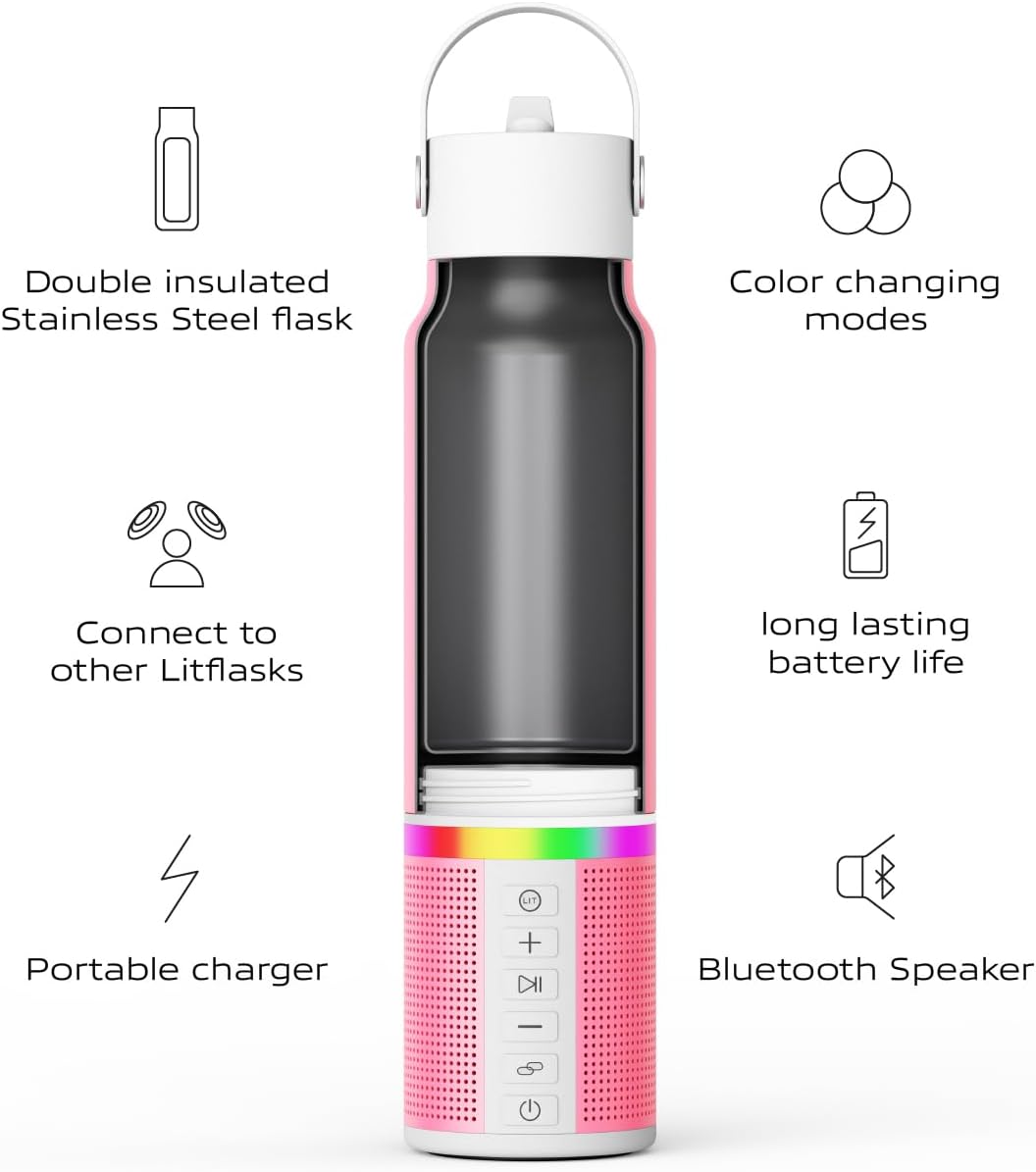
Image 2.2: Exploded view illustrating the double-insulated flask, detachable speaker, and various features like portable charging and Bluetooth speaker.
2.2 Key Features
- Double-Wall Insulation: Keeps beverages hot or cold for extended periods.
- High-Fidelity Bluetooth Speaker: For audio playback.
- 5000 mAh Portable Charger: To charge compatible USB devices.
- Detachable Design: Speaker module separates from the bottle for easy cleaning and customization.
- Bump Technology: Allows pairing with other LITFLASK units for surround sound.
- Built-in Microphone: Enables hands-free calling.
- LED Light: Provides visual feedback and ambiance.
3. Setup
3.1 Initial Charging
Before first use, fully charge the speaker module.
- Locate the USB-C charging port on the speaker module.
- Connect the provided USB-C charging cord to the port and a compatible USB power adapter (not included).
- The LED indicator will show charging status. A full charge typically takes approximately 3-4 hours.
3.2 Assembling the Bottle
Ensure the speaker module is securely attached to the bottle before filling with liquids.
- Align the speaker module with the base of the stainless steel bottle.
- Twist the speaker module clockwise until it is firmly seated and locked into place.
- Ensure the cap is securely screwed onto the bottle to prevent leaks.
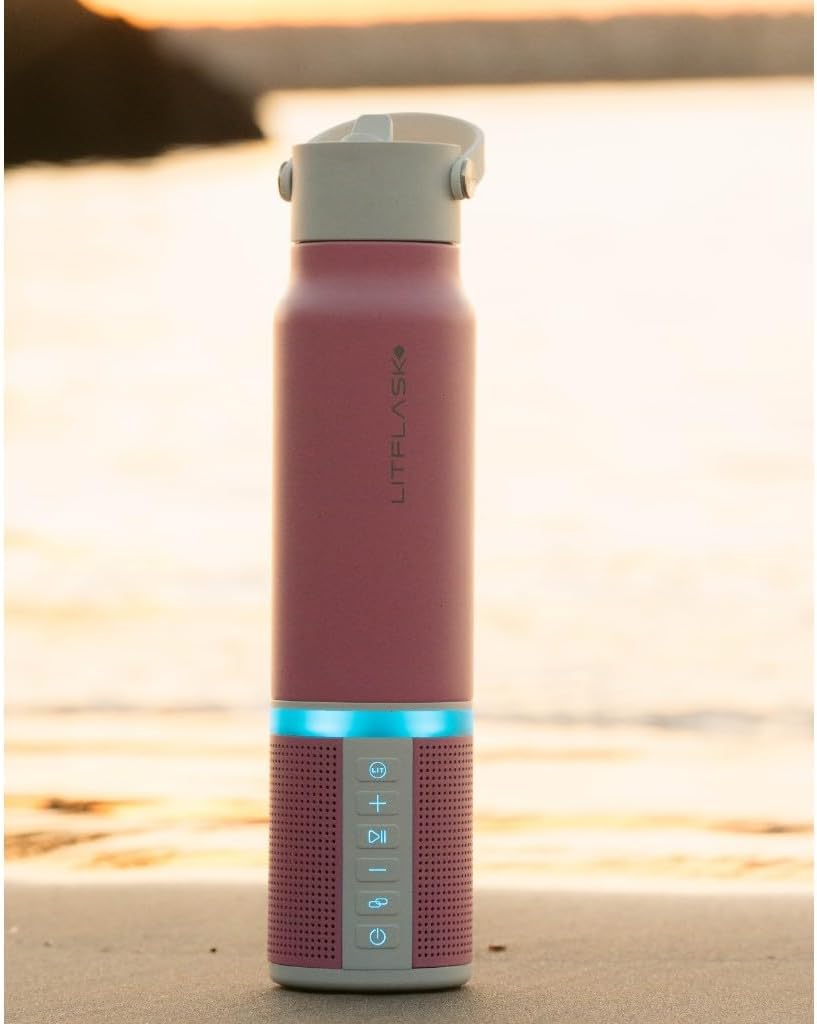
Image 3.1: The detachable speaker module separated from the water bottle for cleaning or charging.
4. Operating Instructions
4.1 Powering On/Off
- To power on, press and hold the Power button (located on the speaker module, typically a circle with a vertical line) for 3 seconds. You will hear an audible prompt.
- To power off, press and hold the Power button for 3 seconds.
4.2 Bluetooth Speaker Operation
- Ensure the speaker module is powered on. The LED light will flash, indicating it is in pairing mode.
- On your device (smartphone, tablet, etc.), enable Bluetooth and search for "LITFLASK".
- Select "LITFLASK" to pair. Once connected, you will hear a confirmation sound, and the LED light will become solid.
- Use the control buttons on the speaker module or your connected device to manage playback:
- Play/Pause: Press the Play/Pause button (typically a triangle/two vertical bars icon).
- Volume Up: Press the '+' button.
- Volume Down: Press the '-' button.
- Next Track: Press and hold the '+' button.
- Previous Track: Press and hold the '-' button.

Image 4.1: Close-up of the speaker module showing control buttons for audio playback and volume.
4.3 Hands-Free Calling
When connected via Bluetooth, the built-in microphone allows for hands-free calls.
- Answer Call: Press the Play/Pause button once.
- End Call: Press the Play/Pause button once during a call.
- Reject Call: Press and hold the Play/Pause button for 2 seconds.
4.4 Portable Charging Function
The LITFLASK speaker module can act as a power bank to charge your devices.
- Ensure the speaker module is sufficiently charged.
- Open the protective cover on the speaker module to access the USB-A output port.
- Connect your device's charging cable to the USB-A output port on the LITFLASK and to your device.
- Charging will begin automatically.

Image 4.2: The LITFLASK providing portable charging to a smartphone.
4.5 LED Light Modes
The LITFLASK features an integrated LED light with various modes.
- To cycle through LED light modes, press the Light button (often indicated by a lightbulb icon).
- Modes may include solid colors, pulsing, or color-changing effects.

Image 4.3: The LITFLASK displaying its LED light feature.
4.6 Bump Technology (Pairing Multiple LITFLASKS)
For an enhanced audio experience, two LITFLASK units can be paired together for stereo sound.
- Ensure both LITFLASK units are powered on and not connected to any other Bluetooth device.
- Connect your primary device (e.g., smartphone) to one LITFLASK via Bluetooth.
- On the connected LITFLASK, press and hold the Link button (often indicated by a chain link icon) until you hear a beep.
- The two LITFLASK units will automatically search for and pair with each other. This may take 5-10 seconds.
- Once paired, audio will play through both units, creating a surround sound effect.

Image 4.4: Demonstrating the Bump Technology feature to pair two LITFLASK units.

Image 4.5: Multiple LITFLASK units showcasing their LED lights, ideal for a group audio experience.
5. Maintenance and Care
5.1 Cleaning the Water Bottle
The stainless steel water bottle is dishwasher safe.
- Detach the speaker module from the bottle by twisting counter-clockwise.
- Wash the stainless steel bottle and cap in a dishwasher or by hand with warm, soapy water.
- Ensure all parts are thoroughly dry before reassembling.
5.2 Cleaning the Speaker Module
The speaker module is water resistant, but should not be submerged or placed in a dishwasher.
- Wipe the speaker module with a damp cloth.
- Do not use abrasive cleaners or solvents.
- Ensure the charging ports are dry before use or charging.
5.3 Storage
- Store the LITFLASK in a cool, dry place when not in use.
- If storing for an extended period, ensure the speaker module is partially charged (around 50%) to preserve battery life.
6. Troubleshooting
| Problem | Possible Cause | Solution |
|---|---|---|
| Device does not power on. | Low battery. | Charge the speaker module using the provided USB-C cable. |
| Cannot pair via Bluetooth. | Bluetooth is off on your device; LITFLASK is already paired; LITFLASK is out of range. |
|
| No sound from speaker. | Volume too low; device not connected; audio source issue. |
|
| Portable charging not working. | LITFLASK battery low; incorrect cable; device not compatible. |
|
| Bump Technology pairing fails. | One or both LITFLASKS already connected; too far apart. |
|
7. Specifications
| Feature | Detail |
|---|---|
| Brand | LITFLASK |
| Model | B0CYHW7WFP |
| Capacity | 20 Fluid Ounces (approx. 590 ml) |
| Material | Stainless Steel |
| Product Dimensions | 3"W x 12.75"H (7.62 cm x 32.38 cm) |
| Item Weight | 1.96 pounds (0.89 kg) |
| Portable Charger Capacity | 5000 mAh |
| Special Features | Built-in Microphone, LED Light, Premium Sound, USB-C Portable Charging, Water Resistant |
| Included Components | 1 LitFlask, Instruction Manual, USB-C Charging Cord |
| Care Instructions | Bottle is Dishwasher Safe (Speaker module hand wash only) |
8. Warranty and Support
For detailed warranty information and customer support, please refer to the official LITFLASK website or contact their customer service directly. Contact information may also be found on the product packaging.
Manufacturer: Litflask
Website: Visit the LITFLASK Store on Amazon