
Horokarda LP45
Horokarda LP45 Belt-Driven Turntable User Manual
Model: LP45
1. Introduction
Thank you for purchasing the Horokarda LP45 Belt-Driven Turntable. This manual provides essential information for the proper setup, operation, and maintenance of your record player. Please read these instructions thoroughly before use to ensure optimal performance and longevity of your device.
The Horokarda LP45 is designed to deliver high-quality audio playback from your vinyl records, featuring a belt-driven system, an integrated preamplifier, and an Audio Technica AT3600 cartridge. It supports both 33 and 45 RPM speeds and includes modern connectivity options such as USB for digital conversion and Bluetooth for wireless audio streaming.
2. Important Safety Instructions
To reduce the risk of electric shock, fire, or injury, always follow these basic safety precautions:
- Read all instructions before operating the product.
- Keep these instructions for future reference.
- Do not use this apparatus near water.
- Clean only with a dry cloth.
- Do not block any ventilation openings. Install in accordance with the manufacturer's instructions.
- Do not install near any heat sources such as radiators, heat registers, stoves, or other apparatus (including amplifiers) that produce heat.
- Protect the power cord from being walked on or pinched, particularly at plugs, convenience receptacles, and the point where they exit from the apparatus.
- Only use attachments/accessories specified by the manufacturer.
- Unplug this apparatus during lightning storms or when unused for long periods of time.
- Refer all servicing to qualified service personnel. Servicing is required when the apparatus has been damaged in any way, such as power-supply cord or plug is damaged, liquid has been spilled or objects have fallen into the apparatus, the apparatus has been exposed to rain or moisture, does not operate normally, or has been dropped.
3. Package Contents
Carefully unpack all items and ensure you have received the following:
- Horokarda LP45 Turntable Unit
- Dust Cover
- Platter
- Drive Belt (often pre-installed or located under the platter)
- AC Power Adapter
- USB Cable
- RCA Audio Cable
- 45 RPM Adapter
- User Manual (this document)

Image: Horokarda LP45 Turntable and its accessories, including the AC adapter, USB cable, and 45 RPM adapter.
4. Product Overview
Familiarize yourself with the various components of your Horokarda LP45 turntable.
4.1 Front/Top Panel Controls

Image: Detailed view of the turntable's control panel, highlighting the Pitch Control Knob, Return Switch, 33/45 RPM Speed Selector, and Play/Stop Switch.
- Pitch Control Knob: Adjusts the playback speed fine-tuning.
- Return Switch: Initiates the auto-return function for the tonearm.
- 33/45 RPM Speed Selector: Switches between 33 1/3 and 45 revolutions per minute playback speeds.
- Play/Stop Switch: Starts or stops the platter rotation.
4.2 Rear Panel Connections

Image: Rear panel connections of the turntable, indicating the Phono-Line Out Switch, RCA (R&L) Jacks for audio output, and a USB port for digital conversion.
- Phono-Line Out Switch: Selects between Phono (for external phono preamps) and Line (for built-in preamplifier) output.
- RCA (R&L) Jacks: Connect to an amplifier, powered speakers, or receiver using the RCA audio cable.
- USB Port: Connects to a computer for converting vinyl to digital audio files.
- DC 12V Power Input: Connects the AC power adapter.
- Power Switch: Turns the unit on or off.
5. Setup Instructions
Follow these steps to set up your Horokarda LP45 turntable:
5.1 Initial Assembly
- Place the Turntable: Position the turntable on a stable, level surface away from direct sunlight, heat sources, and excessive vibration.
- Install the Platter: Carefully place the platter onto the center spindle. Ensure it sits securely.
- Attach the Drive Belt: The drive belt is typically located under the platter or may be pre-installed. If not pre-installed, gently stretch the belt around the inner rim of the platter and then around the motor pulley. Ensure the belt is not twisted.
- Install the Dust Cover: Attach the dust cover hinges to the corresponding slots on the rear of the turntable.
- Cartridge Installation: The Horokarda LP45 comes with a pre-installed Audio Technica AT3600 cartridge. Ensure it is securely mounted and the stylus guard is removed before playback.

Image: The pre-installed Audio Technica cartridge on the tonearm, ready for use.
5.2 Connecting to Audio System
- RCA Connection: Connect the RCA audio cable from the RCA (R&L) Jacks on the rear of the turntable to the audio input (e.g., AUX IN, LINE IN) of your amplifier, powered speakers, or receiver.
- Phono/Line Switch:
- If connecting to an amplifier/receiver with a dedicated PHONO input, set the Phono-Line Out Switch on the turntable to PHONO.
- If connecting to an amplifier/receiver with a standard LINE/AUX input (or directly to powered speakers), set the Phono-Line Out Switch on the turntable to LINE to utilize the turntable's built-in preamplifier.
- Power Connection: Connect the AC power adapter to the DC 12V Power Input on the turntable, then plug the adapter into a wall outlet.
6. Operating Instructions
6.1 Basic Playback
- Power On: Turn on the turntable using the Power Switch on the rear panel.
- Select Speed: Choose the appropriate speed (33 or 45 RPM) using the 33/45 RPM Speed Selector based on the record you are playing. Use the 45 RPM adapter for singles if needed.
- Place Record: Carefully place a vinyl record on the platter.
- Remove Stylus Guard: Gently remove the clear stylus guard from the cartridge.
- Start Platter: Press the Play/Stop Switch to start the platter rotation.
- Position Tonearm: Lift the tonearm using the cueing lever and carefully position the stylus over the desired track on the record. Lower the cueing lever to gently drop the stylus onto the record.
- Adjust Volume: Adjust the volume on your connected amplifier or powered speakers.
- Auto-Return: When the record finishes, the auto-return function will lift the tonearm and return it to its resting position. You can also manually initiate this by pressing the Return Switch.
- Stop Playback: To stop playback mid-record, lift the tonearm using the cueing lever, return it to its rest, and press the Play/Stop Switch.
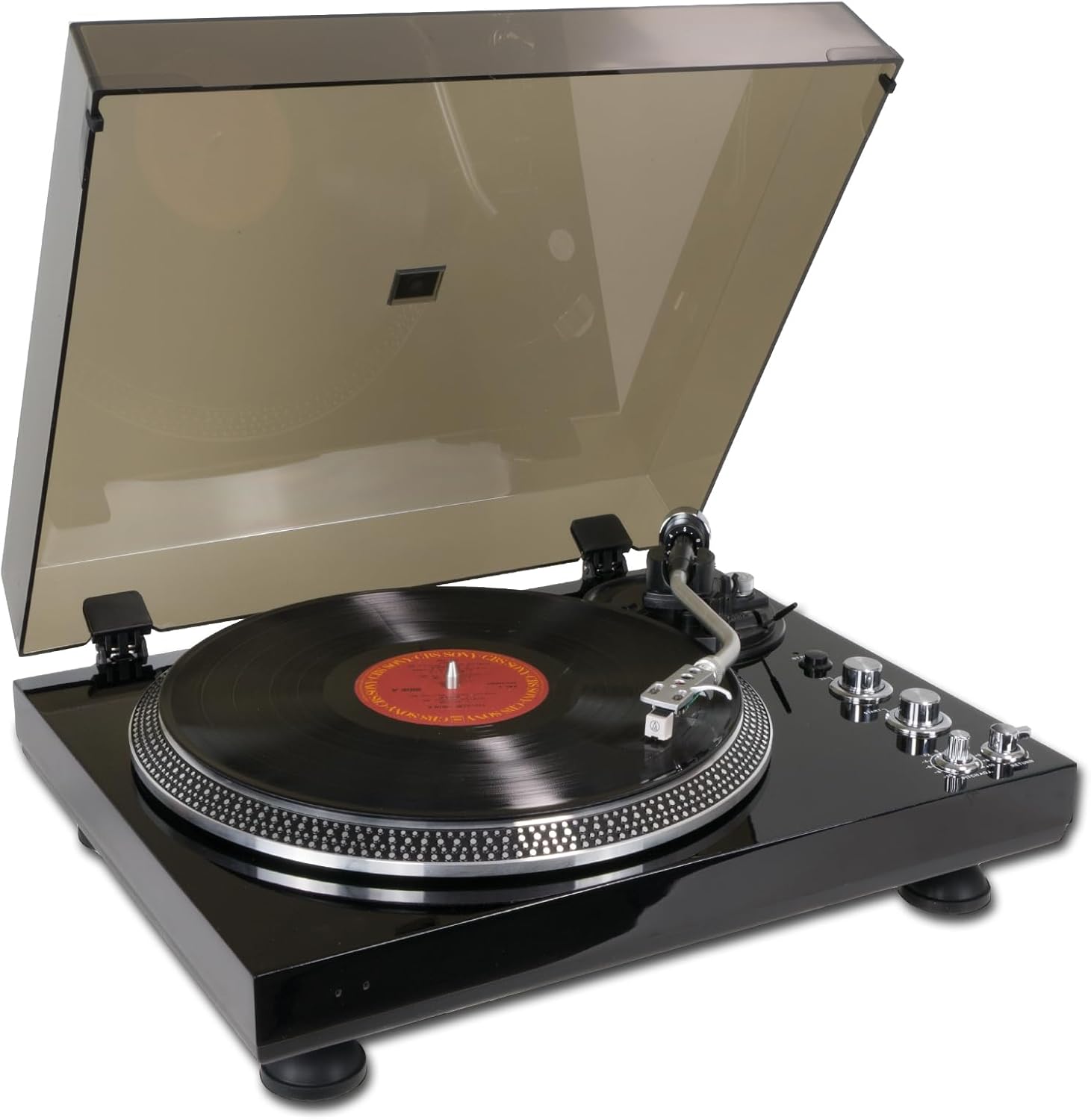
Image: The Horokarda LP45 turntable in operation, playing a vinyl record with the dust cover open.
6.2 Pitch Adjustment
The Pitch Control Knob allows for fine adjustment of the playback speed. Rotate the knob to slightly increase or decrease the speed to match the original recording or for creative effects.
6.3 Anti-Skating Adjustment
The anti-skating mechanism helps to balance the inward force on the tonearm, ensuring the stylus tracks evenly in the record groove. Adjust the anti-skating dial (if present, typically a small knob near the tonearm base) to match the tracking force setting of your cartridge. For the pre-installed AT3600 cartridge, a setting between 1.5 and 2.5 is generally appropriate, but refer to the cartridge manufacturer's specifications for precise recommendations.
7. USB Recording (Vinyl to Digital)
The Horokarda LP45 allows you to convert your vinyl records into digital audio files (MP3/WAV) using a computer and appropriate software.
- Connect to Computer: Use the supplied USB cable to connect the turntable's USB port to an available USB port on your computer.
- Install Software: Install audio recording software on your computer (e.g., Audacity, a free and open-source audio editor).
- Configure Software: In your recording software, select the turntable as the input device (it may appear as "USB Audio CODEC" or similar). Adjust recording levels to avoid clipping.
- Start Recording: Begin playback of your vinyl record on the turntable and simultaneously start recording in your software.
- Save Files: Once recording is complete, stop playback and recording. Edit and save your digital audio files in your preferred format (MP3, WAV, etc.).
8. Bluetooth Connectivity
The Horokarda LP45 features a Bluetooth transmitter, allowing you to stream audio wirelessly to compatible Bluetooth speakers or headphones.
- Enable Bluetooth on Receiver: Put your Bluetooth speaker or headphones into pairing mode. Refer to your speaker/headphone manual for specific instructions.
- Activate Turntable Bluetooth: The turntable's Bluetooth function is typically activated automatically when powered on, or via a dedicated button (refer to your specific model's controls if a button is present). An indicator light may flash to show it's searching for devices.
- Pairing: The turntable will automatically search for and attempt to pair with nearby Bluetooth devices in pairing mode. Once connected, the indicator light will usually become solid.
- Start Playback: Begin playing a record on the turntable. Audio should now stream wirelessly to your connected Bluetooth device.

Image: The Horokarda LP45 turntable streaming music wirelessly to a Bluetooth speaker.
Note: Bluetooth connectivity can sometimes be affected by distance, obstacles, and interference from other wireless devices. Ensure your Bluetooth speaker/headphones are within range and there are no major obstructions.
9. Maintenance
9.1 Cleaning the Turntable
- Wipe the dust cover and cabinet with a soft, dry cloth.
- Do not use harsh chemicals, waxes, or abrasive cleaners.
- Keep the dust cover closed when not in use to prevent dust accumulation.
9.2 Stylus Care
- The stylus is delicate. Handle it with extreme care.
- Clean the stylus regularly using a soft brush, brushing gently from back to front.
- A worn stylus can damage records and degrade sound quality. Replace the stylus after approximately 300-500 hours of playback, or if you notice a significant drop in sound quality.
9.3 Record Care
- Handle records by their edges to avoid touching the grooves.
- Store records vertically in their sleeves in a cool, dry place.
- Clean records regularly with a dedicated record cleaning brush or solution to remove dust and static.
10. Troubleshooting
If you experience issues with your turntable, refer to the following common problems and solutions:
| Problem | Possible Cause | Solution |
|---|---|---|
| No power | Power adapter not connected; Power outlet not working; Power switch off. | Ensure power adapter is securely connected to turntable and a working outlet. Turn on the power switch. |
| No sound or low sound | RCA cables not connected correctly; Phono/Line switch incorrect; Amplifier/speakers off or volume low; Stylus guard still on. | Check RCA connections. Set Phono/Line switch correctly (LINE for most setups, PHONO if using external phono preamp). Turn on amplifier/speakers and increase volume. Remove stylus guard. |
| Sound distortion or skipping | Dirty record/stylus; Worn stylus; Incorrect tracking force/anti-skating; Turntable not level. | Clean record and stylus. Replace stylus if worn. Adjust tracking force and anti-skating. Ensure turntable is on a level surface. |
| Platter not spinning | Drive belt dislodged or broken; Play/Stop switch off. | Check and re-seat the drive belt around the platter and motor pulley. Press the Play/Stop switch. |
| Humming noise | Grounding issue; Interference from other electronics; Loose connections. | Ensure all connections are secure. Try moving the turntable away from other electronic devices. If your system has a ground terminal, ensure it's connected (though this model may not have a dedicated ground wire). |
| Bluetooth not connecting | Bluetooth speaker/headphones not in pairing mode; Out of range; Interference. | Ensure your Bluetooth receiving device is in pairing mode. Move devices closer. Reduce interference from other wireless devices. |
11. Specifications
| Feature | Detail |
|---|---|
| Brand | Horokarda |
| Model Number | LP45 |
| Drive Type | Belt-Drive |
| Motor Type | AC Motor |
| Speeds | 33 1/3 RPM, 45 RPM |
| Cartridge | Audio Technica AT3600 (pre-installed) |
| Preamplifier | Built-in (switchable Phono/Line Out) |
| Special Features | Auto Return, Anti-Skating, Strobe Light, USB Output, Bluetooth Transmitter |
| Material | Wood |
| Color | Walnut (as per product description, though main image is black) |
| Dimensions (approx.) | 17.72 x 13.78 x 6.3 inches (45 x 35 x 16 cm) |
| Item Weight | 12.13 pounds (5.51 kg) |
| Included Components | Record Player, AC adapter, USB cable, RCA cable, 45 RPM adapter |
12. Warranty and Support
For warranty information and technical support, please refer to the documentation provided with your purchase or contact Horokarda customer service. Keep your proof of purchase for warranty claims.
For further assistance, you may visit the manufacturer's website or contact their support channels.
Ask a question about this manual
Ask about setup, troubleshooting, compatibility, parts, safety, or missing instructions. Manuals+ will review the question and use this page’s manual context to help answer it.