
Product Overview
The Elecharger MC3527 48V AC Motor Controller is designed for electric vehicles, providing efficient and reliable power management for the motor. This manual provides essential information for the proper installation, operation, and maintenance of your controller.

Figure 1: Front view of the Elecharger MC3527 48V AC Motor Controller, showing terminals B-, B+, U, V, W, and L1. The 48V rating is visible.
Safety Information
Always observe the following safety precautions to prevent injury or damage to the product:
- Ensure power is disconnected before installation or maintenance.
- Only qualified personnel should perform installation and wiring.
- Do not expose the controller to extreme temperatures or corrosive environments beyond its IP66 rating.
- Verify all connections are secure and correct before applying power.
Setup and Installation
The MC3527 48V controller requires careful installation. Assembly is required.
- Preparation: Ensure the vehicle's power system is completely off and disconnected from any power source.
- Mounting: Securely mount the controller in a location that allows for adequate ventilation and protection from physical damage. The controller features mounting holes for this purpose.
- Wiring Connections:
- Connect the main power cables to the B- and B+ terminals.
- Connect the motor phase wires to the U, V, and W terminals.
- Connect the auxiliary control wires and communication lines to the appropriate connectors. Refer to your vehicle's wiring diagram for specific connections.
- Torque Specification: Ensure all terminal bolts are tightened to the specified torque of 6-10 N.m (Newton-meters) for secure electrical contact.
- Final Check: Double-check all connections for correctness and security before restoring power.

Figure 2: Bottom view of the controller, highlighting the heat sink fins and mounting points for secure installation.
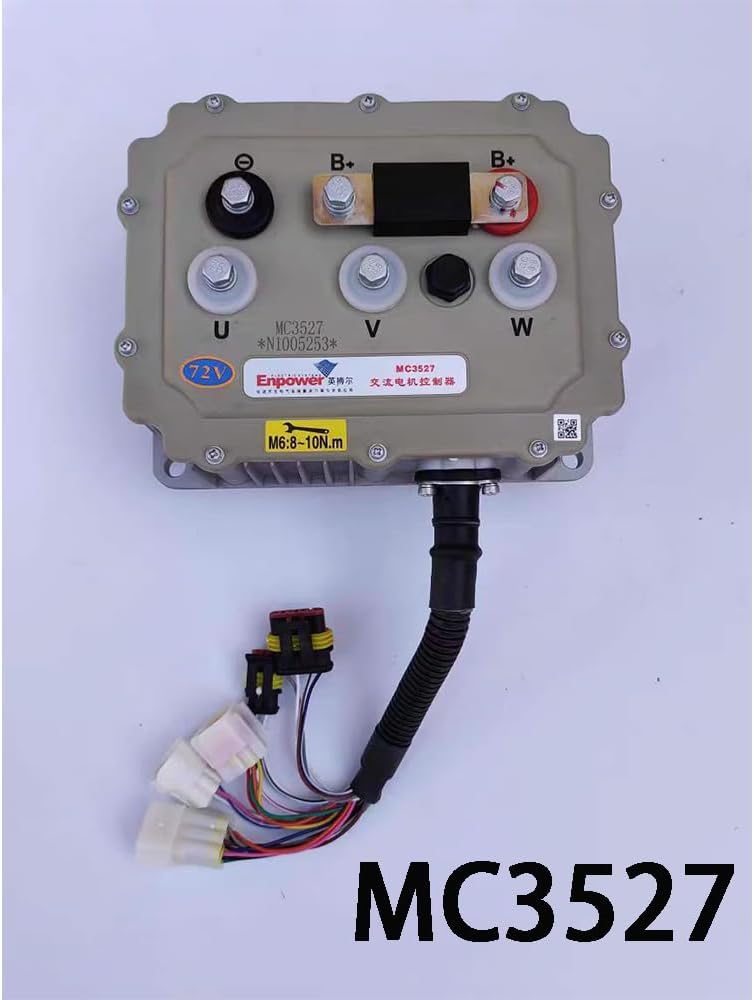
Figure 3: The MC3527 controller with its integrated wiring harness, showing various connectors for control signals and communication.
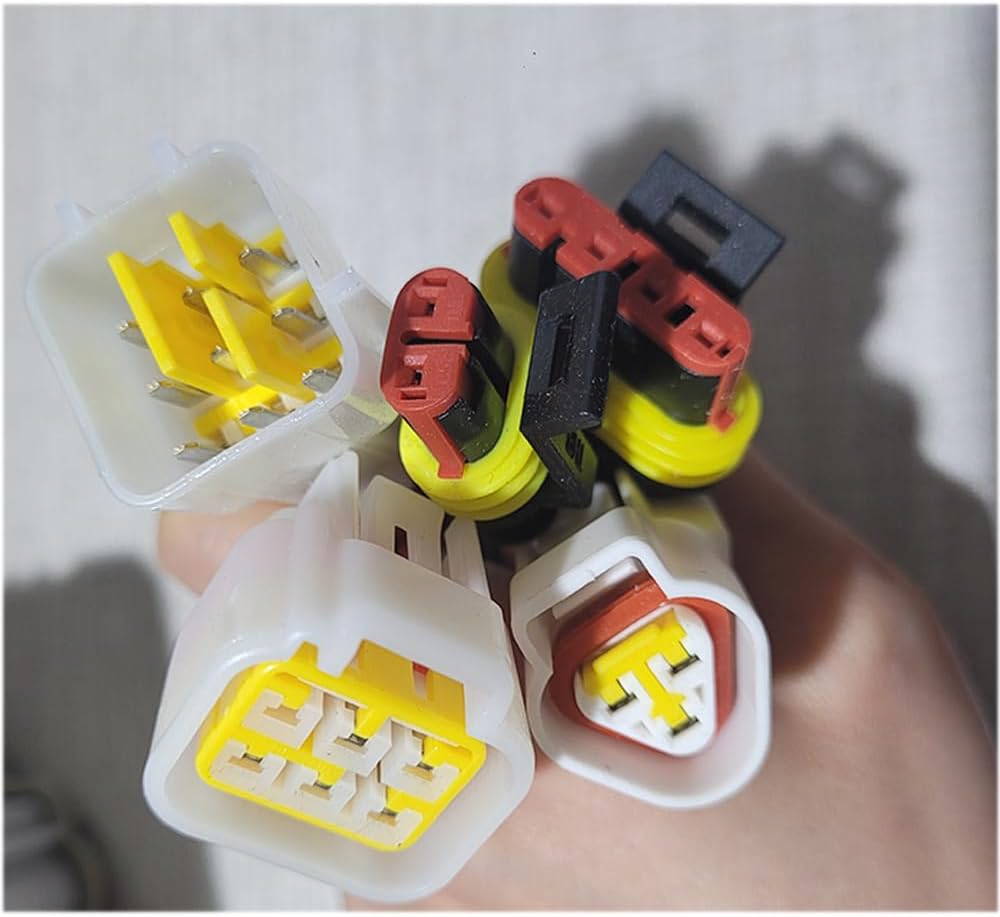
Figure 4: A close-up view of the various electrical connectors, which are crucial for connecting the controller to the vehicle's systems.
Note: For optimal performance, it is recommended to take photos of your existing controller, connectors, and motor code to ensure compatibility and proper replacement.
Operating Instructions
Once installed, the MC3527 48V controller operates in conjunction with your vehicle's existing control system. No direct user interaction with the controller itself is typically required during normal operation.
- Turn on the vehicle's main power switch.
- The controller will initialize and communicate with the vehicle's systems.
- Operate the vehicle as per its manufacturer's instructions. The controller will manage power delivery to the motor based on accelerator input and other vehicle parameters.
Maintenance
The Elecharger MC3527 48V AC Motor Controller is designed for minimal maintenance. However, periodic checks can ensure its longevity and optimal performance.
- Visual Inspection: Periodically inspect the controller for any signs of physical damage, corrosion, or loose connections.
- Cleaning: Keep the controller free from excessive dirt and debris. Use a dry, soft cloth for cleaning. Do not use harsh chemicals or abrasive materials.
- Connection Integrity: Check that all electrical connections remain tight and secure. Re-torque terminal bolts if necessary, adhering to the 6-10 N.m specification.
- Ventilation: Ensure the area around the controller remains clear to allow for proper heat dissipation from its heat sink fins.
Troubleshooting
If you experience issues with your motor controller, consider the following common troubleshooting steps:
| Problem | Possible Cause | Solution |
|---|---|---|
| Motor not responding | No power to controller; Loose wiring; Faulty motor connection. | Check main power supply; Inspect all wiring connections; Verify motor phase connections. |
| Intermittent operation | Loose or corroded connections; Overheating. | Tighten all connections; Ensure adequate ventilation around the controller. |
| Unusual noises from motor/controller | Incorrect wiring; Motor fault. | Re-check motor phase wiring (U, V, W); Consult a qualified technician for motor inspection. |
If the issue persists after attempting these steps, contact customer support or a qualified technician.
Specifications
| Feature | Detail |
|---|---|
| Model Number | MC3527 48V |
| Brand | Elecharger |
| Manufacturer | Elechager |
| Waterproof Rating | IP66 |
| Compatible Models | E-CAR, LETIN, LICHI, YOGOMO, DOJO, HONRI, etc. |
| Components Included | Controller |
| Assembly Required | Yes |
| UPC | 608275433754 |
Warranty and Support
Specific warranty information is not provided in the product details. For warranty claims or technical support, please contact the manufacturer, Elechager, or your point of purchase.
When contacting support, please have your product model number (MC3527 48V) and ASIN (B0CYCC525Z) ready.