
1. Product Overview
The YUDIANMIE 3-in-1 Stylus Pen is designed for high precision and sensitivity across all capacitive touchscreen devices. It features multiple tip options to enhance your drawing, writing, and navigation experience without the need for Bluetooth pairing or charging.

Image: The YUDIANMIE 3-in-1 Stylus Pen set, showcasing its versatile design and multiple tips.
2. Key Features
- 3-in-1 Versatility: Equipped with two different sizes of rubber tips and a transparent disc tip, allowing for precise pointing and versatile use across various tasks like drawing, writing, and gaming.
- Broad Compatibility: Seamlessly works with all capacitive touchscreen devices, including iPhone, Apple iPad, Android phones and tablets, Samsung Galaxy devices, Notebooks, Tablets, Chromebooks, and Microsoft Surface.
- Effortless Operation: Designed for immediate use without the need for Bluetooth pairing or charging, ensuring convenience and natural workflow.
- Premium Quality: Constructed from durable aluminum alloy, lightweight, and ergonomically designed for comfortable holding. Features scratch-resistant and advanced fingerprint-resistant surfaces for consistent performance and appearance.
- Enhanced Precision: Offers a finer touch than fingertips, enabling more accurate interaction with small touchpoints and eliminating bulky finger interference.

Image: Detailed view of the stylus pen, highlighting its 5.91-inch length, 4.5mm rubber tip, 7mm fiber tip, and 180-degree rotation of the disc tip.
Video: An official demonstration of the 3-in-1 Stylus Pen for touchscreen, showcasing its features and functionality.
3. Setup
The YUDIANMIE 3-in-1 Stylus Pen requires no complex setup. It is ready for use right out of the packaging. Simply select the desired tip and begin interacting with your touchscreen device.
- No Bluetooth pairing required.
- No charging needed.
4. Operating Instructions
The stylus offers three distinct tip types for various applications:
- Rubber Tips (4.5mm and 7mm): Ideal for general navigation, tapping, and broad strokes. Provides a soft, responsive touch.
- Transparent Disc Tip: Designed for high precision tasks such as detailed drawing, fine writing, and selecting small icons. The transparent disc allows you to see exactly where your mark will appear on the screen. This tip rotates 180 degrees for optimal writing angles.
To use, simply touch the desired tip to your device's screen. The stylus is compatible with all capacitive touch screens, including smartphones, tablets, and other touch-enabled devices.

Image: Examples of stylus usage for convenient note-taking, precise icon clicking, and faster texting.

Image: The stylus pen in action across various activities including gaming, digital painting, web browsing, and educational applications.
5. Maintenance
To ensure optimal performance and longevity of your stylus pen, follow these maintenance guidelines:
- Cleaning: Wipe the stylus body and tips gently with a soft, dry, lint-free cloth to remove dust and smudges. Avoid using abrasive cleaners or solvents.
- Tip Replacement: The stylus comes with extra replacement tips. Replace tips when they show signs of wear or if sensitivity decreases.
How to Replace Tips:
- For Fiber Nibs: Remove the fiber nibs by unscrewing them.
- For Rubber Tips: Replace the old rubber tip with a new one by gently pulling it off and pushing the new one on.
- For Disc Tip: Unscrew the cap covering the disc tip. Gently pull out the old disc tip and insert the new one.
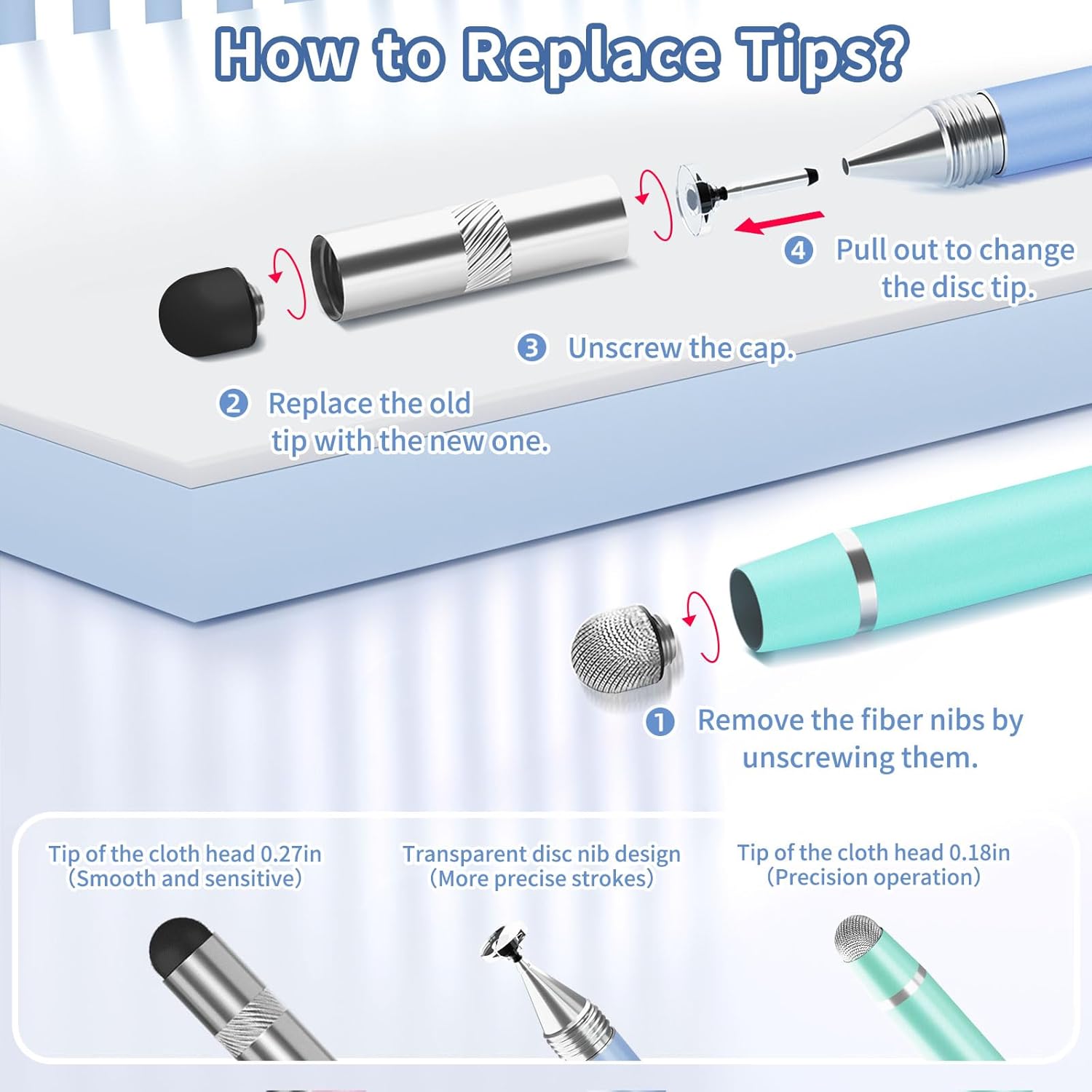
Image: Step-by-step guide on how to replace the fiber nibs, rubber tips, and the transparent disc tip.
6. Troubleshooting
If you experience issues with your YUDIANMIE 3-in-1 Stylus Pen, consider the following:
- Unresponsive or Inconsistent Touch:
- Ensure your device's screen is clean and free of smudges or debris.
- Verify that you haven't inadvertently connected to another stylus via Bluetooth, as this stylus does not require Bluetooth and may conflict with other connected pens.
- Check if the stylus tip is worn out. If so, replace it with a new one as per the maintenance instructions.
- Disc Tip Not Functioning: Ensure the transparent disc is not removed from the tip. The disc is an integral part of its functionality and is designed to remain attached.
- Physical Damage: If the stylus has been dropped or damaged, inspect the tips and body for any visible deformities that might affect performance.
7. Specifications
| Attribute | Detail |
|---|---|
| Brand | YUDIANMIE |
| Model Number (ASIN) | B0CYC4TPGT |
| Color | Macaroon Colour |
| Material | Aluminum |
| Item Weight | 1.44 ounces |
| Package Dimensions | 8.46 x 2.01 x 0.39 inches |
| Compatible Devices | All Touch Screens, Tablet, Smartphone |
| Batteries Included? | No |
| Batteries Required? | No |
| Manufacturer | YUDIANMIE |
| Country of Origin | China |
| Date First Available | April 23, 2024 |
8. Warranty and Support
This YUDIANMIE product comes with a standard manufacturer's warranty. For specific warranty details or technical support, please refer to the product packaging or contact YUDIANMIE customer service directly through their official channels.
Please retain your proof of purchase for any warranty claims.