
1. Introduction
Thank you for choosing the CHONCHOW Magnetic Cell Phone Cooler. This device is designed to rapidly cool your mobile phone or tablet, preventing overheating during intensive use such as gaming, live streaming, or video playback. It utilizes a semiconductor refrigeration principle to efficiently dissipate heat, ensuring stable performance and extending the lifespan of your device.
This manual provides detailed instructions for the proper setup, operation, and maintenance of your new phone cooler. Please read it thoroughly before use.

Image 1.1: Front view of the CHONCHOW Magnetic Cell Phone Cooler, showcasing its compact design and RGB lighting.
2. Key Features
- Rapid Cooling: Employs semiconductor refrigeration technology for quick and efficient temperature reduction.
- Universal Compatibility: Supports both magnetic attachment and a back clip for versatile installation on most phones and tablets.
- Ultra-Quiet Operation: Designed with a silent fan to ensure minimal noise disturbance during use.
- Large Cooling Area: Features approximately 4.65 square inches of thermal conductive cooling area to cover critical components.
- Adjustable Fan Stages: Offers three-stage refrigeration adjustment for customized cooling performance.
- Cool LED Lights & Temperature Display: Equipped with colorful RGB lights and an LED display for real-time temperature monitoring.

Image 2.1: The cooler attached to a smartphone, illustrating its compact size and the various features it offers.
3. Setup and Installation
The CHONCHOW Magnetic Cell Phone Cooler offers two primary installation methods: magnetic attachment and back clip fixation.
3.1 Magnetic Attachment
- Prepare Your Device: Ensure the back surface of your phone or tablet is clean and dry.
- Apply Magnetic Tape (if needed): If your device does not have built-in magnetic capabilities (e.g., MagSafe), stick the provided mini magnetic tape to the back of your phone or phone case. Ensure it is centered where the cooler will be placed for optimal contact.
- Attach Cooler: Align the cooler with the magnetic tape or your device's magnetic area. The cooler will snap into place securely.
3.2 Back Clip Installation
- Insert Back Clip: Slide the back clip onto the heat sink of the cooler from top to bottom until it clicks into place.
- Attach to Device: Gently open the clip and secure it to your phone or tablet. Ensure the cooling plate makes firm contact with the back of your device.

Image 3.1: Visual guide for both magnetic and clip-on installation methods, demonstrating how to attach the cooler to a smartphone.
4. Operating Instructions
4.1 Powering On/Off
Connect the cooler to a power source using the provided USB cable. The device will automatically power on and begin cooling. To power off, simply disconnect the USB cable.
4.2 Adjusting Fan Stages
The cooler features a physical switch for easy power control and offers three-stage refrigeration adjustment. Press the "Adjust Button" to cycle through the cooling modes:
- L1 (Low): Suitable for light use, such as e-book reading or news browsing.
- L2 (Medium): Ideal for watching movies or videos.
- L3 (High): Recommended for demanding tasks like gaming or live broadcasting, providing maximum cooling.

Image 4.1: Illustration of the three fan speed adjustment modes and the button used to switch between them.
4.3 LED Lights and Temperature Display
When connected to power, the cooler will emit colorful RGB lights. The integrated LED display will show the real-time temperature, allowing you to monitor the cooling performance.

Image 4.2: A detailed view of the cooler's digital display, indicating the real-time temperature drop.
5. Maintenance
To ensure optimal performance and longevity of your CHONCHOW Magnetic Cell Phone Cooler, follow these simple maintenance guidelines:
- Cleaning: Periodically wipe the surface of the cooler with a soft, dry cloth to remove dust and debris. Do not use liquid cleaners or abrasive materials.
- Air Vents: Ensure the air intake and exhaust vents are clear of obstructions to maintain efficient airflow.
- Storage: When not in use, store the cooler in a cool, dry place away from direct sunlight and extreme temperatures.
6. Troubleshooting
If you encounter any issues with your CHONCHOW Magnetic Cell Phone Cooler, please refer to the following common solutions:
| Problem | Possible Cause | Solution |
|---|---|---|
| Cooler not turning on. | No power supply or faulty cable. | Ensure the USB cable is securely connected to both the cooler and a working power source (e.g., USB wall adapter, power bank). Try a different USB cable or power source. |
| Cooling performance is weak. | Poor contact with phone, blocked vents, or low fan speed setting. |
|
| Noise level is high. | Fan operating at highest speed or internal obstruction. |
|

Image 6.1: The cooler in operation, emphasizing its ultra-quiet design for an undisturbed user experience.
7. Specifications
| Attribute | Detail |
|---|---|
| Brand | CHONCHOW |
| Model Number | PH-X76 |
| Power Connector Type | USB |
| Voltage | 5 Volts (DC) |
| Cooling Method | Forced Air, Semiconductor Refrigeration |
| Compatible Devices | Smartphones, Tablets |
| Product Dimensions | 2.36 x 1.02 x 2.36 inches |
| Item Weight | 3.52 ounces |
| Cooling Area | Approx. 4.65 sq. Inches |
| Date First Available | March 18, 2024 |
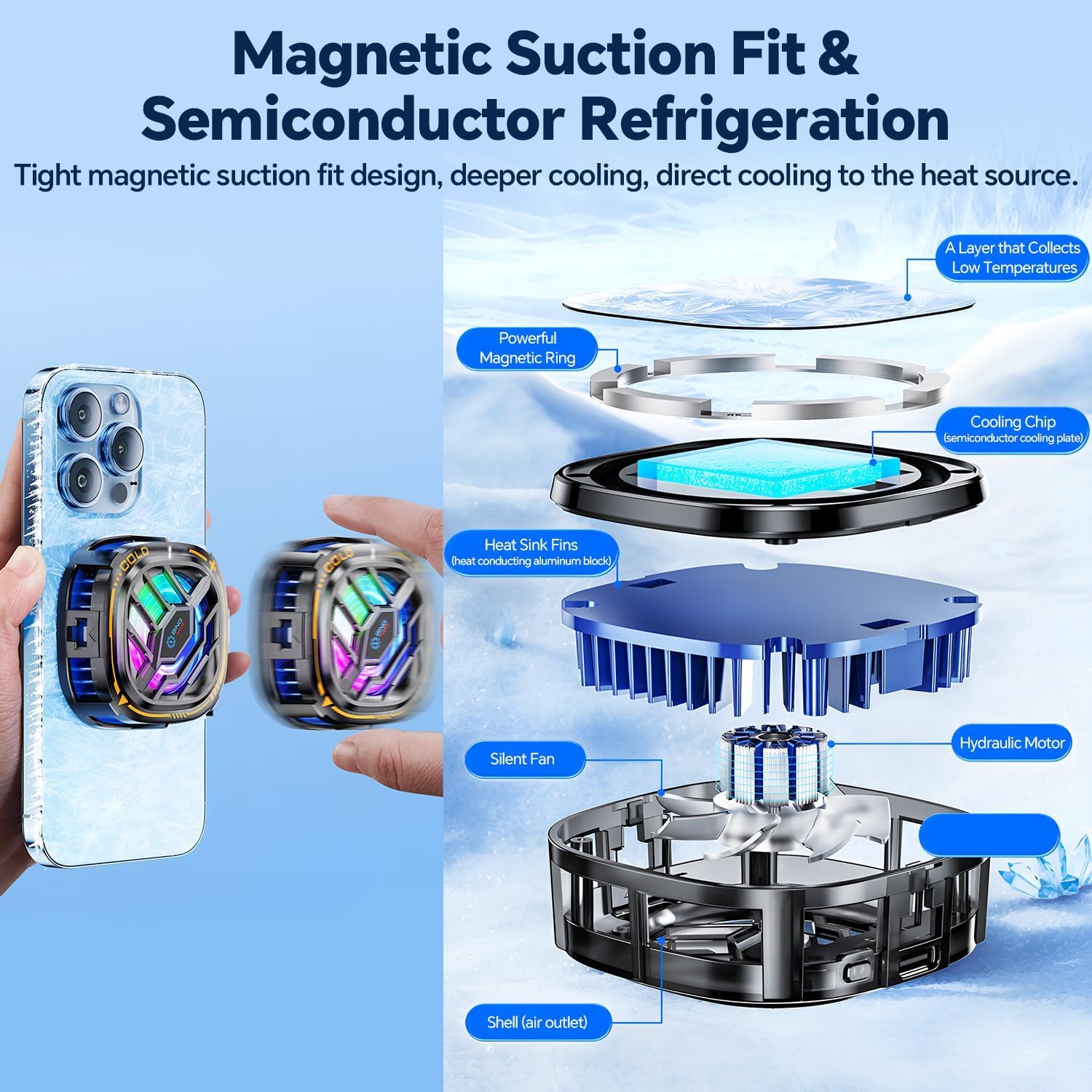
Image 7.1: An exploded diagram illustrating the internal components and cooling mechanism of the CHONCHOW phone cooler.
8. Customer Support
For any questions, concerns, or assistance with your CHONCHOW Magnetic Cell Phone Cooler, please do not hesitate to contact our customer service team. We are committed to providing satisfactory after-sales service.
Please refer to your purchase platform or the CHONCHOW official website for contact information.