
1. Introduction
Thank you for choosing OPAXIS Motion Sensor Outdoor Lights. This manual provides detailed instructions for the safe installation, operation, and maintenance of your new outdoor lighting fixtures. Please read this manual thoroughly before installation and retain it for future reference.
2. Product Features
- Advanced Motion Sensor: Integrates 3 working modes (DIM, ECO+, D2D) and an Override Mode for versatile lighting control.
- One-Button Mode Switching: Easily switch between modes and adjust brightness with a single button press on the sensor.
- Adjustable Sensing Distance: Unique function to flexibly meet lighting needs in various scenarios by switching between far, medium, and near settings.
- Durable Construction: Made from 100% aluminum for enhanced resistance to rain, moisture, and rust, ensuring long-term outdoor use.
- Weather Resistant: Designed to endure various outdoor elements including rain, sun, wind, and snow.
- Stylish Design: Features a matte black finish geometric frame and sturdy tempered glass panels for an elegant appearance.
- Easy Bulb Replacement: Bottom opening design allows for simple bulb replacement without tools.
- Standard E26 Socket: Compatible with any bulb featuring a standard E26 socket. Dimmable LED bulbs are recommended to prevent flickering. (Bulb not included)
3. Package Contents
The package includes:
- OPAXIS Motion Sensor Outdoor Light Fixture (2 units)
- Motion Sensor (integrated)
- Installation Hardware
- User Manual
Note: Bulbs are not included and must be purchased separately.
4. Specifications
| Attribute | Detail |
|---|---|
| Brand | OPAXIS |
| Model Number | P81492BK |
| Color | Black |
| Material | Aluminum, Tempered Glass |
| Style | Modern |
| Indoor/Outdoor Usage | Outdoor |
| Power Source | Corded Electric |
| Special Features | Anti-Rust, Distance Adjustable, Energy Efficient, Motion Sensor, Water Resistant |
| Control Method | Touch (Push Button) |
| Light Source | LED (Bulb not included) |
| Number of Light Sources | 2 (for the 2-pack product) |
| Voltage | 120 Volts (AC) |
| Wattage | Max 100 watts |
| Bulb Base | E26 |
| Water Resistance Level | Water Resistant (IP65) |
| Brightness | 1000 lumen (dependent on bulb) |
| Mounting Type | Wall Mount |
| Item Dimensions (L x W x H) | 5.9"L x 5.9"W x 10.9"H |
5. Safety Information
Please observe the following safety precautions during installation and operation:
- Always turn off the power at the circuit breaker before installing, servicing, or cleaning the fixture.
- Consult a qualified electrician if you are unsure about the installation process.
- Ensure all electrical connections are secure and comply with local codes and ordinances.
- Do not exceed the maximum wattage specified for the bulb (Max 100W).
- Use only dimmable LED bulbs to avoid flickering issues when using dimming modes.
- The fixture is designed for outdoor use and is water resistant (IP65), but avoid submerging it in water.
6. Setup and Installation
The OPAXIS Motion Sensor Outdoor Light is designed for easy installation. No specialized tools or electrician are typically required for basic setup.
6.1 Installation Steps
- Turn Off Power: Before starting, ensure the power to the installation area is turned off at the main circuit breaker.
- Mounting Plate: Attach the cross mounting plate to your wall junction box using the provided screws.
- Wiring: Connect the fixture's wires to your household wiring (black to black, white to white, ground to ground). Secure connections with wire nuts.
- Secure Fixture: Mount the light fixture onto the cross mounting plate and secure it with the provided screws.
- Install Bulb: Insert an E26 base bulb (max 100W, dimmable LED recommended) into the socket through the open bottom of the fixture.
- Restore Power: Turn the power back on at the circuit breaker.

Figure 1: Product Dimensions and Key Components. This image illustrates the physical dimensions of the light fixture, highlighting the tempered clear glass, the integrated dusk to dawn motion sensor, and the UL listed E26 bulb socket.

Figure 2: Easy Bulb Replacement. The image shows a hand inserting a bulb into the fixture from the bottom, emphasizing the tool-free access for bulb changes and cleaning.
Video 1: OPAXIS Motion Sensor Outdoor Wall Light Overview. This video provides a visual demonstration of the light fixture's features, including its design, motion sensor, and mode switching capabilities.
7. Operating Instructions
Your OPAXIS outdoor light features a new generation motion sensor with multiple working modes and adjustable settings.
7.1 Mode Switching
The light fixture offers three primary working modes and an override mode, easily switchable with a single button press on the sensor:
- DIM Mode (Red Indicator Light):
- 30% brightness at night.
- Activates to 100% brightness once motion is detected.
- Reverts to 30% brightness when no motion is detected.
- Automatically turns off during the day.
- ECO+ Mode (Green Indicator Light):
- Full off at night.
- Activates to 100% brightness once motion is detected.
- Reverts to full off when no motion is detected.
- Automatically turns off during the day.
- D2D Mode (Blue Indicator Light):
- 100% brightness at night.
- Turns off automatically at dawn.
- Override Mode (Indicator Light OFF):
- To activate: Quickly turn the light switch OFF then ON within 2 seconds.
- Keeps 100% brightness at night for 8 hours.
- Automatically turns off at dawn and returns to the previously selected AUTO MODE (DIM, ECO+, or D2D).

Figure 3: One-Click Mode Switching. This diagram visually explains the functionality of DIM, ECO+, and D2D modes, showing light behavior during day, night, and upon motion detection.

Figure 4: Smart Indicator Lights. This image displays the different colored indicator lights on the motion sensor, corresponding to each working mode for easy identification.
7.2 Brightness Adjustment (DIM Mode)
In DIM mode, you can adjust the standby brightness (15%-100%) by pressing and holding the sensor button. This allows you to customize the low-level illumination to your preference.
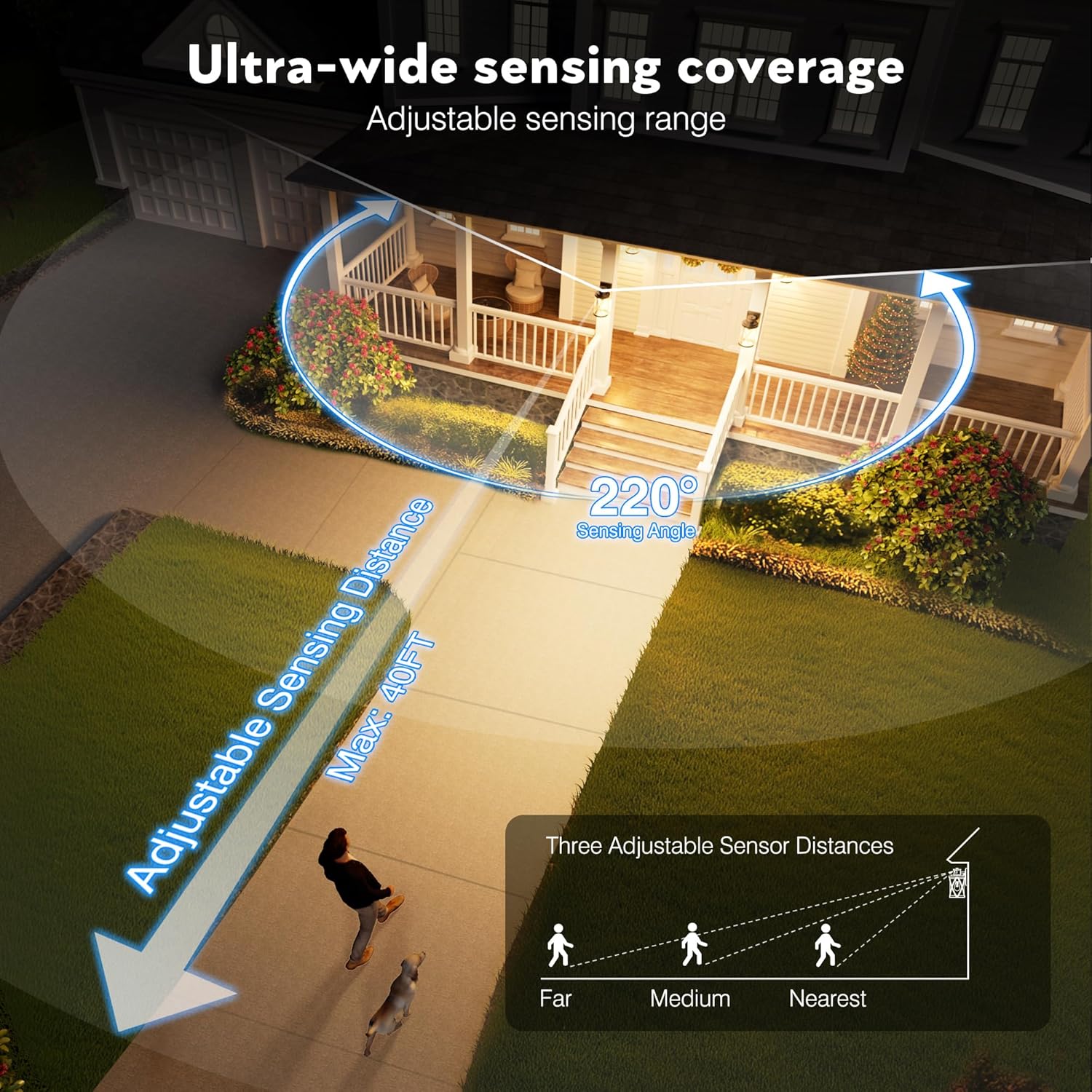
Figure 5: Integrated Dimmer for Saving. This image illustrates the smooth dimming capability from 15% to 100% and how to operate it via the sensor button.
7.3 Adjustable Sensing Distance
The motion sensor's detection range can be adjusted to suit your needs. Tap the sensor button to cycle through three distance settings: Far, Medium, and Near. The maximum sensing distance is 40 feet with a 220° sensing angle.

Figure 6: Ultra-Wide Sensing Coverage. This diagram visually explains the adjustable sensing range and angle, showing how to select between Far, Medium, and Near detection distances.
8. Maintenance
Regular maintenance ensures optimal performance and longevity of your OPAXIS outdoor lights.
- Cleaning: Periodically clean the fixture with a soft, damp cloth. Avoid abrasive cleaners or solvents that could damage the finish or glass.
- Bulb Replacement: To replace the bulb, simply unscrew the old bulb from the E26 socket through the open bottom of the fixture and screw in a new one. Ensure power is off before replacing.
- Inspection: Regularly inspect the fixture for any signs of damage, loose connections, or wear. Address any issues promptly.

Figure 7: Weather Resistance. This image highlights the fixture's ability to withstand various weather conditions, including rain, sun, wind, and snow.
9. Troubleshooting
If you encounter issues with your OPAXIS Motion Sensor Outdoor Lights, refer to the following common troubleshooting steps:
| Problem | Possible Cause | Solution |
|---|---|---|
| Light does not turn on at night. | No power; Bulb faulty; Sensor obstructed; Incorrect mode. | Check circuit breaker. Replace bulb. Clear sensor. Verify mode setting (e.g., not in ECO+ mode with no motion). |
| Light stays on constantly. | Override mode active; Continuous motion detected; Sensor malfunction. | Cycle power to reset override mode. Check for constant motion sources. Contact support if issue persists. |
| Light flickers. | Non-dimmable bulb used in dimming mode; Loose connection. | Ensure a dimmable LED bulb is installed. Check electrical connections. |
| Motion sensor not detecting. | Sensor obstructed; Incorrect distance setting; Sensor malfunction. | Clear any obstructions. Adjust sensing distance (Far, Medium, Near). |
10. Warranty and Support
OPAXIS provides a 1-year limited warranty for this product. For any questions or support needs, please contact OPAXIS customer service.
Frequently Asked Questions (FAQs)
- Is OPAXIS light suitable for storm and rainy environments and very cold climates?
Yes, all OPAXIS lights feature IP65 waterproofing, making them suitable for storm and rainy locations. They are designed to endure severe cold and extreme weather conditions.
- Is OPAXIS light easy to install?
Yes, our light is designed for very easy installation and can typically be installed successfully in just a few minutes, potentially saving on electrician fees.
For further assistance, please visit the official OPAXIS store on Amazon: OPAXIS Store.