
Psecici AO-818
Psecici Handheld Fan User Manual
Model: AO-818
1. Introduction
Thank you for purchasing the Psecici Handheld Fan. This portable personal fan is designed to provide a refreshing breeze for various settings, including desk, travel, office, and outdoor use. Its compact, foldable design and multiple speed settings ensure comfort and convenience wherever you go. Please read this manual thoroughly before use to ensure proper operation and maintenance.
2. Safety Instructions
To ensure safe operation and prevent damage, please observe the following safety precautions:
- Do not insert fingers or any objects into the fan blades when the fan is operating.
- Keep the fan away from water and other liquids. Do not use in wet environments.
- Do not disassemble, repair, or modify the fan yourself. Contact qualified personnel for service.
- Keep out of reach of children. This is not a toy.
- Use only the specified charging voltage (5V DC).
- Do not expose the fan to extreme temperatures or direct sunlight for prolonged periods.
- Ensure the charging port is clean and free of debris before charging.
3. Package Contents
Verify that all items are present in the package:
- Psecici Handheld Fan (Model: AO-818)
- Lanyard
- USB Charging Cable (Type-C)
- User Manual
4. Product Overview
Familiarize yourself with the components of your Psecici Handheld Fan:
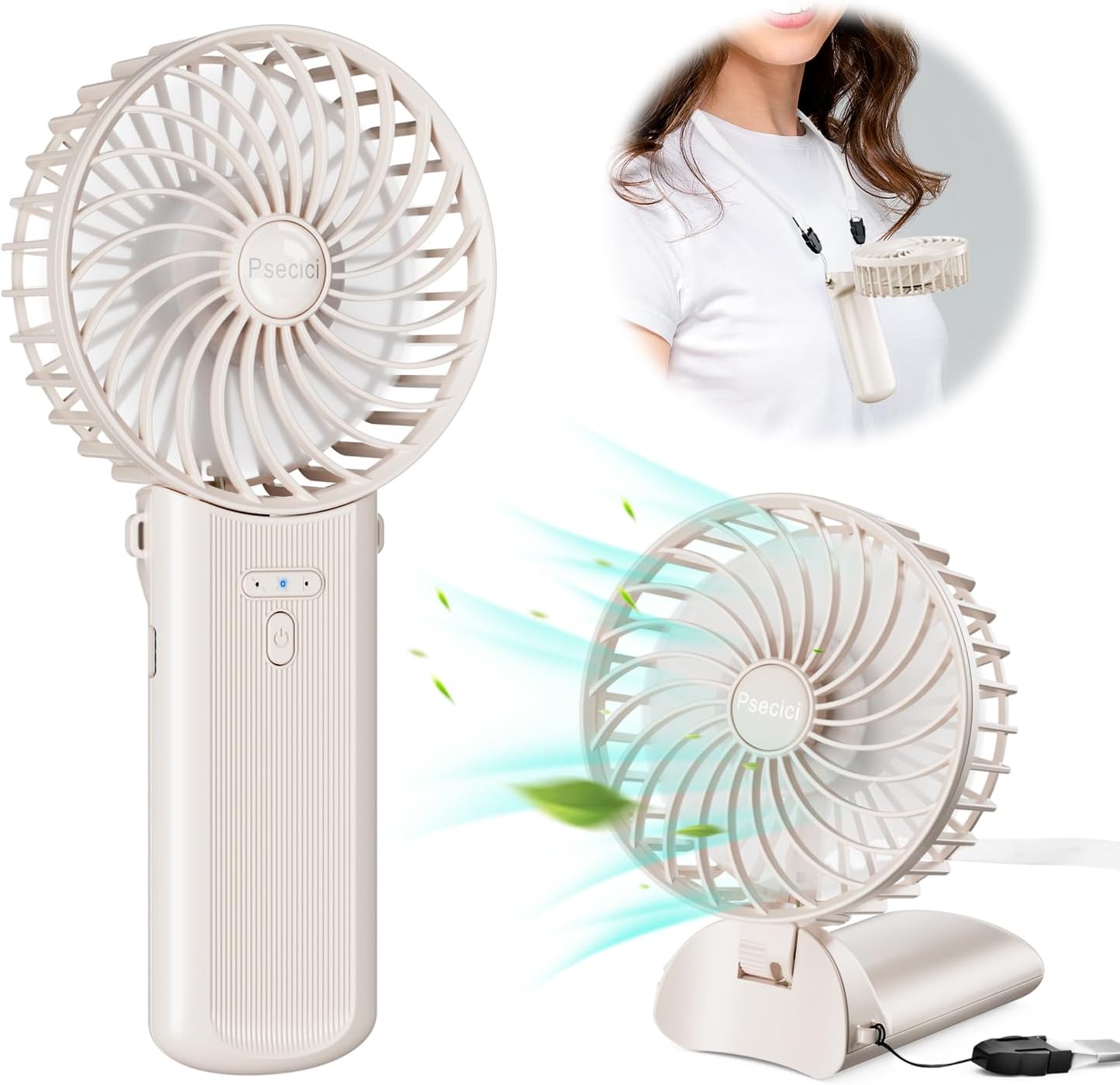
Figure 4.1: Psecici Handheld Fan showing its versatile design for handheld, desk, and neck-worn use.
- Fan Head: Contains the fan blades and protective grille.
- Handle/Base: Ergonomically designed for handheld use, also folds to form a stable desk stand.
- Power Button: Controls power ON/OFF and fan speed.
- Indicator Lights: Display battery status and current fan speed.
- USB-C Charging Port: Located on the base for recharging the internal battery.
- Lanyard Hole: For attaching the included lanyard.
5. Setup
The Psecici Handheld Fan is designed for immediate use after charging. No complex assembly is required.
5.1 Attaching the Lanyard
- Locate the small hole on the side of the fan's handle.
- Thread the thin loop of the lanyard through this hole.
- Pass the main strap of the lanyard through the loop and pull tight to secure.
Once attached, the fan can be comfortably worn around your neck for hands-free cooling.
6. Operating Instructions
The fan features a simple one-button control for power and speed adjustment.

Figure 6.1: Four adjustable wind speed levels for customized airflow.
- Power On / Speed Adjustment: Press the power button once to turn on the fan at the lowest speed (Level 1). Each subsequent press will cycle through the speed levels:
- 1st Press: Level 1 (Low Wind Mode)
- 2nd Press: Level 2 (Medium Wind Mode)
- 3rd Press: Level 3 (Strong Wind Mode)
- 4th Press: Level 4 (Super Strong Wind Mode)
- Power Off: After the 4th speed level, pressing the button again will turn the fan off. Alternatively, press and hold the power button for 2-3 seconds to turn off the fan from any speed setting.
- Folding Function: The fan head can be folded 180 degrees. This allows it to be used as a handheld fan, a desk fan, or hung around the neck.

Figure 6.2: The fan's 3-way functionality: handheld, neck-worn, and desk stand.
7. Charging the Fan
The fan is powered by a built-in rechargeable battery. Charge the fan when the indicator lights show low battery or when the fan performance decreases.

Figure 7.1: Charging options and estimated battery life per speed setting.
- Connect the included USB charging cable to the USB-C port on the fan's base.
- Connect the other end of the USB cable to a power source such as a computer USB port, a mobile power bank, or a 5V/1A AC adapter (not included).
- The indicator lights will illuminate during charging and turn off or change color when fully charged (refer to specific model indicator behavior if available, otherwise assume standard).
- A full charge can provide up to 16 hours of continuous use on the lowest speed setting. Usage time varies significantly with speed level:
- Super Strong: ~4 hours
- Strong: ~8 hours
- Medium: ~12 hours
- Low: ~16 hours
Note: Usage times are estimates and may vary based on environmental conditions and battery health.
8. Maintenance
Regular maintenance helps prolong the life of your fan.
- Cleaning: Use a soft, dry cloth to wipe the exterior of the fan. Do not use abrasive cleaners or solvents. For dust accumulation on the fan blades, gently wipe with a cotton swab or a soft brush. Ensure the fan is OFF before cleaning.
- Storage: When not in use for extended periods, store the fan in a cool, dry place, away from direct sunlight and extreme temperatures. It is recommended to charge the fan every 3 months to maintain battery health.
- Removable Grille: The front grille is designed to be removable for easier cleaning of the blades. Gently twist or unclip the grille as indicated by markings (if any) to remove it. Reattach securely after cleaning.
9. Troubleshooting
If you encounter issues with your fan, refer to the following common problems and solutions:
| Problem | Possible Cause | Solution |
|---|---|---|
| Fan does not turn on. | Battery is depleted. | Charge the fan using the provided USB cable. |
| Fan stops unexpectedly. | Low battery. | Recharge the fan. |
| Weak airflow. | Fan blades are dirty or obstructed. | Clean the fan blades and grille. Ensure nothing is blocking the air intake/output. |
| Fan makes unusual noise. | Foreign object inside. | Turn off the fan immediately. Inspect for any foreign objects and carefully remove them if safe to do so. If noise persists, discontinue use. |
| Charging indicator not working. | Cable or adapter issue. | Try a different USB cable or power adapter. Ensure connections are secure. |
If the problem persists after trying these solutions, please contact customer support.
10. Specifications
| Model Name | AO-818 |
| Brand | Psecici |
| Power Source | Battery Powered (Rechargeable) |
| Voltage | 5 Volts (DC) |
| Number of Power Levels | 4 |
| Noise Level | 20 dB (at lowest setting) |
| Control Method | Touch Button |
| Product Dimensions (L x W x H) | 1.18 x 3.5 x 7.2 inches |
| Item Weight | 5.6 ounces |
| Included Components | Lanyard, USB Charging Cable |
11. Warranty and Support
Psecici products are manufactured to high quality standards. For warranty information or technical support, please refer to the warranty card included with your purchase or visit the official Psecici website. Please have your model number (AO-818) and purchase details ready when contacting support.
For further assistance, you may contact Psecici customer service via their official channels. Keep your purchase receipt as proof of purchase.