
1. Introduction
Thank you for choosing the TIPRE Smart Scale CS06. This advanced 8-electrode digital scale utilizes dual-frequency bio-impedance technology to provide a comprehensive analysis of your body composition. It measures not only body weight but also various metrics such as body fat, muscle mass, bone mass, BMI, and more, helping you track your health and fitness journey effectively. This manual provides essential information for safe and proper use of your device.
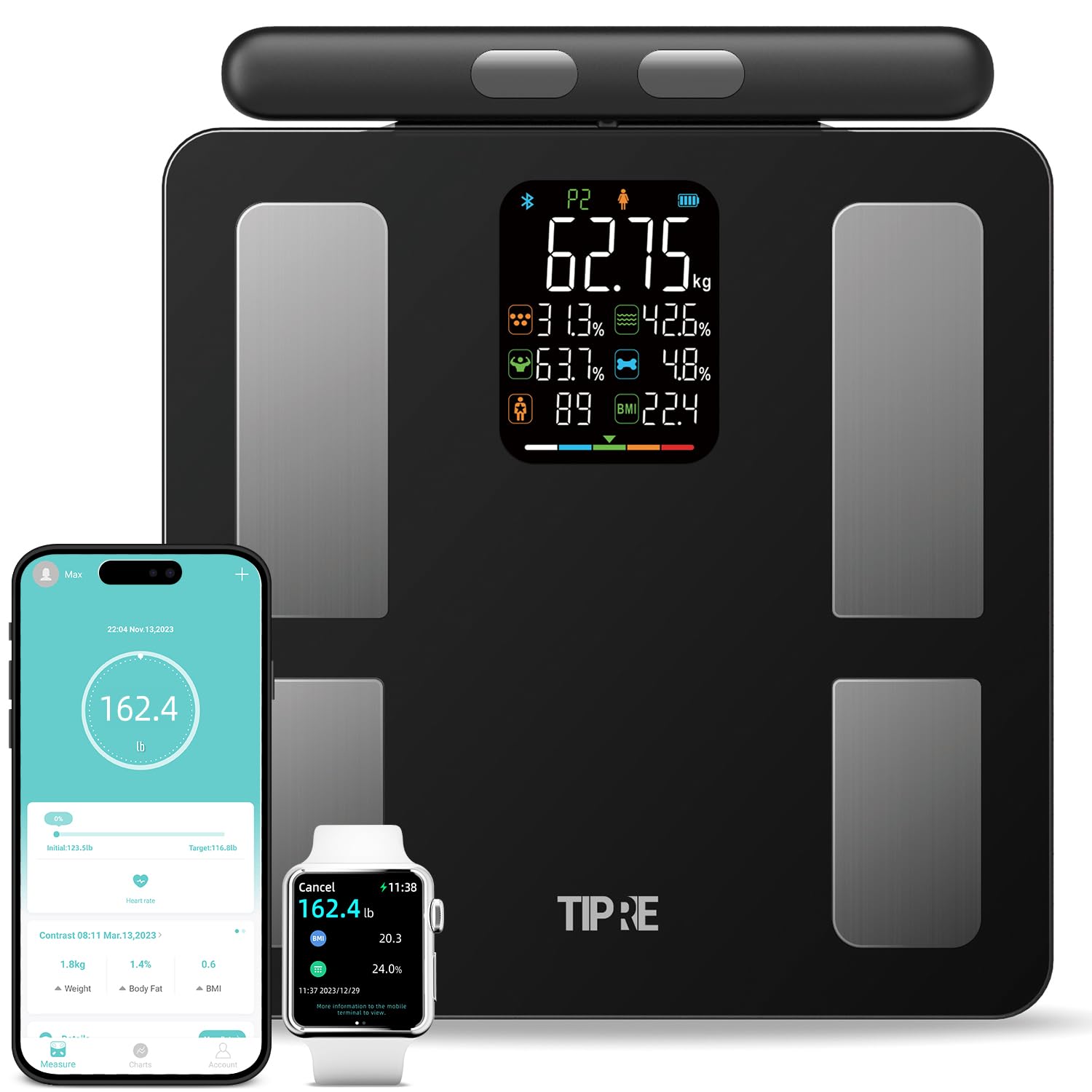
Image: The TIPRE Smart Scale CS06, featuring its large display, retractable handle, and accompanying mobile application interface on a smartphone and smartwatch.
2. Key Features
- Accurate 8-Electrode Measurement: Employs eight electrodes and high/low dual-frequency bio-impedance technology for direct and precise body composition analysis across four limbs and torso.
- Comprehensive Body Composition Analysis: Provides detailed results for over 20 body metrics, including weight, body fat, hydration, muscle mass, bone mass, BMI, and body score.
- High Capacity & Precision: Supports a maximum capacity of 400 lbs (180 kg) with a division of 0.1 lb (0.05 kg).
- Large Color VA Screen: Offers excellent clarity with a large, colorful VA display showing 8 basic indicators at a glance.
- Retractable Handle: Features a 63-inch retractable handle for convenient storage and suitability for users of all heights.
- Smart App Integration: Connects via Bluetooth to the 'Moving Life' APP (available on Google Play and App Store) for tracking fitness journeys, managing data, and syncing with other health apps like Apple Health, Google Fit, and Fitbit.
- Multi-User Support: Allows creation of multiple user profiles and auto-identification of data for each user, including a baby mode to track infant growth.
- Durable Design: Constructed with 6 mm tempered glass and enlarged non-slip pads for enhanced safety and durability.
- Power Source: Operates on 4 AA batteries (included).

Image: Illustration of the 8-electrode and dual-frequency bio-impedance technology, showing how it directly measures body composition across the entire body, in contrast to 4-electrode scales that estimate upper body data.
3. Setup Guide
3.1. Battery Installation
- Locate the battery compartment on the underside of the scale.
- Open the battery cover.
- Insert the 4 AA batteries (included), ensuring correct polarity.
- Close the battery cover securely.
3.2. App Download and Registration
- Download the 'Moving Life' APP by scanning the QR code in the user guide or searching for 'Moving Life' on the App Store or Google Play. Alternatively, visit www.camry.com.cn/app_download_movinglife.html.
- Open the APP and follow the on-screen instructions to register a new account and input your personal data (e.g., age, height, gender). Accurate personal data is crucial for precise body composition analysis.
3.3. Device Binding
- Ensure Bluetooth is enabled on your smartphone.
- Open the 'Moving Life' APP, navigate to the 'ME' page, then select 'My Devices' and tap the '+' icon to add a new device.
- Gently step on the scale to activate its display. The APP should detect the scale.
- Select your scale from the list in the APP to complete the binding process.

Image: A visual guide demonstrating the process of downloading the app, registering, binding the device, and performing a body composition measurement with the correct posture.
4. Operating Instructions
4.1. Performing a Measurement
- Place the scale on a hard, flat surface to ensure accurate readings.
- Step onto the scale with bare feet, ensuring your feet are positioned on the four large electrode pads.
- Gently pull up the retractable handle. Hold the handle with both hands, placing your thumbs on the front electrodes and your fingers on the back electrodes.
- Maintain a straight posture, keeping your arms approximately 45 degrees from your body. Avoid moving during the measurement process.
- The scale will first display your weight. After approximately 20 seconds, the full body composition analysis will be complete. The display will show basic data, and all detailed metrics will be available in the 'Moving Life' APP.
Important Notes:
- For accurate body composition analysis, always measure barefoot and without socks or shoes.
- It is recommended to use body lotion to keep limbs moist if you have dry skin, as this can affect data collection.
- Ensure the correct user information (athlete/normal mode) is set in the app for optimal accuracy.
Video: Demonstration of how to properly use the TIPRE Smart Scale, including standing barefoot on the electrodes and holding the retractable handle for a full body composition analysis.
5. Data Management and Tracking
The 'Moving Life' APP is designed to help you manage and track your health data over time. After the initial binding, measurement data will automatically upload and save to the APP when your mobile phone is connected.
- Progress Tracking: View changes in your body composition over days, weeks, months, or years through charts and reports.
- Multi-User Profiles: Create profiles for family members. The scale can auto-identify users, and data can be shared.
- Baby Mode: Track your baby's growth and weight.
- Data Sync: Sync your fitness data with popular health applications like Apple Health, Google Fit, and Fitbit.
- Health Reports: Generate and print professional PDF-style health reports from the app.

Image: The 'Moving Life' application interface, highlighting its multi-user functionality and compatibility with Apple Health, Google Fit, and Fitbit for comprehensive health data management.
6. Care and Maintenance
- Clean the scale surface with a soft, slightly damp cloth. Avoid using abrasive cleaners or harsh chemicals, as they may damage the surface.
- Store the scale in a dry place, away from direct sunlight and extreme temperatures.
- If the scale will not be used for an extended period, remove the batteries to prevent leakage.
- Replace batteries when the 'La' indicator appears on the display.
7. Troubleshooting
| Display Indication | Meaning | Solution |
|---|---|---|
| "0" (Zero) | Wrong Measurement | Ensure correct posture, bare feet, and proper contact with electrodes. Refer to Section 4.1. |
| "La" | Low Battery Indication | Replace the 4 AA batteries. |
| "ErrL" | Overload Indication | The weight exceeds the maximum capacity of 400 lbs (180 kg). |
| "ErrH" | Error | Contact customer support for assistance. |
If you encounter any other issues or have questions, please contact TIPRE customer support at tipre@qq.com.
8. Product Specifications
- Product Dimensions: 13.15 x 7.87 x 1.34 inches
- Item Weight: 5.89 Pounds
- Model Number: CS06
- Batteries: 4 AA batteries (included)
- Brand: TIPRE
- Color: Black
- Recommended Uses: Adults
- Special Features: Auto Shut Off, Backlit Display, Body Composition Biometric Analysis, Retractable Handle
- Display Type: LED
9. Warranty and Support
For information regarding product warranty, please refer to the documentation included with your purchase or contact TIPRE customer support. Extended protection plans may also be available for purchase.
Customer Support: If you have any questions, concerns, or require technical assistance, please do not hesitate to contact our support team:
- Email: tipre@qq.com