
novopal DLCD500PEU12
NOVOPAL 500W Pure Sine Wave Inverter
User Manual
1. Introduction
Thank you for choosing the NOVOPAL 500W Pure Sine Wave Inverter. This manual provides essential information for the safe and efficient operation of your inverter. Please read it thoroughly before use and keep it for future reference.
2. Safety Instructions
Always observe the following safety precautions to prevent personal injury or damage to the inverter and connected devices:
- Ventilation: Ensure adequate ventilation around the inverter. Do not block ventilation openings.
- Environment: Operate the inverter in a dry, well-ventilated area, away from direct sunlight, heat sources, and flammable materials.
- Polarity: Connect the battery cables with correct polarity (red to positive, black to negative). Incorrect connection can cause severe damage.
- Overload Protection: Do not exceed the inverter's rated power output (500W continuous, 1000W peak). Overloading can trigger protection mechanisms or damage the unit.
- Grounding: Ensure the inverter is properly grounded using the provided GND cable.
- Water and Moisture: Keep the inverter away from water, rain, and excessive humidity.
- Children: Keep out of reach of children.
- Professional Installation: For permanent installations, consult a qualified electrician.

Image: Various protection icons indicating advanced safety features of the inverter, including temperature, grounding, and overload protection.
3. Product Features
- Pure Sine Wave Output: Provides stable and clean power, suitable for sensitive electronics.
- High Power Output: 500 Watts continuous power, 1000 Watts peak surge capacity.
- Versatile Connectivity: Features 1 AC 220/230V outlet and 2 USB 5V/2.1A ports.
- LCD Display: Real-time monitoring of input/output voltage, battery status, frequency, temperature, and load percentage.
- Intelligent Cooling Fan: Operates only when internal temperature exceeds 45°C or inverter power exceeds 40%, ensuring quiet operation and efficient heat dissipation.
- Advanced Protection Functions: Soft start, over-voltage, under-voltage, overload, short-circuit, and over-temperature protection.
- Durable Construction: Robust aluminum alloy casing for enhanced protection against drops and impacts.

Image: Diagram illustrating the smooth, stable pure sine wave output provided by the inverter, ideal for sensitive electronics.
4. Package Contents
Please check the package for the following items:
- 1x NOVOPAL 12V to 220/230V 500W Pure Sine Wave Inverter
- 2x Battery Cables (1 red, 1 black)
- 1x GND Grounding Cable
- 1x Cigarette Lighter Connection Cable
- 1x User Manual (this document)
- Spare Fuses (if included)

Image: The NOVOPAL 500W inverter shown alongside its included accessories: battery cables, cigarette lighter cable, spare fuses, and user manual.
5. Product Overview
Familiarize yourself with the components of your NOVOPAL inverter:

Image: A diagram highlighting key components of the inverter, including the ON/OFF switch, AC receptacles, USB ports, cooling fan, and pure copper terminals.
- ON/OFF Switch: Powers the inverter on or off.
- AC Receptacles: For connecting 220/230V AC devices.
- USB Ports (2.1A x2): For charging USB-powered devices.
- LCD Display: Shows operational status and readings.
- Cooling Fan: Activates automatically to dissipate heat.
- DC 12V Input Terminals: For connecting to a 12V DC power source (battery).
- GND Terminal: For grounding the inverter.
6. Setup
Follow these steps for proper setup:
- Choose a Location: Place the inverter in a cool, dry, and well-ventilated area. Ensure it is stable and secure.
- Connect to Battery (Direct Connection):
- Ensure the inverter is OFF.
- Connect the red battery cable to the positive (+) terminal of the inverter and the positive (+) terminal of your 12V battery.
- Connect the black battery cable to the negative (-) terminal of the inverter and the negative (-) terminal of your 12V battery.
- Tighten all connections securely.

Image: Red and black battery cables, indicating their use for connecting the inverter to a 12V battery source.
- Connect to Cigarette Lighter (Limited Power):
- For lower power devices, you can use the cigarette lighter connection cable.
- Plug the cable into the inverter's DC input and then into your vehicle's 12V cigarette lighter socket.
- Important: Do not exceed the maximum power rating of your vehicle's cigarette lighter socket (typically 120W-180W).

Image: A hand plugging the inverter's cigarette lighter adapter into a car's 12V socket.
- Grounding: Connect the GND cable from the inverter's grounding terminal to a proper earth ground point (e.g., vehicle chassis).
7. Operating Instructions
- Power On: After connecting the inverter to a 12V power source, press the ON/OFF switch to turn on the inverter. The LCD display will illuminate.
- Monitor LCD Display:
The LCD provides real-time information:
- DC IN: Input voltage from the battery.
- AC OUT: Output AC voltage.
- BATTERY: Battery status level.
- FREQUENCY: Output frequency (50Hz).
- LOAD: Percentage of current load.
- TEMPERATURE: Internal temperature of the inverter.

Image: A detailed view of the inverter's LCD screen, displaying various parameters such as DC input voltage, AC output voltage, battery level, frequency, load percentage, and internal temperature.
- Connect Devices: Plug your AC devices into the AC receptacles and USB devices into the USB ports. Ensure the total power consumption does not exceed 500W.
- Power Off: When finished, turn off the inverter by pressing the ON/OFF switch before disconnecting devices or the power source.

Image: The inverter connected and actively charging a smartphone and another device simultaneously via its AC outlet and USB port.
8. Maintenance
- Cleaning: Regularly clean the exterior of the inverter with a dry, soft cloth. Do not use liquid cleaners or solvents.
- Ventilation: Keep the ventilation openings clear of dust and debris to ensure proper airflow.
- Cooling Fan: The intelligent cooling fan will activate automatically when needed. Ensure it is not obstructed.
- Storage: If storing the inverter for an extended period, disconnect it from the power source and store it in a cool, dry place.
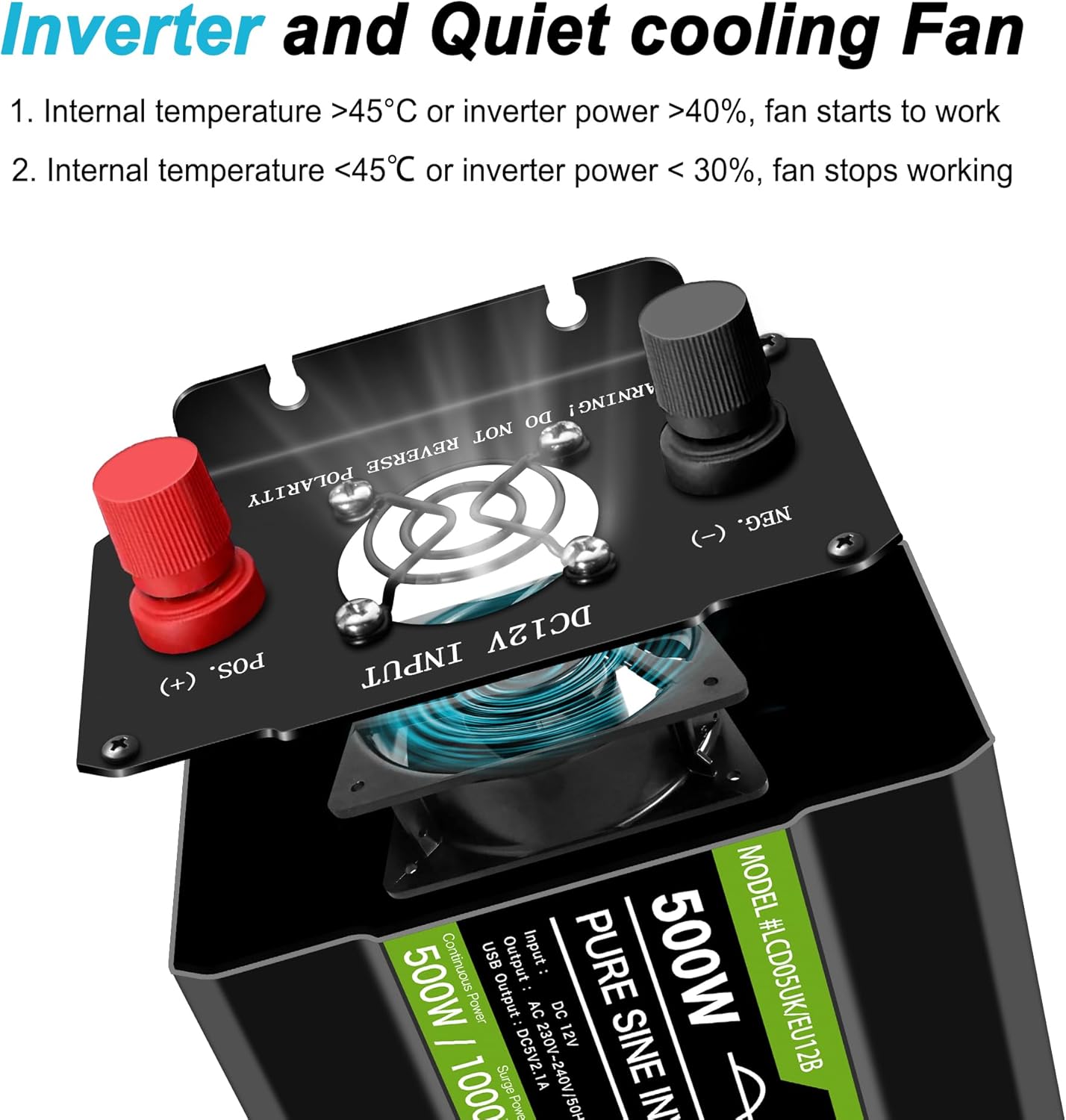
Image: An internal view of the inverter showing the cooling fan and its placement, emphasizing the importance of proper ventilation for efficient operation.
9. Troubleshooting
If you encounter issues with your inverter, refer to the following common problems and solutions:
| Problem | Possible Cause | Solution |
|---|---|---|
| Inverter does not turn on. | Loose battery connection, low battery voltage, faulty fuse. | Check battery cable connections. Ensure battery voltage is above 11V. Check and replace fuses if necessary. |
| "FAULT" indicator or error on LCD. | Overload, over-temperature, short circuit, input voltage out of range. | Reduce connected load. Allow inverter to cool down. Check for short circuits in connected devices. Verify input voltage is within 11V-15V. |
| No AC output. | Inverter OFF, low battery, overload, faulty AC device. | Turn inverter ON. Recharge battery. Reduce load. Test AC device with another power source. |
| Fan not running. | Normal operation (fan only runs when needed). | This is normal. The fan activates when internal temperature exceeds 45°C or load exceeds 40%. |
Image: The inverter's LCD display indicating the transition from a normal 'POWER' state to an 'ERROR' state, which helps in diagnosing issues.
10. Specifications
| Parameter | Value |
|---|---|
| Brand | NOVOPAL |
| Model Number | DLCD500PEU12 (500W 12V) |
| Continuous Power | 500 Watts |
| Peak Power | 1000 Watts |
| Input Voltage | 12 Volts DC |
| Output Voltage | 220/230 Volts AC |
| Output Frequency | 50 Hz |
| Output Waveform | Pure Sine Wave |
| USB Output | 5V / 2.1A (x2) |
| Dimensions (L x W x H) | 24.5 x 7 x 10.5 cm |
| Recommended Use | Travel, camping, boat trips, car, RV use in areas without grid electricity. |
11. Warranty and Support
Your NOVOPAL 500W Pure Sine Wave Inverter comes with a 1-year warranty against manufacturer defects. This warranty covers defects in materials and workmanship under normal use.
Additionally, a 30-day return policy for refund or replacement is available from the date of purchase, subject to the retailer's terms and conditions.
For technical support, warranty claims, or any questions regarding your product, please contact NOVOPAL customer service through your purchase platform or the official NOVOPAL website.
Ask a question about this manual
Ask about setup, troubleshooting, compatibility, parts, safety, or missing instructions. Manuals+ will review the question and use this page’s manual context to help answer it.