
1. Introduction
This manual provides essential information for the setup, operation, and maintenance of your SAMSUNG QN50QN90DAFXZA 50 Inch Neo QLED TV. Please read this manual thoroughly to ensure proper use and to maximize your viewing experience.

Image: Front view of the Samsung Neo QLED TV, showcasing its display and stand.
2. Safety Information
Observe the following safety precautions to prevent damage to your TV and ensure personal safety:
- Do not block ventilation openings.
- Do not place the TV near heat sources.
- Protect the power cord from being walked on or pinched.
- Only use attachments/accessories specified by the manufacturer.
- Unplug the TV during lightning storms or when unused for long periods.
- Refer all servicing to qualified service personnel.
3. What's in the Box
Verify that all components are present:
- SAMSUNG QN50QN90DAFXZA 50 Inch Neo QLED TV
- TV Stand
- Remote Control (SolarCell Remote)
- Power Cable
- User Manual (this document)

Image: The Samsung Neo QLED TV shown alongside optional extended protection plan documents and a screen cleaner, which may be included in certain bundles.
4. Setup
4.1 Physical Installation
Carefully unpack the TV and its components. Choose a stable location for your TV, either on its stand or mounted on a wall (wall mount sold separately).

Image: Side profile of the Samsung Neo QLED TV, illustrating its slim form factor.
4.2 Initial Power-On and Configuration
- Connect the power cable to the TV and a wall outlet.
- Press the power button on the remote control.
- Follow the on-screen instructions to complete the initial setup, including language selection, network connection (Wi-Fi 5), and channel scanning.
4.3 Connectivity
Your TV features multiple ports for connecting external devices:
- HDMI 2.1 Ports (x4): For connecting gaming consoles, Blu-ray players, and other high-definition devices.
- USB-A Ports (x2): For connecting USB storage devices.
- LAN Port: For wired internet connection.
- Bluetooth 5.2: For wireless audio devices and accessories.
- Optical Audio Output Port: For connecting to soundbars or home theater systems.
5. Operating the TV
5.1 Remote Control
The included SolarCell Remote charges via indoor lighting or USB-C, eliminating the need for disposable batteries. Use it to navigate menus, adjust volume, change channels, and access smart features.
5.2 Smart TV Features (Samsung Tizen OS)
Your TV runs on Samsung's Tizen OS, providing access to a wide range of streaming services, apps, and smart features. The built-in voice assistant allows for hands-free control.

Image: The Samsung Tizen OS interface, showing various streaming applications and content recommendations.
5.3 Picture and Sound Settings
The Neo QLED TV utilizes advanced technologies for enhanced viewing and audio:
- Quantum Matrix with Mini LEDs: Precisely controls the Mini LEDs for intense picture quality and brightness, enhancing contrast in every scene.
- Neo Quantum HDR: Delivers realistic picture with 4K color and contrast, providing rich, accurate shades and tones.
- 4K AI Upscaling: Utilizes the NQ4 AI Gen2 Processor to enhance lower-resolution content to near 4K quality.
- Real Depth Enhancer Pro: Adjusts for a fully dimensional picture by finding and enhancing the focal point in each frame.
- Dolby Atmos & Object Tracking Sound Lite: Provides immersive audio that moves with the on-screen action.
- Motion Xcelerator Turbo 144Hz: Ensures smooth motion for fast-paced content and gaming (requires compatible gaming PC supporting 4K resolution).

Image: A high-resolution image of elephants in a natural setting, demonstrating the TV's 4K display capabilities.
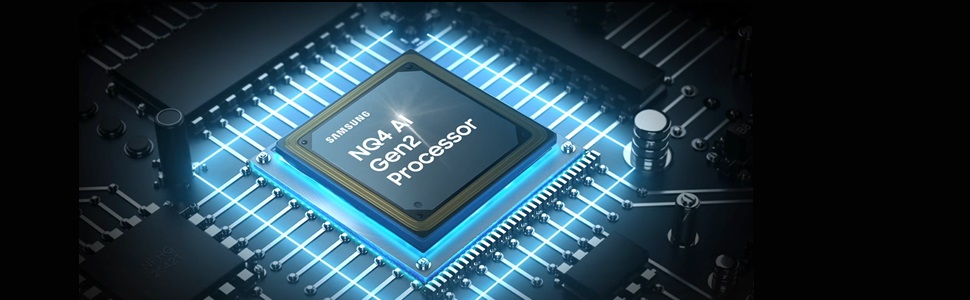
Image: A close-up view of the NQ4 AI Gen2 Processor, the TV's central processing unit.
5.4 Samsung Gaming Hub
Access cloud gaming services and connect your gaming devices through the Samsung Gaming Hub for an optimized gaming experience.
6. Maintenance
6.1 Screen Cleaning
To clean the TV screen, gently wipe it with a soft, lint-free cloth. For stubborn marks, use a screen-specific cleaning solution that is non-ammonia and alcohol-free. Apply the solution to the cloth, not directly to the screen.

Image: A screen cleaning solution, suitable for maintaining the TV display.
7. Troubleshooting
If you encounter issues with your TV, refer to the following common solutions:
- No Power: Ensure the power cable is securely connected to both the TV and the power outlet. Test the outlet with another device.
- No Picture/Sound: Check all cable connections (HDMI, optical). Verify the correct input source is selected. Restart the TV and any connected devices.
- Poor Picture Quality: Adjust picture settings (brightness, contrast, sharpness). Ensure the input source is providing a high-quality signal.
- Remote Control Not Working: Ensure the SolarCell remote is charged. Point the remote directly at the TV.
- Network Connectivity Issues: Restart your router and modem. Reconnect the TV to your Wi-Fi network in the settings menu. For wired connections, check the Ethernet cable.
For more detailed troubleshooting, consult the full digital manual available on the Samsung support website or contact customer service.
8. Specifications
| Feature | Specification |
|---|---|
| Brand | SAMSUNG |
| Model Number | QN50QN90DAFXZA |
| Screen Size | 50 Inches |
| Display Technology | Neo QLED |
| Resolution | 4K (3840 x 2160) |
| Refresh Rate | 120 Hz (Motion Xcelerator Turbo 144Hz for compatible PC gaming) |
| Processor | NQ4 AI Gen2 Processor |
| Audio Output | 40 Watt 2.2CH, Dolby Atmos, Object Tracking Sound Lite |
| Connectivity | Wi-Fi 5, Bluetooth 5.2, 4 HDMI 2.1 Ports, 2 USB-A, LAN Port, Optical Audio Output |
| Operating System | Samsung Tizen OS |
| Product Dimensions (with stand) | 8.7"D x 43.8"W x 27.8"H |
| Item Weight | 38.8 pounds |
| VESA Mount Compatible | 200x200 |
9. Warranty and Support
9.1 Manufacturer's Warranty
Your SAMSUNG QN50QN90DAFXZA TV is covered by a limited manufacturer's warranty. Please refer to the warranty card included with your product or visit the official Samsung website for specific terms and conditions.
9.2 Extended Protection
Optional extended protection plans may be available from third-party providers. These plans typically offer coverage for mechanical and electrical failures, power surge protection, and customer support beyond the manufacturer's warranty period. Benefits for such plans often begin on day one for specific coverages like power surge protection.

Image: An informational graphic detailing typical features and benefits of an extended protection plan, such as coverage for mechanical/electrical failures and customer support.
9.3 Customer Support
For technical assistance, product registration, or service inquiries, please visit the official Samsung support website or contact their customer service hotline. Contact information can typically be found on the Samsung website or in your product documentation.


