
Introduction
Thank you for choosing the BTEK/BMAX 48V Cordless Drill Driver & Impact Wrench. This powerful and versatile tool is designed to handle demanding tasks with ease, offering impressive torque and a compact design for comfortable and precise handling. This manual provides essential information for the safe and efficient operation, maintenance, and troubleshooting of your new tool. Please read it thoroughly before first use and keep it for future reference.
Safety Instructions
Always follow basic safety precautions when using electric tools to reduce the risk of fire, electric shock, and personal injury.
- Work Area Safety: Keep your work area clean and well-lit. Cluttered or dark areas invite accidents. Do not operate power tools in explosive atmospheres, such as in the presence of flammable liquids, gases, or dust.
- Electrical Safety: Avoid body contact with earthed or grounded surfaces (e.g., pipes, radiators, ranges, refrigerators). Do not expose power tools to rain or wet conditions.
- Personal Safety: Always wear eye protection and appropriate personal protective equipment. Dress properly; avoid loose clothing or jewelry. Keep hair, clothing, and gloves away from moving parts.
- Tool Use and Care: Do not force the power tool. Use the correct tool for your application. Disconnect the battery pack from the power tool before making any adjustments, changing accessories, or storing power tools.
- Battery Pack Use and Care: Recharge only with the charger specified by the manufacturer. Do not disassemble, open, or shred battery packs. Do not short-circuit a battery pack.
Product Overview and Components
The BTEK/BMAX 48V Cordless Drill Driver & Impact Wrench comes with a comprehensive set of accessories to assist you in various tasks. Below are the main components and a visual guide.
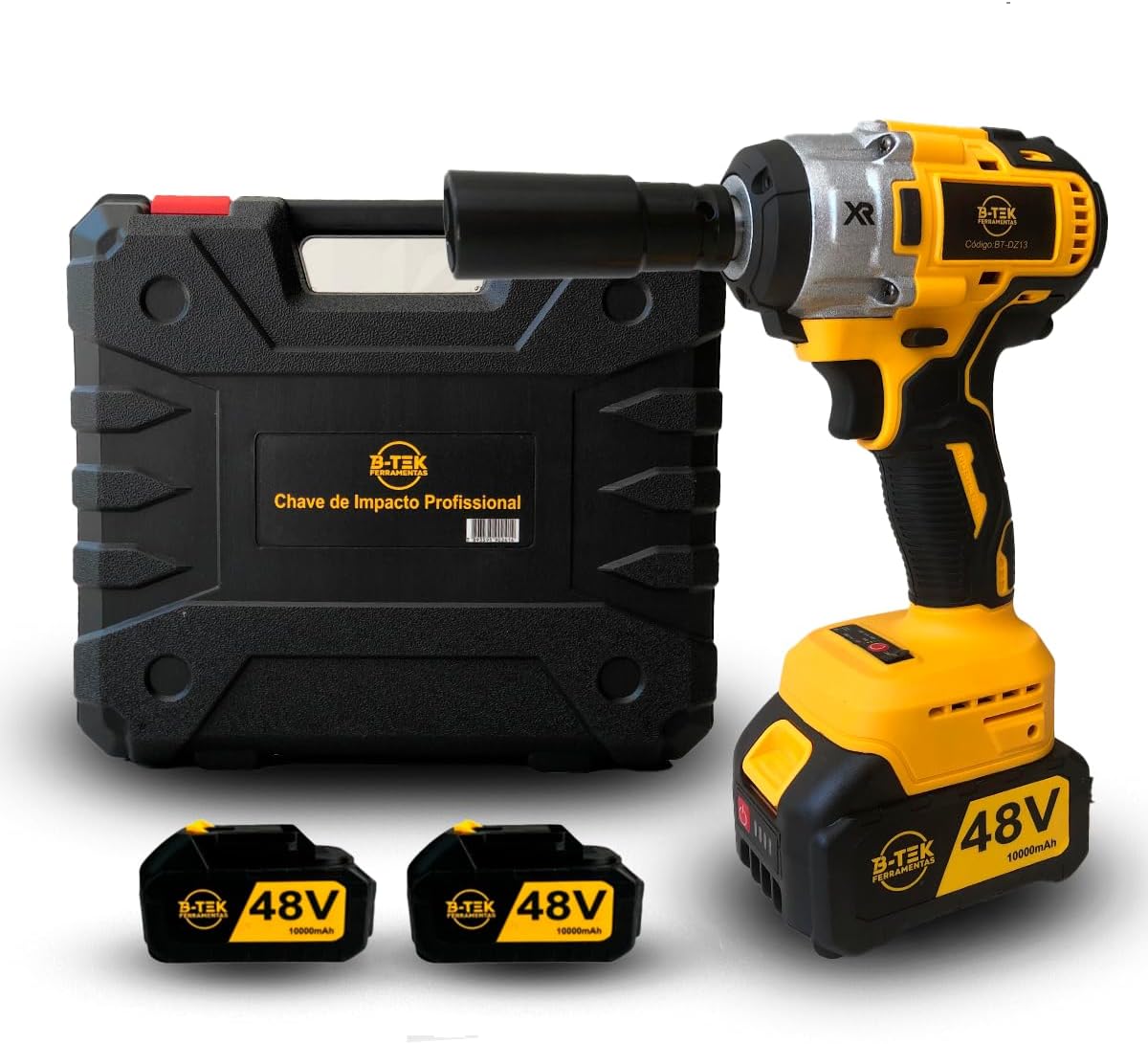
Figure 1: The 48V Cordless Drill Driver & Impact Wrench, its carrying case, and two 48V batteries.

Figure 2: Key features of the tool, including the 1/2'' square drive, compact design, LED work light, brushless motor, and speed selector.

Figure 3: The complete kit, showing the impact wrench, carrying case, two batteries, charger, 6 sockets, drill bit accessory, bit adapter, and chuck adapter.

Figure 4: Detail of the battery base with LED indicators showing charge levels and the power switch.
Included Components:
- 48V Cordless Drill Driver & Impact Wrench
- 2 x 48V Lithium-Metal Batteries
- Battery Charger (Bivolt: 110/220V)
- Carrying Case
- 6 Sockets
- Drill Bit Accessory
- Bit Adapter
- Chuck Adapter
Setup
1. Charging the Battery:
Before first use, fully charge both 48V lithium-metal batteries. Connect the charger to a 110V or 220V power outlet. Insert the battery into the charger. The LED indicators on the battery will show the charging status. A full charge is indicated when all 4 LED levels are lit. The charger is designed for bivolt operation, adapting to your local voltage.
2. Installing the Battery:
Align the battery with the base of the tool handle. Slide the battery into place until it clicks securely. Ensure it is firmly seated before operation.
3. Attaching Accessories:
The tool features a 1/2'' square drive for sockets. For drill bits, use the provided chuck adapter. Insert the desired socket or adapter onto the square drive until it locks into place. Ensure accessories are securely attached before starting the tool.
Operating Instructions
1. Powering On/Off:
Press the trigger switch to turn on the tool. The tool will start operating. Release the trigger to turn it off. The integrated LED work light will illuminate during operation, providing better visibility in dark areas.
2. Speed Selection:
The tool features a speed selector with two working speeds (0 - 2600/ 0 - 3100 RPM). Use the selector switch, typically located near the handle, to choose the appropriate speed for your task. Lower speeds are suitable for delicate work, while higher speeds are for faster material removal or tightening.
3. Forward/Reverse Function:
A reverse function switch allows you to change the direction of rotation. Push the switch to the left for forward rotation (tightening) and to the right for reverse rotation (loosening). Ensure the tool has come to a complete stop before changing direction.
4. Using the Impact Wrench/Drill:
Apply firm, steady pressure to the workpiece. For impact wrench applications, the tool will deliver high torque impacts to loosen or tighten fasteners. For drilling, ensure the correct drill bit is used for the material. Always maintain a firm grip on the tool.
Maintenance
1. Cleaning:
Regularly clean the tool's ventilation openings to prevent overheating. Use a soft, damp cloth to wipe down the exterior. Do not use harsh chemicals or abrasive cleaners. Ensure the tool is dry before storage.
2. Storage:
Store the tool and its accessories in the provided carrying case in a dry, cool place, away from direct sunlight and moisture. Keep out of reach of children.
3. Battery Care:
To prolong battery life, avoid fully discharging the battery before recharging. Store batteries in a partially charged state if not used for extended periods. Do not expose batteries to extreme temperatures.
Troubleshooting
| Problem | Possible Cause | Solution |
|---|---|---|
| Tool does not turn on. | Battery not charged or not properly installed. | Ensure battery is fully charged and securely inserted into the tool. Check battery LED indicators. |
| Reduced power or intermittent operation. | Low battery charge; tool overheating; internal fault. | Recharge battery. Allow tool to cool down if it feels hot. If issues persist, contact customer support. |
| Chuck/Mandrel is bent or not functioning. | Improper use; excessive force; manufacturing defect. | Ensure accessories are correctly installed and not overtightened. Avoid applying excessive side force during operation. If defect is suspected, contact customer support. |
| Battery not charging. | Charger not connected; faulty charger or battery. | Verify charger is plugged into a live outlet. Check charger and battery for visible damage. Try charging a different battery if available. |
Specifications
| Feature | Detail |
|---|---|
| Manufacturer | BTEK |
| Model Number | DZ13 |
| Power Source | Battery Powered |
| Battery Type | Lithium-Metal (2 included) |
| Voltage | 48V |
| Wattage | 48 watts |
| Torque | 320 Newton Meters |
| Impact Rate | 0 - 2600 / 0 - 3100 impacts/min |
| Max Rotational Speed | 3100 RPM |
| Amperage | 10 Amperes |
| Drive Size | 1/2 inch Square Drive |
| Charger Input | Bivolt (110V/220V) |
| Special Features | Compact, Reverse Function, Built-in LED Work Light, Brushless Motor, Portable |
| Material | Rubber, Metal, Plastic |
| Color | Yellow |
| Product Dimensions (L x W x H) | 10 x 16 x 26 cm (3.9 x 6.3 x 10.2 inches) |
| Weight | 1.75 kg (3.86 lbs) |
Warranty and Support
For warranty information and customer support, please refer to the documentation provided with your purchase or contact the seller directly. Keep your proof of purchase for any warranty claims. Additional protection plans may be available for extended coverage.


