
Introduction
This manual provides detailed instructions for the installation, operation, and maintenance of your SICSOLINK 8 Port PoE+ Switch. This unmanaged switch is designed to provide power and data connectivity for various network devices, including IP cameras, access points, and VoIP phones, making it ideal for home offices and small businesses. Please read this manual thoroughly before using the product to ensure proper setup and performance.
Product Features
- 10 Total Ports: Features 8 Power over Ethernet (PoE+) ports and 2 dedicated uplink ports for network expansion.
- PoE+ Standard Compliance: Supports IEEE 802.3af/at, ensuring compatibility with a wide range of standard PoE devices.
- High Power Output: Delivers up to 30W per PoE port with a total power budget of 120W, capable of powering multiple high-power devices simultaneously.
- AI Smart PoE: Intelligent detection of device power needs and distance, with automatic reboot functionality for stable connections and reduced downtime.
- Extended Transmission: Supports data and power transmission up to 250 meters (820 feet) in AI Smart PoE mode.
- Plug & Play: Requires no configuration for immediate use.
- Durable Design: Compact metal housing for enhanced durability and efficient heat dissipation.
- Flexible Installation: Suitable for desktop placement or wall mounting.
- Wide Operating Temperature: Functions reliably in environments ranging from -10°C (14°F) to +55°C (131°F).
Package Contents
Verify that all items are present and in good condition upon unpacking.
- SICSOLINK 8 Port PoE+ Switch (Model P0802D)
- Power Adapter
- Power Cord
- User Manual (this document)

Image: The SICSOLINK 8 Port PoE+ Switch shown with its power adapter and power cord, illustrating the complete package contents.
Physical Overview
The SICSOLINK 8 Port PoE+ Switch features a robust metal casing with clearly labeled ports and indicators for easy identification and operation.
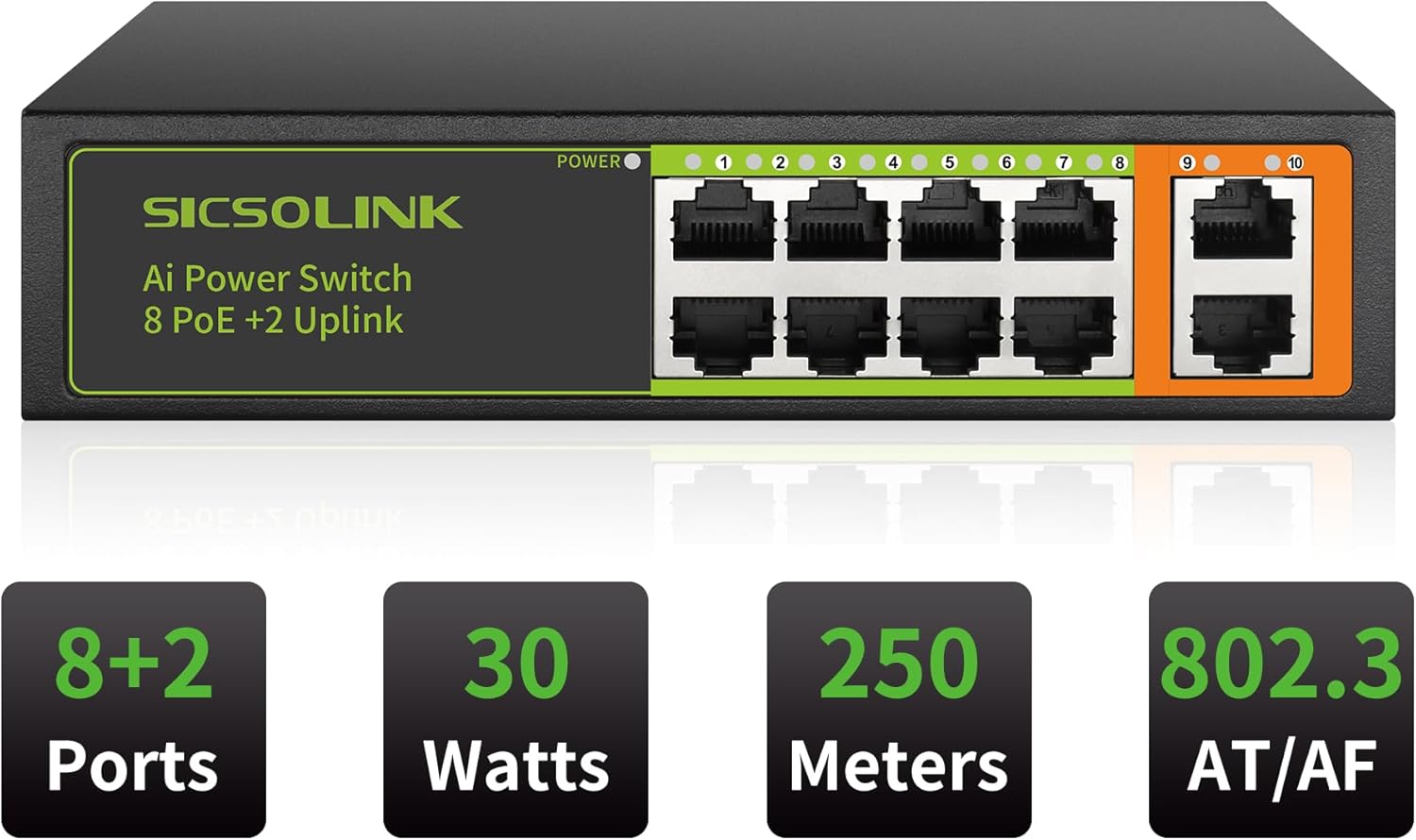
Image: Front panel of the SICSOLINK 8 Port PoE+ Switch, highlighting the 8 PoE ports (1-8) and 2 uplink ports (9-10), along with the power indicator.
- Power LED: Indicates the power status of the switch.
- PoE Ports (1-8): These 10/100Mbps RJ45 ports support Power over Ethernet (PoE+) for connecting compatible devices such as IP cameras, wireless access points, and VoIP phones.
- Uplink Ports (9-10): These 10/100Mbps RJ45 ports are used to connect the switch to a router, Network Video Recorder (NVR), or another network switch.
Setup
The SICSOLINK PoE+ Switch is designed for plug-and-play operation, requiring minimal setup.
- Connect Power: Connect the included power adapter to the switch's power input and then plug the power cord into a standard electrical outlet. The Power LED on the switch should illuminate.
- Connect Uplink: Use a standard Ethernet cable to connect one of the uplink ports (9 or 10) on the switch to your router, NVR, or main network switch.
- Connect PoE Devices: Connect your PoE-compatible devices (e.g., IP cameras, access points) to any of the PoE ports (1-8) using standard Ethernet cables. The switch will automatically detect and power these devices.
- Connect Non-PoE Devices (Optional): For non-PoE devices that require network connectivity through the switch, use a PoE splitter (sold separately) to separate power and data, then connect the data cable to a PoE port.
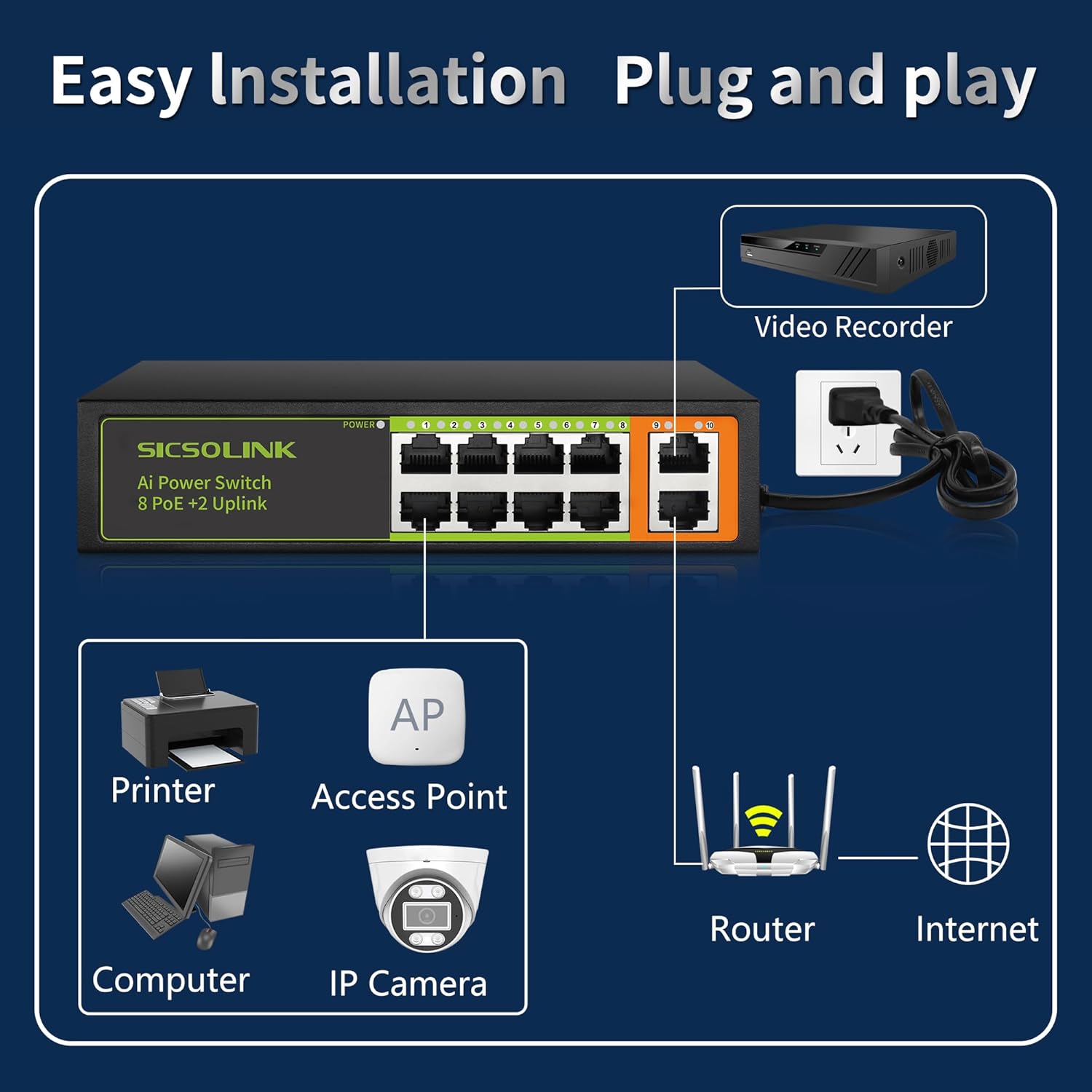
Image: An illustration demonstrating the simple plug-and-play setup, connecting the switch to a router, IP camera, computer, printer, and access point.
Operating Instructions
Once connected, the SICSOLINK PoE+ Switch operates automatically. It is an unmanaged switch, meaning no software configuration is required.
- Automatic Device Detection: The switch automatically detects whether a connected device is PoE-compatible and supplies power accordingly.
- Power Budget: Each PoE port can deliver up to 30W, with a total power budget of 120W across all 8 PoE ports, sufficient for powering up to 8 IP cameras or other high-power PoE devices.
- Data Transmission: Data transfer begins immediately upon connection. The switch supports 10/100Mbps speeds on all ports.
- LED Indicators: Observe the LED indicators on each port to confirm active connections and data activity.

Image: An illustration detailing the PoE power capabilities, showing that all 8 ports are PoE capable, providing up to 30W each for a total of 120W, ideal for powering 8 IP cameras.
AI Smart PoE Functionality
The AI Smart PoE feature enhances the reliability and efficiency of your network.
- Intelligent Detection: Each PoE port intelligently detects the power requirements and optimal transmission distance for the connected device.
- Auto-Reboot: In the event of a connection failure or device unresponsiveness, the AI Smart PoE function will automatically restart the affected port, restoring connectivity without manual intervention. This is particularly beneficial for security camera systems to minimize downtime.
- Extended Range: This mode allows for extended power and data transmission up to 250 meters (820 feet) over standard Ethernet cables, surpassing the typical 100-meter limit.

Image: A diagram comparing the power and distance extension capabilities of a normal PoE switch versus the SICSOLINK AI Smart PoE Switch, highlighting the 820ft extension.
Installation
The compact design of the SICSOLINK PoE+ Switch allows for versatile placement options.
Desktop Placement
Simply place the switch on a flat, stable surface such as a desk or shelf. Ensure adequate ventilation around the device.
Wall Mounting
The switch can be securely mounted to a wall using appropriate screws (not included) and the mounting holes located on the underside of the device. Ensure the mounting surface is sturdy enough to support the switch and connected cables.

Image: An illustration showing the compact dimensions of the SICSOLINK PoE Switch and examples of both desktop and wall-mounted installations.
Maintenance
To ensure optimal performance and longevity of your SICSOLINK PoE+ Switch, follow these simple maintenance guidelines:
- Keep Clean: Regularly dust the switch to prevent accumulation that could hinder ventilation. Use a soft, dry cloth.
- Ensure Ventilation: Do not block the ventilation holes. Ensure the switch is placed in an area with good airflow to prevent overheating.
- Cable Management: Keep network cables organized and free from kinks or excessive tension to prevent damage and ensure reliable connections.
- Power Stability: Connect the switch to a stable power source. Consider using a surge protector to safeguard against power fluctuations.
Troubleshooting
If you encounter issues with your SICSOLINK PoE+ Switch, refer to the following common problems and solutions:
| Problem | Possible Cause | Solution |
|---|---|---|
| No Power LED indication. | Power adapter not connected or faulty; power outlet issue. | Ensure the power adapter is securely connected to the switch and a working power outlet. Test the outlet with another device. |
| PoE device not receiving power or data. | Device is not PoE-compatible; cable fault; device power exceeds port budget; AI Smart PoE auto-reboot in progress. | Verify the device is PoE-compatible (IEEE 802.3af/at). Check Ethernet cable for damage. Ensure total power budget (120W) and per-port budget (30W) are not exceeded. Wait for AI Smart PoE to complete its cycle or try reconnecting the device. |
| Network connection issues. | Incorrect cable connection; faulty uplink connection; router/NVR issue. | Ensure uplink ports are correctly connected to your router/NVR. Check all Ethernet cables for secure connections and damage. Verify your router/NVR is functioning correctly. |
| Slow network speed. | Cable quality; network congestion; device limitations. | Use high-quality Ethernet cables. Reduce network traffic if possible. Ensure connected devices are not bottlenecking the network. |
Specifications
| Model Number | P0802D |
| Number of Ports | 10 (8 PoE+ ports, 2 Uplink ports) |
| PoE Standard | IEEE 802.3af/at |
| PoE Power Output Per Port | Up to 30W |
| Total PoE Power Budget | 120W |
| Data Transfer Rate | 10/100Mbps (per port) |
| Extended Transmission | Up to 250 meters (820 feet) with AI Smart PoE |
| Switch Type | Unmanaged |
| Dimensions (L x W x H) | 17 x 9 x 4 cm (6.69 x 3.54 x 1.57 inches) |
| Weight | 0.58 kg (1.28 lbs) |
| Case Material | Metal |
| Operating Temperature | -10°C to +55°C (14°F to 131°F) |
| Voltage | 52 Volts (DC) |
| Current Rating | 2.3 Amps |
| Included Components | Power Adapter |

Image: An illustration highlighting the wide operating temperature range of the SICSOLINK PoE Switch, from -10°C (14°F) to +55°C (131°F).
Warranty and Support
Your SICSOLINK 8 Port PoE+ Switch comes with a 1-year warranty, ensuring peace of mind regarding product quality and performance.
For technical assistance or warranty claims, please contact SICSOLINK customer support. 24-hour technical support is available to help you with any questions or issues you may encounter.
Please refer to the product packaging or the official SICSOLINK website for the most current contact information.