
1. Introduction
The Octagon SX RCU 07 is an original 2-in-1 remote control designed for various Octagon receivers. It features an ergonomic design and includes a universal TV learning function, allowing it to control both your Octagon receiver and your television. This manual provides instructions for setup, operation, and troubleshooting.
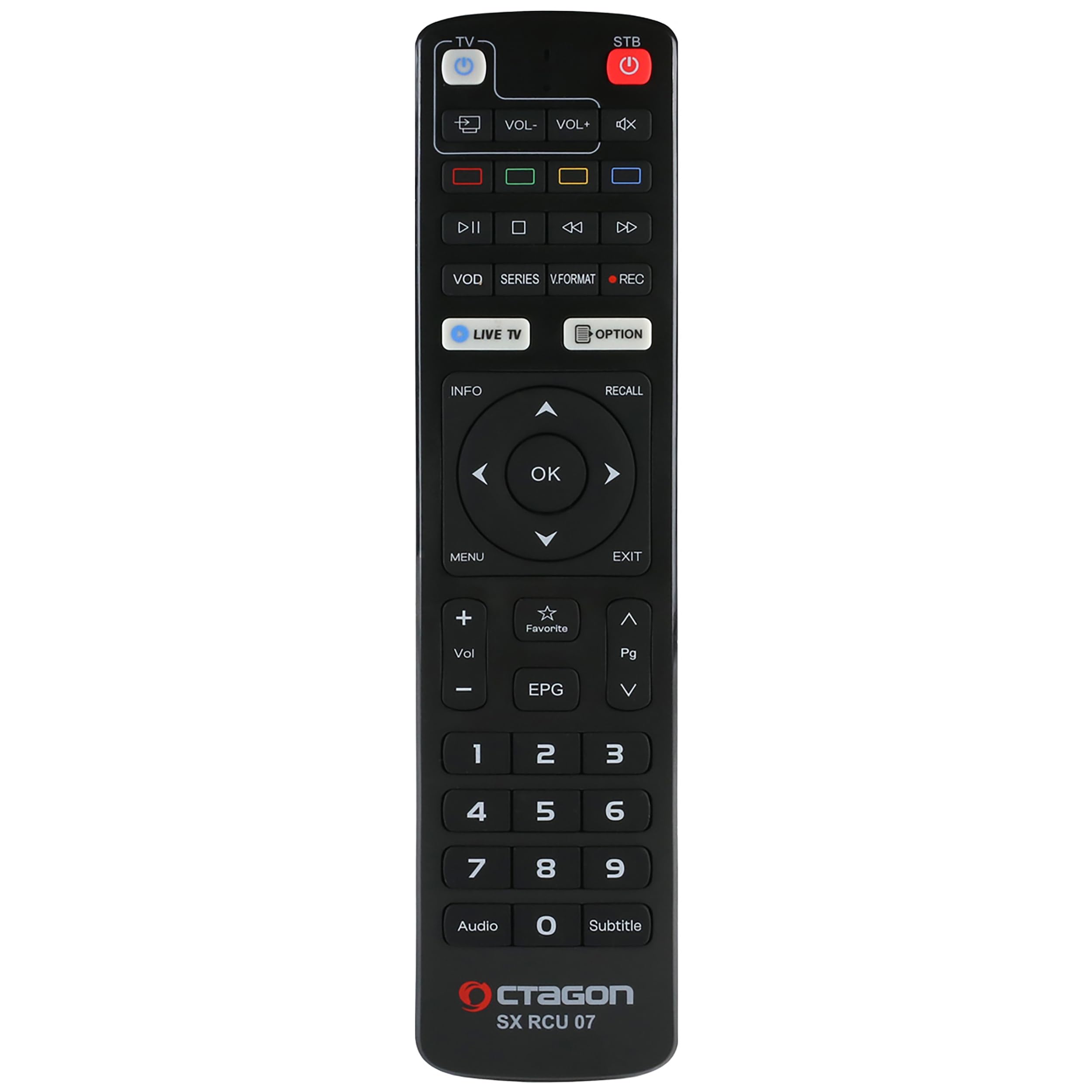
Figure 1: Front view of the Octagon SX RCU 07 Remote Control.
2. Setup
2.1 Inserting Batteries
The Octagon SX RCU 07 remote control requires two AAA batteries (not included). To insert the batteries:
- Open the battery compartment cover on the back of the remote control.
- Insert two AAA batteries, ensuring the correct polarity (+ and -) as indicated inside the compartment.
- Close the battery compartment cover securely.
2.2 Initial Receiver Setup
The remote control is ready for immediate use with compatible Octagon receivers without any prior programming. Simply insert the batteries, and it will automatically control all common functions of your Octagon receiver.
2.3 TV Learning Function (2-in-1)
The Octagon SX RCU 07 remote control can learn functions from your existing TV remote, allowing you to control basic TV functions (like Power, Volume) with a single remote. Follow these steps to program the TV functions:
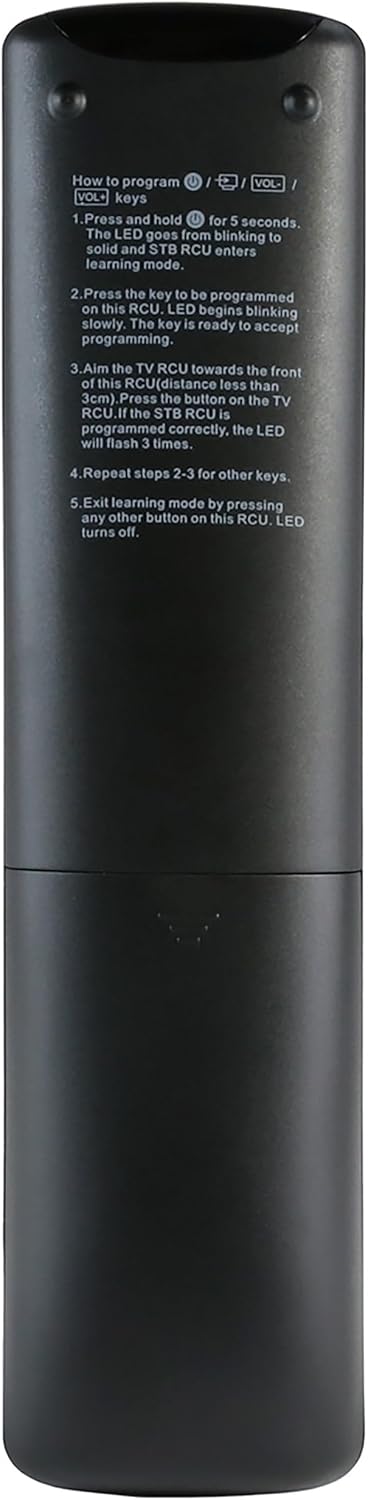
Figure 2: Back view of the remote control showing the TV learning instructions.
- Press and hold the TV Power button (blue button) for 5 seconds. The LED indicator on the remote will change from blinking to a steady light, indicating that the remote is in learning mode.
- Press the button on the Octagon remote that you wish to program (e.g., TV Power, Vol+, Vol-). The LED will start to blink slowly, indicating it is ready to receive a signal.
- Point your original TV remote control directly at the front of the Octagon remote (ensure the distance is less than 3 cm). Press and hold the corresponding button on your TV remote (e.g., TV Power). If the Octagon remote successfully learns the function, its LED will flash three times.
- Repeat steps 2 and 3 for any other buttons you wish to program (e.g., Volume Up, Volume Down, Mute).
- To exit learning mode, press any other button on the Octagon remote that is not being programmed. The LED will turn off.
3. Operating the Remote Control
The Octagon SX RCU 07 remote control provides comprehensive control over your compatible Octagon receiver and learned TV functions. Below are some key functions:
- STB Power / TV Power: Turns the receiver / TV on or off.
- Volume +/-: Adjusts the volume.
- Mute: Mutes the audio.
- Navigation Keys (Up, Down, Left, Right) & OK: Used for menu navigation and selection.
- MENU: Accesses the main menu of the receiver.
- EXIT: Exits current menu or screen.
- INFO: Displays program information.
- LIVE TV: Direct access to live television.
- VOD / SERIES: Direct access to Video On Demand or Series content.
- REC: Initiates recording.
- EPG: Accesses the Electronic Program Guide.
- Favorite: Accesses favorite channels list.
- Number Keys (0-9): For direct channel input.
- Audio / Subtitle: Controls audio tracks and subtitle options.
4. Maintenance
4.1 Battery Replacement
When the remote control's performance degrades or the LED indicator does not light up, it is time to replace the batteries. Always replace both AAA batteries at the same time with new ones, ensuring correct polarity.
4.2 Cleaning
To clean the remote control, use a soft, dry cloth. Do not use liquid cleaners, sprays, or abrasive materials, as these can damage the remote's surface or internal components.
4.3 Storage
Store the remote control in a dry place away from direct sunlight and extreme temperatures. If the remote will not be used for an extended period, it is advisable to remove the batteries to prevent leakage.
5. Troubleshooting
- Remote not responding:
- Check if the batteries are inserted correctly and are not depleted. Replace if necessary.
- Ensure there is a clear line of sight between the remote control and the receiver/TV. Remove any obstructions.
- Make sure you are within the effective operating range (up to 10 meters).
- TV learning function not working:
- Ensure the original TV remote has fresh batteries and is functioning correctly.
- Verify that the distance between the two remotes during the learning process is less than 3 cm.
- Repeat the learning steps carefully, ensuring the LED indicator behaves as described.
- Intermittent control:
- This could indicate low battery power. Replace the batteries.
- Ensure no strong light sources (like direct sunlight) are interfering with the infrared signal.
6. Specifications
| Feature | Detail |
|---|---|
| Brand | Octagon |
| Model Name | SX RCU 07 |
| Color | Black |
| Connectivity Technology | Infrared |
| Special Feature | Universal (with TV learning function) |
| Compatible Devices | Octagon Receivers, Television |
| Number of Supported Devices | 2 (Receiver + TV) |
| Number of Buttons | 47 |
| Controller Type | Button Control |
| Maximum Range | 10 Meters |
| Dimensions (L x W x H) | 200 x 50 x 12 mm (approx.) |
7. Compatible Octagon Receiver Models
The Octagon SX RCU 07 remote control is compatible with the following Octagon receiver models:
- SX888 V2 4K IP
- SX888 V2 4K IP WL
- SX988 4K
- SX888 4K
- SFX6008 IP HD
- SFX6008 IP HD WL
- SX888 SE V2 HD WL
- SX888 SE V2 HD
- SX887 HD
- SX887 WL HD
- SX887 SE HD
- SX887 SE HD WL
- SX889 IP HD
- SX889 IP HD WL
- SX888 IP HD
- SX888 IP HD WL
- IP HD
- IP HD WL
- IP8 4K
8. Warranty and Support
Information regarding product warranty and customer support is not provided within this instruction manual. Please refer to the product packaging, the retailer's website, or the official Octagon website for detailed warranty terms and support contact information.