
1. Introduction
Thank you for choosing the Generico E-bike Waterproof LCD Display. This display is designed to provide essential information and control for your electric bicycle, enhancing your riding experience. It features a durable, waterproof design and is compatible with Ebike Argento Minimax models.
Key Features:
- Adjustable Voltage: Supports both 36V and 48V battery systems.
- Waterproof LCD Screen: Ensures clear data readability in various weather conditions.
- 5 Power Assist Levels: Allows for precise control over motor assistance.
- Motor Power Consumption Display: Monitor your motor's energy usage.
- Light Control: Integrated control for your e-bike's lights.
- Battery Charge Indicator: Provides real-time battery status.
- Durable Construction: Resistant ABS plastic casing protects internal circuitry.
2. Setup and Installation
The Generico E-bike Waterproof LCD Display is designed for quick and easy installation on your bicycle's handlebars. Mounting hardware is included.
Package Contents:
- Generico E-bike Waterproof LCD Display
- Mounting Hardware
Installation Steps:
- Mount the Display: Securely attach the display to your e-bike's handlebars using the provided mounting hardware. Ensure it is positioned for optimal visibility and accessibility.
- Connect the Cable: Locate the display's connection cable and plug it into the corresponding port on your e-bike's electrical system. Ensure the connection is firm and secure to maintain waterproofing.

Figure 2.1: Front and Back View of the Display. This image illustrates the display's screen, control buttons, and the rear mounting bracket with its electrical connector.
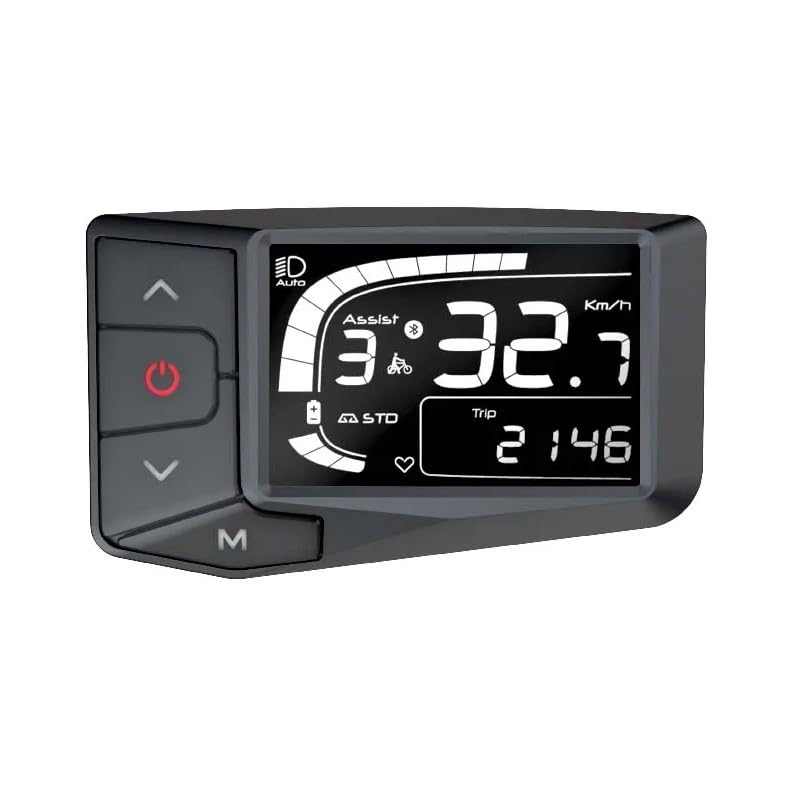
Figure 2.2: Rear View of the Display. This image shows the back of the display, emphasizing the waterproof connector port for electrical connection to the e-bike.
3. Operating Instructions
The display features intuitive buttons for easy control and data access during your ride.
Button Functions:
- Power Button: Press and hold to turn the display ON/OFF. A short press may cycle through display modes.
- Up Button (▲): Increases power assist level, navigates menus upwards, or increases values.
- Down Button (▼): Decreases power assist level, navigates menus downwards, or decreases values.
- Mode (M) Button: Cycles through different display information (e.g., Trip Distance, Odometer, Average Speed, Max Speed). A long press may enter settings mode.
Display Information:
- Speed: Current riding speed.
- Power Assist Level: Indicates the selected motor assistance level (1-5).
- Battery Charge: Graphical and/or percentage display of remaining battery life.
- Motor Power Consumption: Shows real-time power draw from the motor.
- Light Indicator: Shows if the e-bike lights are active.
- Trip Distance: Distance covered during the current ride.
- Odometer: Total distance covered by the e-bike.
Adjusting Voltage (36V/48V):
The display supports both 36V and 48V battery systems. The voltage setting is typically configured during initial setup or can be adjusted via the display's settings menu. Refer to your e-bike's main controller manual for specific instructions on voltage configuration if not automatically detected.
4. Maintenance
Proper maintenance ensures the longevity and optimal performance of your LCD display.
- Cleaning: Wipe the display screen and casing with a soft, damp cloth. Avoid using abrasive cleaners, solvents, or harsh chemicals, as these can damage the screen or plastic.
- Waterproofing: While the display is waterproof, avoid submerging it in water or directing high-pressure water jets directly at it. Ensure all connections are secure to maintain its waterproof integrity.
- Storage: When not in use for extended periods, store the e-bike and display in a cool, dry place away from direct sunlight and extreme temperatures.
5. Troubleshooting
If you encounter issues with your display, refer to the following common troubleshooting steps:
| Problem | Possible Cause | Solution |
|---|---|---|
| Display does not turn on | No power from e-bike battery; Loose connection; Faulty display. | Check e-bike battery charge; Ensure all cables are securely connected; Contact support if problem persists. |
| Incorrect speed reading | Speed sensor issue; Incorrect wheel size setting. | Check speed sensor for damage or obstruction; Verify wheel size setting in display menu (if available). |
| Buttons unresponsive | Software glitch; Physical damage; Water ingress. | Try restarting the display (power off/on); Inspect buttons for physical damage; Ensure display is dry. |
If these steps do not resolve the issue, please contact the seller or manufacturer for further assistance.
6. Specifications
| Feature | Detail |
|---|---|
| Brand | Generico |
| Model Number | B0CY2YH8JY |
| Product Type | Waterproof LCD Display |
| Display Type | LCD |
| Voltage Compatibility | 36V / 48V (Adjustable) |
| Power Assist Levels | 5 |
| Sensor Type | Speed Sensor |
| Mounting Type | Handlebar Mount |
| User Interface Input | Buttons |
| Included Components | Mounting hardware |
| Country of Origin | Italy |
7. Warranty and Support
Warranty Information:
This product comes with a 1-year manufacturer's warranty from the date of purchase. The warranty covers defects in materials and workmanship under normal use. It does not cover damage caused by misuse, accidents, unauthorized modifications, or improper installation.
Customer Support:
For technical assistance, warranty claims, or any questions regarding your Generico E-bike Waterproof LCD Display, please contact the seller or retailer from whom you purchased the product. Please have your model number (B0CY2YH8JY) and proof of purchase ready when contacting support.