
1. Introduction
Welcome to your new Growalleter Ocean Wave Projector Light. This device is designed to create a tranquil and immersive visual experience with its dynamic water ripple effects and customizable RGB lighting. This manual provides essential information for setup, operation, and maintenance to ensure optimal performance and enjoyment.
2. What's in the Box
- Ocean Wave Projector Light Unit
- Remote Control
- USB Power Cable
- User Manual (this document)
3. Product Features
- Immersive RGB Mood Lighting: Offers 16 colors and 4 dynamic gradient modes (Breath, Flicker, Smooth, Static) with adjustable 360° RGB lighting and automatic looping.
- Safe and Convenient Power Supply: Features overcurrent and voltage protection. Designed for continuous plug-in use via a power outlet; not battery-powered or rechargeable.
- Convenient Control: Includes a remote for adjusting brightness, color, and modes. Features an intelligent memory function to save preferred settings.
- Dynamic Water Wave Projection: Emits a gentle, soothing glow with ASMR visual effects, creating a tranquil and immersive visual experience.
- Versatile Design: Suitable for various settings including bedrooms, living rooms, home offices, and cafes.
4. Setup
4.1 Unpacking
Carefully remove all components from the packaging.
4.2 Power Connection
Connect the provided USB power cable to the projector light unit.
Plug the USB cable into a compatible USB power adapter (not included) and then into a standard electrical outlet.
Important Note:
This device requires continuous power from a wall outlet and is not rechargeable or battery-operated.

Image: The Growalleter Ocean Wave Projector Light unit with its remote control, illustrating the compact design and included accessories.
4.3 Remote Control Preparation
Ensure the remote control has a working battery. If applicable, remove any plastic battery tab before first use.
5. Operating Instructions
5.1 Power On/Off
Press the "ON" button on the remote control or use the touch switch on the base of the unit to turn the light on.
Press the "OFF" button on the remote control or use the touch switch to turn the light off.
5.2 Changing Colors
Use the color buttons (R, G, B, W, and other colored circles) on the remote control to select a static color. The device offers 16 distinct colors.

Image: A detailed view of the remote control, highlighting buttons for power, brightness, and 16 color options, along with dynamic modes.
5.3 Adjusting Brightness
Use the brightness adjustment buttons (sun icons) on the remote control to increase or decrease the light intensity.
5.4 Dynamic Modes
The remote control includes buttons for various dynamic modes:
- FLASH: Rapidly cycles through colors.
- STROBE: Flashes colors at a moderate pace.
- FADE: Smoothly transitions between colors.
- SMOOTH: Gradually changes colors with a gentle transition.
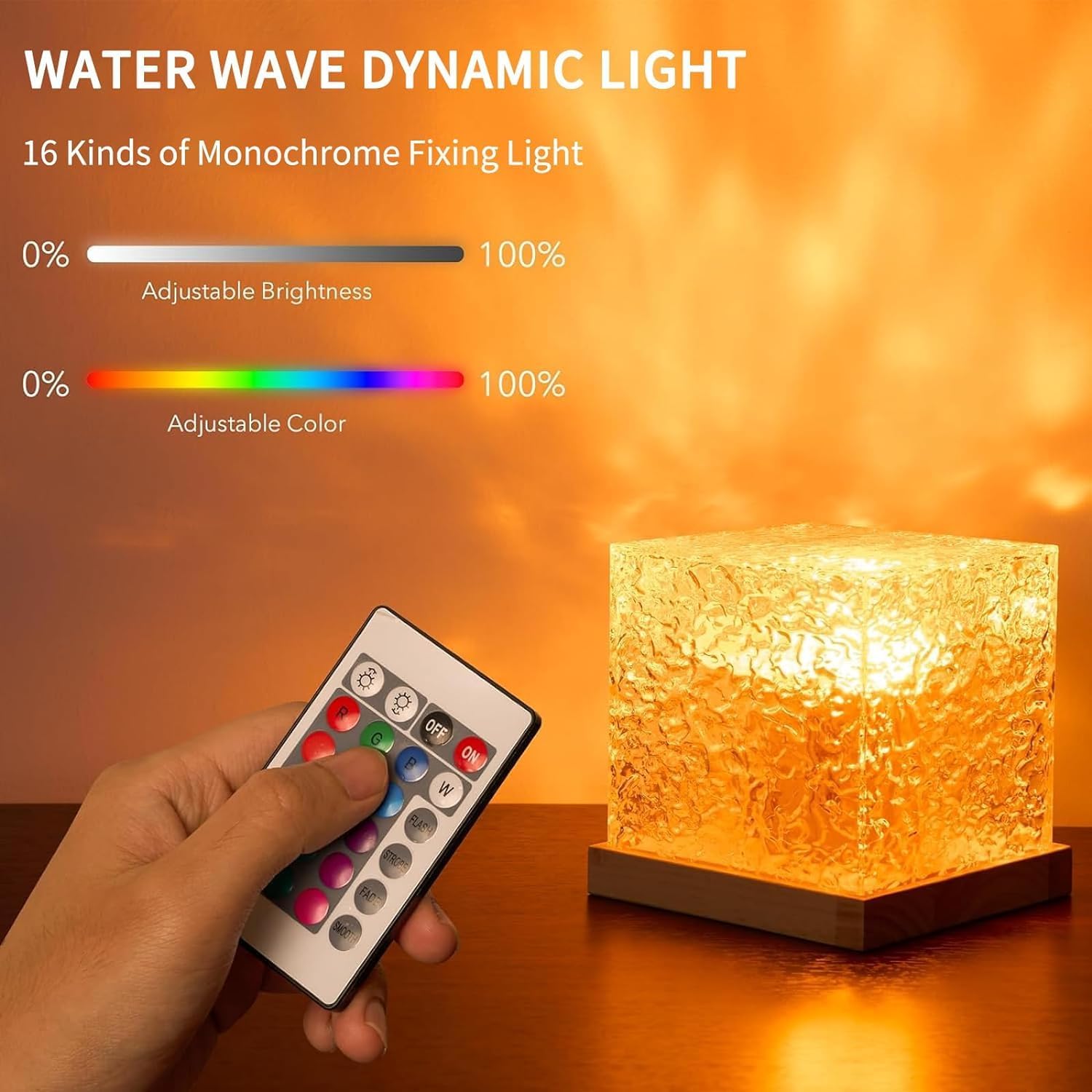
Image: The projector light casting a vibrant, dynamic water wave pattern onto a wall, demonstrating its visual effect.
5.5 Memory Function
The projector light features an intelligent memory function that saves your last selected settings (color, brightness, mode) when powered off and restores them upon powering on.
6. Maintenance
6.1 Cleaning
Disconnect the power before cleaning.
Use a soft, dry cloth to wipe the surface of the projector light. Do not use abrasive cleaners or solvents.
6.2 Storage
Store the device in a cool, dry place when not in use for extended periods.
7. Troubleshooting
7.1 Light Does Not Turn On
- Ensure the USB cable is securely connected to both the projector and the power adapter.
- Verify the power adapter is plugged into a working electrical outlet.
- Check the remote control battery.
7.2 Remote Control Not Responding
- Ensure there are no obstructions between the remote and the projector.
- Replace the remote control battery if necessary.
7.3 Light Flickers or Changes Unexpectedly
- Ensure the power connection is stable.
- Avoid placing the unit near strong electromagnetic interference.
8. Specifications
| Brand | Growalleter |
| Model Name | Ocean Wave Projector Light |
| Product Dimensions | 4.4"D x 4.4"W x 4.4"H |
| Item Weight | 5.3 ounces (150 Grams) |
| Light Source Type | LED |
| Number of Light Sources | 1 |
| Control Method | Remote |
| Power Source | Corded Electric (USB Charging) |
| Voltage | 36 Volts |
| Material | Acrylonitrile Butadiene Styrene, Acrylic |
| Finish Type | Matte |
| Special Feature | Corded |
| Indoor/Outdoor Usage | Indoor |
| Shade Color | Multicolor |
| Lamp Type | LED |
| Switch Type | Remote |
| Installation Type | Tabletop |
| Water Resistance Level | Not Water Resistant |
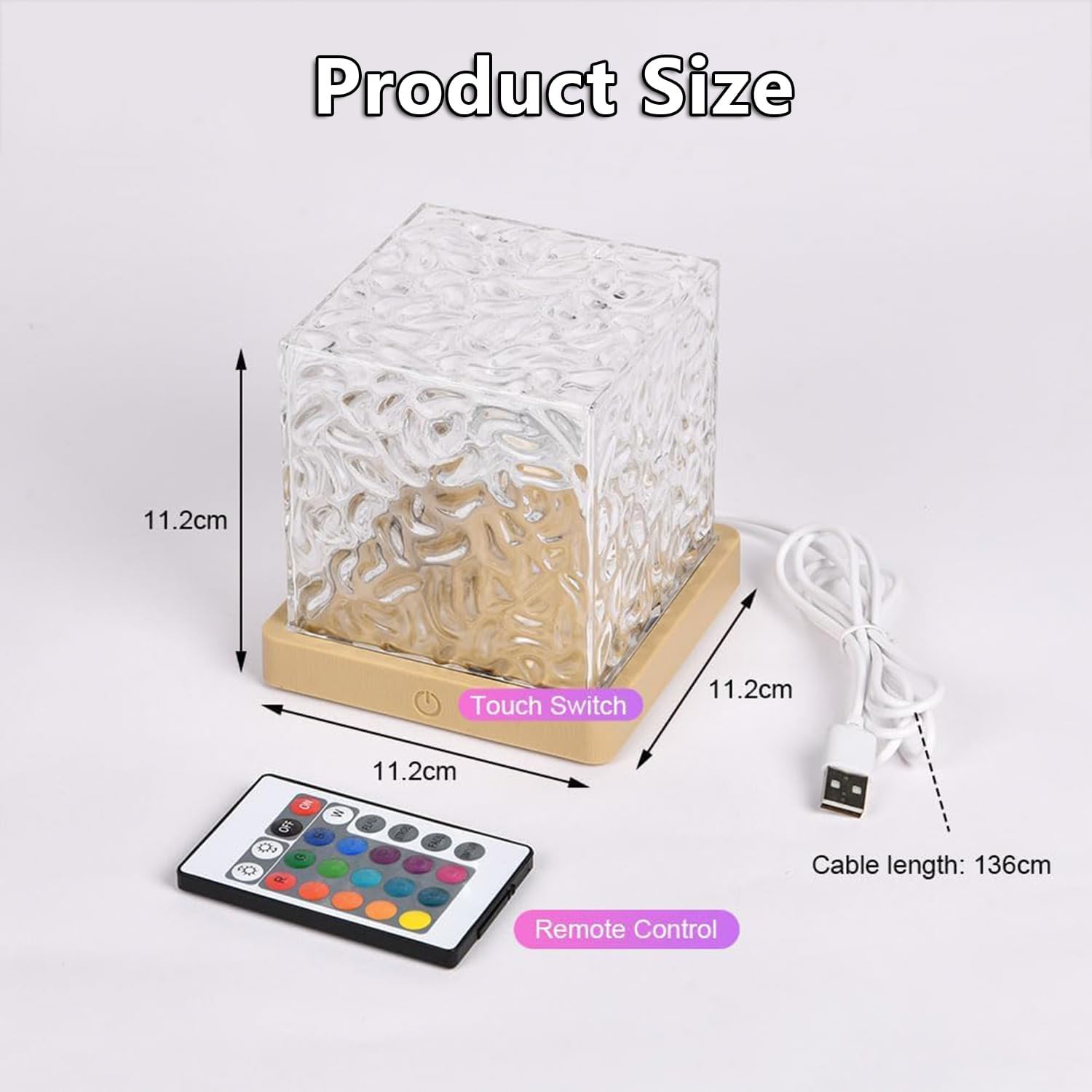
Image: A diagram illustrating the product dimensions and components like the touch switch and remote control.
9. Safety Information
- Keep out of reach of children and pets.
- Do not disassemble or modify the device.
- Avoid direct eye exposure to the light source.
- Use only with the specified power supply.
- Do not expose to water or moisture. This product is not water resistant.
- Unplug the device during lightning storms or when unused for long periods.
10. Warranty and Support
For warranty information or technical support, please contact Growalleter customer service through the retailer's platform or visit the official Growalleter website. Please retain your proof of purchase for warranty claims.