
SEDETA B0CY2FBDYM
SEDETA L Shaped Gaming Desk Instruction Manual
Brand: SEDETA | Model: B0CY2FBDYM
1. Overview
The SEDETA L Shaped Gaming Desk is a versatile and robust desk designed for both gaming and home office use. It features a reversible configuration, allowing it to be set up as a 62-inch corner desk or an 87-inch long office desk. The desk is equipped with various features to enhance functionality and organization.
Key Features:
- Reversible L-shaped or long office desk configuration.
- Integrated display cabinet with LED lights for showcasing items.
- Pegboard for convenient organization of small items.
- Five large fabric drawers for ample storage space.
- Built-in power strip with 4 AC outlets and 2 USB ports.
- Durable P2 particle board and sturdy metal frame construction.
- Adjustable leg pads for stability on uneven floors.
2. Setup & Assembly
Assembly is required for this desk. Please follow the detailed instructions provided in the packaging for proper setup. Ensure all components are present before beginning assembly.
2.1 Reversible Configuration
The desk offers a reversible design, allowing you to configure it as an L-shaped corner desk or a straight two-person desk. The top hutch can also be placed on either the left or right side to suit your space and needs.

Image: Desk configurations and dimensions.
2.2 Adjustable Feet
The desk is equipped with adjustable leg pads. These pads help to keep the desk stable on uneven floor surfaces and protect your floor from scratches. Rotate the pads to adjust the height as needed.

Image: Adjustable feet for stability.
3. Operating Instructions
3.1 LED Light Strips
The desk includes RGB LED light strips with over 60,000 colors and 29 flashing modes. Control the lights via a dedicated app on your smartphone. Features include music sync, where the light color changes with sound rhythm, and a timer function for smart operation.
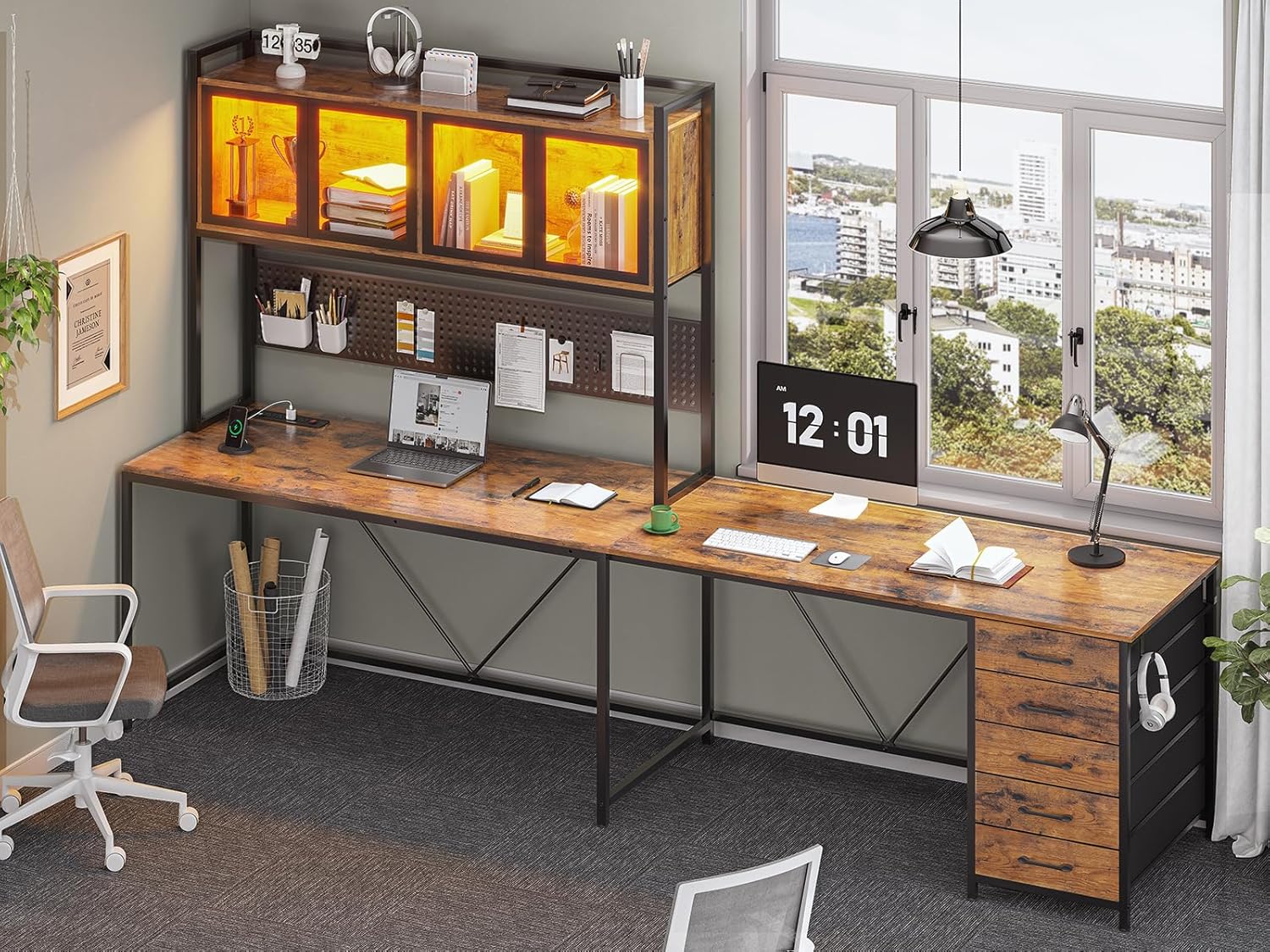
Image: Display cabinet with LED lighting.
3.2 Built-in Power Strip
A recessed power strip is integrated into the desk, providing convenient access to power. It features 4 AC outlets and 2 USB ports for charging your devices. An on-off switch allows for one-button power control, enhancing safety and energy efficiency.

Image: Integrated power strip with outlets and USB ports.
3.3 Display Cabinet
The desk features a display cabinet with glass doors that open with a simple push mechanism (no handle design). This cabinet provides ample space to display decorations, photo albums, or other items, protecting them from dust.
Image: Display cabinet for storage and display.
3.4 Fabric Drawers
The desk includes five easy-to-assemble fabric drawers. These drawers are made of breathable, high-quality fabric and offer sufficient storage space for organizing office supplies, gaming accessories, or personal items, reducing desktop clutter.
Image: Five fabric drawers for organized storage.
3.5 Pegboard
A long pegboard is located behind the monitor area, offering additional vertical storage and organization options. It comes with S-hooks, allowing you to hang headphones, controllers, or other small items, maximizing your workspace.

Image: Pegboard for accessory organization.
3.6 Headphone Hook
Convenient hooks are located on the side of the desk, ideal for hanging headphones, backpacks, or other items you need to keep within easy reach but off the main desk surface.

Image: Headphone hook for convenient storage.
4. Maintenance
- Cleaning: Wipe surfaces with a soft, damp cloth. Avoid harsh chemicals or abrasive cleaners that may damage the finish.
- Fabric Drawers: Spot clean fabric drawers with a mild detergent and water. Allow to air dry completely before reinserting.
- Stability: Periodically check all screws and fasteners to ensure they are tight. Re-tighten if necessary to maintain desk stability.
- Electrical Components: Keep the power outlet and LED lights away from water and excessive heat. Always turn off the power outlet when not in use or when leaving the room.
5. Troubleshooting
- Damaged or Missing Parts: If your item arrives damaged, scratched, or with missing parts, please contact customer support for free replacement or a partial refund.
- Unstable Desk: Ensure all assembly screws are tightened. Adjust the leg pads to level the desk on uneven surfaces.
- LED Lights Not Working: Check the power connection to the LED strip. Ensure the app control is properly synced and the timer function is not active.
- Power Outlet Not Functioning: Verify the power strip's on-off switch is in the 'on' position. Check the main power source connection.
6. Product Specifications
| Feature | Specification |
|---|---|
| Brand | SEDETA |
| Product Dimensions | 62"D x 43.3"W x 64.7"H |
| Color | Rustic Brown |
| Style | Modern |
| Base Material | Metal |
| Top Material Type | Engineered Wood |
| Special Features | 5 Drawers, Pegboard, Display Cabinet, LED Lights, Built-in Power Strip |
| Recommended Uses | Gaming, Home Office |
| Number of Drawers | 5 |
| Number of Cabinets | 1 |
| Required Assembly | Yes |
7. Warranty & Support
This SEDETA product comes with a limited warranty. For specific details regarding the warranty coverage and duration, please refer to the documentation included with your purchase or contact the manufacturer directly.
For any questions, concerns, or assistance with assembly, parts, or troubleshooting, please reach out to SEDETA customer support. Contact information can typically be found on the product packaging or the official SEDETA website.
8. Important Safety Information
Always assemble the desk according to the provided instructions. Ensure the desk is stable and properly anchored to the floor to prevent tipping. Do not overload the desk or drawers. Keep the power outlet and LED lights away from water and heat sources. Always turn off the power outlet and LED lights when not in use or when leaving the room.
Ask a question about this manual
Ask about setup, troubleshooting, compatibility, parts, safety, or missing instructions. Manuals+ will review the question and use this page’s manual context to help answer it.