
1. Introduction
Thank you for choosing the Lrecat i21 Wireless Earbud Sport. These over-ear headphones are designed for active lifestyles, featuring Bluetooth 5.3 technology, IP7 waterproofing, and a secure earhook design. This manual provides essential information for setting up, operating, and maintaining your earbuds to ensure optimal performance and longevity.
2. What's in the Box
- 2x Wireless Earbuds (Left/Right)
- 1x Charging Case
- 3x Eartips (Sizes S/M/L)
- 1x Type-C Charging Cable
- 1x User Manual
3. Setup
3.1 Charging the Earbuds and Case
Before first use, fully charge the earbuds and charging case. Place the earbuds into the charging case. Connect the provided Type-C charging cable to the charging port on the case and a suitable USB power source. The dual LED digital display on the case will show the remaining power of the charging case and the charging status of each earbud. A full charge provides up to 8 hours of listening time per earbud, with the charging case extending total playtime to 48 hours.

Image: The Lrecat i21 charging case with earbuds, illustrating the 48-hour total playtime and the dual LED display for battery levels.
3.2 Pairing with Your Device
The Lrecat i21 earbuds feature automatic pairing. After the initial successful pairing, the earbuds will automatically connect to your previously paired device when removed from the charging case. The connection range is approximately 48 feet.
- First-time Pairing: Open the charging case and remove both earbuds. They will automatically enter pairing mode.
- On your device (smartphone, tablet, etc.), go to Bluetooth settings and enable Bluetooth.
- Search for available devices and select "i21" from the list.
- Once connected, you will hear a confirmation prompt, and the earbuds will be ready for use.
These earbuds utilize advanced Bluetooth 5.3 technology for a faster, more stable connection with minimal interference. They are compatible with most Bluetooth-enabled devices, including iOS and Android cellphones, smart watches, PCs, tablets, and laptops.
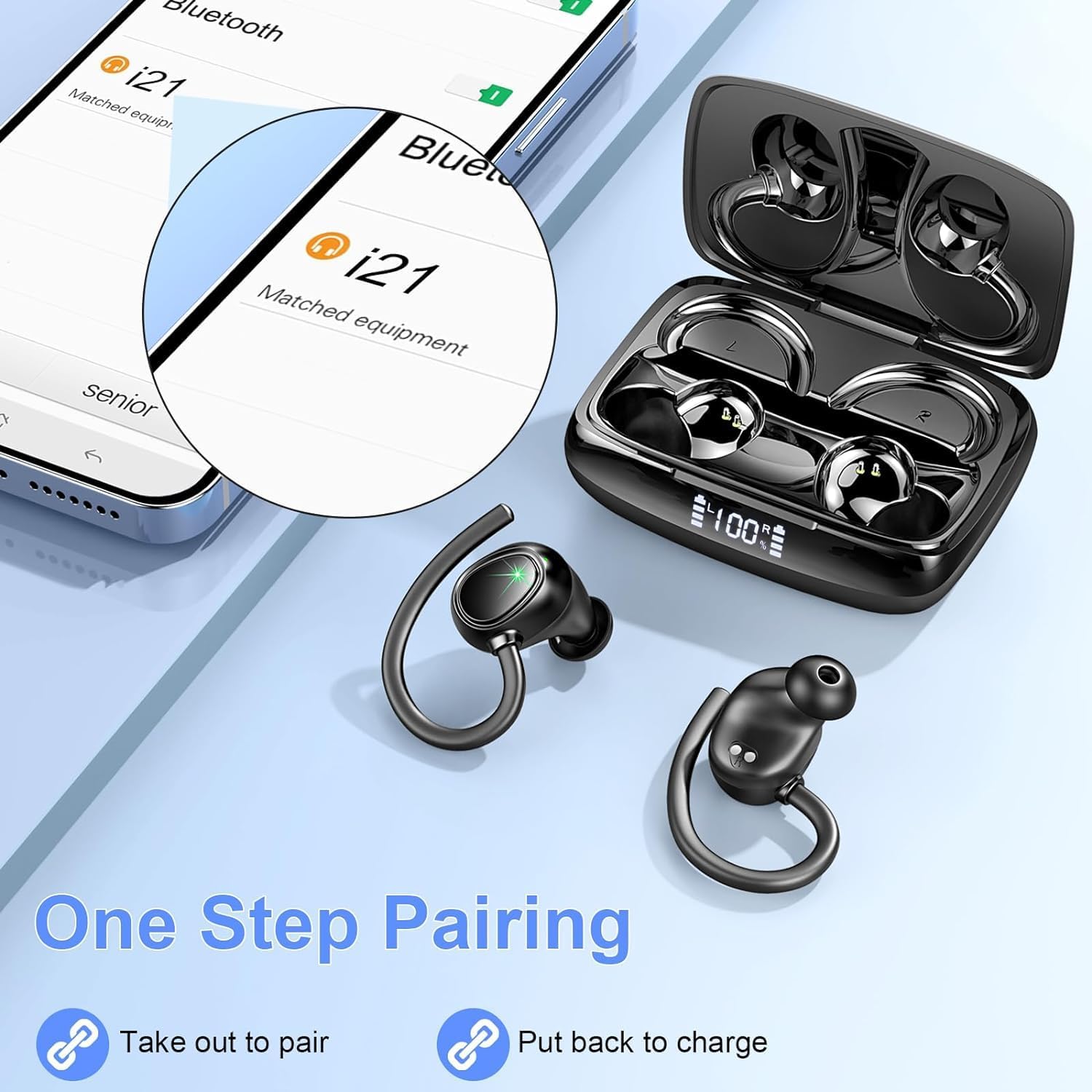
Image: A visual representation of the one-step pairing process, showing the earbuds and a phone screen indicating successful connection.
4. Operating Instructions
4.1 Wearing the Earbuds
The Lrecat i21 earbuds are designed with flexible and soft ear hooks to ensure a secure and comfortable fit, especially during physical activities. Choose the appropriate eartip size (S/M/L) for optimal comfort and sound isolation.
- Select the eartips that best fit your ears.
- Gently place the earbud into your ear canal.
- Adjust the ear hook to wrap securely around the back of your ear.
- Ensure a snug fit to prevent the earbuds from falling out during movement.

Image: Illustration of the secure and comfortable fit provided by the soft earhooks and various eartip sizes.
4.2 Touch Controls
The earbuds feature intuitive touch controls for managing audio playback and calls:
- Play/Pause: Single tap on either earbud.
- Next Track: Double tap on the right earbud.
- Previous Track: Double tap on the left earbud.
- Volume Up: Triple tap on the right earbud.
- Volume Down: Triple tap on the left earbud.
- Answer/End Call: Single tap on either earbud during an incoming call or active call.
- Reject Call: Press and hold either earbud for 2 seconds during an incoming call.
- Activate Voice Assistant: Press and hold either earbud for 3 seconds.
4.3 Sound Quality
The Lrecat i21 earbuds are equipped with 14.2mm double-layer diaphragm drivers, providing Hi-Fi sound quality with strong bass, clear mids, and bright treble. Environmental Noise Cancelling (ENC) microphones are integrated to isolate your voice from surrounding noise, ensuring clear call performance.
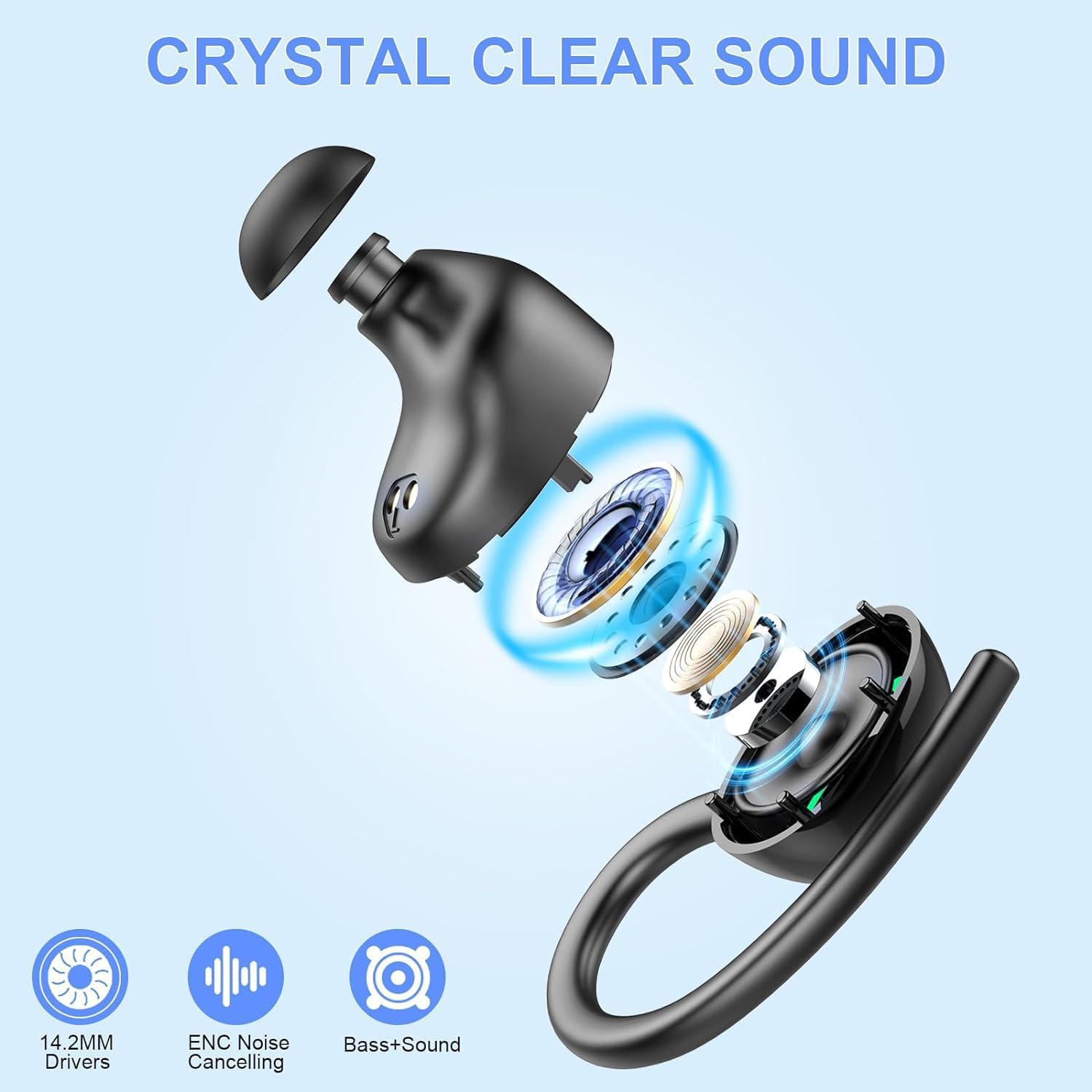
Image: An exploded view of an earbud, illustrating the internal components responsible for crystal clear sound, including 14.2mm drivers and ENC technology.
5. Maintenance
5.1 IP7 Waterproof Rating
The earbuds have an IP7 waterproof rating, meaning they can resist sweat, rain, and minor water splashes. This makes them suitable for workouts, sports, and outdoor activities. However, they are not designed for swimming or submersion in water.

Image: Earbuds shown in a water splash scenario, highlighting their IP7 waterproof and sweatproof features.
5.2 Cleaning and Storage
To maintain the performance and hygiene of your earbuds:
- Wipe the earbuds and charging case with a soft, dry cloth after each use.
- Remove eartips periodically and clean them with mild soap and water, ensuring they are completely dry before reattaching.
- Store the earbuds in their charging case when not in use to protect them and keep them charged.
- Avoid exposing the earbuds to extreme temperatures or direct sunlight for extended periods.
6. Troubleshooting
If you encounter issues with your Lrecat i21 earbuds, refer to the following common solutions:
- Earbuds not pairing: Ensure both earbuds are fully charged and removed from the case. Turn off and on your device's Bluetooth, then try pairing again.
- No sound: Check the volume level on both your device and the earbuds. Ensure the earbuds are properly connected to your device.
- Charging issues: Verify the Type-C cable is securely connected to both the case and the power source. Check the charging indicator on the case.
- Intermittent connection: Ensure your device is within the 48-foot Bluetooth range and there are no significant obstructions between the earbuds and your device.
- Resetting the earbuds: If problems persist, consult the full user manual (included in the box) for specific reset instructions.
7. Specifications
| Model Name | i21 |
| Brand | Lrecat |
| Connectivity Technology | Wireless |
| Wireless Communication Technology | Bluetooth 5.3 |
| Ear Placement | In Ear |
| Form Factor | Over Ear |
| Control Method | Touch, Voice |
| Special Feature | Lightweight, IP7 Waterproof, Dual LED Display |
| Driver Size | 14.2mm |
| Battery Life (Earbuds) | Up to 8 hours (single charge) |
| Total Playtime (with Charging Case) | Up to 48 hours |
| Charging Port | Type-C |
| UPC | 761086484497 |
8. Warranty and Support
For warranty information, technical support, or customer service inquiries, please refer to the contact details provided in the packaging or on the official Lrecat website. Keep your purchase receipt for warranty claims.

