
1. Introduction
The MIWISE SP548E is a versatile WiFi+Bluetooth Music Pixel LED Smart Controller designed for addressable LED strip lights. It offers multiple control methods including a mobile application, RF remote control, and voice commands via Alexa or Google Assistant. This controller supports various LED driver chips such as WS2811, WS2812B, US1903, and WS2801, managing up to 1200 pixels. Key features include music rhythm synchronization, a wide array of dynamic and static color effects, color DIY customization, and a timer function.

Figure 1.1: MIWISE SP548E Controller, RF Remote, and BanlanX App Interface.

Figure 1.2: The MIWISE SP548E controller seamlessly integrates into various environments, providing smart lighting control.
2. Setup Guide
2.1 Package Contents
- MIWISE SP548E Controller Box
- RF Remote Control
- User Manual
2.2 Connection Diagram
Follow the diagram below to correctly connect your MIWISE SP548E controller to the power supply and LED strip. Ensure the output voltage of the LED strip and power supply are identical (e.g., for a 24V LED strip, use a DC24V power supply).
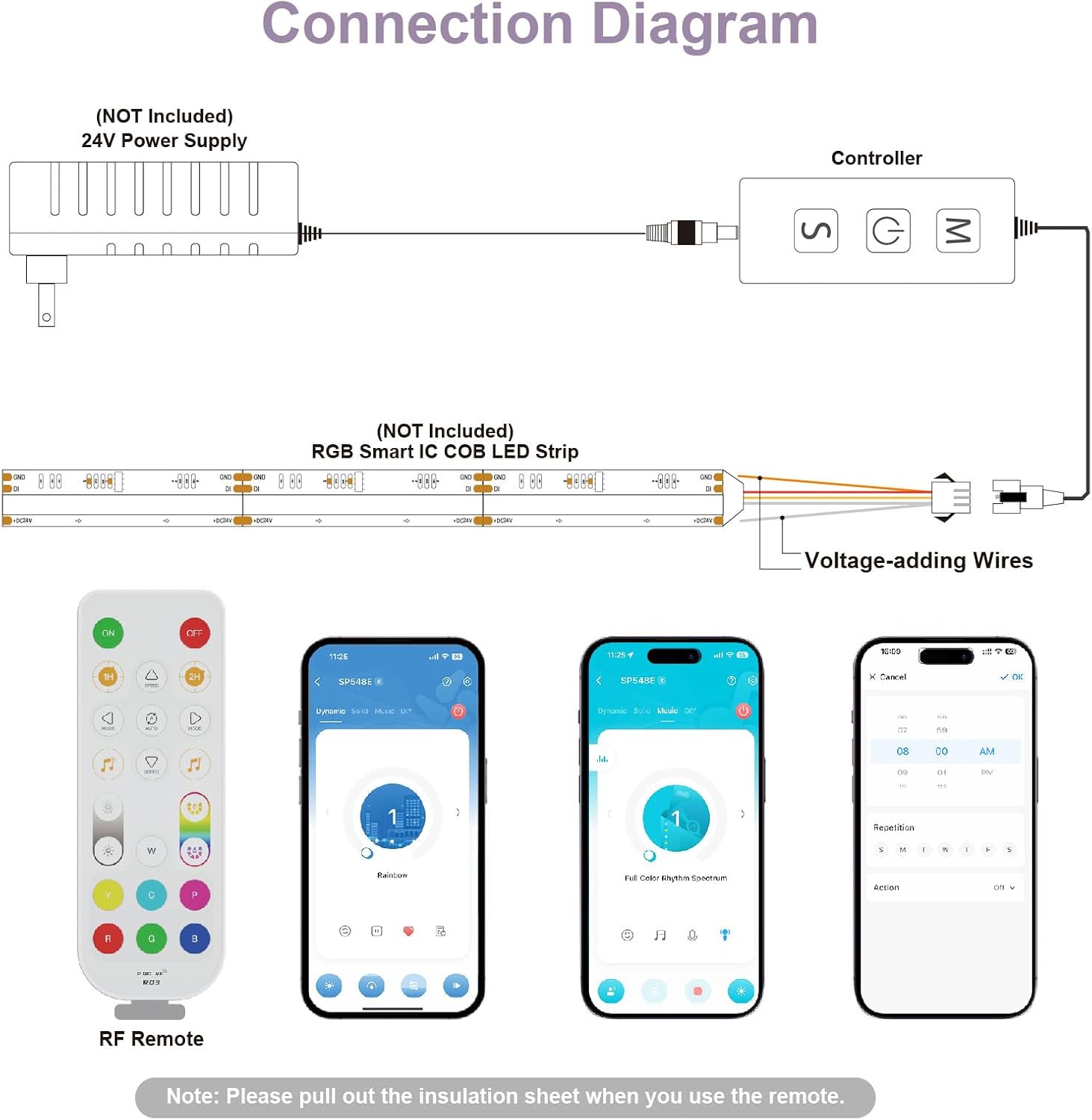
Figure 2.1: Connection diagram showing the controller, power supply (not included), RGB Smart IC COB LED Strip (not included), and voltage-adding wires.
2.3 Applicable LED Strip Types
The SP548E controller is designed specifically for 5V-24V 3PIN SPI RGB LED Strip Lights. It is not compatible with traditional RGB strip lights or 2700K-6500K Tunable Strip Lights.

Figure 2.2: Visual guide for compatible LED strip types (WS2811/WS2812 Strip Lights and WS2811/WS2812B String) and incompatible types (RGB LED Strip Light and 2700K-6500K Tunable Strip Lights).
2.4 App Download and Device Pairing
To control the device via smartphone, download the "BanlanX" app from the App Store (iOS) or Google Play (Android 4.4/IOS 1.0 or higher). Ensure all devices are connected to the same 2.4 GHz Wi-Fi network for optimal performance.

Figure 2.3: Steps to add your MIWISE SP548E device within the BanlanX application.
2.5 RF Remote Control Initial Use
Before using the RF remote control, pull out the insulation sheet from the battery compartment.
3. Operating Instructions
3.1 Control Methods
The MIWISE SP548E controller offers four primary control methods:
- App Control: Use the BanlanX app on your smartphone.
- RF Remote Control: Use the included 2.4G RF remote.
- Control Box: Manual control via buttons on the controller box.
- Voice Control: Compatible with Alexa and Google Assistant.

Figure 3.1: Overview of the four control methods: App Control, 360° RF Remote, Control Box, and Voice Control.
3.2 Voice Control Integration
To enable voice control, add the "BanlanX" skill to your Alexa or Google Assistant application. You can then use voice commands such as "Alexa, turn on the RGB strip light."

Figure 3.2: The controller supports voice commands through Amazon Alexa and Google Assistant for convenient operation.

Figure 3.3: Step-by-step guide to connect your device to Alexa for voice control.
3.3 Music Rhythm Synchronization
The controller features a built-in high-sensitivity microphone that allows the lights to automatically adjust to ambient sound. There are 18 music effects available, with three types of capture: phone microphone, player streaming, and built-in microphone.

Figure 3.4: The controller can synchronize light effects with music from various sources.
3.4 Dynamic Effects and Static Colors
Explore 146 built-in dynamic effects, including rainbow, twinkling stars, and waves. You can adjust the speed, effect length, and brightness. The controller also offers numerous static color effects, allowing direct RGB value sliding for precise color selection. You can collect up to 9 favorite effects for quick access.

Figure 3.5: The BanlanX app and RF remote offer access to over 100 dynamic lighting modes.
3.5 Color Customization (DIY)
The BanlanX app allows you to create custom solid or gradient DIY color effects. You can vary the length of the color in the strip light by setting the pixel count.

Figure 3.6: Customize your lighting with DIY color effects and adjust pixel counts for varied color lengths.
3.6 Brightness Adjustment
Adjust the brightness of your LED strip lights to suit your preference using the app or remote control.

Figure 3.7: Adjust brightness and select solid colors for your LED strip lights.
3.7 Timer Function
Set up to 5 timers to automatically turn the LED strip on or off at specific times each day, with the option to choose a desired light effect. Note that the controller must remain powered on for the timer function to work; cutting power will clear alarm records.

Figure 3.8: The controller features a timer function to schedule automatic turn on/off times.
3.8 Memory Function
The controller retains your last settings even after a power failure, ensuring your preferred lighting configuration is restored when power returns.

Figure 3.9: The controller remembers your last settings after being turned off and back on.
3.9 Group Control
Use the BanlanX mobile app to control multiple groups of strip lights simultaneously, ideal for larger installations or multi-room setups.

Figure 3.10: Manage multiple groups of LED strip lights concurrently using the BanlanX app.
4. Maintenance
4.1 RF Remote Battery Replacement
The RF remote control uses a CR2025, 3V lithium coin cell battery. To replace it:
- Puncture the white plastic piece on the remote.
- Pull the battery tray outward to remove the old battery.
- Insert a new CR2025 battery with the positive (+) side facing up.
- Slide the tray back into the remote until it clicks into place.

Figure 4.1: Instructions for replacing the CR2025 battery in the RF remote control.
4.2 General Care
- Keep the controller and remote in a dry environment.
- Avoid exposing the devices to extreme temperatures or direct sunlight.
- Clean the surfaces with a soft, dry cloth. Do not use harsh chemicals or abrasive cleaners.
5. Troubleshooting
| Problem | Possible Cause | Solution |
|---|---|---|
| LED strip effect is stuck or the end is dim. | Voltage drop along the LED strip. | Add voltage to the LED strip using voltage-adding wires. Ensure your power supply provides sufficient current for the entire strip length. |
| Controller not responding or showing random colors. | Incorrect connection, app synchronization issue, or power supply problem. | Verify all connections are secure according to the connection diagram. Restart the BanlanX app and the controller. Ensure the power supply voltage matches the LED strip's requirements. |
| Cannot connect to the BanlanX app. | Incorrect Wi-Fi band, Bluetooth issue, or app permissions. | Ensure your smartphone and controller are connected to a 2.4 GHz Wi-Fi network. Check Bluetooth settings on your phone. Grant necessary permissions to the BanlanX app. Try restarting your phone and the controller. |
| RF Remote not working. | Battery insulation sheet not removed or low battery. | Ensure the insulation sheet has been removed from the remote's battery compartment. Replace the CR2025 battery if necessary. |
| Timer function not working after power cycle. | Controller lost power. | The controller must remain powered on for the timer function to retain settings. Do not cut power to the controller if you wish to keep timer settings. |
6. Specifications
| Feature | Detail |
|---|---|
| Model Number | M-RGBICSP548E-1 |
| Brand | MIWISE |
| Color | RGB (Red, Green, Blue) |
| Indoor/Outdoor Usage | Indoor |
| Special Features | Dimmable, Music Mode, Addressable |
| Light Source Type | COB |
| Power Source | Corded Electric |
| Voltage | 24 Volts (DC) |
| Wattage | 72 watts |
| Controller Type | Remote Control, Voice Control |
| Control Method | App |
| Max Pixels Controlled | 1200 pixels |
| Compatible IC Models | WS2811, WS2812B, US1903, WS2801, etc. |
| Item Weight | 2.08 ounces |
| Package Dimensions | 8.11 x 4.21 x 0.51 inches |
| UPC | 717994169520 |
7. Warranty & Support
MIWISE is committed to providing high-quality products and excellent services. The product includes a 5-Year Warranty, guaranteeing durability.
7.1 Customer Support
If you encounter any problems while using this product, please contact MIWISE customer support. They will reply as soon as possible and assist you with resolving any issues.
- Dedicated Support Email: support@miwiseled.com

Figure 7.1: MIWISE offers a 5-year warranty and dedicated customer support.