
1. Introduction
This manual provides essential information for the safe and effective operation of your XFALIGHTS MHL-200W Moving Head DJ Light. Please read this manual thoroughly before installation and use, and retain it for future reference. This device is designed for professional stage lighting applications, offering versatile light effects for various events.

Image 1.1: The XFALIGHTS MHL-200W Moving Head DJ Light in operation, projecting various colored beams and patterns.
2. Safety Information
To ensure safe operation, observe the following precautions:
- Electrical Safety: Ensure the power supply voltage matches the device's requirements (AC 110-240V, 50-60Hz). Always connect to a grounded outlet. Disconnect power before cleaning or servicing.
- Temperature: Do not operate in environments exceeding 40°C (104°F). Ensure adequate ventilation to prevent overheating.
- Moisture: Keep the device away from rain, moisture, and liquids.
- Physical Damage: Avoid dropping or subjecting the device to severe impact. Do not open the housing; refer all servicing to qualified personnel.
- Eye Safety: Do not look directly into the light source when the device is operating, as it can cause eye damage.
- Mounting: Securely mount the fixture using appropriate clamps and safety cables. Ensure the mounting surface can support the device's weight.
3. Package Contents
Verify that all items are present and in good condition upon unpacking:
- 1 x XFALIGHTS MHL-200W Moving Head Light
- 1 x User Manual
- 1 x Power Cord
- 1 x DMX Cable
- 1 x Mounting Bracket
- 2 x Screws for mounting bracket

Image 3.1: Contents of the XFALIGHTS MHL-200W package.
4. Product Overview
The XFALIGHTS MHL-200W is a powerful LED moving head fixture designed for dynamic stage lighting. It features a 185W white LED light source (8000K) and offers a range of effects including gobos, colors, and prism rotation.
Key Features:
- Light Source: 185W White LED (8000K)
- Beam Angle: 1.5 degrees
- Strobe: 25 times/second
- Prism: 24-facet rotating prism with infinite rotation
- Gobo Wheel: 14 static gobos with shake and infinite rotation effects
- Color Wheel: 11 colors + open, with color rotating speed and infinite rotation
- Movement: Pan (X-axis) 0-540 degrees, Tilt (Y-axis) 0-220 degrees
- Dimmer: 0-100% linear dimming

Image 4.1: Component overview and heat dissipation features.

Image 4.2: Detailed technical specifications.
5. Setup
5.1 Mounting
The MHL-200W can be mounted on a truss, ceiling, or placed on a flat surface. Always use the provided mounting bracket and ensure it is securely fastened. For overhead installations, use a safety cable (not included) as an additional safety measure.
- Attach the mounting bracket to the fixture using the provided screws.
- Secure the bracket to the desired mounting point (truss, ceiling, etc.).
- Ensure all connections are tight and stable before powering on the unit.
5.2 Power Connection
Connect the provided power cord to the 'POWER IN' socket on the rear of the fixture and then to a suitable grounded power outlet (AC 110-240V, 50-60Hz).
5.3 DMX Connection (Optional)
For DMX control, connect a DMX controller to the 'DMX IN' port using the provided DMX cable. If linking multiple fixtures, connect the 'DMX OUT' of the first fixture to the 'DMX IN' of the next, and so on. A DMX terminator is recommended for the last fixture in a chain.

Image 5.1: Example DMX controller connection setup.
6. Operating Modes
The MHL-200W offers several operating modes, selectable via the onboard control panel or DMX.
6.1 Control Panel
The fixture features an LCD display and four buttons (MENU, UP, DOWN, ENTER) for navigation and setting adjustments.

Image 6.1: Control panel and rear connections.
6.2 DMX512 Mode
This mode allows for precise control over all fixture functions using a DMX controller. The MHL-200W uses 12 DMX channels. Refer to the DMX channel chart (typically found in a separate DMX manual or appendix) for specific channel assignments and values.
6.3 Sound Activated Mode
The fixture responds to ambient sound, synchronizing its movements and effects to the beat of music. Adjust sensitivity via the control panel.
6.4 Auto Mode
The fixture runs through a series of pre-programmed light shows and effects automatically. Various auto programs can be selected via the control panel.
6.5 Master-Slave Mode
Connect multiple MHL-200W fixtures via DMX cables. Set one unit as the 'Master' and others as 'Slave' units. The slave units will then mimic the master unit's movements and effects.

Image 6.2: Overview of control and movement capabilities.
6.6 Effects Overview
The MHL-200W combines various effects to create dynamic lighting displays:
- Gobo Effects: Features 14 distinct gobos, capable of static, shaking, and infinite rotation effects.
- Color Effects: An 11-color wheel plus white, with options for color rotation and speed control.
- Prism Effects: A 24-facet prism that rotates infinitely, splitting the beam into multiple patterns.

Image 6.3: Examples of 24-facet prism effects.
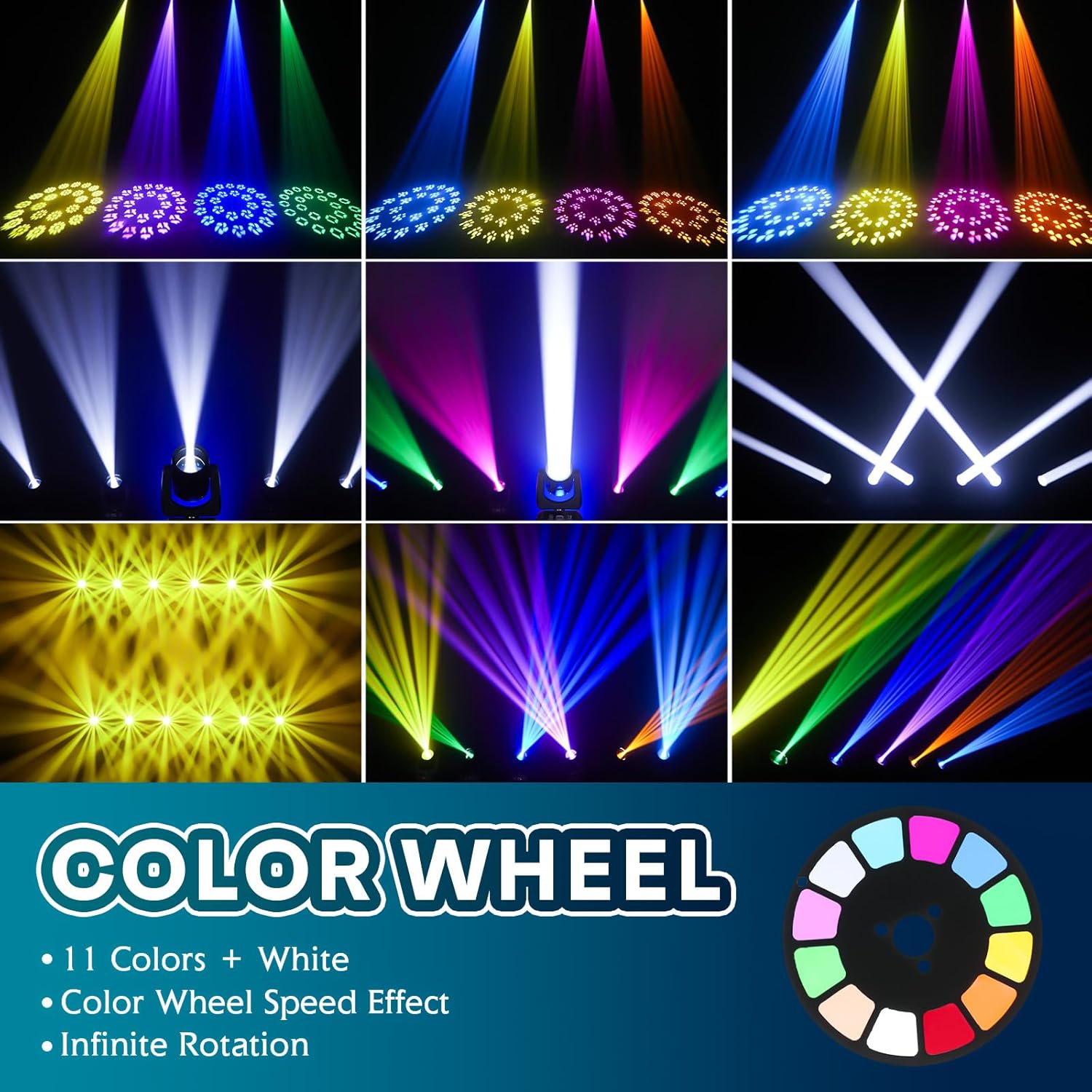
Image 6.4: Examples of color wheel effects.
7. Maintenance
Regular maintenance ensures optimal performance and extends the lifespan of your fixture.
- Cleaning: Periodically clean the lenses and exterior housing with a soft, lint-free cloth. Do not use abrasive cleaners.
- Ventilation: Ensure ventilation openings are clear of dust and debris to maintain proper heat dissipation.
- Inspection: Regularly check power cables, DMX cables, and mounting hardware for any signs of wear or damage. Replace damaged components immediately.
- Storage: When not in use, store the fixture in a dry, dust-free environment.
8. Troubleshooting
If you encounter issues, refer to the following common problems and solutions:
- No Power: Check the power cord connection, the power outlet, and the fuse on the fixture. Ensure the power switch is in the 'ON' position.
- No Light Output: Verify the dimmer setting is not at 0%. Check if the light source is active.
- No DMX Control: Ensure DMX cables are correctly connected (IN to OUT). Verify the DMX address on the fixture matches the controller's setting. Check for a DMX terminator on the last fixture.
- Erratic Movement/Effects: This could indicate DMX signal issues or interference. Check DMX cabling and ensure the fixture is not in a high-vibration environment.
- Overheating: Ensure adequate ventilation around the fixture. Clean any dust from the cooling vents.
If problems persist, contact customer support.
9. Specifications
| Feature | Specification |
|---|---|
| Brand | XFALIGHTS |
| Model Number | MHL-200W |
| Light Source Type | LED |
| Light Source Wattage | 185 Watts |
| Maximum Compatible Light Source Wattage | 200 Watts |
| Color Temperature | 8000 Kelvin |
| Voltage | 110 Volts (AC) |
| Beam Angle | 1.5 Degrees |
| Control Channels | 12 channels |
| Movement (Pan) | 0-540 degrees |
| Movement (Tilt) | 0-220 degrees |
| Gobo Wheel | 14 gobos (static, shake, infinite rotation) |
| Color Wheel | 11 colors + open (color rotating speed, infinite rotation) |
| Prism | 24-facet rotating prism (infinite rotation) |
| Strobe | 25 times/sec |
| Dimmer | 0-100% with adjustable constant color control |
| Material | Plastic |
| Item Weight | 11.02 Pounds |
| Product Dimensions | 14.5"L x 10.5"W x 10.7"H |
10. Warranty and Support
XFALIGHTS products are manufactured to high-quality standards. For warranty information, please refer to the terms and conditions provided at the point of purchase or contact XFALIGHTS customer support directly. Keep your purchase receipt as proof of purchase.
For technical assistance or service inquiries, please contact XFALIGHTS customer support through their official channels.