Introduction
This user manual provides detailed instructions for the SAMSUNG The Frame TV 4K 2024 50LS03D Smart TV 50-inch model. This television is designed to seamlessly blend into your living space, offering an art gallery mode with a matte screen, interchangeable bezels, vibrant 100% color volume with Quantum Dot technology, and a streamlined setup with the One Connect box and a nearly invisible cable. Please read this manual thoroughly to ensure proper installation, operation, and maintenance of your new television.
Setup
Unboxing and Initial Setup
Carefully unpack all components from the box. Ensure all items listed below are present before proceeding with the setup.
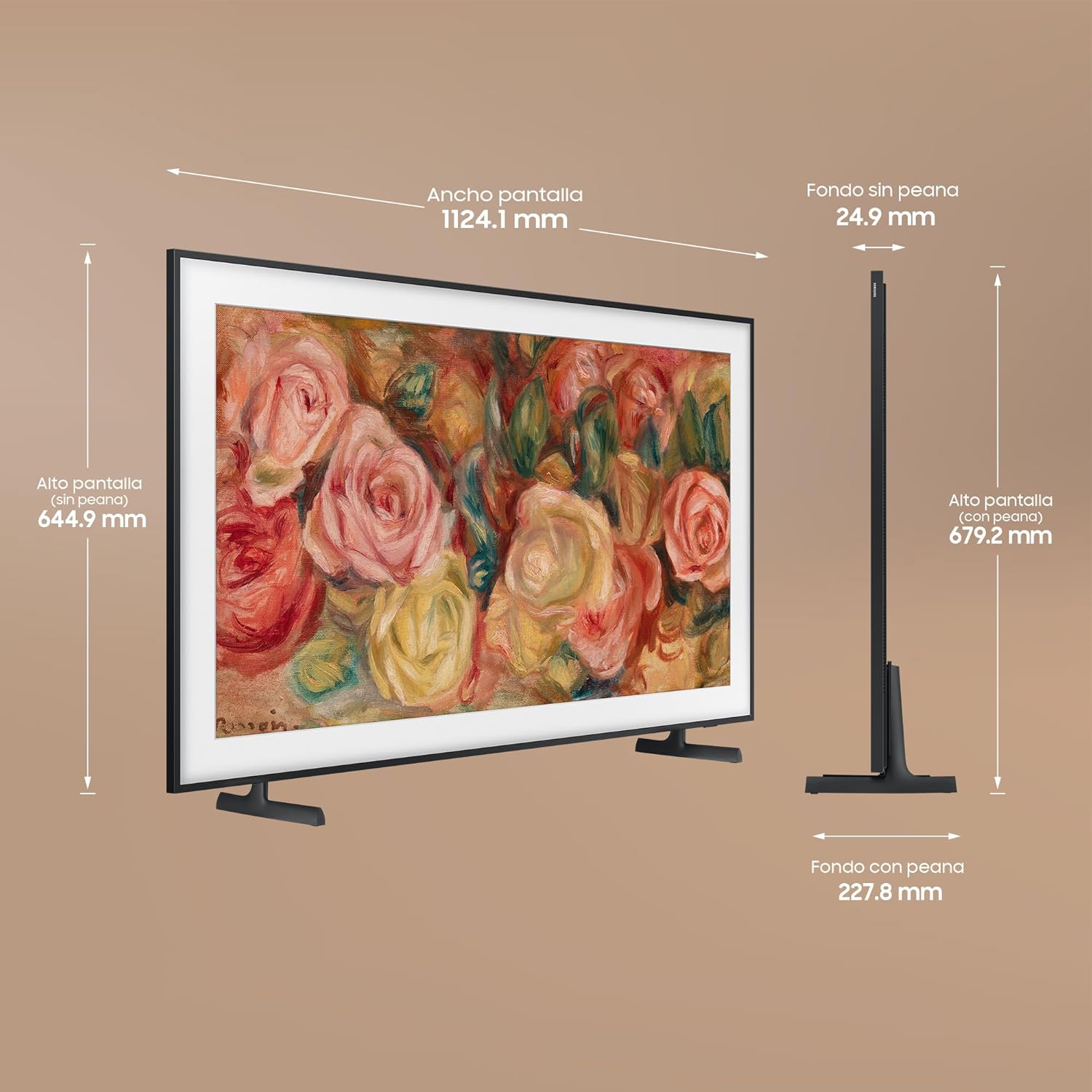
Figure 1: What's in the Box. This image displays the main components included with your Samsung The Frame TV: the LS03 TV unit, the Remote Control, the Power Cable, and the One Connect Box with its various ports (4x HDMI, 2x USB, 1x LAN).
- Placement: Choose a suitable location for your TV. Consider viewing distance and ambient light. The TV can be wall-mounted using the included Slim Fit Wall Mount or placed on a stand.
- Connect One Connect Box: The One Connect Box centralizes all your connections. Connect the One Connect Cable from the TV to the One Connect Box.
- Connect Peripherals: Connect all external devices (e.g., cable box, gaming console, soundbar) to the One Connect Box using HDMI, USB, or other relevant ports.
- Power Connection: Connect the power cable to the One Connect Box, then plug it into a wall outlet.
- Initial Power On: Press the power button on the remote control to turn on the TV and follow the on-screen instructions for initial setup, including network connection and channel scanning.

Figure 2: Product Dimensions. This diagram illustrates the precise measurements of the 50-inch Samsung The Frame TV, including screen width (1124.1 mm), screen height without stand (644.9 mm), depth without stand (24.9 mm), screen height with stand (679.2 mm), and depth with stand (227.8 mm).
Operating Instructions
Basic Operation
- Power On/Off: Press the Power button on the remote control to turn the TV on or off.
- Input Source: Use the Source button on the remote to switch between connected devices (HDMI 1, HDMI 2, TV, etc.).
- Volume Control: Use the Volume Up/Down buttons to adjust the sound level.
- Channel Navigation: Use the Channel Up/Down buttons to change TV channels (if applicable).
Art Mode
The Frame TV's signature feature allows it to display artwork or personal photos when not in use, transforming your TV into a piece of art.

Figure 3: Art Mode in Action. The Samsung The Frame TV seamlessly displays a beautiful painting, appearing like a framed artwork rather than a television screen.
- Activating Art Mode: Press the Art Mode button on your remote or simply turn off the TV. The TV will automatically switch to Art Mode.
- Matte Display: The innovative Matte Display significantly reduces glare and reflections, making the displayed art look more realistic, even in brightly lit rooms.
- Art Store: Access a vast collection of over 2,500 artworks from world-renowned galleries and artists through the Art Store (subscription may be required for full access).
- My Collection: Upload your own photos to display them in Art Mode.
- Interchangeable Bezels: Customize the look of your TV to match your decor. Bezels are available in various colors and styles (sold separately) and attach magnetically.
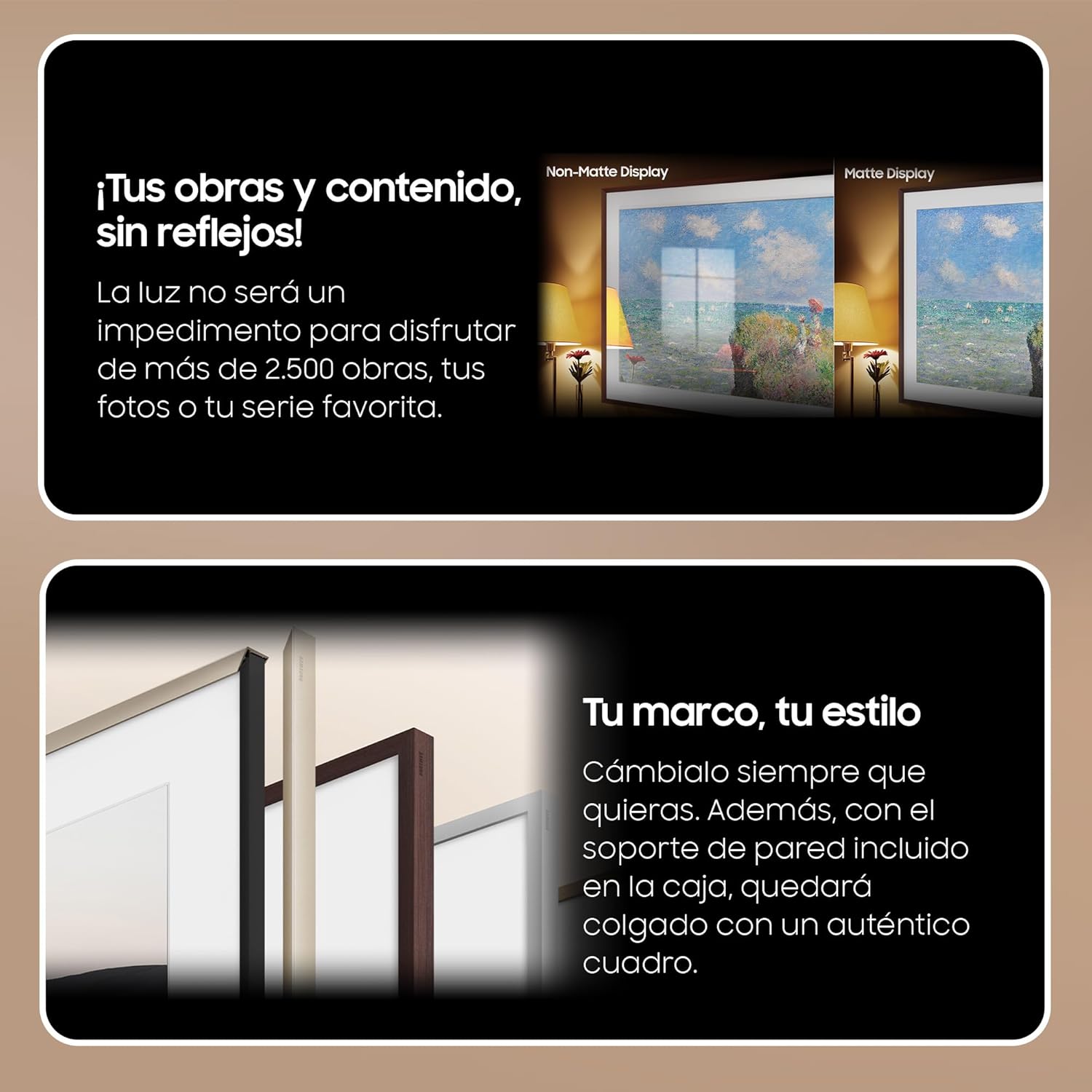
Figure 4: Matte Display Advantage. This image demonstrates the effectiveness of the Matte Display, showing how it eliminates reflections from light sources, ensuring your art and content are viewed without glare.

Figure 5: Interchangeable Bezels. This image showcases the variety of interchangeable bezels, allowing you to personalize your TV's frame to complement your interior design.
Smart Hub and Apps
The Smart Hub provides access to a wide range of streaming services, apps, and connected devices.
- Navigation: Use the directional pad on your remote to navigate the Smart Hub menu.
- App Store: Download and install new applications from the Samsung App Store.
- Universal Guide: Get personalized content recommendations based on your viewing habits.
Remote Control
The included remote control is designed for intuitive navigation and control of your The Frame TV.

Figure 6: Remote Control. This image shows the sleek design of the Samsung The Frame TV and its accompanying remote control, which is designed for ease of use.
- SolarCell Remote: The remote features a solar panel on the back for charging, reducing the need for disposable batteries. It can also be charged via USB-C.
- Voice Assistant: Use the built-in voice assistant (e.g., Bixby, Alexa, Google Assistant) for hands-free control.
- Dedicated Buttons: Quick access buttons for popular streaming services like Netflix and Disney+.
Key Features
100% Color Volume with Quantum Dot
Experience breathtaking colors with Quantum Dot technology, which transforms light into over a billion shades, maintaining vibrancy at any brightness level.

Figure 7: Quantum Dot Technology. This image highlights the capability of Quantum Dot technology to produce over 1 billion colors, ensuring rich and accurate color reproduction.
One Connect Box and Nearly Invisible Cable
The One Connect Box simplifies cable management by consolidating all your device connections into a single, external box. A single, nearly invisible cable then connects the box to the TV, allowing for a clean and clutter-free installation.

Figure 8: One Connect System. This image illustrates how the One Connect Box and its nearly invisible cable help maintain a clean and organized entertainment area by centralizing all connections away from the TV itself.
SmartThings Integration
Control your smart home devices directly from your The Frame TV using the SmartThings app. The TV acts as a central hub for compatible smart devices.

Figure 9: SmartThings Control. This visual demonstrates the TV's capability to serve as a command center for your smart home, connecting to thousands of compatible devices through SmartThings.
Samsung Gaming Hub
Access cloud gaming platforms directly from your TV without the need for a console or downloads. Simply connect your favorite Bluetooth controller and start playing.

Figure 10: Samsung Gaming Hub. This image explains how the Samsung Gaming Hub allows users to play games directly from the cloud, offering a smooth experience with AI-driven recommendations and automatic game settings adaptation.
Q-Symphony
When paired with a compatible Samsung soundbar, Q-Symphony allows the TV's speakers and the soundbar to operate simultaneously, creating a richer and more immersive audio experience.
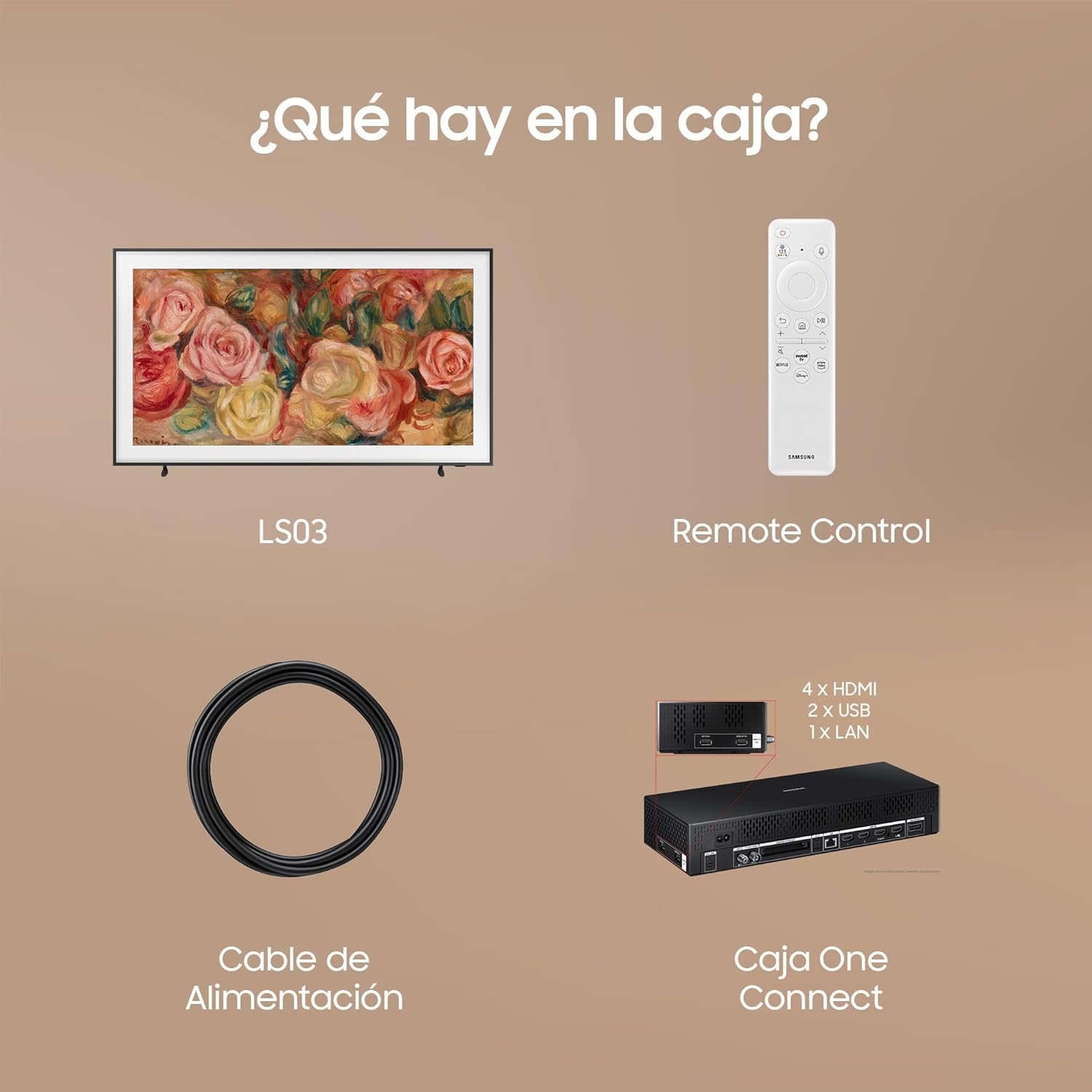
Figure 11: Q-Symphony Integration. This image shows The Frame TV combined with a Music Frame soundbar, demonstrating the Q-Symphony feature for a synchronized and enhanced audio experience.
Maintenance
Cleaning Your TV
- Screen: Gently wipe the screen with a soft, dry microfiber cloth. For stubborn smudges, lightly dampen the cloth with distilled water or a screen-specific cleaning solution (do not spray directly on the screen).
- Body and Bezel: Use a soft, dry cloth to wipe the TV's body and interchangeable bezels. Avoid abrasive cleaners or solvents.
- One Connect Box: Keep the One Connect Box and its ports free of dust. Use a soft, dry cloth for cleaning.
Software Updates
Regularly update your TV's software to ensure optimal performance, access new features, and enhance security.
- Automatic Updates: Enable automatic software updates in the TV settings for convenience.
- Manual Updates: You can check for and install updates manually via the TV's settings menu (Settings > Support > Software Update).
- USB Update: In some cases, updates can be performed via USB. Refer to Samsung's support website for detailed instructions.
Troubleshooting
This section provides solutions to common issues you might encounter with your Samsung The Frame TV.
| Problem | Possible Solution |
|---|---|
| No power / TV does not turn on. |
|
| No picture / Black screen. |
|
| Remote control not working. |
|
| Wi-Fi connection issues. |
|
Specifications
Detailed technical specifications for the SAMSUNG The Frame TV 4K 2024 50LS03D.
| Feature | Detail |
|---|---|
| Brand | SAMSUNG |
| Model Number | TQ50LS03DAUXXC |
| Screen Size | 50 Inches |
| Display Technology | QLED |
| Resolution | 4K (3840 x 2160) |
| Refresh Rate | 50 Hz |
| Operating System | Tizen |
| Connections | Bluetooth, Wi-Fi, Ethernet, 4x HDMI, 2x USB |
| Special Features | Flat Screen, Art Mode, Matte Display, Interchangeable Bezels, One Connect Box, SmartThings, Gaming Hub |
| Included Components | Remote control, user manual, e-manual, power cable |
| Product Dimensions (DxWxH) | 22.8D x 112.4W x 67.9H cm (with stand) |
| Color | Black |
Energy Information

Figure 12: EU Energy Label. This label provides energy efficiency information for the TQ50LS03DAU model, indicating its energy class and consumption for both SDR and HDR content. For more details, visit the official EU EPREL database: https://eprel.ec.europa.eu/qr/1875338

Figure 13: Product Information Sheet. This sheet provides comprehensive technical data and regulatory compliance details for the television, including information on software updates and spare parts availability.
Warranty and Support
Warranty Information
Your Samsung The Frame TV 4K 2024 50LS03D comes with a minimum manufacturer's warranty of 2 years from the date of purchase. This warranty covers manufacturing defects and malfunctions under normal use. Please retain your proof of purchase for warranty claims.
For detailed warranty terms and conditions, please refer to the warranty card included with your product or visit the official Samsung support website for your region.
Customer Support
For technical assistance, troubleshooting, or service requests, please contact Samsung Customer Support. You can find contact information and additional resources on the official Samsung website:
- Online Support: Visit www.samsung.com/support
- Phone Support: Refer to your region's Samsung website for local contact numbers.
- E-Manual: A comprehensive e-manual is available directly on your TV for detailed instructions and features.
Please have your TV's model number (TQ50LS03DAUXXC) and serial number ready when contacting support.


