
Aiwa AW-32HM2PRC
Aiwa 32-inch Smart Roku TV User Manual
Model: AW-32HM2PRC
1. Introduction
Welcome to the user manual for your new Aiwa 32-inch Smart Roku TV, model AW-32HM2PRC. This television is designed to provide an immersive entertainment experience with its integrated Roku TV operating system and HD LED display technology.
With the AIWA 32-inch screen, you can easily access and enjoy your favorite series and movies. The integrated Roku TV operating system and HD LED High Definition technology ensure you appreciate every detail without distraction. The Roku streaming platform offers a superior experience through its vast content selection, ease of use, and excellent value. Thanks to its Wi-Fi connectivity and compact size, this TV is a perfect entertainment hub for any room in your home.

Figure 1.1: Front view of the Aiwa 32-inch Smart Roku TV. The television features a sleek black bezel and a prominent Aiwa logo at the bottom center, with "Roku TV" branding on the lower right. The screen displays a vibrant landscape image with a woman standing on the right.
2. Safety Information
Please read all safety instructions carefully before using your TV. Keep this manual for future reference.
- Power Source: Only use the power cord supplied with the TV. Ensure the voltage matches your local power supply.
- Ventilation: Do not block ventilation openings. Allow adequate space around the TV for proper airflow.
- Water and Moisture: Do not expose the TV to rain or moisture. Do not place objects filled with liquids, such as vases, on the TV.
- Cleaning: Unplug the TV before cleaning. Use a soft, dry cloth. Do not use liquid cleaners or aerosol cleaners.
- Placement: Place the TV on a stable, level surface. Avoid placing it in direct sunlight or near heat sources.
- Lightning: For added protection during a lightning storm or when left unattended for long periods, unplug the TV from the wall outlet.
3. Package Contents
Ensure all items are present in the box:
- Aiwa 32-inch Smart Roku TV (AW-32HM2PRC)
- TV Stands (2 pieces)
- Remote Control
- Power Cord
- User Manual (this document)
- Screws for stand assembly
4. Setup
4.1 Attaching the Stands
To attach the included stands:
- Carefully place the TV face-down on a soft, clean surface to prevent screen damage.
- Align each stand with the corresponding screw holes on the bottom of the TV.
- Secure the stands using the provided screws.
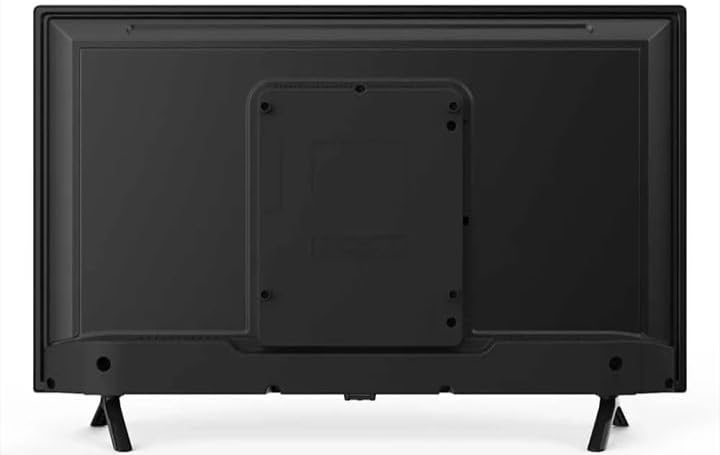
Figure 4.1: Back view of the Aiwa 32-inch Smart Roku TV, showing the VESA mounting pattern in the center and the screw holes for attaching the two included stands at the bottom corners.
4.2 Connecting Power
Plug the power cord into the TV's power input and then into a wall outlet.
4.3 Initial Setup (Roku OS)
Upon first power-on, the TV will guide you through the Roku OS setup process. This includes:
- Language selection.
- Network connection (Wi-Fi).
- Roku account creation or sign-in.
- Channel installation.
5. Operating Your TV
5.1 Remote Control
The included remote control allows you to navigate the Roku TV interface, select channels, adjust volume, and access various features. The TV supports voice search and control via the remote, as indicated in the specifications.
5.2 Roku TV Interface
The Roku TV home screen provides easy access to streaming channels, inputs, and settings.

Figure 5.1: The Roku TV home screen interface, displaying options like Home, Search, Streaming Channels, Cable TV, Game Console, and Antenna TV. Popular streaming app icons such as Netflix, Disney+, Apple TV, Pluto TV, Paramount+, and DIRECTV GO are visible.
5.3 Accessing Apps/Channels
From the home screen, you can select installed streaming channels or browse the Roku Channel Store to add new ones. Use the directional pad on your remote to navigate and the OK button to select.
5.4 Input Selection
To switch between connected devices (e.g., game console, Blu-ray player), select the corresponding input tile on the Roku TV home screen.
6. Connectivity
Your Aiwa Smart Roku TV offers various ports for connecting external devices.
- HDMI Ports (3): For high-definition audio and video connections (e.g., game consoles, Blu-ray players, cable boxes).
- USB Port (1): For connecting USB storage devices to play media files.
- AV Input (Composite): For connecting older devices using RCA cables (yellow for video, red/white for audio).
- Antenna/Cable Input: For connecting an antenna for over-the-air broadcasts or a cable TV connection.
- Wi-Fi: Built-in Wi-Fi for wireless internet connectivity and streaming.
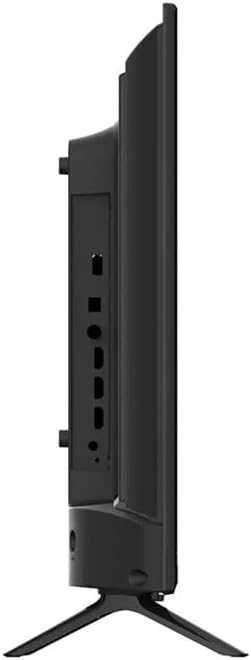
Figure 6.1: Side view of the Aiwa 32-inch Smart Roku TV, illustrating the various input and output ports available for connecting external devices. These include HDMI, USB, and AV inputs.
7. Maintenance
7.1 Cleaning the TV
Always unplug the TV before cleaning. Use a soft, dry, lint-free cloth to wipe the screen and cabinet. Do not use liquid or spray cleaners directly on the TV.
7.2 General Care
Avoid placing heavy objects on the TV. Do not expose the TV to extreme temperatures or humidity. Ensure proper ventilation to prevent overheating.
8. Troubleshooting
If you encounter issues with your TV, refer to the following common problems and solutions:
| Problem | Possible Solution |
|---|---|
| No Power | Check if the power cord is securely plugged into the TV and the wall outlet. Try a different outlet. |
| No Picture / Black Screen | Ensure the correct input source is selected. Check cable connections to external devices. Try restarting the TV. |
| No Sound | Check the volume level and ensure mute is not activated. Verify audio cable connections. |
| Cannot Connect to Wi-Fi | Ensure your Wi-Fi router is on and working. Re-enter the Wi-Fi password. Try restarting both the TV and the router. |
| Remote Control Not Working | Replace the batteries in the remote. Ensure there are no obstructions between the remote and the TV. |
9. Specifications
Detailed technical specifications for your Aiwa 32-inch Smart Roku TV (AW-32HM2PRC).

Figure 9.1: A diagram illustrating the dimensions of the Aiwa 32-inch TV (73 cm width, 48 cm height) and highlighting key Roku TV features such as HD resolution, simple home screen, streaming capabilities, quick search, free mobile app, popular voice assistant compatibility, and voice search/control.

Figure 9.2: A detailed table of technical specifications for the Aiwa 32-inch TV, covering display (size, resolution, refresh rate, brightness, viewing angle, illumination), hardware (smart platform, CPU, GPU, RAM, ATV/DVT systems), audio (power, digital output, Dolby Audio), power requirements (input, consumption), terminals (Antenna, Composite, HDMI, USB, VGA, Headphone, RJ45), and dimensions/weight.
| Feature | Specification |
|---|---|
| Brand | Aiwa |
| Model | AW-32HM2PRC |
| Model Year | 2021 |
| Operating System | Roku OS |
| Screen Resolution | 768p HD (1366 x 768 Pixels) |
| Special Features | Roku TV-Simplified Smart TV, Dolby Audio Technology, Voice Search and Control |
| Display Technology | LED |
| Screen Size (with stand) | 32 Inches / 82 cm |
| Display Type | IPS |
| Aspect Ratio | 16:9 |
| Audio Input | USB, HDMI |
| Refresh Rate | 60 Hz |
| Total USB Ports | 1 |
| Connector Type | Wi-Fi |
| Mounting Type | Table Mount |
| Product Dimensions (L x W x H) | 79 x 13 x 50 cm; 5 kg |
10. Warranty and Support
For warranty information and technical support, please refer to the documentation included with your purchase or visit the official Aiwa support website. Keep your proof of purchase for warranty claims.
For further assistance, you may contact Aiwa customer service through their official channels.
Ask a question about this manual
Ask about setup, troubleshooting, compatibility, parts, safety, or missing instructions. Manuals+ will review the question and use this page’s manual context to help answer it.