
1. Introduction
Thank you for choosing the Moxom MX-ST18 6-in-1 EU Power Strip. This device is designed to provide convenient and safe power distribution for your electronic devices. It features two EU standard AC outlets, two USB-A ports, one USB-C Power Delivery (PD) port, and one USB-A Quick Charge (QC) port, all with a total power capacity of 2500W. Please read this manual carefully before use to ensure proper operation and to maximize the lifespan of your product.
2. Safety Instructions
WARNING: Failure to follow these safety instructions may result in fire, electric shock, or other injuries.
- Do not exceed the maximum load capacity of 2500W. Overloading can cause overheating and fire.
- This power strip is designed for indoor use only. Do not expose it to moisture or wet conditions.
- Do not disassemble, modify, or attempt to repair the device. Contact qualified personnel for service.
- Keep out of reach of children and pets.
- Ensure the power plug is fully inserted into the wall outlet. A loose connection can cause overheating.
- Do not use with damaged cords or plugs.
- Avoid placing the power strip near heat sources or in direct sunlight.
- Unplug the power strip from the wall outlet when not in use for extended periods.

Image: The Moxom MX-ST18 features built-in protection against overcurrent, overvoltage, and short circuits, indicated by the icons on the left side of the power strip.
3. Product Features
- 6-in-1 Design: Equipped with 2 EU AC outlets, 2 standard USB-A ports, 1 USB-C Power Delivery (PD) port (20W), and 1 USB-A Quick Charge (QC) port (18W).
- High Power Capacity: Supports a total power output of up to 2500W, suitable for various high-power appliances.
- Individual On/Off Switches: Each AC outlet has an independent power switch, allowing you to control power to specific devices without unplugging them.
- Advanced Charging Technology: Features 20W PD and 18W QC for rapid charging of compatible smartphones, tablets, and other USB-powered devices.
- Comprehensive Safety Protection: Built-in safeguards against overcurrent, overvoltage, and short circuits ensure the safety of your devices.
- Smart Spacing: Outlets are intelligently spaced to accommodate larger power adapters without blocking adjacent ports.
- Compact and Durable: Designed for portability and longevity, ideal for home, office, or travel use.
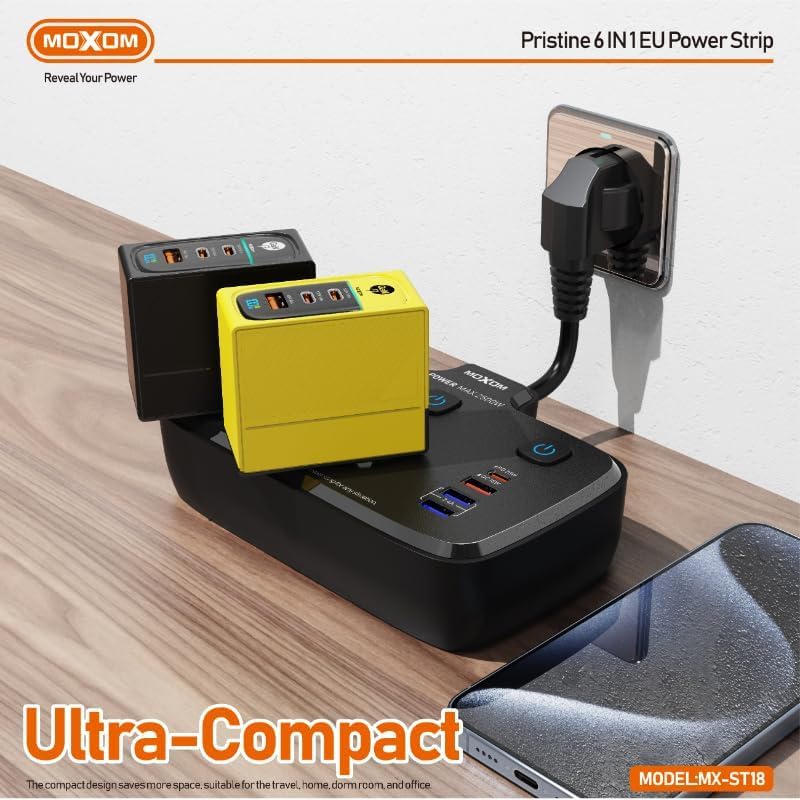
Image: The ultra-compact design of the Moxom MX-ST18 allows for efficient use of space, even with multiple chargers connected.
4. Setup
- Unpack: Carefully remove the Moxom MX-ST18 power strip from its packaging.
- Placement: Choose a dry, stable location away from water, heat, and direct sunlight. Ensure there is adequate ventilation around the power strip.
- Connect to Wall Outlet: Plug the power strip's main plug into a grounded EU standard wall outlet. Ensure the connection is firm.
- Connect Devices: Insert the plugs of your electronic devices into the AC outlets. For USB charging, connect your device's USB cable to the appropriate USB-A, USB-C PD, or USB-A QC port.
- Power On: Press the individual on/off switch above each AC outlet to supply power to the connected device. The USB ports are typically always active when the main power strip is plugged in.
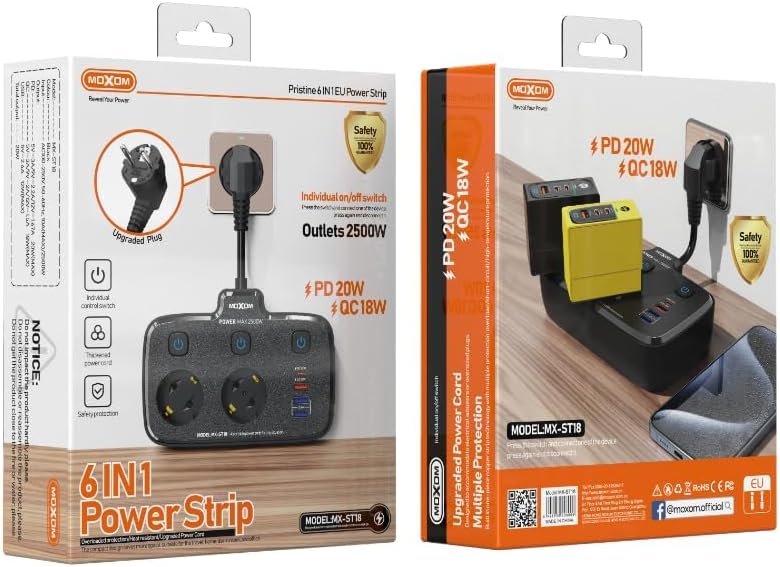
Image: The Moxom MX-ST18 power strip, illustrating its EU plug and the layout of its outlets and USB ports.
5. Operating Instructions
- AC Outlets: Each AC outlet is controlled by its own individual on/off switch. Press the switch to turn the power on or off for the device connected to that specific outlet. This helps conserve energy and provides added safety.
- USB Charging: Connect your USB-powered devices to the USB-A, USB-C PD, or USB-A QC ports. The power strip will automatically detect the device and deliver the optimal charging current.
- Fast Charging: For devices compatible with Power Delivery (PD) or Quick Charge (QC) technology, use the respective USB-C PD (20W) or USB-A QC (18W) ports for faster charging speeds. Ensure your device and cable support these technologies.
- Overload Protection: If the total power consumption exceeds 2500W, the power strip's built-in overload protection may trip, cutting off power to connected devices. If this occurs, unplug some devices, then reset the power strip by unplugging it from the wall and plugging it back in.

Image: The Moxom MX-ST18 in use, demonstrating its fast charging capabilities for various devices.
6. Maintenance
- Cleaning: Disconnect the power strip from the wall outlet before cleaning. Use a dry, soft cloth to wipe the surface. Do not use liquid cleaners or abrasive materials.
- Storage: When not in use, store the power strip in a cool, dry place, away from direct sunlight and extreme temperatures.
- Inspection: Periodically inspect the power cord and plug for any signs of damage. If damage is found, discontinue use and replace the unit.
7. Troubleshooting
| Problem | Possible Cause | Solution |
|---|---|---|
| No power to devices | Power strip not plugged in; individual switch off; overloaded circuit; wall outlet issue. | Ensure power strip is firmly plugged into a working wall outlet. Check individual switches are ON. Reduce connected devices if overloaded. Test wall outlet with another device. |
| Slow USB charging | Device not compatible with fast charging; faulty cable; device drawing too much power. | Ensure device supports PD/QC. Use a high-quality, compatible USB cable. Try a different USB port. |
| Power strip feels hot | Overloaded; poor ventilation. | Unplug some devices to reduce load. Ensure power strip is in a well-ventilated area. If overheating persists, discontinue use. |
8. Specifications
| Feature | Detail |
|---|---|
| Model Number | MX-ST18 |
| Brand | Moxom |
| Color | Black |
| AC Outlets | 2 (EU Standard) |
| USB Ports | 2 x USB-A, 1 x USB-C PD (20W), 1 x USB-A QC (18W) |
| Total USB Ports | 4 |
| Max Power Output | 2500W |
| Voltage | 230V |
| Dimensions (L x W x H) | 21.2 x 17.2 x 6.2 cm |
| Weight | 200 grams |
| Materials | Plastic, Rubber |
| Recommended Use | Home office, entertainment systems, computer setups |
| Special Features | Individual switches, Surge Protection, Fast Charging (PD/QC) |
| Country of Origin | China |
9. Warranty and Support
Moxom products are manufactured to high-quality standards. For warranty information and customer support, please refer to the documentation provided with your purchase or contact your retailer. Keep your proof of purchase for any warranty claims.
Extended warranty plans may be available from third-party providers. Please check with your retailer for details on available protection plans.