
1. Introduction
Thank you for choosing the BOSYTRO 12V-600W AC to DC Converter. This device is designed to efficiently convert alternating current (AC) from a standard wall outlet to direct current (DC) suitable for various 12V applications. This manual provides essential information for the safe installation, operation, and maintenance of your power supply. Please read it thoroughly before use.

Key Features:
- AC to DC Conversion: Input voltage 110V-240V AC, output voltage 12V DC.
- High Power Output: Maximum current up to 50A, maximum output power 600W.
- Easy Operation: Features two nickel-plated copper terminals for direct clamp connection, ensuring good electrical conductivity and high conversion efficiency.
- Intelligent Cooling System: Aluminum alloy shell with multiple ventilation holes and a built-in cooling fan to prevent overheating. Anti-skid pads at the bottom aid heat dissipation and stability.
- Multiple Protection Features: Includes overload protection, over-current protection, and short circuit protection to safeguard connected devices.
- Wide Application: Suitable for industrial automation equipment, RVs, car stereos, LED strips, CCTV systems, 3D printers, motor pumps, security cameras, LCD monitors, and lab computers.
2. Important Safety Information
Failure to follow these safety instructions may result in electric shock, fire, or serious injury.
- Always ensure the input voltage switch (115V/230V) is set correctly for your region's power supply before connecting the unit to AC power. Incorrect voltage selection can damage the unit.
- Do not open the power supply casing. There are no user-serviceable parts inside, and opening it voids the warranty and exposes you to dangerous voltages.
- Ensure proper ventilation. Do not block the cooling fan or ventilation holes.
- Keep the unit away from water, moisture, and high humidity environments.
- Avoid operating the unit in direct sunlight or near heat sources.
- Connect the power supply to a properly grounded outlet.
- Ensure all DC connections are secure and correctly polarized (+ to +, - to -) before applying power.
- Do not exceed the maximum output current (50A) or power (600W) of the unit.
- Disconnect the power supply from the AC outlet before making any connections or disconnections to the DC output.
3. Setup Instructions
3.1 Unboxing
Carefully remove the power supply and all accessories from the packaging. Inspect the unit for any signs of damage. If damage is found, do not use the product and contact customer support.
Included in the Box:
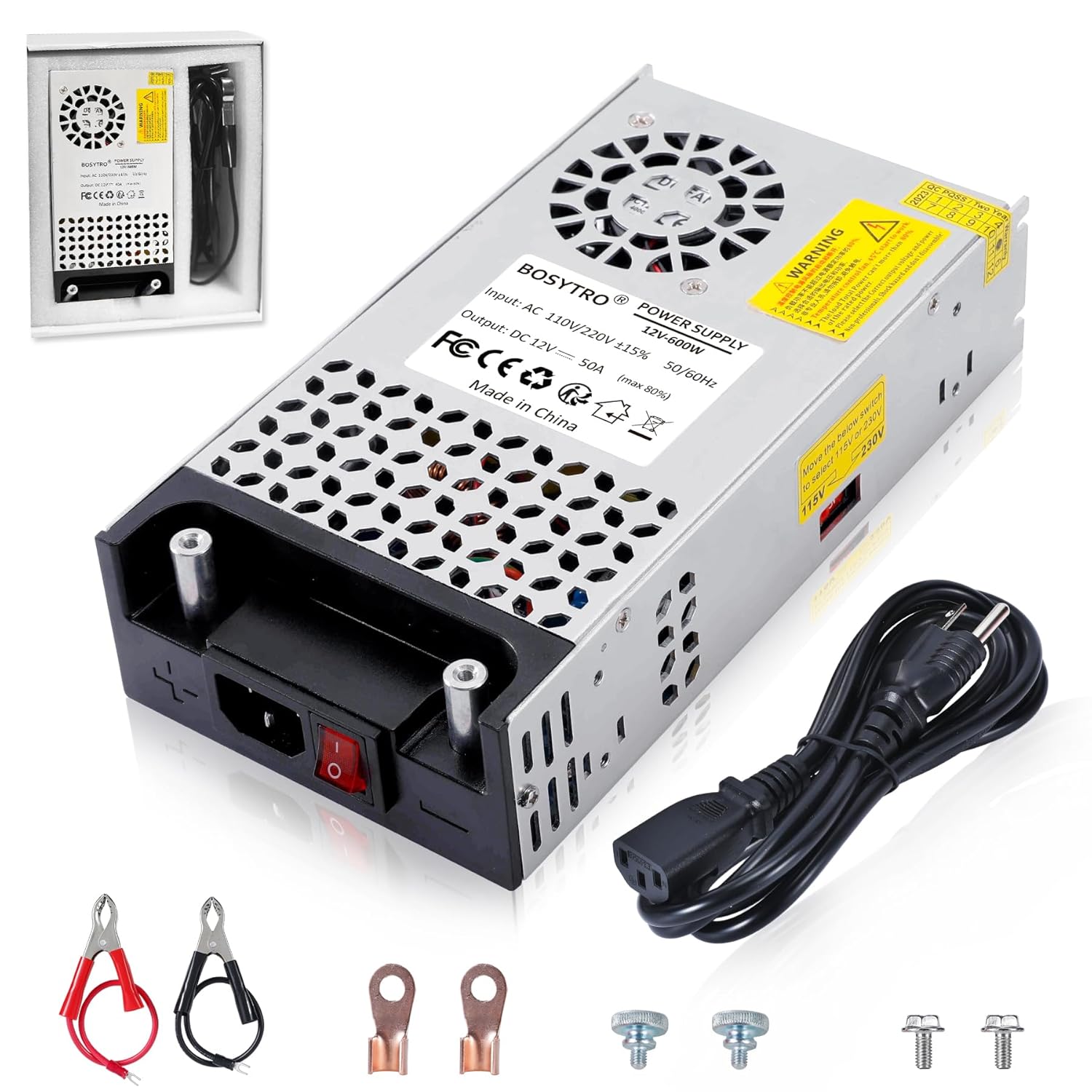
- BOSYTRO AC to DC Converter (12V-600W)
- AC Power Cord
- Alligator Clips (Red and Black)
- Ring Terminals
- Mounting Screws
3.2 Input Voltage Selection
Before connecting the power supply to an AC outlet, you must select the correct input voltage (115V or 230V) using the switch located on the side of the unit. This is crucial to prevent damage to the power supply.
- For North America (USA, Canada, etc.), set the switch to 115V.
- For Europe and other regions, set the switch to 230V.

3.3 Connecting the Power Supply
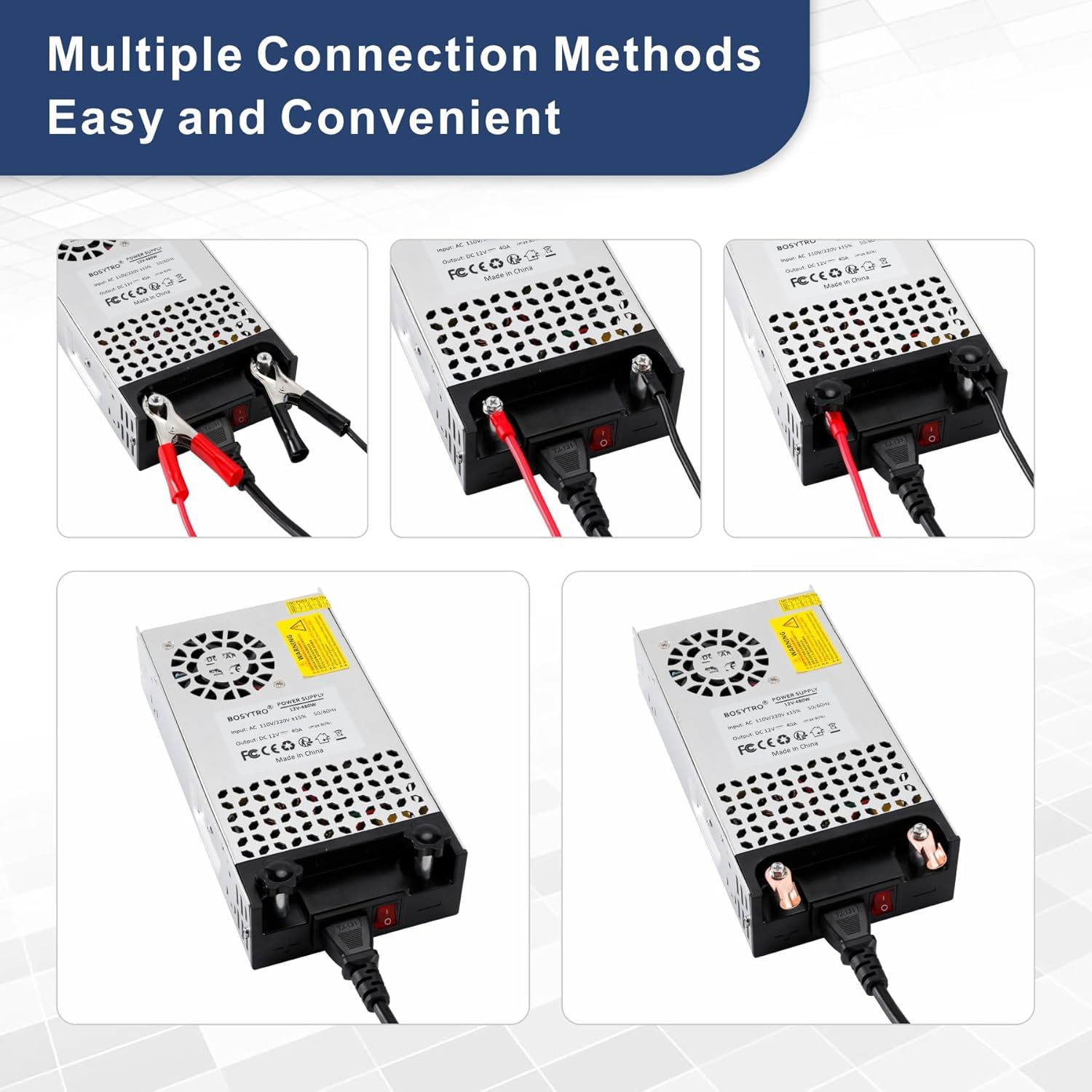
The BOSYTRO 12V-600W power supply offers versatile connection options for its DC output.
- AC Power Connection: Insert the provided AC power cord into the power input socket on the unit and then into a grounded wall outlet. Ensure the power switch on the unit is in the OFF position before plugging into the wall.
- DC Output Connection: The unit features two nickel-plated copper terminals for DC output. You can use the included alligator clips or ring terminals, or directly connect your device's wires. Ensure correct polarity: the red terminal is positive (+), and the black terminal is negative (-).
4. Operating Instructions
4.1 Powering On/Off
After all connections are securely made and the input voltage is correctly selected:
- To power on the unit, flip the red power switch located next to the AC input socket to the 'I' (ON) position.
- To power off the unit, flip the red power switch to the 'O' (OFF) position.

4.2 Output Voltage and Current
The power supply provides a stable 12V DC output. The output current will vary depending on the load connected, up to a maximum of 50A (600W). Ensure your connected device's power requirements do not exceed these limits.
5. Maintenance
5.1 Cooling System
The BOSYTRO 12V-600W power supply features an intelligent cooling system with a built-in fan and an aluminum alloy shell with ventilation holes. To ensure optimal performance and longevity:
- Regularly check that the cooling fan and ventilation holes are free from dust and debris.
- Do not obstruct the airflow around the unit. Maintain adequate space for ventilation.

5.2 General Cleaning
To clean the exterior of the power supply, disconnect it from all power sources and use a soft, dry cloth. Do not use liquid cleaners or solvents.
6. Troubleshooting
If you encounter issues with your BOSYTRO 12V-600W AC to DC Converter, refer to the following common problems and solutions:
- No Power Output:
- Check if the AC power cord is securely plugged into both the unit and the wall outlet.
- Ensure the power switch on the unit is in the 'ON' position.
- Verify that the input voltage selector switch (115V/230V) is set correctly for your region.
- Check the wall outlet with another device to confirm it has power.
- Incorrect Output Voltage/Current:
- Ensure your connected device is rated for 12V DC.
- Verify that the load does not exceed the maximum 50A or 600W capacity of the power supply. Overloading can trigger protection circuits.
- Check all DC connections for proper polarity and secure contact.
- Overheating:
- Ensure the cooling fan and ventilation holes are not blocked.
- Provide adequate space around the unit for proper airflow.
- Reduce the load if the unit is consistently running at its maximum capacity.
- Unit Shuts Down Unexpectedly:
- This may indicate activation of an internal protection circuit (overload, over-current, short circuit, or over-temperature).
- Disconnect the load, turn off the power supply, wait a few minutes, and then restart. If the issue persists, check for a faulty load or short circuit in your wiring.
If these steps do not resolve the issue, please contact BOSYTRO customer support.
7. Specifications
| Feature | Specification |
|---|---|
| Input Voltage | 110V-240V AC |
| Output Voltage | 12V DC |
| Max Output Current | 50 Amps |
| Max Output Power | 600 Watts |
| Product Dimensions | 4.53"D x 4.5"W x 2"H (11.5cm x 11.4cm x 5.1cm) |
| Weight | 2.5 Pounds (approx. 1.13 kg) |
| Mounting Type | Floor Mount |
| Cooling | Built-in Fan, Aluminum Alloy Shell |
| Protections | Overload, Over-current, Short Circuit |
| Operating Temperature | -10°C to 60°C |
| Storage Temperature | -40°C to 85°C |

8. Warranty and Support
8.1 Warranty Information
BOSYTRO products are manufactured to high-quality standards. This product is covered by a limited warranty against defects in materials and workmanship from the date of purchase. Please retain your proof of purchase for warranty claims. The warranty does not cover damage caused by improper installation, misuse, unauthorized modifications, or natural disasters.
8.2 Customer Support
For technical assistance, warranty inquiries, or any questions regarding your BOSYTRO 12V-600W AC to DC Converter, please contact BOSYTRO customer support through the retailer where the product was purchased or visit the official BOSYTRO website for contact information.