
Introduction
Thank you for choosing the Genérico Y60 Cycle BT5.3 Intercom Headset. This device is designed to enhance your riding experience with advanced Bluetooth 5.3 connectivity, intercom capabilities, FM radio, and robust features like IPX6 waterproofing and noise reduction. Please read this manual carefully to ensure proper installation, operation, and maintenance of your headset.
Safety Information
- Always prioritize road safety. Do not operate the device in a way that distracts you from driving.
- Keep the device away from extreme temperatures, direct sunlight, and corrosive materials.
- Do not attempt to disassemble or modify the device. This may void the warranty and cause damage.
- Ensure the device is securely mounted to your helmet before riding.
- Use only the provided charging cable and adapter to prevent damage to the battery.
Package Contents
Please check the package for the following items:
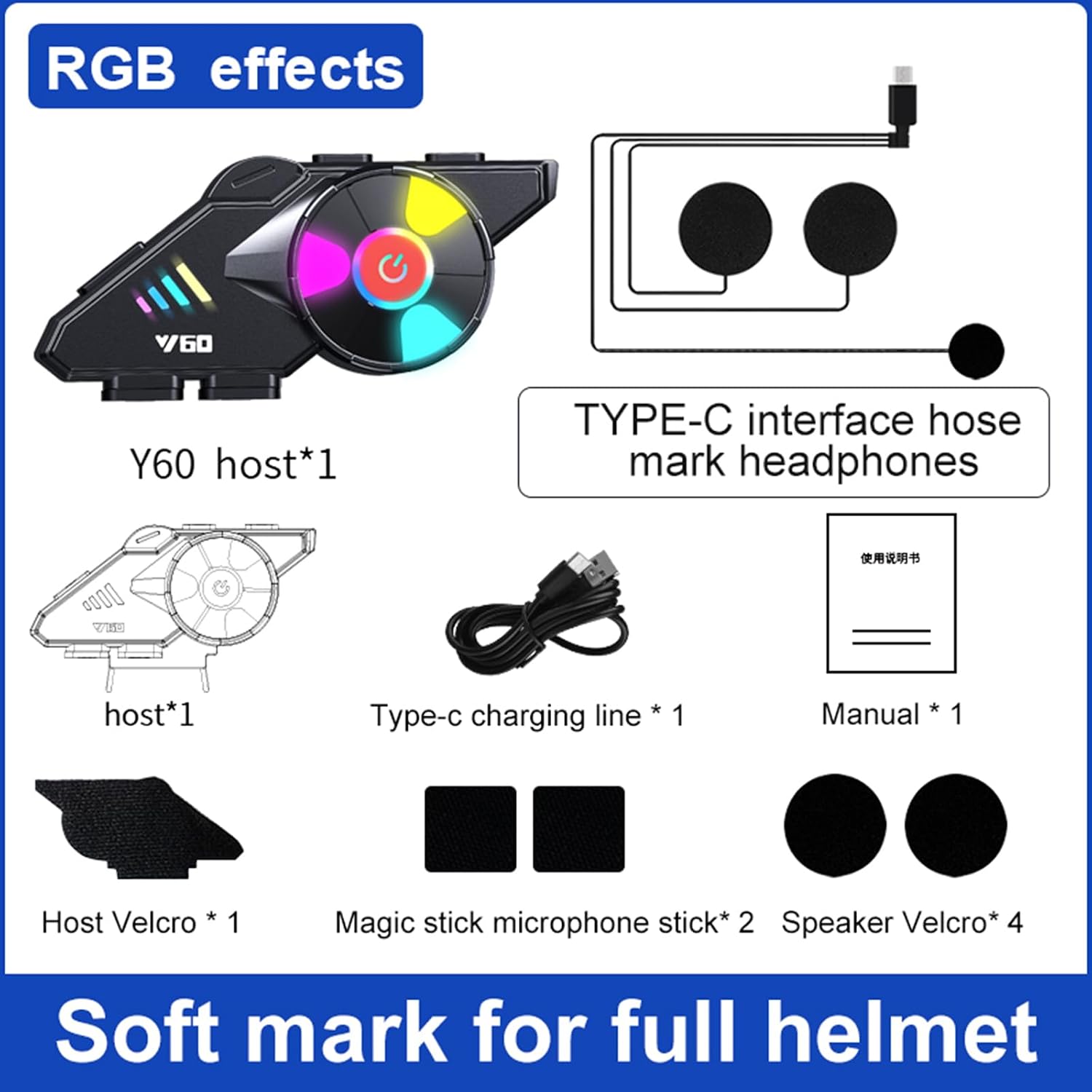
Figure 1: Package Contents - This image displays all components included in the Genérico Y60 Cycle BT5.3 Intercom Headset package. It shows the Y60 main unit, a Type-C charging cable, a user manual, host Velcro, microphone stick Velcro, and speaker Velcro pads.
- Y60 Host Unit (1)
- Speaker Microphone (1)
- Type-C Charging Cable (1)
- Host Velcro (1)
- Microphone Stick Velcro (2)
- Speaker Velcro (4)
- User Manual (1)
Product Features
The Genérico Y60 Intercom Headset is equipped with advanced technologies for a superior user experience:

Figure 2: Core Technologies - This image highlights the nine key technologies integrated into the Y60 headset, such as Bluetooth 5.3 chip, high-fidelity sound, auto answer, IPX67 waterproof, voice assistant, and the ability to connect to two mobile phones simultaneously.
- Bluetooth 5.3 Chip: Provides stable and efficient wireless connectivity.
- High-Fidelity Sound: Delivers clear and immersive audio quality.
- Extraordinary Standby: Optimized power management for extended standby times.
- Auto Answer: Automatically answers incoming calls for convenience.
- IPX6 Waterproof: Designed to withstand heavy rain and splashes, ensuring durability in various weather conditions.
- AI Voice Assistant Support: Access your device's voice assistant for hands-free control.
- One-to-Two Connection: Connects simultaneously to two mobile phones, allowing seamless switching between devices for music, navigation, or calls.
- Host & Earphone Split Design: Flexible design for easy installation and comfort.
- RGB Dazzling Color Lighting: Features 6-color RGB light effects with breathing and off modes to personalize your device and enhance visibility.
- Multiple Noise Reduction Programs: Utilizes CVC algorithm and DSP hardware for effective environmental noise reduction, providing a clearer sound experience.
- Professional Audio Decoding Technology: Unique speaker structure and comprehensive package deliver perfect sound quality with double noise reduction and windproof sponge protection for clearer calls.
Setup
1. Charging the Device
Before first use, fully charge the Y60 headset. Connect the provided Type-C charging cable to the charging port on the device and a suitable USB power source. The device supports fast charging.

Figure 3: Battery Life and Charging - This image illustrates the long-lasting battery life of the Y60 headset, indicating 25 hours of continuous play and a 1000mAh battery capacity, along with its quick charge feature.
- A 20-minute charge can provide approximately 3 hours of use.
- The 1000mAh battery offers over 32 hours of continuous play and 300 hours of standby time.
2. Helmet Installation
The Y60 headset is designed for easy installation on various helmet types.

Figure 4: Helmet Compatibility - This image shows the Y60 headset mounted on a helmet and indicates its suitability for a wide range of helmet types, including full helmets, half helmets, off-road helmets, unmask helmets, and retro helmets.
- Attach the Host Velcro to the side of your helmet where you intend to mount the main unit.
- Secure the Y60 host unit to the Host Velcro.
- Insert the speaker microphone into the helmet's interior, positioning the speakers near your ears and the microphone near your mouth. Use the Speaker Velcro and Microphone Stick Velcro to secure them.
- Ensure all cables are neatly tucked away and do not obstruct your vision or movement.
Operating Instructions
1. Power On/Off
- Power On: Press and hold the power button (usually the central button with a power icon) for approximately 3 seconds until you hear an audible prompt or see the indicator lights illuminate.
- Power Off: Press and hold the power button for approximately 3-5 seconds until you hear an audible prompt or the indicator lights turn off.
2. Bluetooth Pairing
- With the device powered off, press and hold the power button for about 5-7 seconds until the indicator light flashes red and blue alternately, indicating pairing mode.
- On your mobile phone, enable Bluetooth and search for available devices.
- Select 'Y60' from the list of devices. Once connected, the indicator light will typically turn blue and flash slowly.
- To connect a second phone, repeat the pairing process. The Y60 supports simultaneous connection to two mobile devices.
3. Music Playback
- Once paired with your phone, open your music player application.
- Use the headset's buttons to play/pause, skip tracks (forward/backward), and adjust volume. (Specific button functions may vary; refer to quick start guide for exact layout).
4. Call Handling
- Answer Call: The device supports auto-answer. Alternatively, a short press of the power button will answer an incoming call.
- End Call: Short press the power button during a call.
- Reject Call: Press and hold the power button for 2 seconds when a call comes in.
- Voice Assistant: Double-press the power button to activate your phone's AI voice assistant (e.g., Siri, Google Assistant).
5. FM Radio
The Y60 headset includes an FM radio function. (Specific button combination to activate FM radio may vary; refer to quick start guide for exact instructions).
6. RGB Ambient Lighting
The device features customizable RGB lighting. (Specific button combination to cycle through light modes or turn them off may vary; refer to quick start guide for exact instructions).
Maintenance
- Cleaning: Use a soft, damp cloth to wipe the surface of the device. Do not use harsh chemicals or abrasive cleaners.
- Storage: When not in use for extended periods, store the device in a cool, dry place. Ensure it is fully charged before storing and recharge every few months to maintain battery health.
- Water Exposure: While IPX6 waterproof, avoid prolonged submersion. If exposed to heavy rain, ensure the charging port cover is securely closed.
Troubleshooting
| Problem | Possible Cause | Solution |
|---|---|---|
| Device does not power on | Low battery; Device malfunction | Charge the device fully. If problem persists, contact support. |
| Cannot pair with phone | Device not in pairing mode; Bluetooth off on phone; Interference | Ensure device is in pairing mode (flashing red/blue). Turn phone's Bluetooth off and on. Move closer to the phone. |
| No sound or low volume | Volume too low; Speakers improperly connected; Phone volume low | Increase volume on both headset and phone. Check speaker connections. |
| Poor call quality / Noise | Microphone position; Environmental noise; Weak signal | Adjust microphone closer to mouth. Move to a quieter area. Ensure good phone signal. |
Specifications

Figure 5: Audio Technology - This image illustrates the advanced audio decoding technology, featuring a 30mm playback unit, stereo surround, and high-definition sound for an enhanced listening experience.
| Feature | Specification |
|---|---|
| Bluetooth Version | BT 5.3 |
| Transmission Distance | Up to 10 meters (33 feet) |
| Battery Capacity | 3.7V 1000mAh |
| Standby Time | 300 hours |
| Talk Time | 28-32 hours |
| Continuous Play Time | >32 hours |
| AI Voice Assistant | Supported |
| Waterproof Rating | IPX6 |
| Ambient Light | Supported (On/Off) |
| Package Size | 131 x 102 x 60 mm |
| Package Weight | 210 g |
| Manufacturer | XIIYUNN |
Warranty and Support
This product comes with a standard manufacturer's warranty. For specific warranty details, please refer to the documentation provided with your purchase or contact your retailer. For technical support or further assistance, please reach out to the customer service provided by your point of purchase.