
1. Introduction
This manual provides instructions for the ANNNWZZD Magnetic Wireless Mag-Safe Charging Station, Model LR-WR327-B. This device is designed to simultaneously charge compatible iPhone models, Apple Watch, and AirPods, offering a streamlined charging experience.
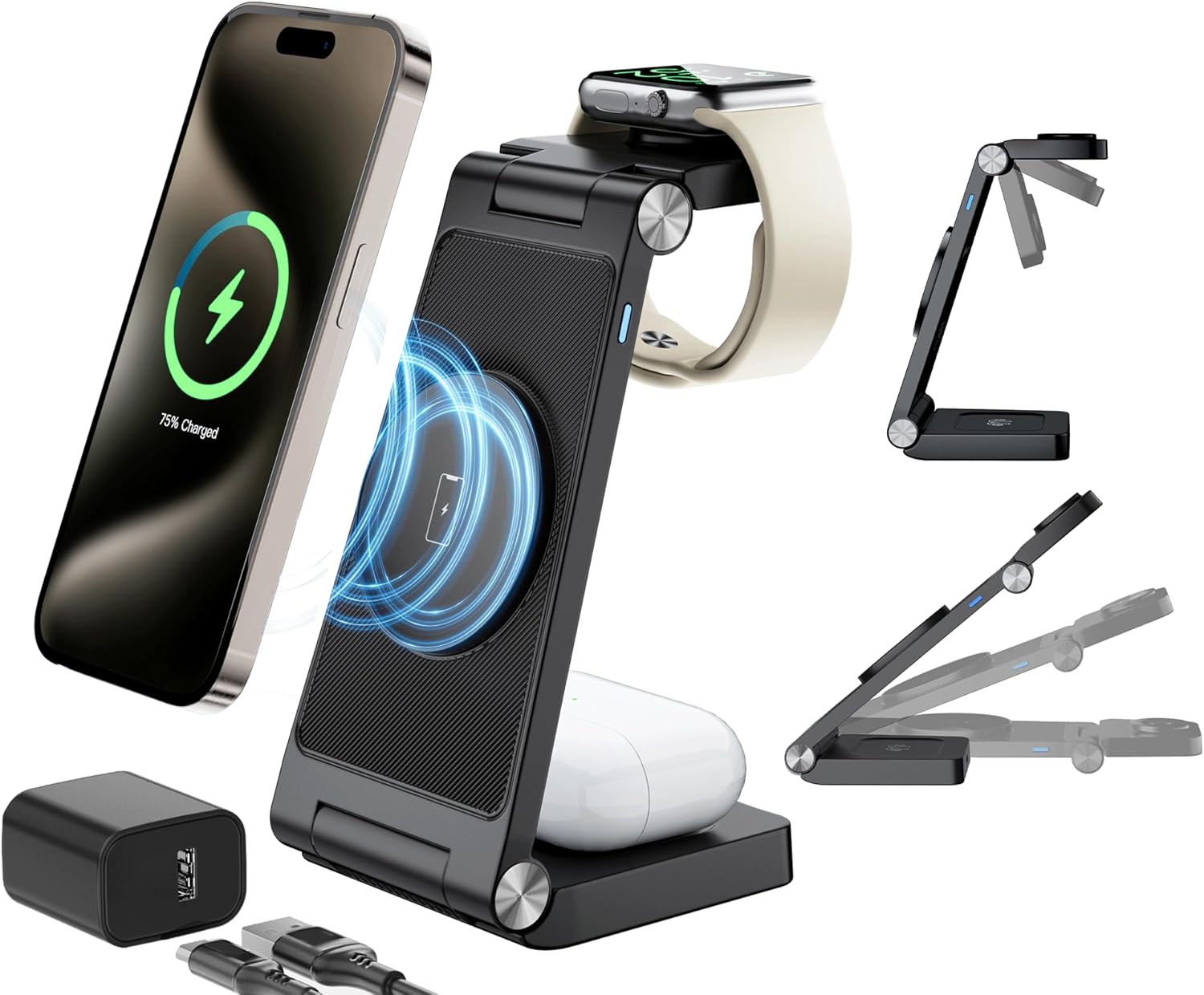
Image 1: ANNNWZZD 3-in-1 Magnetic Wireless Charging Station in use.
2. Package Contents
Please verify that all items are present in the package:
- 1 x ANNNWZZD Wireless Charging Station
- 1 x 18W Power Adapter
- 1 x USB-A to USB-C Charging Cable
- 1 x User Manual (this document)
3. Product Features
- 3-in-1 Wireless Charging: Charges compatible iPhone models, Apple Watch, and AirPods simultaneously.
- Fast Charging: Supports up to 10W fast wireless charging for compatible iPhones and 18W total output with the included adapter.
- Magnetic Alignment: Features Mag-Safe compatible magnetic suction for secure and efficient iPhone charging.
- Multi-Protection System: Integrated intelligent chipset provides over-current, over-voltage, and over-charging protection.
- Camera Protection Design: Elevated phone charging pad prevents contact with the phone's camera module.
- Portable and Foldable: Designed for easy portability, folding flat for travel or storage.
- Adjustable Viewing Angles: Allows for flexible positioning of the phone for optimal viewing during charging.

Image 2: The charging station supports multiple device orientations.

Image 3: Folded dimensions for portability.
4. Setup Guide
- Connect the Power Adapter: Plug the included 18W power adapter into a wall outlet.
- Connect the Charging Cable: Insert the USB-A end of the charging cable into the power adapter and the USB-C end into the charging station's input port.
- Position the Charging Station: Place the charging station on a flat, stable surface. You can unfold it into a stand configuration or keep it flat as a pad.
- Power On: The charging station is now ready for use. A charging indicator light may illuminate to confirm power.

Image 4: Example of a tidy setup using the charging station.
5. Operating Instructions
To charge your devices, follow these steps:
5.1. Charging iPhone
- Ensure your iPhone is Mag-Safe compatible (iPhone 12 series or newer).
- Place your iPhone onto the magnetic charging pad. The magnets will align the phone automatically.
- The phone can be charged in portrait or landscape mode.
- A charging indicator will appear on your iPhone screen.
- Note: For optimal magnetic connection and charging efficiency, avoid phone cases thicker than 1mm, unless they are Mag-Safe compatible.
5.2. Charging Apple Watch
- Place your Apple Watch onto the dedicated watch charging module.
- Ensure the watch is properly seated and the charging icon appears on its screen.
5.3. Charging AirPods
- Place your AirPods case (with wireless charging capability) onto the designated AirPods charging area at the base of the station.
- The charging indicator on your AirPods case should illuminate.

Image 5: Magnetic charging mechanism for secure device placement.

Image 6: Adjustable angles for comfortable viewing.

Image 7: Stand mode offers high efficiency and usability while charging.
6. Compatibility
The charging station is compatible with the following devices:
- iPhone: iPhone 15, 15 Plus, 15 Pro, 15 Pro Max, 14, 14 Plus, 14 Pro, 14 Pro Max, 13, 13 mini, 13 Pro, 13 Pro Max, 12, 12 mini, 12 Pro, 12 Pro Max.
- Apple Watch: Apple Watch Ultra 2, S9, Ultra, S8, S7, S6, SE, S5, S4, S3, S2, S1.
- AirPods: AirPods Pro 2, AirPods Pro, AirPods 3, AirPods 2 (with Mag-Safe compatible wireless charging case).

Image 8: Device compatibility and charging power levels.
7. Safety Information
To ensure safe operation and prevent damage, please observe the following:
- Use only the provided 18W power adapter and USB-C cable.
- Do not expose the device to water, moisture, or extreme temperatures.
- Avoid dropping or subjecting the device to strong impacts.
- Do not disassemble, modify, or attempt to repair the device yourself.
- Keep the charging station away from metallic objects during charging to prevent interference or overheating.
- Ensure proper ventilation around the charging station during use.
- The elevated design of the phone charging pad helps prevent contact with the phone's camera. Ensure your phone is correctly aligned.

Image 9: Built-in multi-protection features.

Image 10: Proper phone placement ensures no contact with the camera.
8. Maintenance
- Cleaning: Disconnect the power before cleaning. Use a soft, dry cloth to wipe the surface of the charging station. Do not use harsh chemicals or abrasive materials.
- Storage: When not in use, store the charging station in a cool, dry place, away from direct sunlight. Its foldable design allows for compact storage.
9. Troubleshooting
| Problem | Possible Cause | Solution |
|---|---|---|
| Device not charging | Not properly connected to power; Device not correctly placed; Incompatible phone case; Device not wireless charging compatible. | Ensure power adapter and cable are securely connected. Reposition the device on the charging pad. Remove thick or non-Mag-Safe cases. Verify device compatibility. |
| Slow charging | Using a non-18W power adapter; Phone case interference; Multiple devices charging simultaneously. | Use the included 18W adapter. Remove phone case or use a Mag-Safe compatible one. Charging speed may vary when multiple devices are connected. |
| Charging intermittent | Poor device alignment; Foreign objects on charging pad; Overheating. | Realign the device on the charging pad. Remove any foreign objects. Allow the charger to cool down if it feels warm. |
| LED indicator not working | No power; Faulty unit. | Check power connection. If still not working, contact customer support. |
10. Specifications
- Model Number: LR-WR327-B
- Brand: ANNNWZZD
- Product Dimensions: 5.5 x 2.67 x 0.66 inches (folded)
- Item Weight: 10.5 ounces
- Connector Type: USB Type C (input), Wireless (output)
- Input Voltage: 9 Volts
- Amperage: 3 Amps
- Total USB Ports: 1 (for power input)
- Special Features: Charging Indicator, Fast Charging, Magnetic, Short Circuit Protection, Wireless Charging
- Color: Black
11. Warranty and Support
For warranty information or technical support, please refer to the contact details provided on the product packaging or the official ANNNWZZD website. Please retain your proof of purchase for warranty claims.