
1. Product Overview
This manual provides instructions for the isinlive MJ005H Replacement Filter, designed for use with POMORON MJ005H Air Purifiers. This filter is engineered to maintain the air purifier's optimal performance by effectively capturing various airborne particles.

Image: The isinlive MJ005H Replacement Filter positioned next to a compatible POMORON MJ005H Air Purifier, illustrating its intended use.
The filter is a crucial component for ensuring clean air in your indoor environment.
2. Product Features
The isinlive MJ005H Replacement Filter utilizes a 4-stage filtration system to enhance air quality:
- Pre-Filter: Captures large particles such as fibers, hair, pet fur, dust, and lint.
- Special Silver Ion Layer: Further enhances air purification efficiency.
- HEPA Filter: Works for 99.9% of particles as small as 0.3 microns, including pollen, dust, and pet dander.
- Activated Carbon Layer: Neutralizes household odors, smoke, and volatile organic compounds (VOCs).
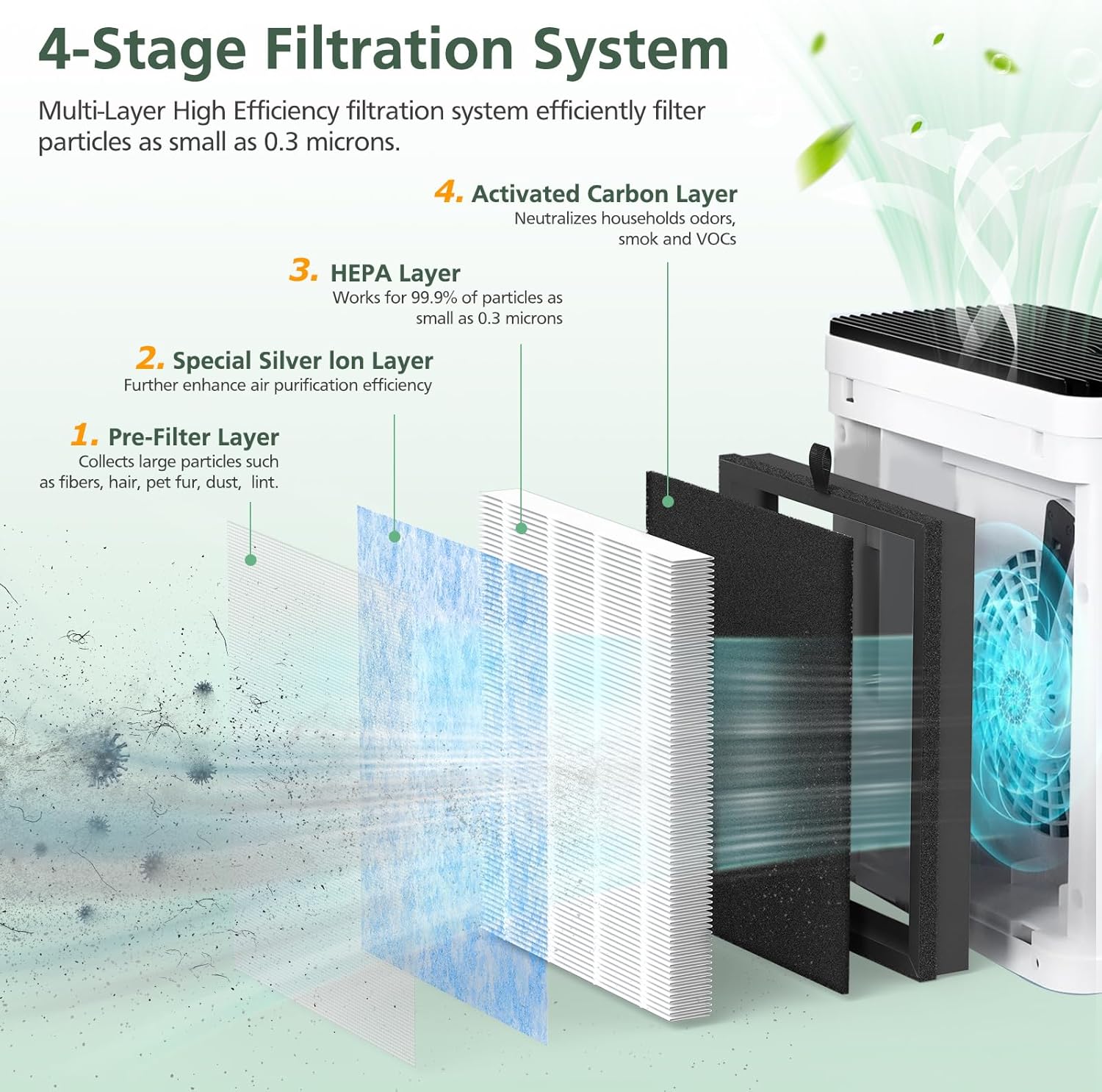
Image: A detailed diagram showing the four distinct layers of the MJ005H replacement filter: Pre-Filter, Special Silver Ion Layer, HEPA Layer, and Activated Carbon Layer, and their respective functions.
This multi-layer system is designed to effectively remove a wide range of airborne contaminants, contributing to a cleaner indoor environment.
3. Installation Instructions
Follow these steps to replace the filter in your POMORON MJ005H Air Purifier:
- Step 1: Gently pull out the filter cover from your air purifier.
- Step 2: Remove the old filter and dispose of it properly. Unpack the new isinlive MJ005H Replacement Filter from its plastic packaging.
- Step 3: Insert the new filter back into the air purifier, ensuring it is correctly seated. Close the filter cover securely.
- Step 4: Long-press the filter reset button (often indicated by a snowflake or filter icon) on your air purifier for 3 seconds to reset the filter indicator.
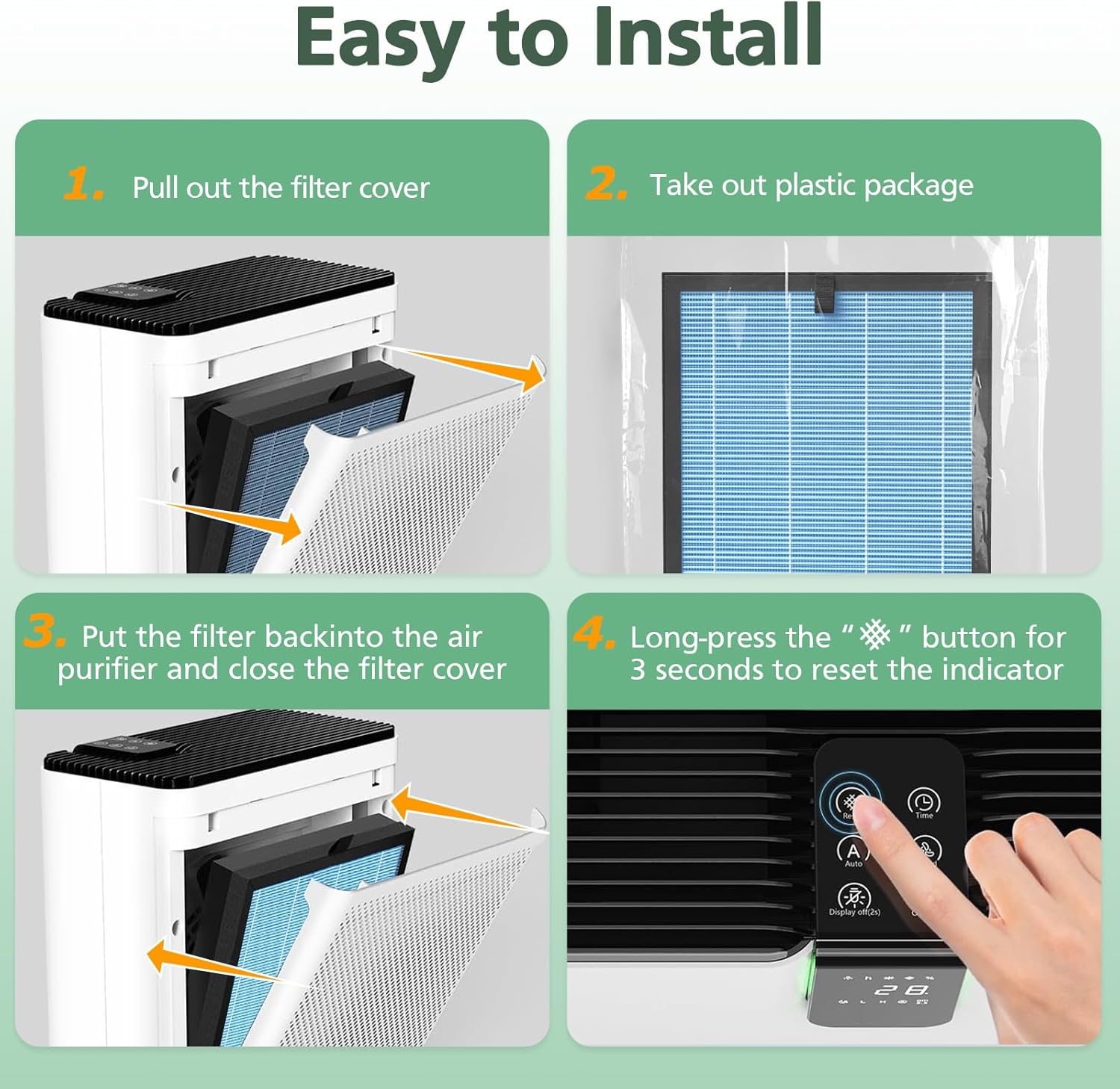
Image: A visual guide demonstrating the four steps for easy filter installation: pulling out the cover, unwrapping the new filter, inserting it, and resetting the indicator.
No tools are required for this process.
4. Maintenance
To ensure optimal performance of your air purifier, it is recommended to replace the isinlive MJ005H air filters every 3 to 6 months. The exact replacement frequency may vary depending on your usage patterns and the air quality of your environment.

Image: A visual comparison showing a clean, new filter next to a visibly soiled filter after three months of use, emphasizing the importance of timely replacement.
Regular replacement ensures the air purifier continues to operate at its highest efficiency.
5. Specifications
| Feature | Detail |
|---|---|
| Brand | isinlive |
| Model Number | MJ-M0R0-5HIF |
| Compatible Device | POMORON MJ005H Air Purifiers |
| Filtration System | 4-Stage (Pre-Filter, Silver Ion Layer, HEPA Filter, Activated Carbon Filter) |
| Particle Removal Efficiency | 99.9% of particles as small as 0.3 microns |
| MERV Rating | 13 |
| Item Weight | 1.1 pounds (0.5 Kilograms) |
| Package Dimensions | 11.18 x 9.57 x 2.99 inches |
| Number of Items | 2 (per pack) |
6. Troubleshooting
If your air purifier is not functioning as expected after filter replacement, consider the following:
- Airflow Reduction: Ensure the filter is correctly seated and the filter cover is fully closed. An improperly installed filter can restrict airflow.
- Filter Indicator Light: If the filter replacement indicator remains on, ensure you have performed the reset procedure correctly (long-press the reset button for 3 seconds).
- Unusual Odors: New filters may emit a slight odor initially, which should dissipate quickly. If strong or persistent odors occur, verify the filter is genuine and installed correctly.
For further assistance, refer to your POMORON MJ005H Air Purifier's main instruction manual or contact the air purifier manufacturer's customer support.
7. Warranty and Support
For information regarding the warranty of your isinlive MJ005H Replacement Filter, please refer to the product packaging or contact isinlive customer service directly. Support for the POMORON MJ005H Air Purifier itself should be directed to the air purifier's manufacturer.
Always ensure you purchase genuine replacement filters to maintain warranty validity and optimal performance of your air purifier.