Introduction
The eLinkSmart P12 Smart Padlock offers advanced security and convenience with multiple unlocking options. This heavy-duty, weatherproof padlock is designed for various indoor and outdoor applications, providing reliable protection for your belongings.

Image: The eLinkSmart P12 Smart Padlock, showcasing its keypad, included RFID cards, and physical keys.
Package Contents
Please verify that all items are present in your package:
- 1 * P12 Smart Padlock
- 1 * USB-C Charging Cable
- 1 * User Manual (this document)
- 2 * RFID Cards
- 2 * Spare Keys
Key Features
- 5 Unlocking Ways: Mobile App, Apple Watch, Passcode, RFID Card, and Spare Key.
- Heavy Duty & Durable: Designed with 3200N pull resistance, hardened stainless steel shackle, strong zinc alloy body, and advanced pick-resistant keyhole.
- Weatherproof (IP67): Resistant to water, dust, rust, and corrosion, suitable for extreme environmental conditions (-4°F to 122°F).
- Ultra-Long Battery Life: Built-in 500mAh rechargeable Li-ion battery provides up to 24 months standby time or approximately 8000 unlocks on a single charge. Fast recharging via USB-C within 3 hours.
- Anti-Peeping Passcode: Supports random digits before and after the real passcode for enhanced security.
- Temporary Passcodes: Ability to generate temporary passcodes for guest access.
- Battery Indicator: Check battery level directly on the lock.

Image: Visual representation of the five unlocking methods: Mobile App, Apple Watch, Passcode, RFID Card, and Spare Key.

Image: Detailed view of the padlock's construction, emphasizing its zinc alloy body, advanced keyhole, and thick stainless steel shackle for high security.

Image: The padlock shown in different environmental settings, illustrating its IP67 weatherproof capabilities against sun, rain, and snow, and its operational temperature range.
Setup
1. Initial Charging
Before first use, fully charge the padlock using the provided USB-C cable. The charging port is located on the side of the lock. A full charge typically takes about 3 hours.
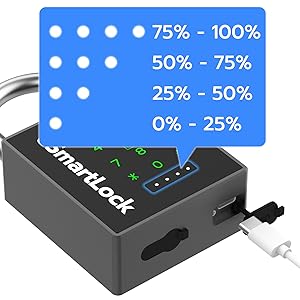
Image: The padlock's USB-C charging port and the visual battery indicator lights.
2. App Installation and Pairing
Download the eLinkSmart app from your device's app store (available for Android and iOS). Follow the in-app instructions to pair your padlock via Bluetooth. Ensure Bluetooth is enabled on your smartphone.
3. Setting Up Passcodes and RFID Cards
Once paired with the app, you can set up your primary passcode, add additional passcodes (up to 20), and register the included RFID cards. The app provides a user-friendly interface for managing these access methods.
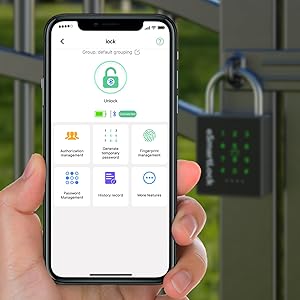
Image: A smartphone showing the eLinkSmart mobile application, used for managing the smart padlock.
Operating the Padlock
Unlocking Methods:
- Mobile App: Open the eLinkSmart app on your smartphone, ensure Bluetooth is active, and tap the unlock icon.
- Apple Watch: If configured, use the eLinkSmart app on your Apple Watch to unlock the padlock.
- Passcode: Enter your registered passcode on the padlock's keypad. For anti-peeping, you can enter random digits before and after your actual passcode.
- RFID Card: Swipe a registered RFID card over the designated area on the padlock.
- Spare Key: Insert and turn one of the provided physical keys into the keyhole located at the bottom of the padlock.
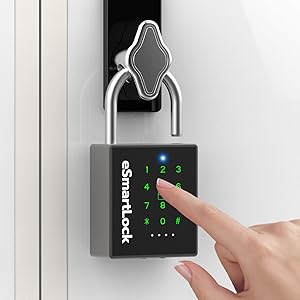
Image: A hand interacting with the padlock's keypad to enter a passcode.
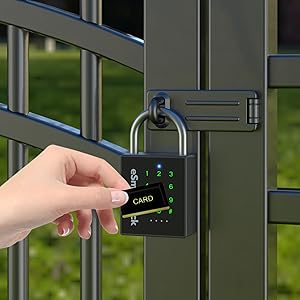
Image: A hand using an RFID card to unlock the eLinkSmart P12 padlock.
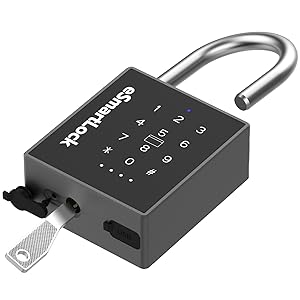
Image: The padlock being unlocked using one of the provided physical spare keys.
Locking the Padlock:
To lock the padlock, simply push the shackle down firmly until it clicks into place. The padlock will automatically lock.
Maintenance
- Charging: Recharge the padlock when the battery indicator shows low power (below 25%). The padlock will also provide a low battery reminder.
- Cleaning: Wipe the padlock with a soft, damp cloth. Avoid using abrasive cleaners or solvents.
- Environmental Care: While weatherproof, prolonged submersion is not recommended. Ensure the USB-C port cover is securely closed when not charging to maintain water resistance.
- Energy Saving: The padlock enters a sleep state to save power. Touch the keypad once to wake it up, then touch again to unlock or connect to the app.
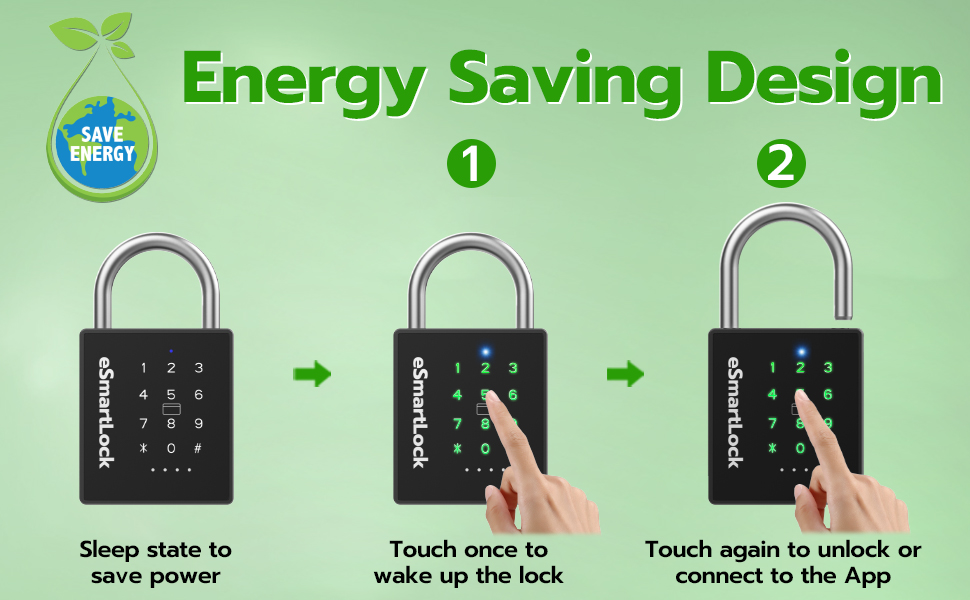
Image: Steps showing how the padlock enters sleep mode for energy saving and how to wake it up for use.
Troubleshooting
| Problem | Possible Cause / Solution |
|---|---|
| Padlock not responding to input. |
|
| Cannot connect via Bluetooth app. |
|
| Passcode not working. |
|
| RFID card not recognized. |
|
Specifications
| Feature | Detail |
|---|---|
| Model Name | P12BC |
| Lock Type | Code, Gate, Heavy Duty, Locker |
| Unlocking Methods | Mobile App, Apple Watch, Passcode, RFID, Spare Key |
| Material | Alloy Steel, Stainless Steel, Zinc |
| Dimensions (L x W x H) | 4.6 x 2.5 x 1.1 inches |
| Item Weight | 11.2 ounces |
| Waterproof Rating | IP67 |
| Pull Resistance | 3200N |
| Battery Type | 500mAh Rechargeable Lithium Ion |
| Standby Time | Up to 24 months |
| Unlocks per Charge | Approx. 8000 times |
| Charging Time | Approx. 3 hours (USB-C) |
| Operating Temperature | -4°F to 122°F (-20°C to 50°C) |
| Controller Type | Android, iOS |
| Connectivity Protocol | Bluetooth |

Image: Physical dimensions of the P12 Smart Padlock, including its height, width, and shackle thickness, shown alongside an iPhone 13 Mini for size comparison.
Warranty and Support
eLinkSmart provides a 6-month warranty for the P12 Smart Padlock. Additionally, free lifetime technical support is available. For any queries, replacements, or refunds, please contact eLinkSmart customer support.
Contact Email: hongjdzwj@outlook.com