
1. Safety Information
Please read and understand this entire manual before attempting to assemble, operate, or install the product. Failure to follow these instructions could result in electric shock, fire, or serious personal injury.
- Ensure all electrical connections comply with local codes and ordinances, and the National Electrical Code (NEC).
- Consult a qualified electrician if you are unfamiliar with electrical wiring.
- Disconnect power at the main circuit breaker before installation or servicing.
- The mounting structure must be capable of supporting the weight of the fan (approximately 6.2 kg / 13.6 lbs).
- Do not operate the fan with damaged blades or housing.
- Keep hands, clothing, and other objects clear of the fan blades when the fan is in operation.
2. Product Overview and Dimensions
The IBalody 48-inch ceiling fan features a modern design with solid wood blades, an integrated LED light, and a quiet DC motor. It offers 6 speed settings, 3 color temperatures for the light, a memory function, and a timer, all controllable via remote.

Figure 2.1: Product dimensions and key features. The fan has a 48-inch diameter and an 11-inch height. It includes a 28W LED light and a 35W DC motor.
3. Package Contents
Verify that all components are present before beginning installation:
- Fan Motor Assembly
- Fan Blades (3x Solid Wood)
- LED Light Kit
- Remote Control with Wall Cradle
- Mounting Bracket and Hardware
- Downrod (if applicable)
- Instruction Manual
4. Specifications
| Feature | Specification |
|---|---|
| Brand | IBalody |
| Model Number | I-4541 |
| Size | 48 inches |
| Color | Black (housing), Wood (blades) |
| Material | Glass, Metal, Wood, Acrylic |
| Motor Type | DC Motor (35W) |
| Light Source | Integrated LED (28W) |
| Light Output | Max 1000 lumens |
| Color Temperature | 3000K (Warm), 4000K (Natural), 6000K (White) |
| Control Method | Remote Control |
| Fan Speeds | 6 adjustable speeds |
| Timer Function | 1H, 2H, 4H auto-off |
| Voltage | 120 volts |
| Item Weight | 6.2 pounds |
| Mounting Type | Semi Flush Mount |
| Certification | ETL |
5. Installation
Professional installation is recommended. Ensure power is disconnected at the circuit breaker before starting.
5.1. Pre-Installation Checks
- Verify your ceiling can support the fan's weight (approx. 6.2 kg).
- Ensure the electrical box is securely mounted and rated for ceiling fan support.

Figure 5.1: Installable ceiling conditions. The fan is suitable for both flat and sloped ceilings, but requires solid support, not just plaster or drywall.
5.2. Wiring Connections
Connect the fan light motor wires to the remote receiver by color, then secure them together with electrical bandage. Refer to the installation video for detailed steps.
Video 5.2: This video provides a step-by-step guide for installing the IBalody ceiling fan, including wiring connections and mounting procedures.
6. Operating Instructions
The fan and light functions are controlled by the included remote control.
6.1. Remote Control Functions

Figure 6.1: Remote control layout and functions. The remote allows control over light, fan speed, rotation direction, and timer settings.
Video 6.1: This video demonstrates the remote control functions, including adjusting fan speeds, changing light colors, and using the mute button.
6.2. Light Control and Memory Function
The integrated LED light offers three color temperatures: 3000K (warm light), 4000K (natural light), and 6000K (white light). Press the light button on the remote to cycle through these options.
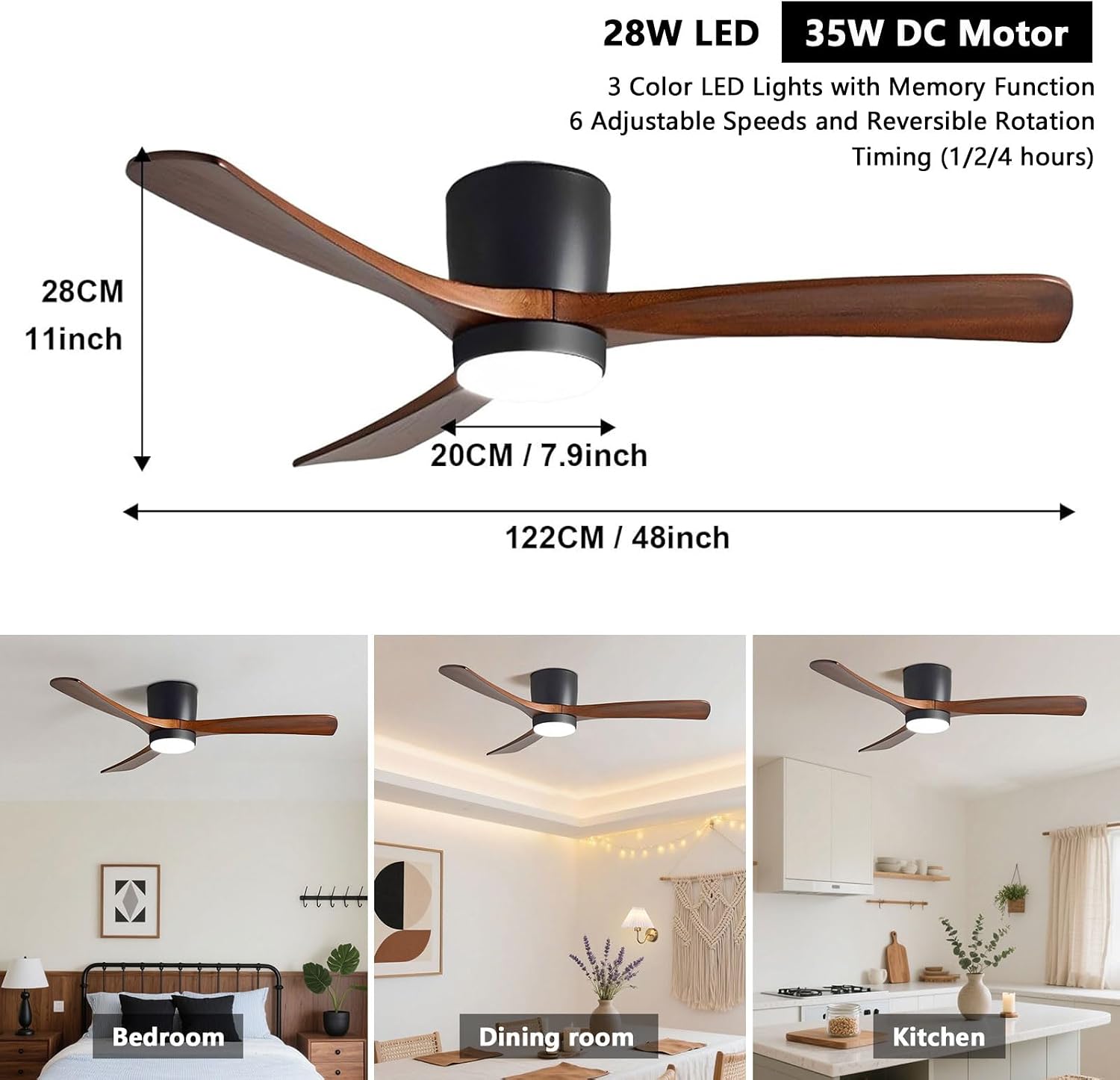
Figure 6.2: Intelligent Memory and 3 Color Temperatures. The fan light retains the last-used color temperature when turned off. Within 1-2 minutes, it remembers the previous setting. Within 1 minute, it switches to the next color temperature for quick adjustments.
6.3. Fan Speed Settings
The fan features 6 adjustable wind speeds to suit your comfort needs. Use the remote control to select your desired speed.
- Speeds 1-2: Soft wind for gentle air circulation.
- Speeds 3-4: Natural wind for comfortable cooling.
- Speeds 5-6: Cool wind for maximum airflow.

Figure 6.3: Fan speed settings. The fan offers 6 speeds, categorized into soft, natural, and cool wind levels.
6.4. Reversible DC Motor
The DC motor allows for reversible blade rotation, providing comfort year-round.
- Forward Rotation (Summer Mode): Blades rotate counter-clockwise, pushing air downwards to create a cooling breeze.
- Reverse Rotation (Winter Mode): Blades rotate clockwise, pulling air upwards to circulate warm air trapped near the ceiling.

Figure 6.4: Reversible DC Motor operation. Forward rotation provides a cooling effect, while reverse rotation helps distribute warm air.
6.5. Timer Function
Set the fan to automatically turn off after a specified period using the timer function on the remote control.
- Available settings: 1 hour, 2 hours, 4 hours.

Figure 6.5: Timer settings. The fan can be set to automatically turn off after 1, 2, or 4 hours.
7. Maintenance
Regular maintenance ensures optimal performance and longevity of your ceiling fan.
7.1. Cleaning
- Always disconnect power before cleaning.
- Wipe the fan housing and blades with a soft, damp cloth. Do not use abrasive cleaners or solvents.
- Dust the fan blades regularly to prevent dust buildup, which can affect balance and performance.
7.2. LED Light Replacement
The integrated LED light is designed for long life. If replacement is ever needed, the LED module is removable.

Figure 7.1: LED Light Removable Replacement. The LED light module can be replaced if necessary.
8. Troubleshooting
If you encounter issues with your fan, refer to the following common problems and solutions:
| Problem | Possible Cause | Solution |
|---|---|---|
| Fan does not start | No power to the fan; Loose wire connections; Remote control battery low. | Check circuit breaker; Ensure all wiring is secure; Replace remote control battery. |
| Light does not work | Loose wire connection to light kit; Faulty LED module. | Check light kit wiring; Contact customer support for LED module replacement. |
| Fan wobbles | Loose fan blades; Uneven blade balance; Loose mounting bracket. | Ensure all blade screws are tight; Use a balancing kit (not included) if necessary; Tighten mounting bracket screws. |
| Light color changes every time it's turned on/off | This model features a smart memory function designed to retain the last-used color temperature. If the light color changes unexpectedly, it may be due to rapid power cycling or a temporary reset. | Allow 1-2 minutes between turning the light off and on for the memory function to properly engage. If the issue persists, ensure the remote control is functioning correctly and contact customer support for further assistance. |
9. Warranty and Support
Your comfort and satisfaction are our priority. IBalody provides reliable after-sales support for any installation or usage issues you may encounter.
- For assistance, please contact IBalody customer service through the retailer where the product was purchased or visit the official IBalody store online.
- Keep your purchase receipt for warranty claims.