
1. Introduction
This user manual provides comprehensive instructions for the installation, operation, maintenance, and troubleshooting of the Generic OEM Replacement Whirlpool Refrigerator Control Board, model W10801162. This control board is designed as a direct replacement for specific Whirlpool refrigerator models, ensuring proper functionality and performance. Please read this manual thoroughly before attempting any installation or repair to ensure safety and correct operation.
2. Safety Information
WARNING: Electrical shock hazard. Disconnect power before servicing. Failure to do so can result in death or electrical shock.
- Always disconnect the refrigerator from its power source before attempting any installation, repair, or maintenance.
- Installation should only be performed by a qualified technician or a person with adequate electrical and appliance repair experience.
- Wear appropriate personal protective equipment, such as gloves and safety glasses, during installation.
- Handle the control board with care to avoid damage to electronic components. Avoid touching the circuit board directly with bare hands to prevent electrostatic discharge.
- Ensure all connections are secure and correctly oriented before restoring power.
3. Setup and Installation
This control board is a replacement part. Refer to your specific refrigerator's service manual for detailed, model-specific installation instructions. The following steps provide a general overview:
- Disconnect Power: Unplug the refrigerator from the wall outlet or turn off the circuit breaker supplying power to the appliance.
- Access Control Board: Locate and access the existing control board compartment. This typically involves removing a rear access panel or a panel inside the refrigerator.
- Document Connections: Before disconnecting any wires, take clear photos or make a diagram of all wire connections to the old control board. This will be crucial for correct reassembly.
- Disconnect Wiring: Carefully disconnect all wire harnesses and connectors from the old control board.
- Remove Old Board: Unmount and remove the faulty control board from its housing.
- Install New Board: Position the new Generic OEM Replacement Control Board (W10801162) into the housing. Ensure it fits securely.

Figure 1: Front view of the W10801162 control board, displaying the part number and revision information on a label.
- Reconnect Wiring: Using your photos or diagrams, carefully reconnect all wire harnesses and connectors to the new control board. Double-check each connection for accuracy and security.
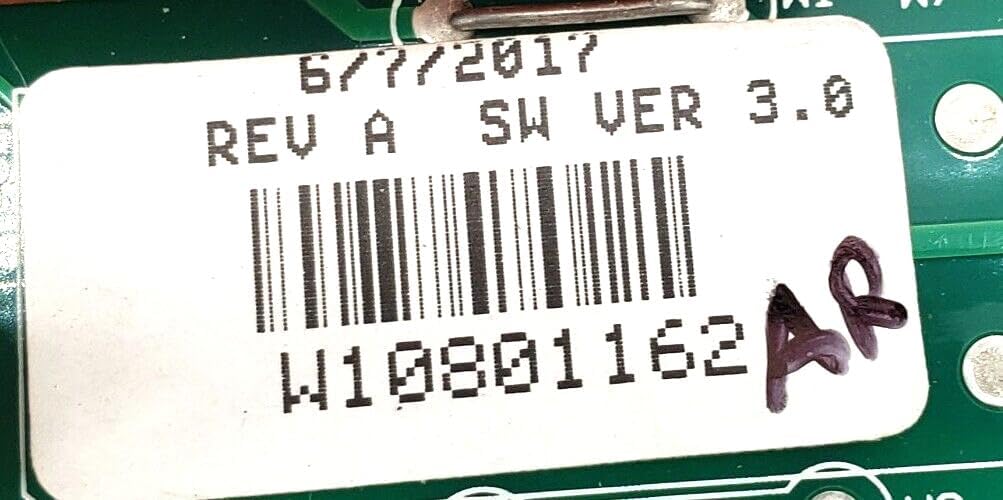
Figure 2: Rear view of the W10801162 control board, illustrating the intricate circuit traces and solder points.
- Secure Compartment: Reinstall any access panels or covers that were removed.
- Restore Power: Plug the refrigerator back into the wall outlet or turn on the circuit breaker.
- Test Functionality: Verify that the refrigerator powers on and operates correctly. Check for proper cooling, light operation, and any error codes.
4. Operating Instructions
Once correctly installed, the Generic OEM Replacement Whirlpool Refrigerator Control Board W10801162 operates automatically as part of your refrigerator's system. There are no specific user-adjustable settings on the control board itself. For instructions on how to operate your refrigerator (e.g., setting temperature, using specific features), please refer to the original user manual provided with your Whirlpool refrigerator.
5. Maintenance
The control board itself requires minimal maintenance. To ensure its longevity and proper function:
- Keep the area around the control board clean and free from dust and debris.
- Ensure the control board compartment remains dry and free from moisture or condensation.
- Avoid exposing the refrigerator to extreme temperatures, which can affect electronic components.
- Do not attempt to clean the circuit board with liquids or abrasive materials.
- There are no user-serviceable parts on the control board. Any issues beyond basic troubleshooting should be addressed by a qualified technician.
6. Troubleshooting
If your refrigerator is not functioning correctly after installing the new control board, consider the following troubleshooting steps:
- No Power: Check if the refrigerator is properly plugged into a working outlet. Verify the circuit breaker has not tripped.
- Incorrect Connections: Review your installation steps and double-check all wire harnesses and connectors on the control board. Ensure they are securely and correctly attached according to your diagrams or photos.
- Refrigerator Not Cooling/Freezing: If the refrigerator powers on but does not cool, this could indicate an issue with other components (e.g., compressor, fan, thermostat) or a persistent issue with the control board itself.
- Error Codes: If your refrigerator displays error codes, consult your refrigerator's service manual to interpret these codes and identify potential solutions.
- Persistent Issues: If troubleshooting steps do not resolve the problem, it is recommended to contact a qualified appliance repair technician for further diagnosis and repair.
7. Specifications
| Feature | Detail |
|---|---|
| Part Numbers | W10316784, W10801162, WPW10675033, AP602372 |
| Item Weight | 2 pounds |
| Product Dimensions | 1 x 1 x 1 inches |
| Included Components | Control Board |
| Manufacturer | Generic |
8. Warranty and Support
Specific warranty information for this Generic OEM Replacement Control Board W10801162 may vary depending on the retailer or manufacturer. Please refer to the product listing or contact the seller directly for details regarding warranty coverage and terms.
For technical support or assistance with installation and troubleshooting beyond the scope of this manual, it is recommended to contact the seller or a qualified appliance repair professional.