
Important Safety Information
Read all instructions thoroughly before using the SmoothSkin Pure Adapt IPL Hair Removal Device. This device is intended for permanent hair reduction. Improper use can lead to adverse effects.
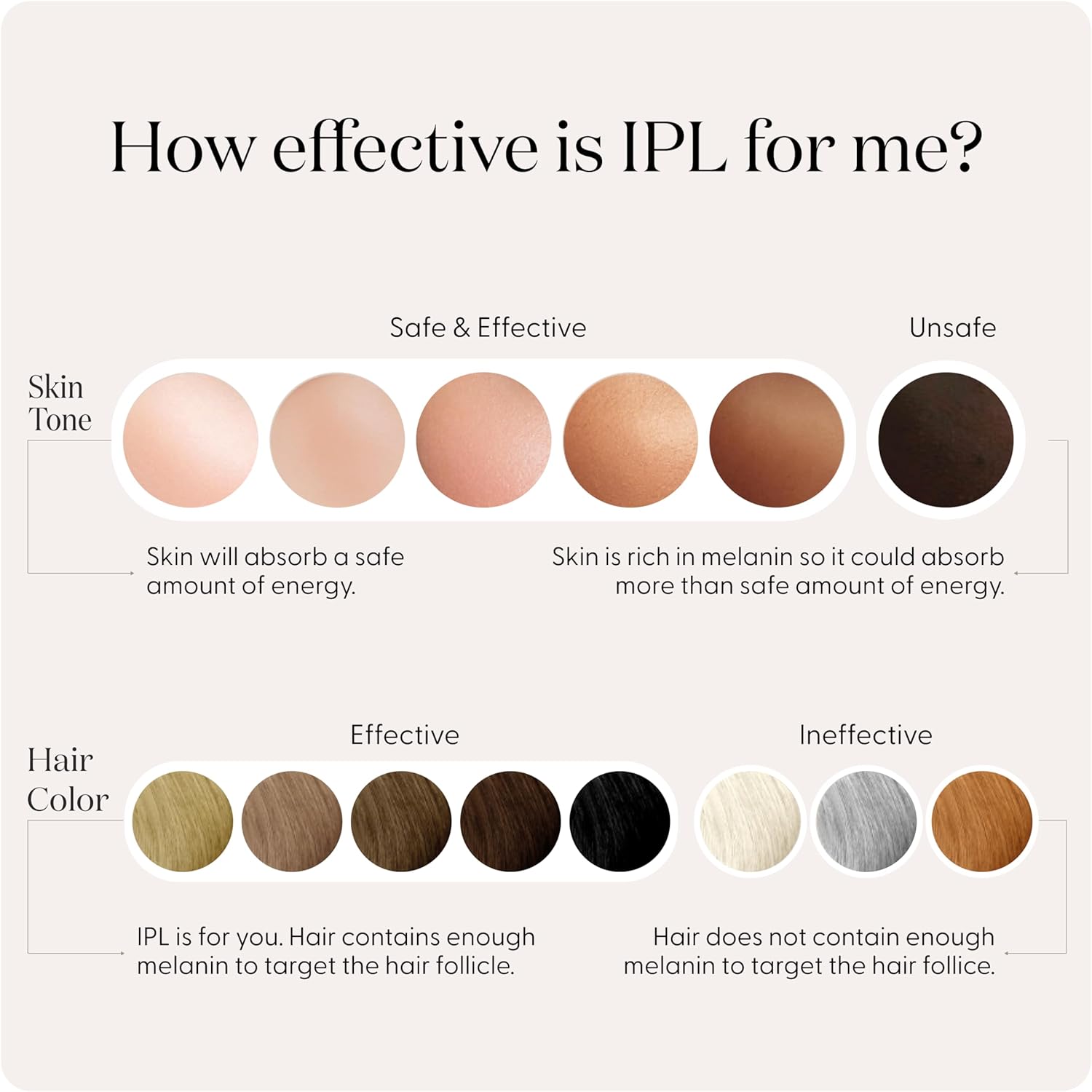
- The device is not suitable for very dark skin tones or very light body hair (white, grey, red).
- Avoid using the device on tattoos, moles, and freckles.
- Always perform a patch test on a small area of skin at least 24 hours before your first full treatment to check for adverse reactions.
- Do not apply creams, gels, or lotions to the skin immediately before or during treatment.
- Ensure the device's treatment window is in full and even contact with the skin during operation to activate the flash safely.
What's in the Box
The SmoothSkin Pure Adapt package typically includes:
- SmoothSkin Pure Adapt IPL Device
- Power Adapter and Cable
- Precision Head Attachment (for smaller areas)
- Storage Pouch
- User Guide (this manual)
Device Overview

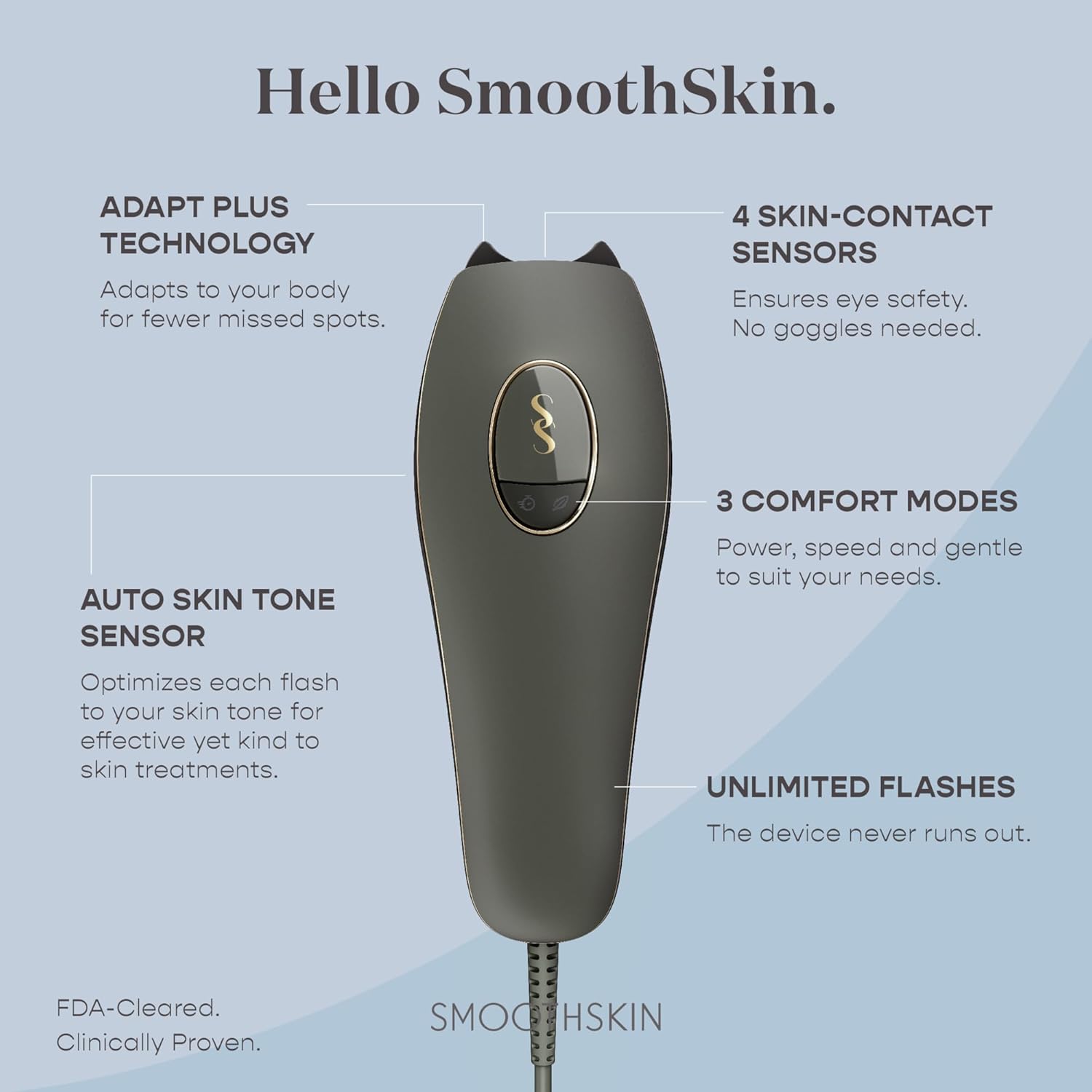
The SmoothSkin Pure Adapt is designed for effective and safe at-home IPL hair reduction, incorporating advanced features:
- Adapt Plus Technology: Intuitively adjusts to your body's curves for full skin contact and fewer missed spots.
- 4 Skin-Contact Sensors: Ensures eye safety by only activating when in full contact with the skin. No goggles are needed.
- 3 Comfort Modes: Choose between Power, Speed, and Gentle modes to suit your needs and skin sensitivity.
- Auto Skin Tone Sensor: Optimizes each flash to your specific skin tone for effective yet gentle treatments.
- Unlimited Flashes: The device is designed for long-term use without running out of flashes.
Setup
1. Prepare the Treatment Area
Before each treatment, ensure the skin area is clean, freshly shaved, and completely dry. Do not use waxing, epilating, or plucking methods, as IPL targets the hair follicle below the skin surface. Avoid applying any creams, gels, or lotions to the skin before or during the treatment.
2. Connect Power
Plug the power adapter into the device and then into a suitable electrical outlet. The device will automatically switch on.
3. Skin Contact and Suitability Check
Gently press the device's treatment window against your skin. The device features intelligent skin-contact sensors and an auto skin tone sensor:
- A white light indicates good skin contact and a suitable skin tone for treatment.
- A red light indicates poor skin contact or an unsuitable skin tone. Reposition the device to ensure full contact. If the light remains red, the area may not be suitable for IPL treatment.
Skin and Hair Suitability

Intense Pulsed Light (IPL) technology works by targeting melanin in the hair follicle. Therefore, it is most effective on light to medium skin tones with dark hair. It is unsafe for very dark skin tones as it can cause skin damage, and ineffective on very light hair colors (white, grey, red) as these lack sufficient melanin for the treatment to work.
Operating Instructions
Selecting Treatment Mode
The SmoothSkin Pure Adapt offers three comfort modes to customize your treatment experience:
- Power Mode (Default): Provides the highest energy output for the most effective treatments.
- Gentle Mode: Reduces energy output for sensitive areas or if you experience discomfort. Press the feather button to activate.
- Speed Mode: Offers faster flashes for quicker treatments, ideal for maintenance. Press the clock button to activate.
Treatment Techniques
The device supports two primary treatment techniques:
- Glide Mode: Ideal for treating larger body areas such as legs and arms. Hold down the activation button and slowly glide the device across the skin, ensuring continuous contact. The Adapt Plus Technology helps the device conform to body curves for seamless treatment.
- Stamp Mode: Best for smaller or uneven areas like underarms, bikini line, or face. Press the device firmly against the skin, activate the flash, then lift and move to the next adjacent area.

For precise application on areas like the face, ensure the device head is fully in contact with the skin before activating the flash.

The device's ergonomic design allows for effective treatment on various body parts, including arms, legs, and underarms.
Treatment Regimen
For optimal and long-lasting hair reduction, follow the recommended treatment schedule:
- Initial Treatment Phase: Treat once a week for 12 consecutive weeks.
- Maintenance Phase: After the initial 12 weeks, perform top-up treatments every 4-8 weeks to maintain hair-free skin. The frequency may vary based on individual hair regrowth patterns.
Users typically observe visible results in as little as 2 uses, with up to 99% permanent hair reduction achieved within the 12-week initial treatment phase.
Maintenance
To ensure the longevity and optimal performance of your SmoothSkin Pure Adapt device:
- Cleaning: After each use, gently wipe the treatment window and the device exterior with a soft, dry cloth. Ensure no hair or debris obstructs the window.
- Storage: Store the device in its original box or the provided storage pouch in a cool, dry place when not in use. This protects the treatment window and prevents damage.
- Avoid Liquids: Do not immerse the device in water or any other liquid. Clean only with a dry cloth.
Troubleshooting
If you encounter any issues with your SmoothSkin Pure Adapt, refer to the following common solutions:
- Device not flashing:
- Ensure the device's treatment window is in full and even contact with the skin.
- Check the skin tone indicator light. If it's red, your skin tone may be too dark for safe treatment in that area, or skin contact is insufficient.
- Verify the device is properly plugged into a power outlet.
- Device feels excessively hot:
- A small fan operates during use to cool the device, so some warmth is normal.
- If the device becomes uncomfortably hot, discontinue use and allow it to cool down. Ensure the ventilation slots are not blocked.
- Red light indicator persists:
- Reposition the device to achieve full skin contact.
- If the light remains red despite good contact, the area of skin may be too dark for safe IPL treatment. Refer to the skin tone chart in the 'Setup' section.
For further assistance, please contact SmoothSkin customer support.
Specifications
- Model: SmoothSkin Pure Adapt
- Technology: IPL (Intense Pulsed Light)
- Skin Tone Sensor: Automatic
- Comfort Modes: Power, Speed, Gentle
- Flashes: Unlimited
- Manufacturer: Cyden LTD
- Package Dimensions: 10.59 x 6.3 x 3.9 inches
- Weight: 1.4 Pounds
- Date First Available: March 29, 2024
Warranty and Support
The SmoothSkin Pure Adapt IPL Hair Removal Device typically includes a manufacturer's warranty. For specific details regarding your warranty coverage, including duration and terms, please refer to the warranty card included in your product packaging or visit the official SmoothSkin website.
Extended protection plans may also be available for purchase, offering additional coverage beyond the standard warranty period. For product support, troubleshooting assistance, or inquiries about warranty and protection plans, please contact SmoothSkin customer service directly.

