
1. Introduction
This instruction manual provides essential information for the safe and effective operation of your Baby Ganibs BG1038 Video Baby Monitor. Please read this manual thoroughly before using the product and retain it for future reference. This monitor is designed to provide a secure and reliable way to observe your baby.
2. Package Contents
Verify that all items are present in the package:
- Parent Unit (Monitor)
- Baby Unit (Camera)
- Power Adapter for Parent Unit
- Power Adapter for Baby Unit
- User Manual (this document)
3. Safety Information
WARNING: STRANGULATION HAZARD
- Keep cords out of reach of children (more than 3 feet / 1 meter away).
- Never place the camera or cords within reach of the baby in the crib or playpen.
- This product is not a substitute for responsible adult supervision.
- Do not use the monitor near water or heat sources.
- Use only the provided power adapters.
- Ensure proper ventilation for both units.
- Do not attempt to open or repair the product. Contact customer support for assistance.
4. Product Overview
The Baby Ganibs BG1038 Video Baby Monitor consists of a Parent Unit (monitor) and a Baby Unit (camera). Familiarize yourself with the components and controls.

Figure 4.1: Parent Unit and Baby Unit. The parent unit features a 3.2-inch IPS screen for clear viewing, while the baby unit is a compact camera with an antenna.
4.1 Parent Unit (Monitor)
- 3.2-inch IPS Screen: Displays live video feed from the camera.
- Control Buttons: Navigation, Menu, OK, Power, Zoom, Talk-back.
- Antenna: For wireless signal reception.
- Speaker: For audio output from the baby unit.
- Microphone: For talk-back function.
4.2 Baby Unit (Camera)
- Camera Lens: Captures video.
- Infrared LEDs: For night vision.
- Microphone: Captures audio from the baby's room.
- Antenna: For wireless signal transmission.
- Power Port: For connecting the power adapter.
- Mounting Base: Allows for stable placement or wall mounting.
5. Setup
5.1 Powering the Units
- Connect the small end of the power adapter to the DC jack on the Baby Unit.
- Plug the other end of the power adapter into a standard electrical outlet.
- Connect the small end of the second power adapter to the DC jack on the Parent Unit.
- Plug the other end of the power adapter into a standard electrical outlet.
- Press and hold the Power button on the Parent Unit to turn it on. The screen will illuminate.
5.2 Placement of the Baby Unit (Camera)
Place the Baby Unit in a location that provides a clear view of your baby. Ensure it is at least 3 feet (1 meter) away from the crib or playpen to prevent strangulation hazards from the power cord. The camera can be placed on a flat surface or wall-mounted.
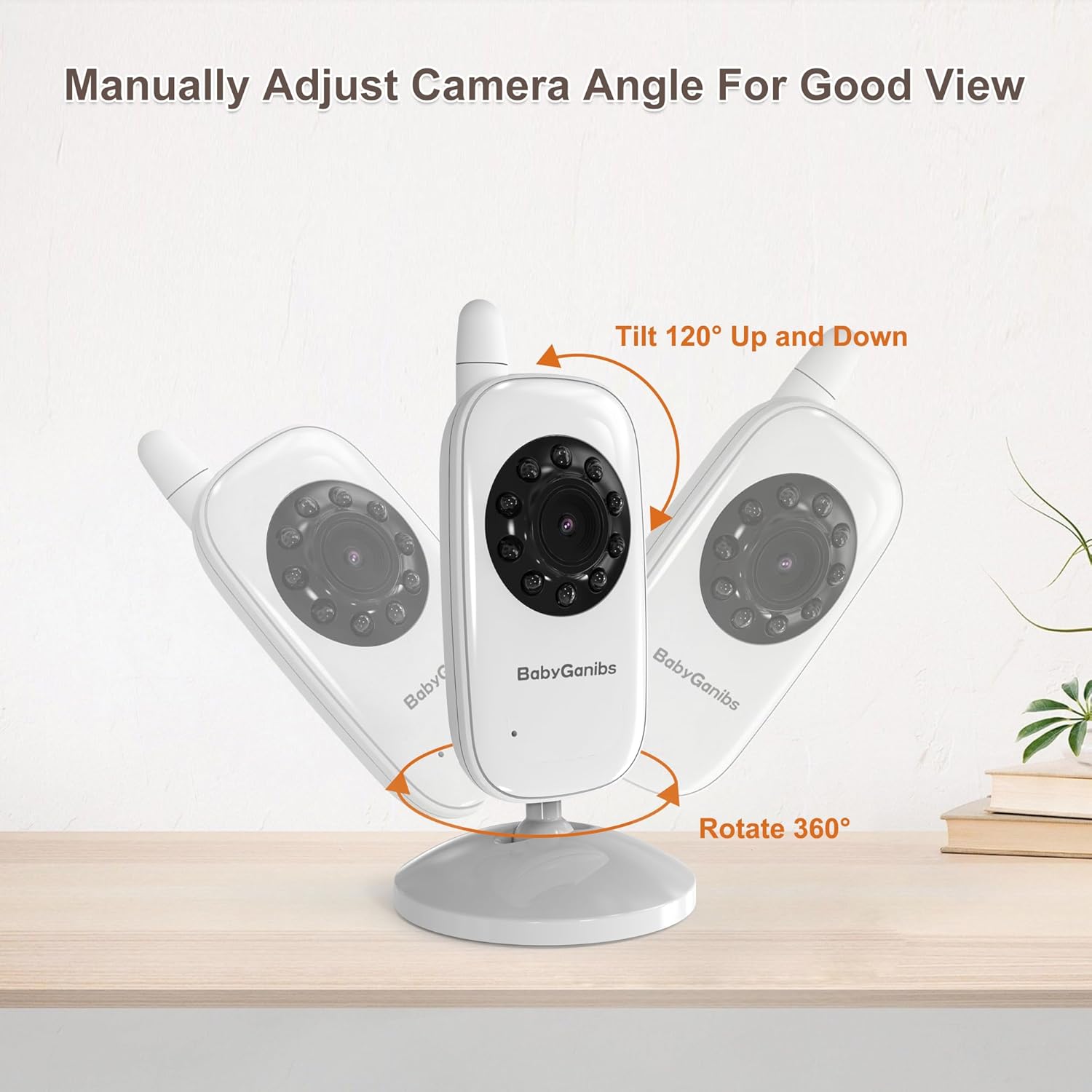
Figure 5.1: Manual Camera Angle Adjustment. The camera can be manually tilted 120 degrees up and down and rotated 360 degrees on its base to achieve the desired viewing angle.
5.3 Placement of the Parent Unit (Monitor)
Place the Parent Unit in a convenient location where you can easily monitor your baby. The monitor operates wirelessly, offering flexibility in placement.

Figure 5.2: Wireless Range. The monitor offers an outdoor range of up to 1000 feet and an indoor range of up to 165 feet, allowing for flexible placement within and around your home.
6. Operating Instructions
6.1 Basic Monitoring
Once both units are powered on, the Parent Unit will automatically connect to the Baby Unit and display the live video feed. You will also hear audio from the baby's room.
6.2 Adjusting Volume and Brightness
Use the dedicated buttons on the Parent Unit to adjust the volume of the audio and the brightness of the screen to your preference.
6.3 Talk-Back Function
Press and hold the Talk-Back button on the Parent Unit to speak to your baby through the Baby Unit's speaker. Release the button to resume listening.
7. Features
The Baby Ganibs BG1038 Video Baby Monitor includes several features to enhance your monitoring experience.

Figure 7.1: Key Features. This image highlights the main functionalities of the monitor, including night vision, ECO mode, multi-language support, digital zoom, extended range, adjustable camera, alarm, and customizable display settings.
7.1 Automatic Infrared Night Vision
The Baby Unit is equipped with infrared LEDs that automatically activate in low-light conditions, providing a clear black-and-white video feed on the Parent Unit, even in complete darkness.

Figure 7.2: Automatic Infrared Night Vision. The monitor transitions seamlessly between day and night vision, providing a clear view of your baby even in dark rooms using invisible infrared light.
7.2 ECO Mode (Sound-Activated Screen)
In ECO Mode, the Parent Unit's screen will automatically turn off to conserve power. It will reactivate and display the video feed when the Baby Unit detects sound above a certain threshold.

Figure 7.3: Sound-Activated Screen (ECO Mode). The screen automatically lights up when the camera detects sound, helping to conserve battery life while ensuring you are alerted to your baby's needs.
7.3 2X Digital Zoom
Utilize the digital zoom function to get a closer look at your baby. This feature allows you to magnify the image on the Parent Unit's screen.

Figure 7.4: 2X Digital Zoom. This feature allows you to magnify the image on the monitor screen, enabling clearer observation of your baby's details.
7.4 Secure and Stable Transmission
The monitor uses FHSS 2.4GHz technology for a secure and private connection, free from Wi-Fi interference and hacking risks. No internet connection or apps are required.

Figure 7.5: Secure Transmission. The system operates on FHSS 2.4GHz technology, ensuring a private, anti-hacking connection without the need for Wi-Fi or mobile applications.
7.5 Multi-Language Support
The Parent Unit supports 9 different languages for its menu and interface, allowing users to select their preferred language.
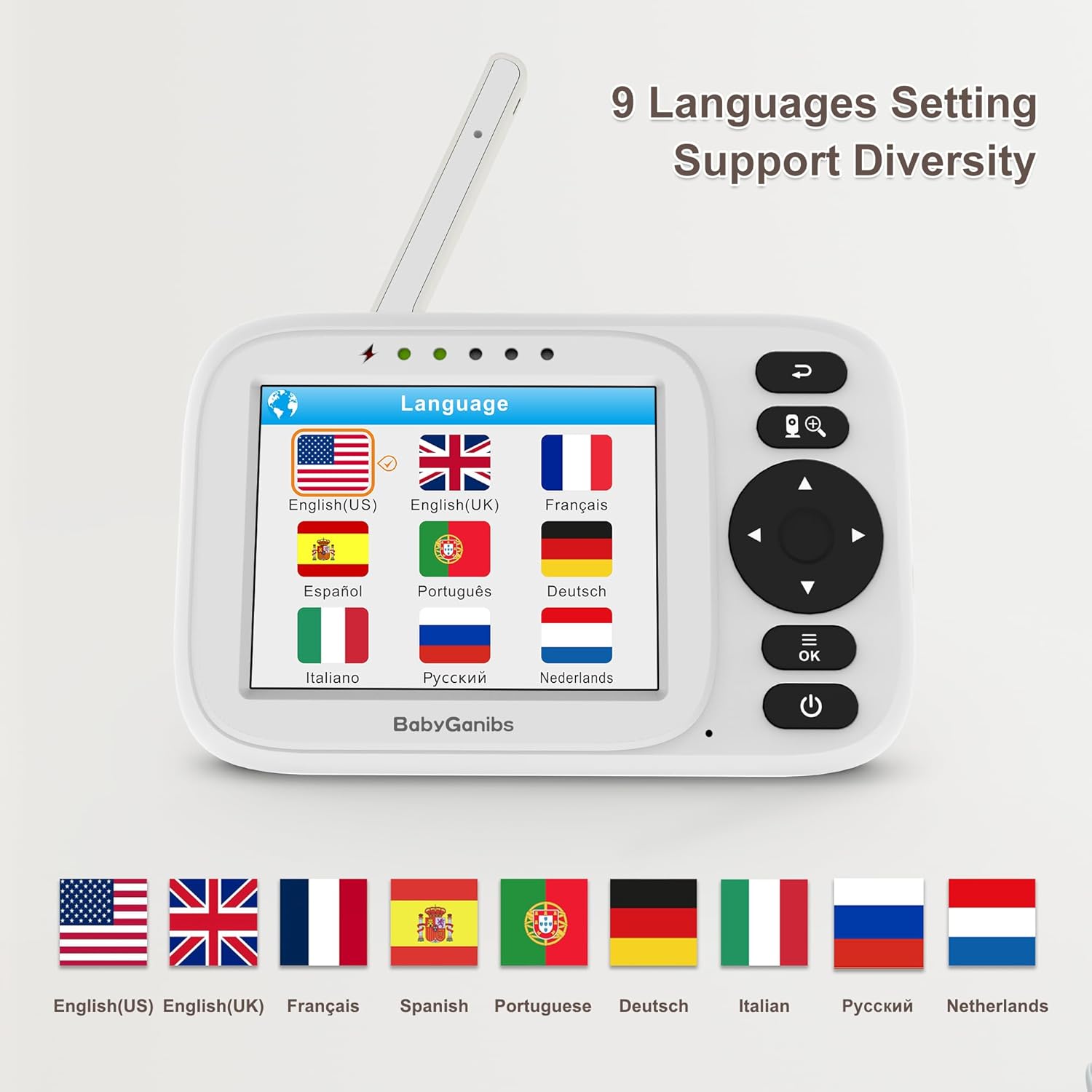
Figure 7.6: 9 Languages Setting. The monitor offers support for multiple languages, including English (US/UK), French, Spanish, Portuguese, German, Italian, Russian, and Dutch, to accommodate diverse users.
8. Maintenance
- Cleaning: Use a soft, dry cloth to clean the surfaces of both units. Do not use abrasive cleaners or solvents.
- Storage: If storing the monitor for an extended period, ensure both units are powered off and disconnected from power. Store in a cool, dry place.
- Battery Care: For optimal battery life of the Parent Unit, avoid extreme temperatures and fully charge the unit before first use.
9. Troubleshooting
If you encounter issues with your Baby Ganibs BG1038 Video Baby Monitor, refer to the following common problems and solutions:
- No Picture/Sound on Parent Unit:
- Ensure both the Parent Unit and Baby Unit are powered on and connected to their respective power adapters.
- Check if the units are within range. Move them closer to each other.
- Re-pair the units if necessary (refer to the pairing section in the full manual, if available).
- Poor Picture Quality:
- Adjust the brightness setting on the Parent Unit.
- Ensure the camera lens is clean and free from obstructions.
- Check for sources of interference (e.g., other 2.4GHz devices).
- Sound Feedback/Static:
- Move the Parent Unit further away from the Baby Unit.
- Reduce the volume on the Parent Unit.
- Parent Unit Battery Not Holding Charge:
- Ensure the power adapter is securely connected to the Parent Unit and the outlet.
- Allow the unit to charge for several hours.
- Battery life naturally degrades over time.
10. Specifications
| Brand | Baby Ganibs |
| Model Name | BG1038 |
| Connectivity Technology | Wireless (FHSS 2.4GHz) |
| Video Capture Resolution | 480p |
| Special Features | Night Vision, ECO Mode, 2X Digital Zoom, Talk-Back, Temperature Sensor (implied by ECO mode and general features of such monitors) |
| Indoor/Outdoor Usage | Indoor |
| Power Source | Corded Electric |
| Controller Type | Push Button |
| Item Dimensions (L x W x H) | 12.4 x 2.01 x 7.8 cm |
| Item Weight | 363 g |
| Mounting Type | Wall Mount |
11. Warranty and Support
For warranty information and customer support, please refer to the documentation included with your purchase or contact Baby Ganibs customer service directly. Keep your proof of purchase for warranty claims.