
Winnes 4GTK918 (Battery 20000mah)
Winnes 4G TK918 GPS Tracker User Manual
Model: 4GTK918 (Battery 20000mah)
Product Overview
The Winnes 4G TK918 GPS Tracker is a technologically advanced device designed for real-time tracking of vehicles and assets. It utilizes both network and GPS satellite positioning systems for accurate location data, accessible via SMS or internet platforms. Featuring a robust 20000mAh battery, it offers extended standby times and is built with a strong magnetic base for easy, non-installation deployment. Its waterproof design ensures durability in various environments.
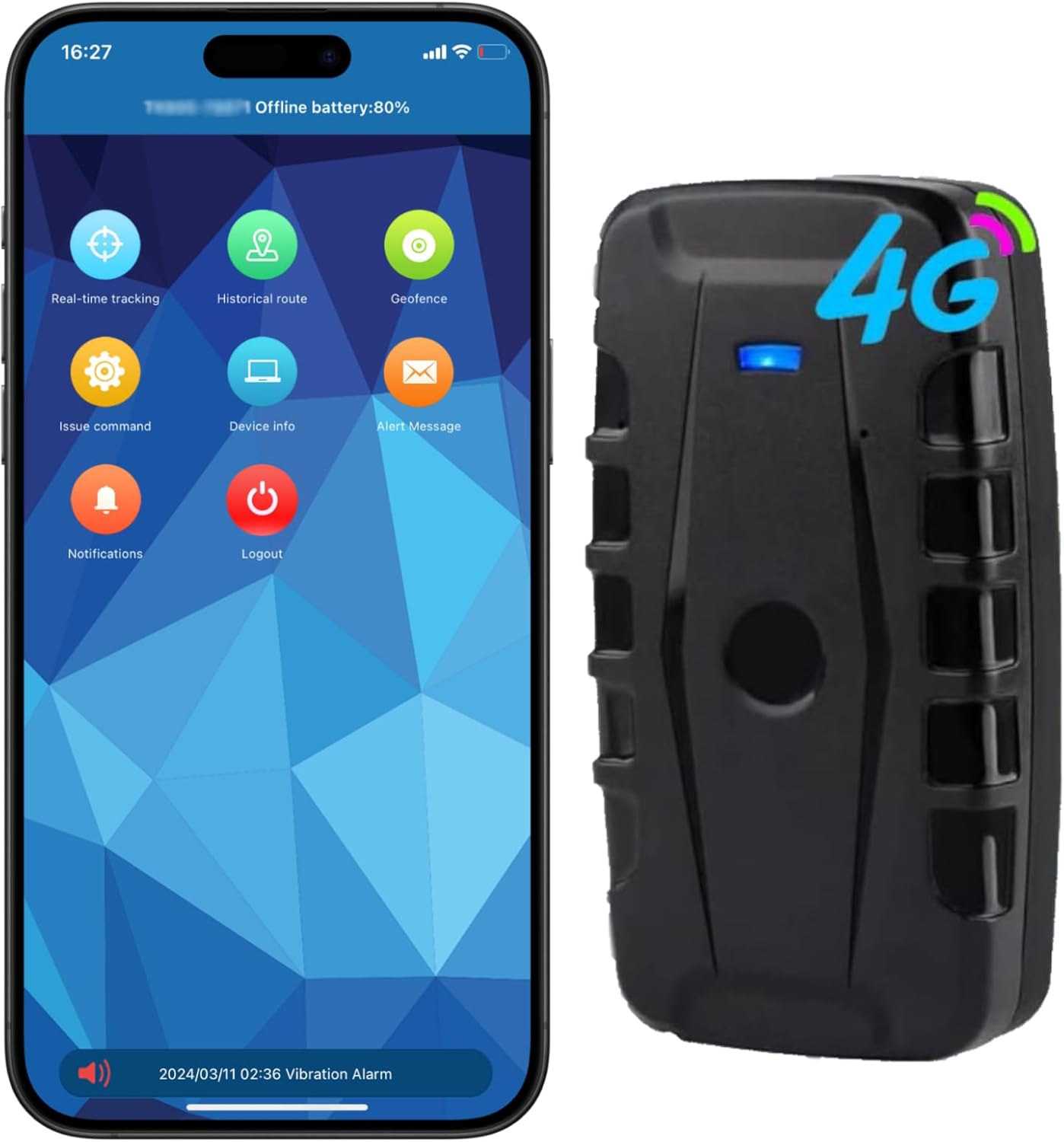
Image: The Winnes 4G TK918 GPS Tracker shown alongside a smartphone displaying its mobile application interface, which provides various tracking and management options.
What's in the Box
Upon opening the package, please ensure all the following items are present:
- 1 x TK918 GPS Tracker
- 1 x User Manual (this document)
- 1 x USB Cable
Technical Specifications
| Parameter | Value |
|---|---|
| Dimensions | 120 x 65 x 49mm (4.72" x 2.56" x 1.93") |
| Weight | 468 grams (10.6 ounces) |
| LTE-FDD Bands | B1/B2/B3/B4/B5/B7/B8/B28/B66 |
| GSM Frequencies | 850/900/1800/1900MHz |
| GPS Sensitivity | -159dBm |
| GPS Accuracy | Within 5 meters |
| Charging Input | DC5V-1.0A |
| Battery | Rechargeable 3.7V 20000mAh Li-ion battery |
| Storage Temperature | -40°C to +85°C |
| Operating Temperature | -20°C to +55°C |
| Waterproof Rating | IP65 |
Setup Guide
1. SIM Card Installation
The TK918 GPS Tracker requires a SIM card for communication and data transmission. Please ensure you use a Normal SIM card (25mm x 15mm). Micro SIM and Nano SIM cards are not compatible.
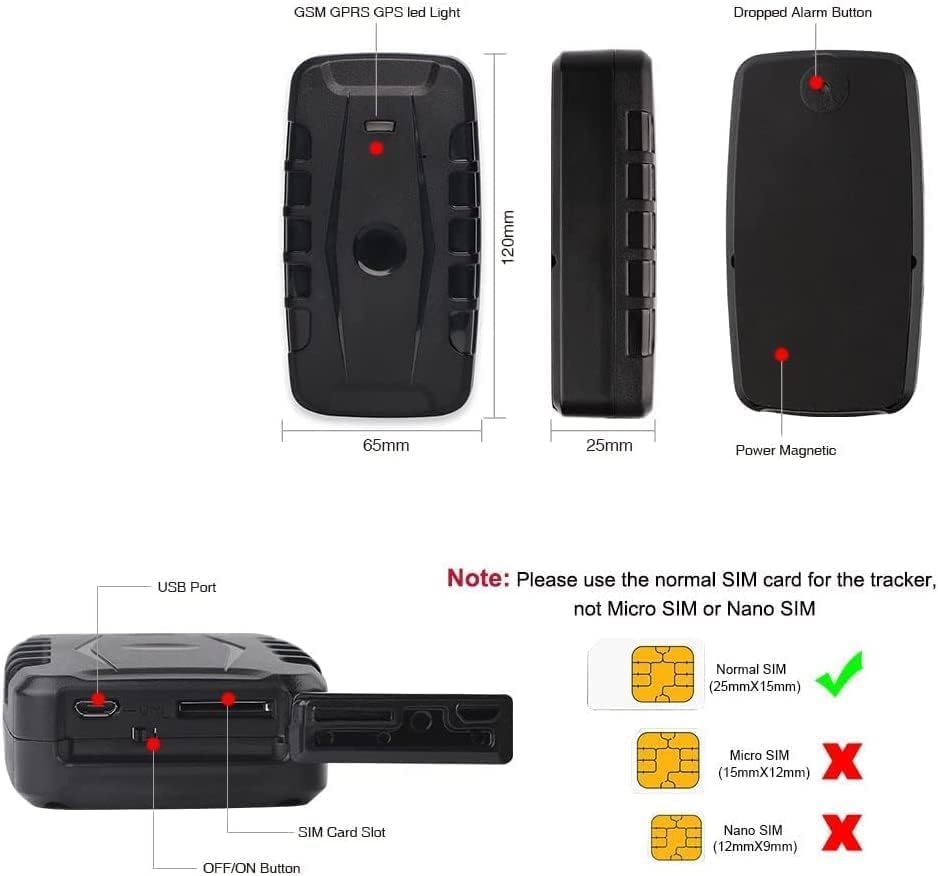
Image: A diagram illustrating the correct size of a Normal SIM card (25mm x 15mm) required for the TK918 GPS Tracker, explicitly showing that Micro SIM and Nano SIM cards are not compatible.
- Locate the SIM card slot on the side of the tracker.
- Ensure the tracker is powered off before inserting the SIM card.
- Carefully insert the Normal SIM card into the slot until it clicks into place.
- Power on the device using the ON/OFF button.
Note: The SIM card requires a subscription for SMS and data traffic. Data consumption is generally less than 50MB per month. You can pause the subscription if the tracker is not in use for an extended period.
2. Initial Charging
Before first use, fully charge the device. Use the provided USB cable to connect the tracker to a DC5V-1.0A power source.
- Connect the small end of the USB cable to the tracker's USB port.
- Connect the other end to a compatible USB power adapter or computer USB port.
- Allow the device to charge until the charging indicator light shows a full charge.
3. App and Web Platform Access
The Winnes TK918 GPS Tracker offers lifetime free access to its mobile application and web platform for tracking and management.

Image: A smartphone displaying the Winnes mobile tracking application interface and a laptop showing the web-based tracking platform, along with a QR code for easy app download.
- Mobile App: Scan the QR code provided in the product packaging or on the image above to download the official mobile application. Alternatively, search for "Winnes GPS" or similar on your device's app store.
- Web Platform: Access the web tracking platform via your computer's browser at www.mytkstar.net.
- Follow the on-screen instructions to register your device using its unique ID number (usually found on the device itself or its packaging).
Operating Instructions
1. Real-time Tracking
The device provides real-time location updates, allowing you to track targets on Google Maps easily, anywhere, anytime.
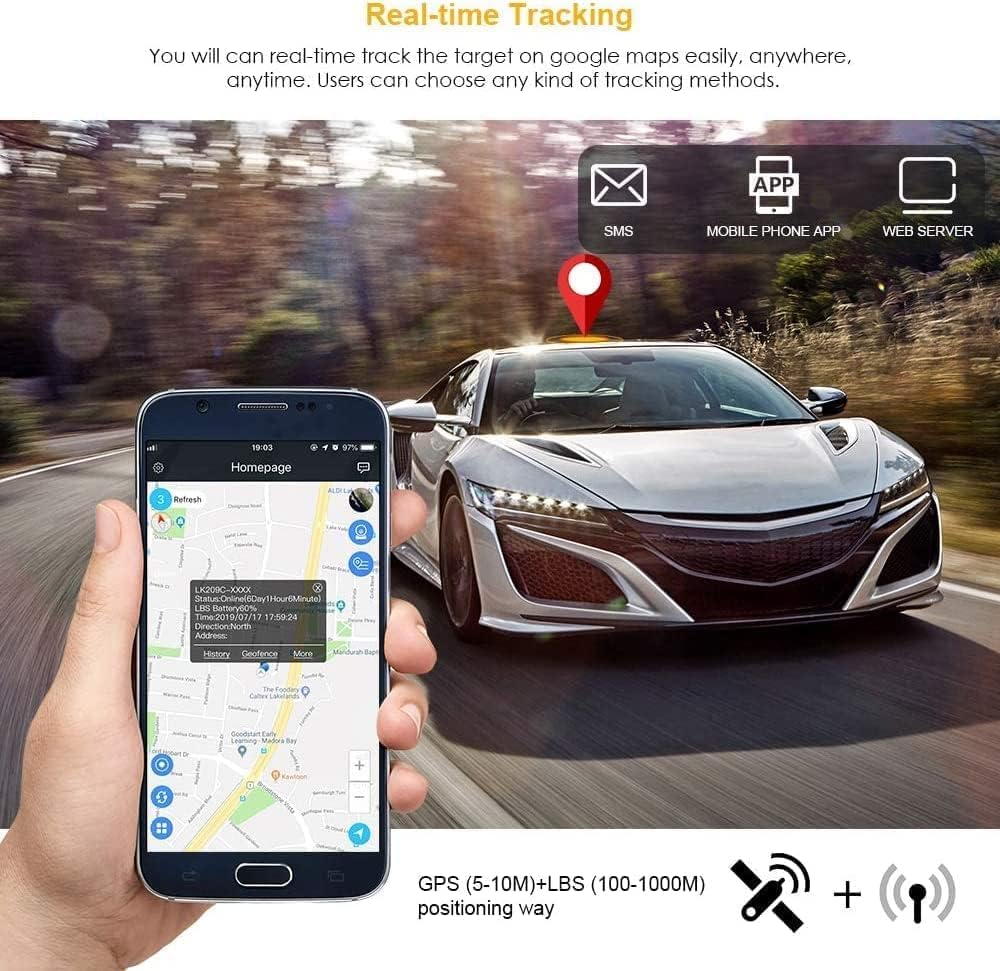
Image: A smartphone screen showing a real-time GPS tracking map, with a car icon indicating the current location on a road, demonstrating the device's tracking capabilities.
- Log in to the mobile app or web platform.
- Select the "Real-time tracking" option to view the current location of your device.
- You can also send an SMS command to the tracker's SIM card number to receive its location via SMS.
2. Historical Route Playback
Review past movements of your tracker for up to six months.
- In the app or web platform, navigate to "Historical Route".
- Select a start and end time to view the route map for that period.
3. Geo-fence Setup
Set up virtual boundaries (geo-fences) to receive alerts when the tracker enters or exits a defined area.

Image: A map displaying a circular geo-fence boundary with alarm indicators, accompanied by icons representing various alarm types such as low battery, overspeed, vibration, movement, and removal/dropped alerts.
- On the tracking screen, select the geo-fence option.
- Click the "+" icon to set a new geo-fence. The device's current location will be set as the center.
- Adjust the radius using the "+" button (recommended radius is more than 500 meters).
- Click "OK" to save the settings.
- An alarm message will be sent if the device moves out of the defined range.
4. Alarm Settings
Configure various alarm types to receive notifications for specific events.
- Vibration Alarm: Notifies you of attempted theft, vandalism, or suspicious movement.
- Low Battery Alarm: Alerts you when the device's battery is low.
- Overspeed Alarm: Triggers if the device exceeds a set speed limit.
- Movement Alarm: Alerts when the device starts moving after being stationary.
- Removal/Dropped Alarm: Notifies if the device is removed or dropped from its attached surface.
Key Features
- Worldwide Coverage: Operates globally with GPS signal and 4G/2G network service.
- High Accuracy: Positioning accuracy within 5 meters.
- No Subscription Fees: Free lifetime access to the application and website.
- Long Battery Life: Built-in 20000mAh rechargeable battery provides up to 240 days standby in energy-saving mode, and 30-60 days in working mode.
- Historical Data: Records journey history for up to 6 months.
- Multiple Alarms: Includes vibration, geo-fence, low battery, overspeed, movement, and removal/dropped alarms.
- Strong Magnetic Mount: Easily attaches to metallic surfaces.
- Durable Design: Waterproof IP65 standard.
Battery Life and Management
The TK918 is equipped with a high-capacity battery for extended operation.

Image: The GPS tracker positioned beside a large clock and a green battery icon, visually representing its significant battery capacity and long standby time.
To maximize battery life, utilize the energy-saving mode when the device is stationary or not actively being tracked. Regular charging is recommended to maintain optimal performance.
Waterproof and Magnetic Design
The tracker's robust construction makes it suitable for various environments.

Image: The waterproof GPS tracker partially submerged in water, with a magnet nearby, illustrating its water resistance and strong magnetic attachment capability.
The IP65 waterproof rating protects against dust and low-pressure water jets, making it ideal for outdoor and harsh conditions. The powerful built-in magnet allows for easy and secure attachment to any magnetic surface on vehicles or assets.
Wide Applications
The versatility of the TK918 GPS Tracker allows for its use in a multitude of scenarios.
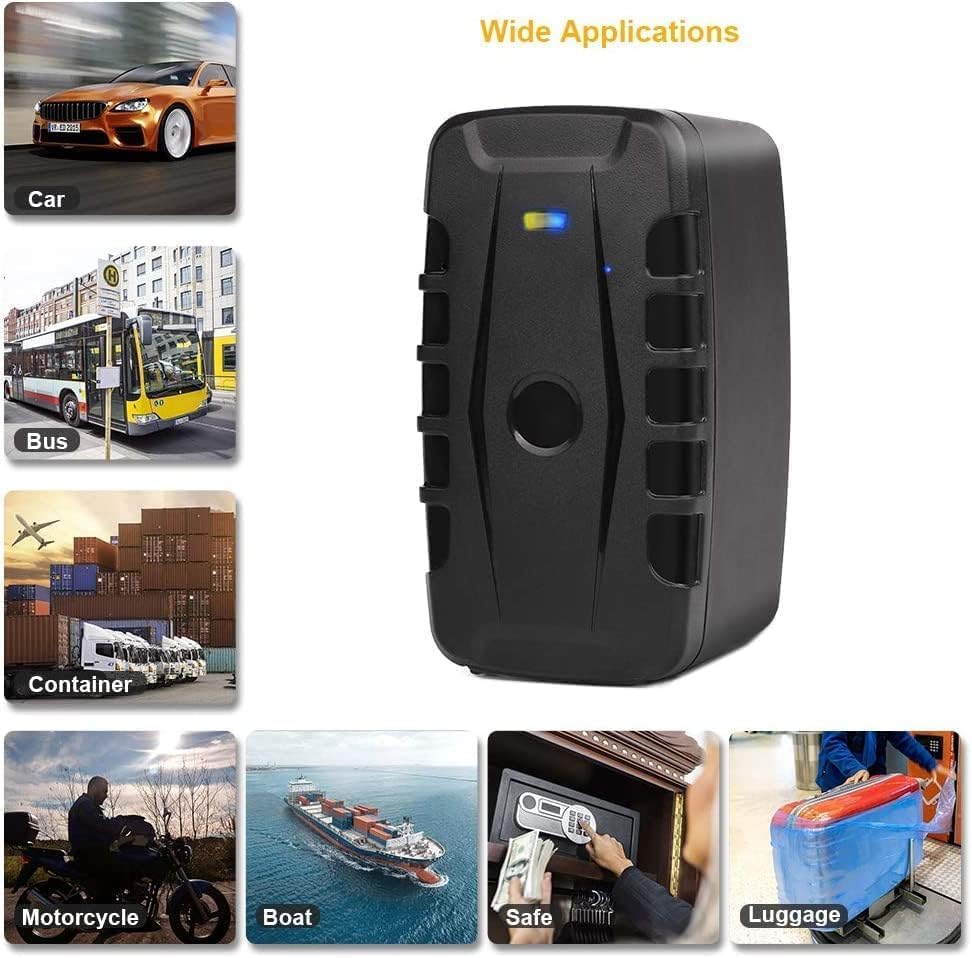
Image: A collage of images depicting various applications for the GPS tracker, such as tracking cars, buses, shipping containers, motorcycles, boats, items inside safes, and luggage, highlighting its broad utility.
- Vehicles (cars, motorcycles, boats, trailers)
- Containers and cargo
- Field equipment and assets
- Personal valuables (e.g., inside a safe or luggage)
Maintenance
- Cleaning: Wipe the device with a soft, dry cloth. Avoid using harsh chemicals or abrasive cleaners.
- Battery Care: To prolong battery life, avoid extreme temperatures and do not allow the battery to fully discharge for extended periods. Charge regularly.
- Storage: When storing the device for a long time, ensure it is partially charged (around 50%) and stored in a cool, dry place.
Troubleshooting
If you encounter issues with your TK918 GPS Tracker, please refer to the following common solutions:
- Device not powering on:
- Ensure the device is fully charged.
- Check the ON/OFF button for proper engagement.
- No GPS signal or inaccurate location:
- Ensure the device is in an open area with a clear view of the sky. GPS signals can be obstructed by buildings, tunnels, or dense foliage.
- Verify that the SIM card has active data service and sufficient balance.
- Restart the device.
- App/Web platform not showing data:
- Check your internet connection.
- Verify the device's SIM card has active data and SMS services.
- Ensure the device is powered on and has a network signal.
- Confirm the device ID is correctly entered in the app/platform.
- Alarms not working:
- Check alarm settings in the app/platform to ensure they are enabled.
- Verify that notification permissions are granted for the app on your smartphone.
- For geo-fence alarms, ensure the geo-fence area is correctly defined and the device has crossed the boundary.
- SIM card not recognized:
- Ensure you are using a Normal SIM card (25mm x 15mm). Micro and Nano SIMs are not compatible.
- Reinsert the SIM card, ensuring it is properly seated in the slot.
- Check if the SIM card is activated and functional with your mobile carrier.
Warranty and Support
Winnes products are manufactured to high-quality standards. For specific warranty details, please refer to the warranty card included with your purchase or contact Winnes customer support directly. Keep your purchase receipt as proof of purchase.
For technical assistance, troubleshooting not covered in this manual, or general inquiries, please visit the official Winnes website or contact their customer service department. Contact information can typically be found on the product packaging or the official website.
Related documents4GTK918 (Battery 20000mah)

Ask a question about this manual
Ask about setup, troubleshooting, compatibility, parts, safety, or missing instructions. Manuals+ will review the question and use this page’s manual context to help answer it.