
Introduction
The MineCtrl GreenPower GRPM16005 Universal Battery Pack provides a wireless power solution for your reclining furniture. This rechargeable battery pack eliminates the need for direct wall outlets, offering flexibility in furniture placement and ensuring continued operation during power interruptions. It is designed for use with power recliners, sofas, sectionals, and lift chairs that utilize a standard 2-pin connector system.
Key Features
- Cordless Freedom: Arrange your power furniture without being restricted by wall outlets, eliminating tangled cords.
- Universal 2-Pin Compatibility: Designed for standard two-pin connectors (one flat and one round) found in many popular recliner brands.
- Extended Use: Provides power for over 100 cycles, typically lasting more than 4 weeks with moderate use.
- Battery Level Indicator: Features a light display to show remaining battery life and a low battery warning at approximately 10% charge.
- Safety Certified: Tested by certified laboratories to meet rigorous safety standards (UL2054:2024, UN38.3).
- Backup Power: Can be used as a backup power source during power outages.
Setup and Installation
The MineCtrl Universal Battery Pack is designed for easy plug-and-play installation. Ensure your reclining furniture uses a standard 2-pin connector (one flat and one round) before installation. This battery pack is not compatible with USB, 5-pin, RJ45, or barrel plug connectors.
- Identify Connectors: Locate the power input cable on your reclining furniture and the power output cable from the battery pack. Both should have 2-pin connectors.
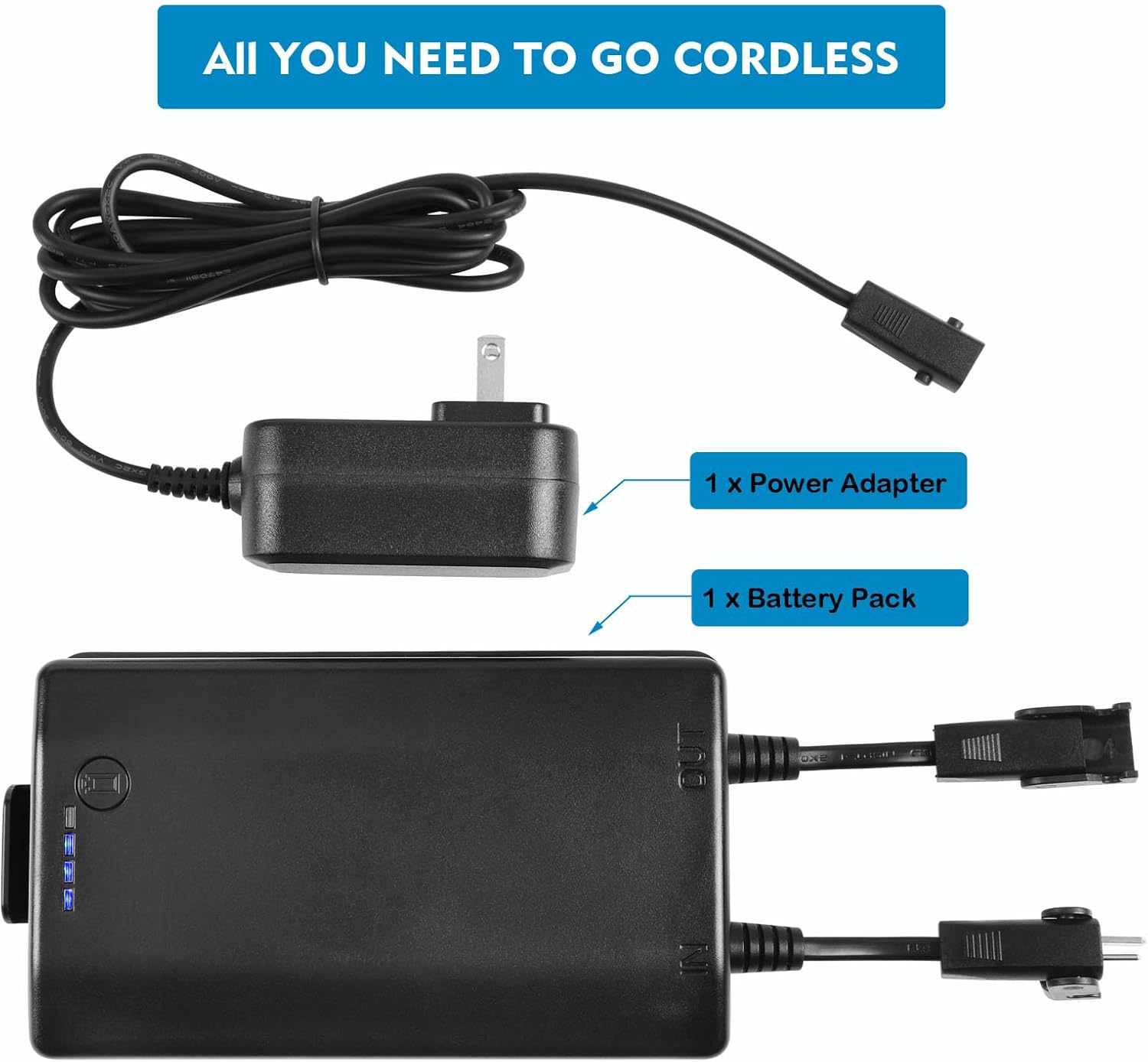
- Connect Battery Pack: Plug the power cable from your recliner into the 'OUT' port of the battery pack.
- Connect Power Adapter (Optional for charging/backup): If you wish to charge the battery pack while it's connected to the furniture or use it as a continuous backup, plug the provided power adapter into the 'IN' port of the battery pack and then into a wall outlet.
- Secure Placement: Place the battery pack in a secure location, typically underneath the recliner, to prevent it from dangling or being damaged.


Video: A demonstration of the MineCtrl Universal Battery Pack, showing its installation and how it enables a power recliner to operate wirelessly, simplifying furniture arrangement and eliminating tangled cords.
Operation
Checking Battery Level
To check the remaining battery life, press the light display button located on top of the battery pack. A series of indicator lights will illuminate, showing the current charge level. This allows you to monitor the battery and determine when recharging is necessary.

Recharging the Battery Pack
When the battery level is low (approximately 10% remaining), the unit will emit a low battery warning sound. To recharge:
- Connect the provided power adapter to the 'IN' port on the battery pack.
- Plug the power adapter into a standard wall outlet.
- The indicator lights on the battery pack will show charging progress.
- You can charge the battery pack while it is connected to your furniture, or you can disconnect it and charge it separately.
The battery pack is designed to provide over 100 cycles of operation for your recliner or sofa. With typical use, this can last more than 4 weeks. Please note that furniture with built-in lights or USB ports will consume more power, potentially requiring more frequent charging.
Maintenance
- Cleaning: Wipe the exterior of the battery pack with a dry, soft cloth. Do not use liquid cleaners or abrasive materials.
- Storage: Store the battery pack in a cool, dry place away from direct sunlight and extreme temperatures.
- Charging: For optimal battery life, avoid completely draining the battery frequently. Recharge when the low battery warning is activated.
- Environmental Conditions: Keep the battery pack away from water and high humidity.
Troubleshooting
| Problem | Possible Cause | Solution |
|---|---|---|
| Recliner does not operate. | Battery pack is discharged. | Recharge the battery pack using the provided power adapter. |
| Recliner does not operate. | Incorrect connection. | Ensure all 2-pin connectors are securely plugged into the correct 'IN' and 'OUT' ports on the battery pack and the recliner. |
| Battery drains quickly. | Furniture with additional power features. | Recliners with built-in lights or USB charging ports consume more power. Expect more frequent charging. |
| Battery pack is beeping. | Low battery warning. | The battery charge is approximately 10% or less. Recharge the battery pack immediately. |
Specifications
| Feature | Detail |
|---|---|
| Brand | MineCtrl |
| Model Number | GRPM16005 |
| Connector Type | 2-Pin (Flat and Round) |
| Compatible Devices | Pride, Golden, Lazboy, Flexsteel, Ashley, Room to Go, Berkline, Med-lift, Tranquil Ease Lift Chair, Cheers electric sofa |
| Input Voltage | 5 Volts |
| Amperage | 2 Amps |
| Wattage | 10 watts |
| Output Current | 2 Amps |
| Material | Plastic And Metal |
| Output Voltage | 25.2 Volts (DC) |
| Power Source | Battery Powered |
| Portable | No |
| Power Plug Type | Type A - 2 pin (North American) |
| Item Weight | 1.5 Pounds |
| Unit Count | 1.0 Count |
| UPC | 771077332966 |
| ASIN | B0CXLMY4Q2 |
Warranty and Support
The MineCtrl Universal Battery Pack comes with a 1-year, hassle-free replacement warranty. This warranty covers defects in materials and workmanship under normal use. For any product support, questions, or warranty claims, please contact MineCtrl customer service. Your satisfaction is our priority.
For further assistance, please refer to the contact information provided with your purchase or visit the official MineCtrl website.