
FoxVilla T13
FoxVilla T13 Action Figure Instruction Manual
Model: T13 | Brand: FoxVilla
1. Introduction
Thank you for choosing the FoxVilla T13 Action Figure. This highly articulated figure, designed by Soozafone, offers extensive poseability and customization options. Crafted from durable PETG and PLA materials, it is designed for enthusiasts who appreciate detailed and flexible models. This manual provides detailed instructions for assembly, operation, and maintenance to ensure you get the most out of your T13 action figure.
2. Product Features
- Advanced Design: Meticulously designed by Soozafone, ensuring intricate detail and functional articulation.
- Durable Materials: Constructed from high-quality PETG and PLA materials for sturdy structure and lasting durability.
- Full Range of Joints: Each joint is fully movable, allowing for a wide variety of postures and dynamic actions.
- Customizable Accessories: Includes different hand and weapon options for personalized display and enhanced playability.
3. Assembly Instructions
The FoxVilla T13 Action Figure requires assembly. Please follow the steps below carefully. Refer to the assembly video for a visual guide.
3.1 Unboxing and Part Identification
Carefully remove all components from the packaging. Identify the main body parts (head, torso, limbs) and the various joint pieces (short and long joints) and accessories. The video below demonstrates the process of detaching parts from the sprue and identifying them.
Video 1: T13 Assembly Instruction Video. This video provides a comprehensive guide to assembling your FoxVilla T13 Action Figure, demonstrating each step from detaching parts from the sprue to full assembly.
3.2 Assembling the Torso
- Connect the short joint pieces to the designated slots on the upper torso.
- Attach the lower torso piece to the upper torso using the appropriate joint.
3.3 Assembling the Limbs
- For each arm and leg, connect the limb segments using the short and long joint pieces as indicated in the video.
- Ensure all joints are securely fitted but allow for smooth rotation.
3.4 Attaching Head and Limbs to Torso
- Attach the head to the neck joint on the upper torso.
- Connect the assembled arms to the shoulder joints on the upper torso.
- Attach the assembled legs to the hip joints on the lower torso.

Figure 1: Assembled Figures. A display of multiple T13 action figures, showcasing their full assembly and range of colors.
4. Articulation and Poseability
The T13 Action Figure features a full range of articulation, allowing for dynamic posing. Each joint is designed to move freely, enabling a wide array of stances and actions.
- Head: Rotates 360 degrees and tilts up/down.
- Shoulders: Full rotation and outward movement.
- Elbows: Double-jointed for extensive bending.
- Wrists: Rotates and pivots.
- Torso: Articulated at the chest and waist for bending and twisting.
- Hips: Full range of motion for splits and high kicks.
- Knees: Double-jointed for deep bends.
- Ankles: Pivots and rotates for stable footing in various poses.
- Feet: Features articulated toes for enhanced stability and dynamic posing.
Video 2: Dummy 13 Action Figure Articulation Showcase. This video demonstrates the extensive articulation and poseability of the T13 action figure, highlighting its flexible joints and dynamic range of motion.

Figure 2: Dynamic Poses. Several T13 action figures are shown in various action-oriented poses, illustrating their full articulation capabilities.
5. Accessories
The T13 Action Figure comes with a variety of interchangeable accessories to enhance customization and play scenarios.
- Interchangeable Hands: Includes multiple sets of hands (e.g., open hands, fists, weapon-holding hands) to suit different poses and accessory use.
- Weapons: Features various weapon options such as swords, guns, and a staff, allowing for diverse combat scenarios.
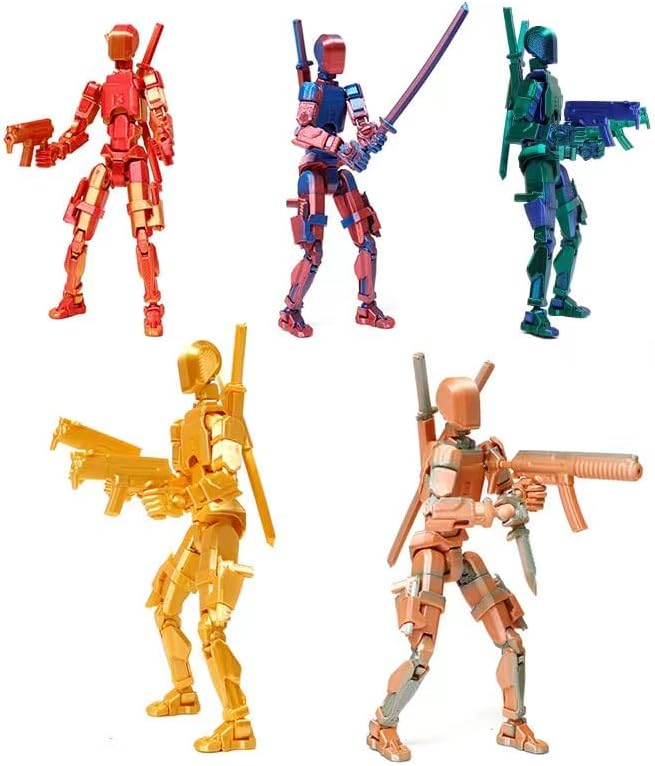
Figure 3: Accessories and Customization. This image displays T13 action figures equipped with different weapons and hand configurations, demonstrating the customization options.
6. Care and Maintenance
To ensure the longevity and optimal condition of your FoxVilla T13 Action Figure, please follow these care and maintenance guidelines:
- Cleaning: Wipe the figure gently with a soft, dry cloth. Avoid using harsh chemicals or abrasive materials, as these can damage the finish.
- Storage: Store the figure in a cool, dry place away from direct sunlight and extreme temperatures to prevent material degradation or discoloration.
- Handling: When changing accessories or posing the figure, apply gentle, even pressure to avoid stressing the joints or breaking small parts.
- Joint Lubrication: If joints become stiff over time, a small amount of silicone-based lubricant can be applied to restore smooth movement.
7. Troubleshooting
If you encounter any issues with your T13 Action Figure, refer to the following common troubleshooting tips:
| Problem | Possible Cause | Solution |
|---|---|---|
| Joints are too stiff. | Tight fit from manufacturing or lack of initial movement. | Gently work the joint back and forth. If needed, apply a small amount of silicone lubricant. |
| Joints are too loose. | Wear and tear or manufacturing tolerance. | Apply a thin layer of clear nail polish or super glue to the ball joint, let it dry completely, then reassemble. This adds friction. |
| Parts do not fit together. | Excess material from the sprue or incorrect orientation. | Ensure all sprue nubs are removed. Check the orientation of the parts against the assembly video. Apply gentle, even pressure. Do not force. |
| Figure falls over easily. | Improper posing or loose ankle/foot joints. | Adjust the pose for better balance. Ensure ankle and toe joints are firm. Consider using a display stand (not included). |
8. Specifications
- Model Number: T13
- Product Dimensions: Approximately 2 x 1 x 5 inches (L x W x H)
- Item Weight: Approximately 1.44 ounces
- Materials: PETG and PLA plastics
- Manufacturer: FoxVilla
9. Warranty and Support
For warranty information or technical support, please contact FoxVilla customer service through the retailer where the product was purchased. Please retain your proof of purchase for any warranty claims.
Contact Information: Refer to your purchase platform or the FoxVilla official website for the most up-to-date contact details.