
1. Product Overview
The WinBridge S96 is a versatile Bluetooth voice amplifier designed to enhance voice projection in various settings such as classrooms, presentations, and outdoor activities. This bundle includes the S96 amplifier and a lapel microphone, offering hands-free operation and clear audio output.
Key Features:
- 25W output for clear and powerful voice amplification.
- Bluetooth 5.0 connectivity for wireless audio streaming.
- Integrated lapel microphone for hands-free use.
- Supports AUX input, USB playback, and recording functions.
- Long-lasting battery life: 8000mAh for amplifier (10-15 hours), 300mAh for microphone (5-8 hours).
- True Wireless Stereo (TWS) function for connecting two S96 units.
- Compact and lightweight design (519g / 18.3oz).

Figure 1.1: WinBridge S96 Bluetooth Voice Amplifier and Lapel Microphone Bundle. This image displays the main components of the bundle, including the S96 amplifier unit and the wired lapel microphone.
2. Package Contents
Please check the package contents upon unboxing to ensure all items are present:
- WinBridge S96 Voice Amplifier Unit
- Wired Lapel Microphone
- USB Type-C Charging Cable
- User Manual (this document)
- Adjustable Waistband/Strap
3. Product Components and Controls
Familiarize yourself with the amplifier's layout and controls:

Figure 3.1: WinBridge S96 Amplifier Labeled Diagram. This image provides a detailed view of the S96 amplifier with labels pointing to its various buttons, ports, and indicators.
- Mute Button: Press to mute/unmute audio output.
- Model Switch (M): Cycles through different modes (e.g., Bluetooth, AUX, USB).
- Previous Song Button: Skips to the previous track during media playback.
- Next Song Button: Skips to the next track during media playback.
- Record Button (R): Initiates or stops audio recording.
- Power Switch/Volume Key: Rotates to adjust volume; press and hold to power on/off.
- LED Screen: Displays current mode, battery status, and other information.
- USB Port: For USB drive playback.
- AUX Port: For connecting external audio devices via a 3.5mm cable.
- Type-C Charging Port: For charging the amplifier.
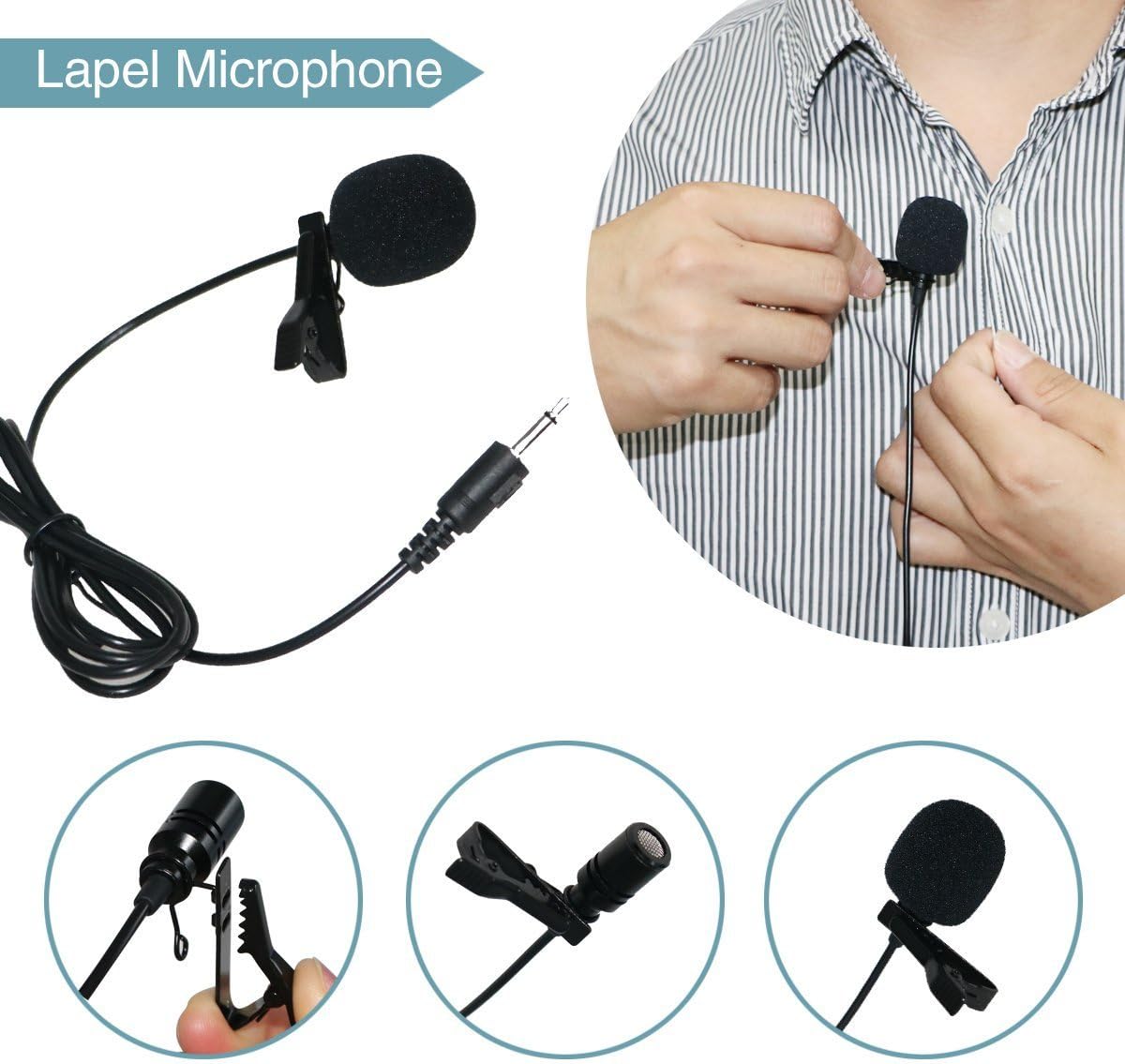
Figure 3.2: Lapel Microphone Components. This image illustrates the lapel microphone, showing its clip, microphone head, and 3.5mm audio jack.
4. Setup Guide
4.1 Charging the Device
Before first use, fully charge both the S96 amplifier and the lapel microphone.
- Amplifier: Connect the provided USB Type-C charging cable to the Type-C charging port on the amplifier and a standard USB power adapter (not included). The LED screen will indicate charging status.
- Lapel Microphone: The lapel microphone is typically powered by the amplifier when connected, or may have a small internal battery charged via a separate micro-USB port if applicable (refer to microphone specific instructions if different).
4.2 Powering On/Off
- To Power On: Press and hold the Power Switch/Volume Key for approximately 3 seconds until the LED screen illuminates.
- To Power Off: Press and hold the Power Switch/Volume Key for approximately 3 seconds until the LED screen turns off.
4.3 Connecting the Lapel Microphone
Insert the 3.5mm audio jack of the lapel microphone into the designated microphone input port on the S96 amplifier. Ensure the connection is secure.

Figure 4.1: Connecting the Lapel Microphone. This image shows the lapel microphone's 3.5mm jack and how it connects to the amplifier.
4.4 Wearing the Amplifier and Microphone
- Amplifier: Use the provided waistband/strap to wear the amplifier around your waist or over your shoulder.
- Microphone: Clip the lapel microphone to your collar, tie, or clothing, ensuring it is positioned close to your mouth for optimal voice pickup.

Figure 4.2: Lapel Microphone in Use. This image demonstrates the proper placement of the lapel microphone on clothing for effective voice capture.
5. Operating Instructions
5.1 Basic Voice Amplification
After connecting the microphone and powering on the amplifier, speak into the microphone. Rotate the Power Switch/Volume Key clockwise to increase the volume to your desired level. Rotate counter-clockwise to decrease volume.
5.2 Bluetooth Pairing
- Power on the S96 amplifier.
- Press the 'M' (Model Switch) button until the LED screen displays 'BT' or a Bluetooth icon, indicating Bluetooth mode.
- On your mobile device (smartphone, tablet, etc.), enable Bluetooth and search for available devices.
- Select 'S96' from the list of found devices to pair. A confirmation tone will sound upon successful pairing.

Figure 5.1: Bluetooth Pairing and TWS Function. This image illustrates the Bluetooth pairing process with a smartphone and also depicts the True Wireless Stereo (TWS) setup with two S96 units.
5.3 AUX Input
To play audio from an external device (e.g., MP3 player, laptop):
- Connect one end of a 3.5mm audio cable (not included) to the AUX port on the S96 amplifier.
- Connect the other end to the audio output jack of your external device.
- Press the 'M' button until the LED screen displays 'AUX'.
5.4 USB Playback
To play audio files from a USB flash drive:
- Insert a USB flash drive containing audio files into the USB port on the S96 amplifier.
- Press the 'M' button until the LED screen displays 'USB'. The amplifier will automatically begin playing audio files.
- Use the Previous/Next Song buttons to navigate tracks.
5.5 Recording Function
The S96 amplifier supports recording audio, typically to a connected USB drive.
- Ensure a USB flash drive is inserted into the USB port.
- Press the 'R' (Record) button to start recording. The LED screen may indicate recording status.
- Press the 'R' button again to stop recording.
5.6 Mute Function
Press the Mute button to temporarily silence the audio output. Press it again to resume audio.
5.7 True Wireless Stereo (TWS) Function
The TWS function allows two S96 amplifiers to be paired together for a stereo sound experience.
- Ensure both S96 units are powered on and in Bluetooth mode, but not yet paired to any device.
- On one S96 unit, press and hold the 'M' button (or a dedicated TWS button if available) until a pairing tone is heard.
- The two units will attempt to pair with each other. Once paired, they will function as left and right channels.
- Now, connect your mobile device to one of the S96 units via Bluetooth as described in section 5.2.
6. Maintenance
6.1 Cleaning
- Wipe the amplifier and microphone with a soft, dry cloth.
- Do not use abrasive cleaners, solvents, or harsh chemicals.
- Avoid getting moisture into any ports or openings.
6.2 Storage
- Store the device in a cool, dry place away from direct sunlight and extreme temperatures.
- If storing for an extended period, charge the battery to approximately 50% every few months to prolong battery life.
6.3 Battery Care
- Avoid fully discharging the battery frequently.
- Do not expose the device to temperatures above 60°C (140°F) as this can damage the battery.
7. Troubleshooting
If you encounter issues with your WinBridge S96, refer to the following common problems and solutions:
- No Sound Output:
- Ensure the amplifier is powered on and charged.
- Check the volume level and increase if necessary.
- Verify the microphone is securely connected to the correct port.
- Ensure the amplifier is not in Mute mode.
- Microphone Not Working:
- Confirm the microphone is fully plugged into the amplifier's microphone input.
- Test with another microphone if available to rule out a faulty microphone.
- Bluetooth Pairing Failure:
- Ensure the S96 is in Bluetooth pairing mode ('BT' displayed).
- Make sure your mobile device's Bluetooth is enabled and searching.
- Move the devices closer to each other.
- Turn off and restart both the S96 and your mobile device, then attempt pairing again.
- Clear previous Bluetooth connections on your mobile device.
- Distorted Sound:
- Reduce the volume level on both the amplifier and the input source.
- Ensure the microphone is not too close to the amplifier to prevent feedback.
- Check for any physical damage to the microphone or cables.
8. Specifications
| Feature | Specification |
|---|---|
| Brand | W WINBRIDGE |
| Model Number | S96 |
| Connectivity Technology | Bluetooth |
| Audio Input | Lapel Microphone, Auxiliary |
| Connector Type | Aux |
| Number of Channels | 1 |
| Power Source | Battery Powered |
| Color | Black |
| Mounting Type | Tabletop (also wearable with strap) |
| Item Weight | 519g / 18.3oz (approx.) |
| Dimensions | 16cm x 12cm x 5cm (approx. 6.3 x 4.72 x 1.97 inches) |
| Amplifier Battery Life | 10-15 hours (8000mAh) |
| Microphone Battery Life | 5-8 hours (300mAh) |
9. Warranty and Support
For warranty information and technical support, please refer to the contact details provided on the product packaging or the official W WINBRIDGE website. Keep your purchase receipt as proof of purchase.