
1. Introduction
This manual provides detailed instructions for the setup, operation, and maintenance of your Froket FU-2002 UHF Wireless Microphone System. This system includes one handheld microphone and one bodypack transmitter with a lavalier and headset microphone, designed for various audio applications.
1.1 Package Contents
- Receiver (1)
- Handheld Microphone (1)
- Bodypack Transmitter (1)
- Lavalier Microphone (1)
- Headset Microphone (1)
- Audio Cable (1)
- Power Plug (1)
- Owner’s Manual (1)
2. Product Overview
Familiarize yourself with the components of your Froket FU-2002 Wireless Microphone System.

Figure 2.1: Complete Froket FU-2002 Wireless Microphone System including receiver, handheld microphone, bodypack transmitter, lavalier microphone, and headset microphone.
2.1 Receiver
The receiver unit processes audio signals from the microphones and connects to your audio system. It features two channels (A and B) for independent microphone control.

Figure 2.2: Dimensions of the receiver (210mm x 150mm x 35mm), handheld microphone (248mm x 50mm), and bodypack transmitter (100mm x 65mm).
2.2 Handheld Microphone
The handheld microphone is designed for vocal performances and presentations. It features a dynamic, heart-shaped pickup pattern for focused sound capture and noise reduction.

Figure 2.3: Illustration of the handheld microphone's dynamic heart-shaped pickup pattern, showing its directional sound capture characteristics.
2.3 Bodypack Transmitter with Lavalier and Headset Microphones
The bodypack transmitter allows for hands-free operation when used with the included lavalier (clip-on) or headset microphones. It transmits audio wirelessly to the receiver.
3. Setup Instructions
3.1 Battery Installation
Both the handheld microphone and the bodypack transmitter require 2 AA batteries each (not included).
For Handheld Microphone: Unscrew the bottom part of the microphone to reveal the battery compartment. Insert two AA batteries, ensuring correct polarity.
For Bodypack Transmitter: Open the battery cover on the back of the bodypack. Insert two AA batteries, observing correct polarity.

Figure 3.1: Inserting AA batteries into the handheld microphone.
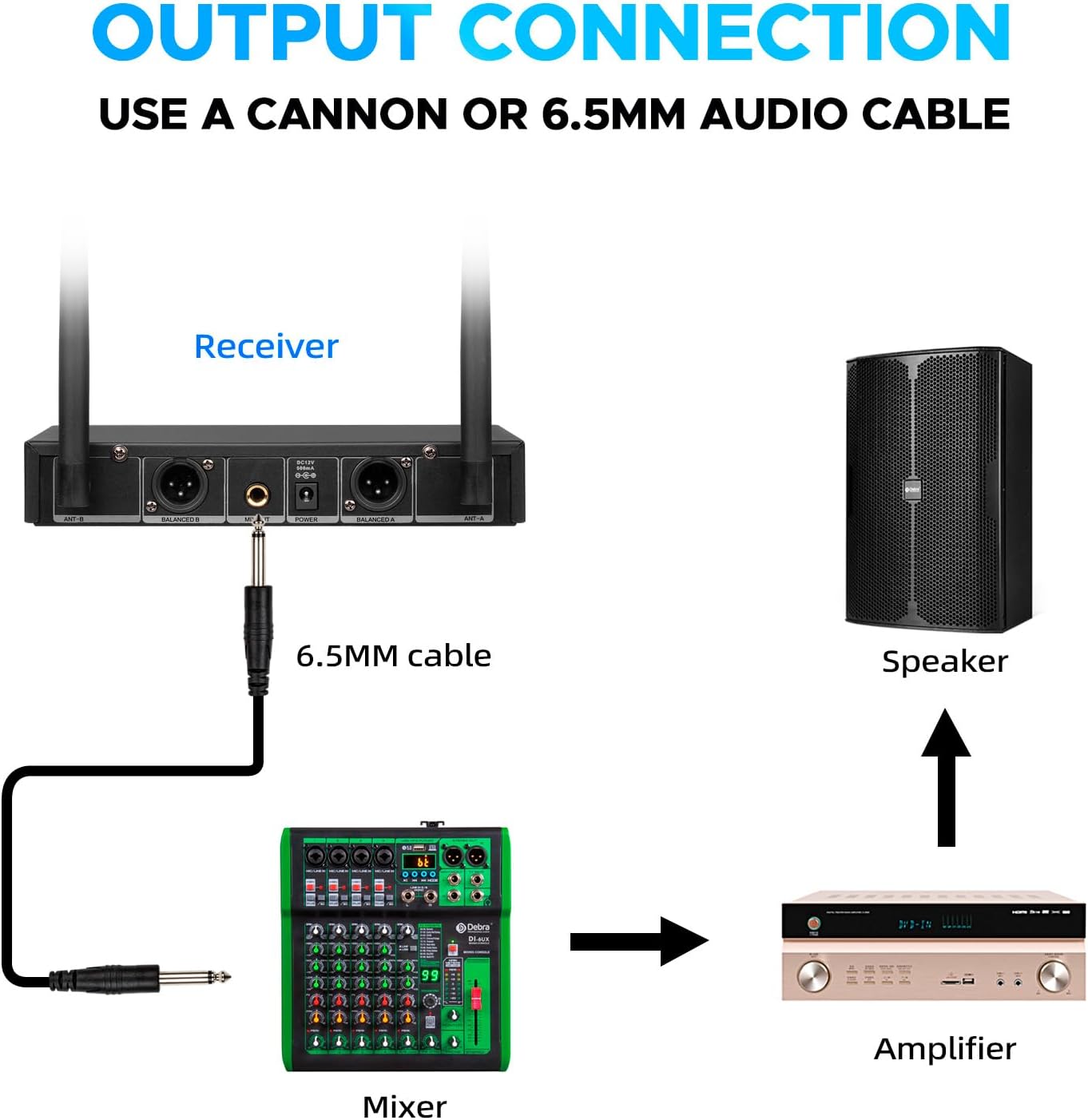
Figure 3.2: Inserting AA batteries into the bodypack transmitter.
3.2 Connecting Lavalier/Headset Microphone to Bodypack
To use the lavalier or headset microphone, connect it to the bodypack transmitter.
Locate the input jack on the bodypack transmitter.
Insert the connector of the lavalier or headset microphone into the jack.
Rotate the connector clockwise to tighten and secure the connection.
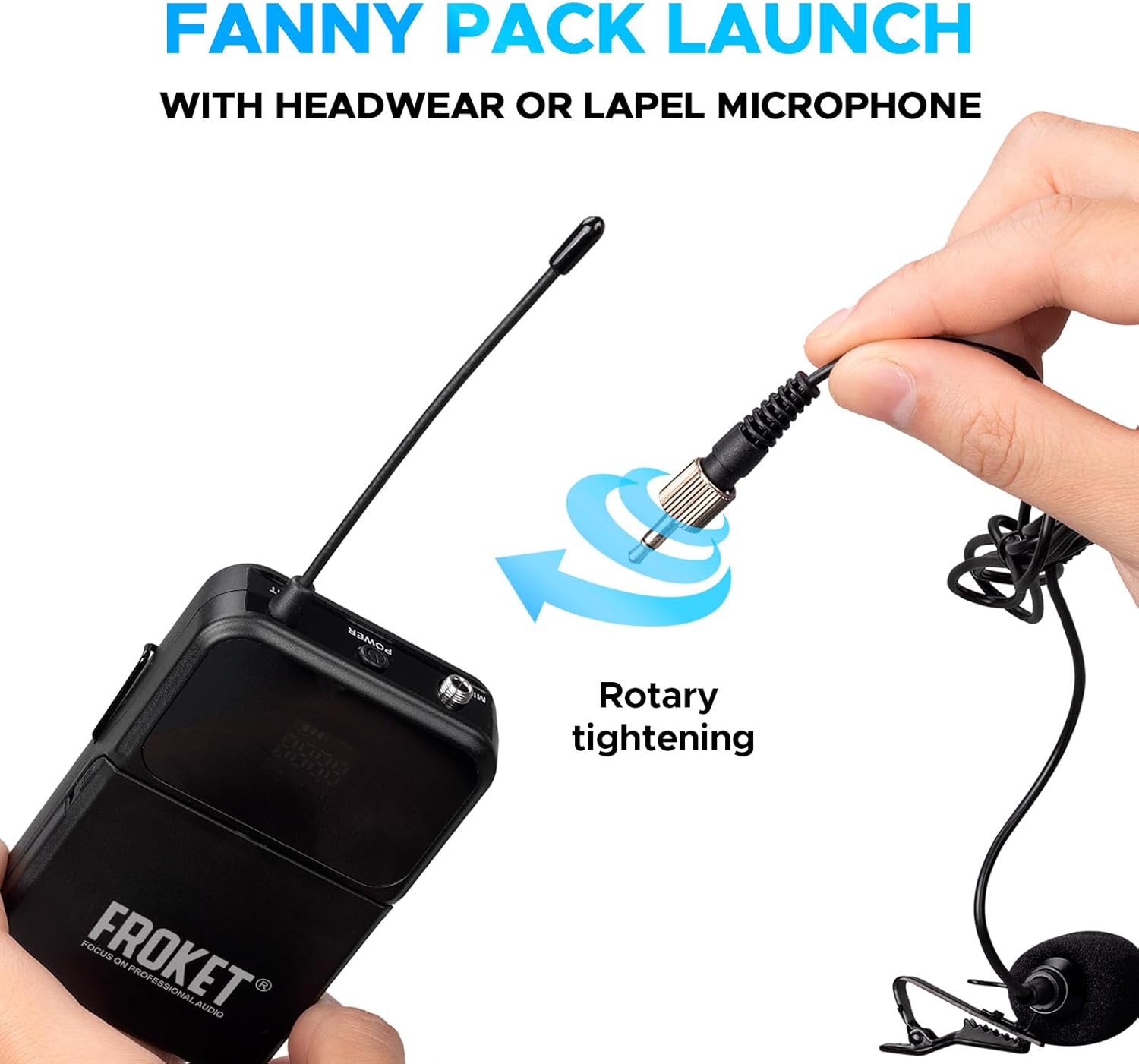
Figure 3.3: Rotary tightening mechanism for connecting the lavalier microphone to the bodypack transmitter.
3.3 Receiver Connection to Audio System
Connect the receiver to your audio mixer, amplifier, or powered speaker.
Connect the provided power adapter to the receiver and a power outlet.
Use the included audio cable (6.5mm) to connect the receiver's MIX OUT jack to an input on your mixer or amplifier.
Alternatively, for separate channel control, use XLR cables (not included) to connect the BALANCED OUT A and BALANCED OUT B ports on the receiver to individual XLR inputs on your mixer.
Ensure all connections are secure.

Figure 3.4: Connection diagram showing the receiver connected to a mixer via a 6.5mm cable, then to an amplifier, and finally to a speaker.
4. Operating Instructions
4.1 Powering On/Off
Receiver: Press the POWER button on the front panel of the receiver to turn it on. The display will illuminate.
Microphones: Press and hold the POWER button on the handheld microphone or bodypack transmitter to turn them on. The displays will show battery level and frequency.
To power off, press and hold the POWER button on each device until the display turns off.
4.2 Automatic Pairing
The Froket FU-2002 system features automatic pairing. Once the receiver and microphones are powered on, they should automatically synchronize to an available channel. The receiver tracks two devices across 30 channels simultaneously.
4.3 Channel Selection and Frequency Adjustment
The system offers 30 adjustable channels per microphone. If interference occurs, you can manually change the channel:
On the handheld microphone or bodypack transmitter, briefly press the POWER button (or a dedicated SET button if available) to cycle through available channels.
Observe the receiver's display to confirm the channel change and signal strength.

Figure 4.1: Handheld microphone display indicating battery level, frequency, and current channel (CHA). The power button can be used for channel adjustment.
4.4 Volume Control
Adjust the output volume for each microphone independently using the VOL-A and VOL-B knobs on the receiver's front panel. Further volume adjustments can be made on your connected audio mixer or amplifier.

Figure 4.2: Receiver front panel with LCD displays for Channel A and Channel B, showing signal input fluctuations and individual volume controls.
4.5 Operating Range
The system provides a wireless operating range of up to 260 feet (80 meters) in open space. Environmental factors such as walls, obstacles, and other wireless devices may affect the actual range.
5. Maintenance
5.1 Battery Replacement
Replace batteries in the handheld microphone and bodypack transmitter when the battery indicator on their displays shows low power. Always use fresh AA alkaline batteries for optimal performance.
5.2 Cleaning
Wipe the receiver, microphones, and cables with a soft, dry cloth. Do not use liquid cleaners or solvents, as they may damage the components.
5.3 Storage
When not in use, store the system in a dry, cool place away from direct sunlight and extreme temperatures. Remove batteries from microphones if storing for extended periods to prevent leakage.
6. Troubleshooting
| Problem | Possible Cause | Solution |
|---|---|---|
| No sound output | Microphone/receiver not powered on; low batteries; incorrect cable connection; receiver volume too low; microphone not paired. | Ensure all devices are powered on. Replace batteries. Check all audio cable connections. Increase receiver volume. Verify microphones are paired with the receiver. |
| Interference or static | Other wireless devices operating on similar frequencies; too far from receiver; obstacles blocking signal. | Change the operating channel on the microphone. Reduce distance between microphone and receiver. Ensure clear line of sight. Turn off other nearby wireless devices. |
| Short operating range | Environmental interference; low batteries; physical obstructions. | Replace batteries. Ensure receiver antennas are fully extended and positioned for optimal reception. Minimize obstructions between transmitter and receiver. |
| Microphone display not working | Low or dead batteries. | Replace batteries with fresh ones. |
7. Technical Specifications
| Feature | Specification |
|---|---|
| Brand | Froket |
| Model Name | Froket UHF Wireless Microphone System (FU-2002) |
| Connectivity Technology | UHF |
| Frequency Range | 520-579MHz |
| Number of Channels | 2 (30 channels per microphone) |
| Operating Range | Up to 260 feet (80 meters) in open space |
| Microphone Form Factor | Handheld, Lavalier, Headset |
| Power Source | Battery Powered (2x AA per microphone) |
| Battery Life | 4-5 hours (approx.) |
| Material | Metal, Plastic |
| Signal-to-Noise Ratio (SNR) | 90 dB |
| Frequency Response | 18000 Hz (18KHz) |
| Audio Sensitivity | 71 Decibels |
| Connector Type | XLR, 6.5mm Jack |
| Compatible Devices | Amplifier, Audio Mixer, Karaoke Machine |
| Item Weight | 0.2 Kilograms (approx. for individual mic/bodypack) |
| UPC | 794414965238 |
8. Warranty and Support
8.1 Return Policy
This product is eligible for a 30-day return policy. Please refer to your purchase platform's specific return guidelines for details.
8.2 Customer Support
For technical assistance or inquiries, please contact Froket customer support. Contact information may be available through your purchase platform or the Froket official website.
Note: The provided data indicates an email address for Froket Audio: forket-audio@hotmail.com.


