
LIVEN LR-D3027S
LIVEN Electric Baking Pan LR-D3027S User Manual
Model: LR-D3027S | Brand: LIVEN
1. Introduction
This manual provides essential information for the safe and efficient operation of your LIVEN Electric Baking Pan LR-D3027S. Please read these instructions thoroughly before first use and retain them for future reference. The LIVEN Electric Baking Pan is a versatile kitchen appliance designed for various cooking tasks, including frying, baking, roasting, and grilling, with a powerful 1500W heating system.
2. Important Safety Instructions
When using electrical appliances, basic safety precautions should always be followed, including the following:
- Read all instructions before operating the appliance.
- Do not touch hot surfaces. Use handles or knobs.
- To protect against electrical shock, do not immerse cord, plugs, or the appliance body in water or other liquid.
- Close supervision is necessary when any appliance is used by or near children.
- Unplug from outlet when not in use and before cleaning. Allow to cool before putting on or taking off parts.
- Do not operate any appliance with a damaged cord or plug, or after the appliance malfunctions or has been damaged in any manner.
- The use of accessory attachments not recommended by the appliance manufacturer may cause injuries.
- Do not use outdoors.
- Do not let cord hang over edge of table or counter, or touch hot surfaces.
- Do not place on or near a hot gas or electric burner, or in a heated oven.
- Extreme caution must be used when moving an appliance containing hot oil or other hot liquids.
- Always attach plug to appliance first, then plug cord into the wall outlet. To disconnect, turn any control to "off", then remove plug from wall outlet.
- Do not use appliance for other than intended use.
3. Product Overview
The LIVEN Electric Baking Pan LR-D3027S is designed for versatile cooking with user-friendly features.
3.1 Components
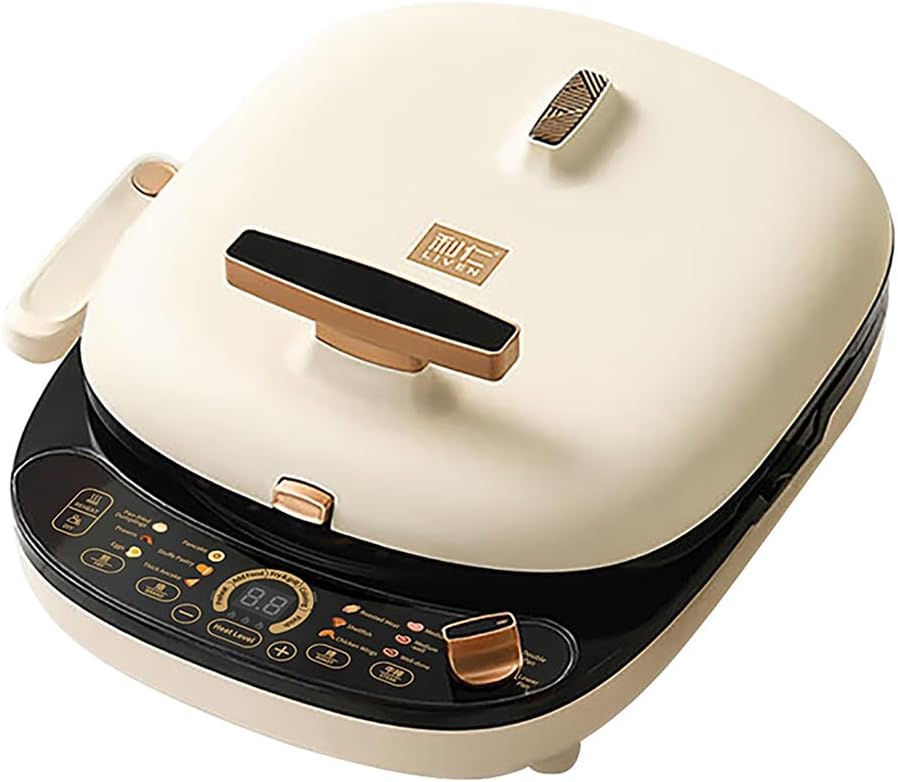
The appliance consists of a main body, an upper baking pan, and a lower baking pan. It features an intuitive control panel and a folding handle for convenience.
3.2 Key Features
- 12 Smart Cooking Programs: Pre-set menus for various dishes including pan-fried dumplings, prawns, eggs, pancakes, stuffed pastry, thick pancake, roasted meat, shellfish, chicken wings, and steak (medium, medium-well, well-done).
- DIY Cooking Mode: Allows manual adjustment of heat level and cooking time.
- Removable Baking Pans: Both upper and lower baking pans can be easily removed for cleaning and versatile cooking configurations.
- Folding Handle: An anti-scald handle on the lower pan for safe handling and compact storage.
- Floating Baking Plate: Ensures food expands fully without being squeezed, prevents oil splattering, and promotes even heating.
- High Power (1500W): Rapid heating for quick cooking.
- Three Power Levels: Adjustable heat settings (high, medium, low).
- Large Capacity: 30cm diameter and 36mm deep baking pan.
- Non-stick Coating: For easy food release and cleaning.

4. Setup and Initial Use
4.1 Unpacking
Carefully remove all packaging materials from the appliance. Ensure all components are present and undamaged. Retain packaging for storage or transport if needed.
4.2 Cleaning Before First Use
Before using the electric baking pan for the first time, wipe the baking plates with a damp cloth or sponge. Dry thoroughly. Do not immerse the main unit in water. The removable baking pans can be washed with warm soapy water.
4.3 Assembling the Baking Pans
The baking pans are designed for easy removal and re-attachment. To attach, align the pan with its respective slot (upper or lower) and gently press until it clicks into place. To remove, follow these steps:
- Hold the baking pan lugs.
- Uplift the pan slightly.
- Press the upper baking pan button to release the upper pan.
- The upper pan can then be removed.
- For the lower pan, turn clockwise and the handle folds down.
- Turn clockwise again to open the handle for removal.


5. Operating Instructions
Familiarize yourself with the control panel before operation.

5.1 Powering On and Pan Selection
Plug the appliance into a standard 120V electrical outlet. Use the Pan Selector Knob located on the right side of the control panel to select the desired cooking mode:
- Off: Turns the appliance off.
- Lower Pan: Activates only the lower baking pan for single-sided cooking.
- Double Pan: Activates both upper and lower baking pans for simultaneous double-sided cooking.

5.2 Using Pre-set Cooking Programs
The appliance offers 12 pre-set cooking programs for various dishes. These are categorized into Fry, Brand (Bake), Roast, and Steak functions.
- Fry Functions: Pan-fried dumplings, prawns, eggs.
- Brand Functions (Bake): Pancake, stuffed pastry, thick pancake.
- Roast Functions: Roasted meat, shellfish, chicken wings.
- Steak Functions: Medium doneness, medium-well doneness, well-done doneness.
Select the desired program by pressing the corresponding button on the control panel. The appliance will automatically set the optimal temperature and time for that dish.

5.3 DIY Cooking Mode and Heat Level Adjustment
For customized cooking, select the DIY mode. In this mode, you can manually adjust the heat level and cooking time.
- Heat Level: Use the + and - buttons to cycle through three power levels: Low, Medium, and High.
- Timer: Adjust the cooking time using the dedicated timer controls.
The floating baking plate design ensures even heat distribution and prevents food from being crushed, allowing for optimal cooking results.

6. Cleaning and Maintenance
Regular cleaning and proper maintenance will ensure the longevity and optimal performance of your LIVEN Electric Baking Pan.
6.1 Cleaning the Baking Pans
The baking pans feature a non-stick coating for easy cleaning. After each use, allow the appliance to cool completely. Remove the baking pans as described in Section 4.3. Wash them with warm, soapy water using a soft sponge or cloth. Avoid abrasive cleaners or metallic scouring pads, which can damage the non-stick surface. Rinse thoroughly and dry completely before reattaching or storing.

6.2 Cleaning the Main Unit
Wipe the exterior of the main unit with a damp cloth. Do not immerse the main unit in water or any other liquid. Ensure no water enters the electrical components. Dry thoroughly.
6.3 Storage
Store the appliance in a cool, dry place. The folding handle allows for more compact storage.
7. Troubleshooting
If you encounter any issues with your LIVEN Electric Baking Pan, please refer to the following common problems and solutions:
| Problem | Possible Cause | Solution |
|---|---|---|
| Appliance does not turn on. | Not plugged in; power outlet malfunction; pan selector knob not set. | Ensure the power cord is securely plugged into a working outlet. Check if the Pan Selector Knob is set to "Lower Pan" or "Double Pan". |
| Food not cooking evenly. | Incorrect heat setting; uneven food distribution; pan not properly seated. | Adjust the heat level. Ensure food is spread evenly across the pan. Verify that the baking pans are correctly attached. |
| Non-stick coating appears damaged or sticky. | Use of abrasive cleaning tools; excessive heat; manufacturing defect. | Avoid using metal utensils or abrasive cleaners. Ensure proper heat settings are used. If the issue persists and is not due to misuse, contact customer support. |
If the problem persists after attempting these solutions, please contact LIVEN customer support for further assistance.
8. Specifications
| Feature | Detail |
|---|---|
| Model Number | LR-D3027S |
| Brand | LIVEN |
| Wattage | 1500 watts |
| Voltage | 120 Volts |
| Product Dimensions | 17.6"D x 14.6"W x 8.3"H |
| Item Weight | 10 Pounds |
| Material | Alloy Steel |
| Color | White |
| Special Feature | Temperature Control |
| Number of Settings | 3 (Heat Levels) |
| Included Components | Baking Pan, Pancake Pan Body |

9. Warranty and Support
9.1 Warranty Information
The LIVEN Electric Baking Pan LR-D3027S comes with a limited warranty. Please refer to the warranty card included with your product for specific terms, conditions, and duration. This warranty typically covers manufacturing defects under normal household use.
9.2 Customer Support
For technical assistance, warranty claims, or general inquiries, please contact LIVEN customer support. Contact information can typically be found on the product packaging, the official LIVEN website, or through your retailer.
Related documentsLR-D3027S


Ask a question about this manual
Ask about setup, troubleshooting, compatibility, parts, safety, or missing instructions. Manuals+ will review the question and use this page’s manual context to help answer it.