1. Setup
1.1 Initial Charging
Before first use, fully charge the BICONIC True Wireless In-Ear Headphones and their charging case. Connect the included charging cable to the charging port on the case and a USB power source. The display on the charging case will indicate the battery level.
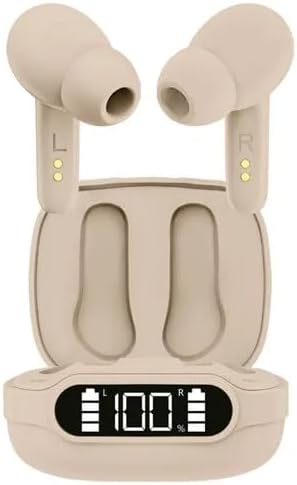
Image: The BICONIC True Wireless In-Ear Headphones are shown inside their charging case. The case features a digital display indicating "100%" battery charge, with separate battery indicators for the left and right earbuds. The earbuds are light brown/beige in color.
1.2 Pairing with Your Device
- Ensure the earbuds are fully charged.
- Open the charging case. The earbuds will automatically enter pairing mode.
- On your device (smartphone, tablet, etc.), enable Bluetooth.
- Search for available Bluetooth devices and select "BICONIC" (or similar name) from the list.
- Once connected, a voice prompt will confirm successful pairing.
The earbuds will automatically reconnect to the last paired device when removed from the case, if Bluetooth is enabled on the device.
2. Operating Instructions
2.1 Wearing the Earbuds
Gently insert each earbud into your ear canal, ensuring a comfortable and secure fit. The left earbud is marked "L" and the right earbud is marked "R". Adjust the angle for optimal sound quality and comfort.
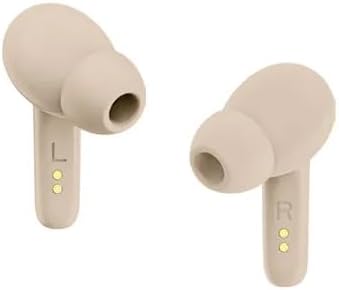
Image: Two individual BICONIC True Wireless In-Ear Headphones are shown. The left earbud has an "L" marking and charging contacts, while the right earbud has an "R" marking and charging contacts. Both are light brown/beige in color.
2.2 Basic Controls
The earbuds feature touch-sensitive controls. Specific functions may vary slightly depending on the model and connected device.
- Play/Pause: Single tap on either earbud.
- Next Track: Double tap on the right earbud.
- Previous Track: Double tap on the left earbud.
- Answer/End Call: Single tap on either earbud during an incoming call or active call.
- Reject Call: Press and hold either earbud for 2 seconds during an incoming call.
- Activate Voice Assistant: Triple tap on either earbud (e.g., Siri, Google Assistant).
2.3 Charging the Earbuds
Place the earbuds back into the charging case. They will automatically begin charging. The LED indicators on the earbuds and the display on the case will show charging status.
3. Maintenance
3.1 Cleaning
Regularly clean your earbuds and charging case to ensure optimal performance and hygiene.
- Use a soft, dry, lint-free cloth to wipe the earbuds and charging case.
- For stubborn dirt, slightly dampen the cloth with water or a mild, non-abrasive cleaner. Avoid getting liquid into openings.
- Gently clean the ear tips and speaker mesh with a cotton swab or small brush to remove earwax or debris.
3.2 Storage
When not in use, store the earbuds in their charging case to protect them from dust, dirt, and damage.
3.3 Battery Care
To prolong battery life:
- Avoid fully discharging the battery frequently.
- Charge the device regularly, even if not in frequent use.
- Store in a cool, dry place away from extreme temperatures.
4. Troubleshooting
If you encounter issues with your BICONIC True Wireless In-Ear Headphones, refer to the following common solutions:
| Problem | Possible Solution |
|---|---|
| Earbuds not pairing/connecting. |
|
| No sound from one earbud. |
|
| Charging case not charging. |
|
| Poor sound quality. |
|
5. Specifications
| Feature | Detail |
|---|---|
| Model Number | BC-AU-BE-144-CR |
| Connectivity Technology | Wireless (True Wireless) |
| Form Factor | In-Ear |
| Color | Coffee |
| Special Features | Rechargeable Battery |
| Included Components | Cable |
| Playback Time | Up to 20 hours (with charging case) |
6. Warranty Information
This product comes with a standard manufacturer's warranty. Please refer to the purchase documentation or contact your retailer for specific warranty terms and conditions. Keep your proof of purchase for any warranty claims.
7. Customer Support
For further assistance, technical support, or inquiries regarding your BICONIC True Wireless In-Ear Headphones, please contact the retailer or the manufacturer's customer service department. Contact information can typically be found on the product packaging or the retailer's website.


